The advert closes at midnight. You saw it at 7pm. Your last CV is on a laptop you sold two years ago. Sound familiar? You do not need a perfect CV tonight. You need a clear, honest one that gets you into the pile, and you can make it online for free in the time you have.
This guide is built around time, not tools. Pick the slot you have, 30 minutes, one hour or a full evening, and follow the plan for it. You will also see which free online options are worth opening, what to write first when your mind goes blank, a worked example from start to finish, and when a ready-made template saves enough time to be worth it.
Quick picks: templates that save time when you need it
| Product | Best for | Price | Link |
|---|---|---|---|
| Hollis Resume Template | Opens right in Google Docs with no font installs | $8.99 | View |
| Alder Resume Template with Photo | Tip-filled placeholders and a photo cropper | $4.79 | View |
| Marlowe Resume Template | A writing playbook for the words | $4.79 | View |
| Sloane Resume Template | Modern two-column layout | $4.49 | View |
The free online options worth opening
You have more free choices than you think. These four cost nothing and work in a browser.
Google Docs
If you have a Gmail address, you have Google Docs. Go to the template gallery from the Docs home screen and you will find a few resume layouts. They are simple, they save automatically to your Drive, and File, Download, PDF gives you a clean file in seconds. On a deadline, that automatic saving alone is a comfort.
Word for the web
Microsoft offers a free browser version of Word with a Microsoft account. It has its own small set of CV templates and exports to PDF. If you are used to Word on a work computer, this will feel familiar.
Your LinkedIn profile
If your LinkedIn profile is reasonably up to date, it has an option to save the profile as a PDF. The result is plain and not quite a CV, but it is a fast way to collect your job titles and dates in one place. Copy from it rather than sending it as is.
Online CV builders
Many websites let you build a CV in the browser with prompts and suggested phrases. They are quick to start. Before you invest an hour, check whether downloading a PDF is included or needs a payment or trial, because terms vary between services and change over time.
For a tight deadline, Google Docs is usually the safest bet. No surprises, no download step, and it works on a phone if your laptop dies.
Before you open anything: the five-minute brain dump
The slowest part of making a CV is not formatting. It is staring at a box called “Experience” and trying to remember dates. So start with a brain dump in any notes app.
- Every job you have had in the last ten years, with month and year you started and left.
- One thing you did well in each job. Rough notes are fine.
- Your education: highest qualification, where, when.
- Any licences, tickets or certificates (driving licence, first aid, food hygiene, forklift).
- Software and tools you use without thinking.
Five minutes. Do not polish anything. Once this list exists, every route below goes twice as fast, because you are copying, not remembering.
If you have 30 minutes
Thirty minutes is enough for a clean one-page CV. It will not be your best. It will be good enough to send, and that matters more tonight.
- Minutes 0 to 5: Brain dump, as above.
- Minutes 5 to 8: Open a Google Docs resume template or a blank doc. Type your name, phone, email and town at the top.
- Minutes 8 to 12: Write a two-sentence profile. “Reliable warehouse operative with four years in fast-moving distribution centres. Forklift licensed and happy on early or late shifts.”
- Minutes 12 to 22: Add your last two or three jobs, each with two bullets. Use the notes from your brain dump.
- Minutes 22 to 25: Education and certificates, one line each.
- Minutes 25 to 30: Read it aloud once, fix typos, download the PDF and send.
Name the file properly before you attach it: “Firstname-Lastname-CV.pdf”. Then breathe. You made the deadline.
If you have one hour
An hour lets you tailor a little and make the bullets stronger. This is where a CV starts to look like it was written for this job.
Follow the 30-minute plan, then spend the extra half hour on three things. First, read the advert and pick out the three skills it mentions most. Make sure each one appears somewhere on your CV, in honest words. Second, turn your strongest bullet into a result. “Served customers” becomes “Handled around 80 customers a shift on a busy high-street till, with zero cash discrepancies in my last six months.” Third, check the length. If you have spilled onto a second page with only a few lines, trim until it fits on one.
If you are unsure whether one page or two suits your experience, our guide on how long a resume should be gives a quick answer by career stage.
When an hour is all you have and you want the layout handled for you, a template that opens straight in Google Docs without missing fonts saves real minutes.
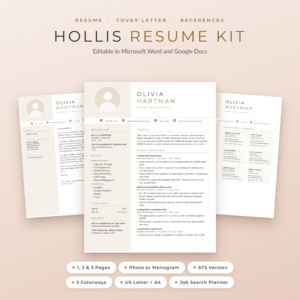
Hollis Resume Template
Price: $8.99 | Best for: fast setup in Google Docs
Hollis has its fonts built into every Word file, and Google Docs already has them, so the layout looks right the moment you open it. You get resumes with photo or monogram in 1, 2 and 3 pages, 1 and 2 page ATS resumes, cover letters, a references page and a thank-you letter, across 84 files in three colourways and two paper sizes. A Resume Writing Guide with 216 action verbs and a 13-page user guide are included. Open the 1-page ATS file first if you are applying through a company website tonight.
If you have one evening
A full evening, say three hours, is enough to build a CV you will use for months. Do the one-hour plan, then add the pieces that make the rest of your search easier.
- A master copy. Save a long version with every job and bullet. Tailor copies from it.
- A matching cover letter. Same header, same font. Three short paragraphs: why this job, what you bring, a polite close.
- A references page. Two or three names, with their permission. Our guide to the resume references page covers who to list and how to lay it out.
- An ATS version. If you will apply through big company portals, a single-column version with no tables or icons reads best.
That is a lot to build from scratch in one evening. A kit with all of those pages already matching lets you spend the time on words instead of margins.
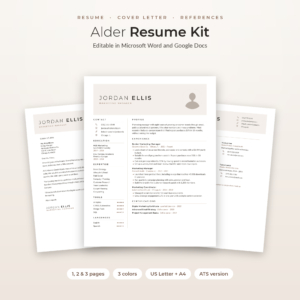
Alder Resume Template with Photo
Price: $4.79 | Best for: a complete set in one evening
Alder includes a 1, 2 and 3 page resume with photo, a no-photo resume, an ATS resume, a cover letter, references page and thank-you letter, all sharing one header. That is 48 Word files in Mocha, Sage and Slate and US Letter or A4. The placeholder lines are short tips telling you what to write, and there is a Round Photo Maker that crops your photo in a browser, a Job Application Tracker for Excel and a step-by-step guide. Type over the 1-page resume tips first, then copy your header to the cover letter.
A worked example: Tom’s 45-minute CV
Tom is 34, a delivery driver for six years, and he spots a depot supervisor role on a Thursday evening with a Friday 9am deadline. His old CV is gone. He has a phone, a borrowed laptop and about 45 minutes before his kids need putting to bed.
He spends five minutes on the brain dump: three jobs, dates from his payslips app, a clean licence, a first aid certificate from last year. He opens a Google Docs template and types his header. His profile reads: “Experienced multi-drop driver ready to step into depot supervision. Trusted to train new drivers and cover the morning load plan when the supervisor is off.”
His best bullet comes from a prompt about what he fixed: “Reworked the van loading order for my route, saving around 40 minutes a day and cutting missed slots.” That one line does more than a paragraph of duties. He adds education and certificates, reads it aloud, catches “loding” for “loading”, and sends it at 8:50pm. He gets a call on Monday. The CV was not fancy. It was clear, true and on time.
What to write when your mind goes blank
Deadlines do strange things to memory. If you freeze, use these prompts. Answer each in one line and you have bullet points.
- What did people come to you for at work?
- What did you fix, tidy, speed up or improve?
- Who did you train or help settle in?
- What did a manager or customer thank you for?
- What was the busiest day you handled, and what made it work?
A cleaner might answer: “Trusted with keys and alarm codes for three office sites.” A call centre agent: “Kept average call time under five minutes while hitting quality checks every month.” Small details, real weight. Nobody else could write your lines, and that is exactly why they work.
If the words still will not come, a guide with examples helps more than a blank box. A writing playbook gives you sentence patterns to borrow and adapt.
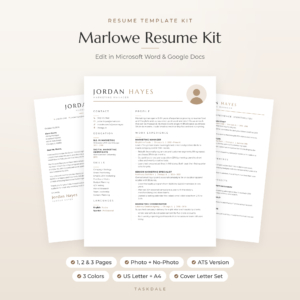
Marlowe Resume Template
Price: $4.79 | Best for: people stuck on what to write
Marlowe pairs a calm minimalist layout with a 10-page Resume Playbook: how recruiters read CVs, a three-sentence profile formula, before-and-after bullet examples, over 120 action verbs, ATS tips and a final checklist. The kit holds 60 editable Word files across Sand, Sage and Slate in US Letter and A4, with 1, 2 and 3 page resumes, an ATS version and matching letters. Read the profile formula, write your three sentences, then build the rest.
Free extras that make a rushed CV look better
A few free tricks lift a fast CV without adding much time.
- One font, two sizes. Use the same font for everything, with headings a couple of points bigger. Instant tidiness.
- Bold job titles only. Not company names, not dates. The eye then jumps from role to role.
- Dates on the right. Line them up with a tab stop so they form a neat column.
- White space. One blank line between sections. A crowded page feels like hard work to read.
- Spellcheck set to the right language. In Google Docs, File, Language. UK English for UK jobs.
None of these take more than a minute, and together they make a rushed CV look calm and considered.
Fast-CV mistakes that cost interviews
Speed causes a few predictable slips. Check for these before you press send.
- Wrong contact details. One digit off in a phone number and nobody can reach you. Read it twice.
- An old email address. “partygirl99” was funny once. Use a plain name-based address.
- Template text left in. Search for “Company Name”, “Your Name” and “Lorem”.
- Odd file names. “Document1.pdf” gets lost. Put your name in it.
- Unexplained gaps. A one-line note like “Career break: caring for a family member” is better than silence.
After you hit send
You made it. Before you close the laptop, spend two more minutes. Write down the job, the company, the date and where you saw the advert. A note in your phone is fine. In ten days, if you have heard nothing, a short polite follow-up email is reasonable.
Then, at the weekend, open the CV again with fresh eyes. You will spot one or two things to improve. Fix them and save it as your master. The next deadline will be far less stressful, because the hard part is already done.
Frequently asked questions
Can I make a CV online for free without signing up?
Google Docs and Word for the web both let you build and download a CV for free, using an account you may already have. Some online builders need an account and may charge to download, so check before you start.
What is the quickest way to make a CV?
List your jobs, dates and qualifications in a notes app first, then copy them into a simple Google Docs template. A one-page CV takes about 30 minutes this way.
Can I make a CV on my phone?
Yes. The Google Docs app works well on a phone. Typing is slower, so keep it to one page and do the brain dump first.
Is a one-page CV OK if I rushed it?
Yes. A clear, accurate one-page CV is better than a messy two-page one. Most entry-level and mid-level roles are happy with one page.
Should I send my CV as a PDF?
Yes, unless the advert asks for Word. A PDF keeps your layout the same on every device.
Your next step
Set a timer for five minutes right now and do the brain dump. Jobs, dates, one win each, qualifications. Once that list exists, everything else is copying. If you want a layout that opens cleanly in Google Docs and comes with matching letters, start with the Hollis Resume Template.