You can create a budget in five simple steps, in one evening, with nothing more than last month’s bank statement and a cup of tea. Find your real income. List your bills. Estimate your everyday spending. Give what is left a job. Then check in once a week. That is it. The rest is detail.
This guide is for people who have never written a budget, or who started one with good intentions and gave up because it felt like a second job. Each step below comes with what to do, how long it takes and the mistake to dodge. Halfway through you will find a complete example built from scratch, and near the end, how to choose between a spreadsheet and a planner so your budget actually gets used.
Quick picks: tools for your first budget
| Product | Best for | Price | Link |
|---|---|---|---|
| Bloom Budget Planner | Budgeting each paycheck | Original price was: $2.79.$1.89Current price is: $1.89. | View |
| Seaglass Annual Budget Spreadsheet | Bills, sinking funds and a full year in Excel | Original price was: $19.99.$9.99Current price is: $9.99. | View |
| Ultimate Annual Budget Spreadsheet | Monthly dashboards in Excel or Google Sheets | $6.00 | View |
| Petalwise Budget Planner | Writing your budget by hand or on a tablet | $3.20 | View |
Before you begin: gather three things
A first budget goes much faster when the facts are on the table before you start. Spend ten minutes collecting these:
- Your last two payslips, or your last two months of deposits if you are self-employed.
- Your last full month of bank and card statements, printed or open on screen.
- A list of regular bills, which you can pull from the statements if you do not have one.
That is all. You do not need a finance degree, a perfect memory or a fancy app. A pen and paper are fine for the first draft. Many people move to a spreadsheet or planner after they have seen their numbers once, and that order works well, because you will know what you need from the tool.
One mindset tip before step one. Your first budget will be wrong. Not badly wrong, just a bit off, because you will forget something or guess low on groceries. That is normal. A budget is a draft you improve each month, not an exam you pass or fail.
Step 1: Find your real monthly income
Start with what actually lands in your bank account, not your salary before tax. If your job offer said $52,000 a year, that is not the number you spend. Your take-home pay, after tax, pension and any other deductions, is the number that matters.
If you are paid monthly, this is easy: look at your last payslip. If you are paid every two weeks, multiply one paycheck by 26 and divide by 12. For $1,480 every other Friday, that is $38,480 a year, or about $3,207 a month. If your income changes month to month, use the lowest of your last three months. Planning on a low month and getting a good one is a pleasant surprise. The reverse is a crisis.
Add any regular extra income too: child support, a side gig that pays reliably, rent from a lodger. Leave out anything you cannot count on, like a possible bonus or a tax refund. Those can be welcome extras once they arrive.
Time needed: 10 minutes. The mistake to dodge: using your gross salary.
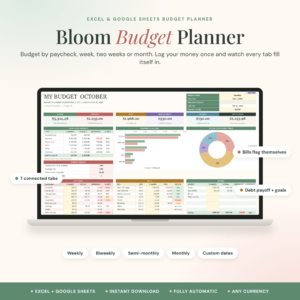
Bloom Budget Planner
Price: Original price was: $2.79.$1.89Current price is: $1.89. | Best for: anyone paid weekly or biweekly
Bloom is a paycheck budget spreadsheet for Excel and Google Sheets. Pick weekly, biweekly, twice a month, monthly or your own dates, type a start date and the end date fills in. It works from one transaction list, and the dashboard shows income, bills, debt payments, savings and a safe-to-spend-per-day number. Enter your next paycheck date first, then add your bills.
Step 2: List every bill, including the yearly ones
Now write down everything that has to be paid. Go through your statement line by line and pull out each fixed or regular cost: rent or mortgage, utilities, phone, internet, insurance, loan payments, childcare, subscriptions, transport passes. Write the amount and the due date beside each one.
Then do the step most first-timers skip. List the bills that do not come every month. Car registration. Annual software renewals. School fees. The dentist. Christmas. A friend’s wedding in June. These are not surprises, even though they always feel like one. Add up the year’s total for each, divide by 12, and that is the amount to set aside monthly.
For example, if car insurance is $780 a year, car registration is $240 and gifts across the year come to about $600, that is $1,620 a year, or $135 a month. Put $135 in a separate savings pot each month and those costs stop wrecking March, July and December.
Time needed: 20 minutes. The mistake to dodge: forgetting yearly bills.
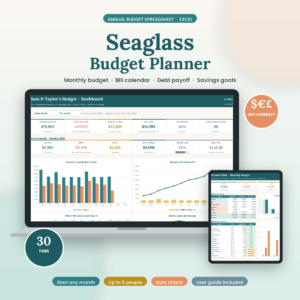
Seaglass Annual Budget Spreadsheet
Price: Original price was: $19.99.$9.99Current price is: $9.99. | Best for: Excel users who want bills mapped
Seaglass is a 30-tab annual budget spreadsheet for Excel with a Start Here menu, 12 monthly budget tabs, a dashboard, a bill calendar, debt snowball and sinking funds. You set up your categories, recurring paychecks and bills once, in about 15 minutes. Tick a bill as paid and the monthly tab, dashboard, calendar and account balances update. List your yearly bills on the sinking funds tab on day one.
Step 3: Estimate your everyday spending
Flexible spending is the money that changes each month: groceries, fuel, eating out, clothes, personal care, kids’ activities, little treats. This is where most budgets go wrong, because people guess what they think they should spend rather than what they actually do spend.
So use last month’s statement. Highlight every grocery shop in one color, every fuel stop in another, every meal out in a third. Add each color up. Those totals are your starting estimates. They may make you wince a little. That is useful, not shameful.
Keep your categories few at first. Six to eight flexible categories is plenty:
- Groceries and household supplies
- Transport and fuel
- Eating out and takeaway
- Personal care and clothing
- Kids or pets
- Fun and hobbies
- Gifts and giving
- Miscellaneous
A note on Miscellaneous: give it a real amount, like $60 or $80. Every month brings a parking fine, a birthday card or a broken phone charger. A small buffer for those keeps the rest of the budget honest.
Time needed: 30 minutes. The mistake to dodge: guessing instead of checking.
Step 4: Give the leftover money a job
Subtract your bills (step 2) and your everyday spending (step 3) from your income (step 1). You will get one of three results.
Money left over
Lovely. Now assign every dollar of it. Common jobs, in a sensible order: a starter emergency fund of $1,000, extra payments on any high-interest debt, a fuller emergency fund of three months’ bills, then goals like a holiday, a house deposit or retirement. If you like the idea of every dollar having a role, our explainer on the zero-based budget takes this step further.
Exactly zero
Workable, but tight. Look at step 3 for one or two small trims so you can start a tiny emergency fund, even $25 a month.
A negative number
This is hard to see, and it is also the most useful thing a budget can tell you. Go back to step 3 and look for cuts first, because flexible spending is the easiest to change. Then look at step 2 for bills you could shop around, like phone plans, insurance or subscriptions. If the gap is still there, the honest answer may be more income or a bigger change, like a cheaper place to live. Knowing that now is far better than finding out from an overdraft fee.
Time needed: 15 minutes. The mistake to dodge: leaving money unassigned, where it quietly gets spent.
Step 5: Track, check in and adjust each week
A budget on paper is a plan. A budget you check is a habit. The fifth step is a short weekly check-in, ideally the same day and time each week.
- Log or check every purchase since last time.
- Compare each flexible category with its budget.
- Move money between categories if one is running over. Taking $30 from Fun to cover Groceries is not failure. It is budgeting.
- Note any bill due in the next seven days.
At month end, look at each category’s planned and actual numbers side by side. Adjust next month’s plan to match reality. By month three, your budget will feel less like a guess and more like a map, and that first month where every category comes in on target is a quietly proud moment.
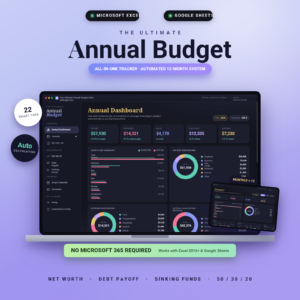
Ultimate Annual Budget Spreadsheet
Price: $6.00 | Best for: beginners who want charts done for them
The Ultimate Annual Budget has 22 tabs, including an annual dashboard and 12 monthly dashboards that compare expected with actual using automatic progress bars. There is also a 50/30/20 dashboard, net worth tracker, debt payoff calculator and sinking funds tracker. It works in Excel 2016 and newer, Google Sheets and LibreOffice, and you only fill the gold cells. Enter last month’s numbers as practice before you start for real.
A full example: Tom’s first budget, start to finish
Tom works in a bike shop and is paid $1,480 every two weeks. He shares a flat and has a small car loan. Here is what his five steps looked like on a Sunday evening.
| Step | What Tom wrote | Monthly amount |
|---|---|---|
| 1. Income | $1,480 x 26 / 12 | $3,207 |
| 2. Monthly bills | Rent share, utilities, phone, internet, car loan, car insurance | $1,655 |
| 2. Yearly bills set aside | Registration, servicing, gifts, annual subscriptions | $120 |
| 3. Everyday spending | Groceries $380, fuel $140, eating out $160, personal $70, fun $120, misc $60 | $930 |
| 4. Leftover | $3,207 minus $2,705 | $502 |
| 4. Jobs for leftover | Emergency fund $250, extra car loan payment $150, holiday fund $102 | $502 |
After his first month, Tom found he had spent $210 eating out, not $160, but only $95 on fun. He moved $50 between them for the next month and left everything else alone. Simple. His emergency fund hit $1,000 in four months, which was the first time he had ever had a cushion like that.
Spreadsheet or planner: where should your budget live?
The best tool is the one you will open every week. Here is a quick way to choose.
- Choose a spreadsheet if you like numbers adding up on their own, you are at a computer daily, or you want charts without effort.
- Choose a printable or digital planner if you think better with a pen, you want budgeting to feel calm rather than technical, or you already use a tablet for notes.
Plenty of people use both. They build the plan in a spreadsheet and keep a paper or tablet log of daily spending. If you go the tablet route, our beginner guide on how to use a digital planner in GoodNotes covers importing, linking and writing on the pages.
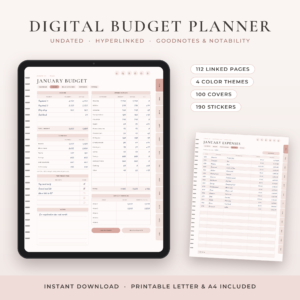
Petalwise Budget Planner
Price: $3.20 | Best for: hand writers and tablet users
Petalwise is an undated budget planner with four 112-page hyperlinked PDFs for GoodNotes, Notability, Noteshelf and Xodo, plus a 42-page printable edition in US Letter and A4. Each month runs through a Calendar, Budget, Bills and Savings, Expenses and Review page, which lines up neatly with the five steps above. Write your step 1 income on the first Budget page tonight.
Where first budgets usually go wrong
- Being too strict. A grocery budget of $150 for a family of four will fail by week two. Start realistic, then trim.
- No fun money. A budget with zero for enjoyment feels like punishment. Keep a small amount, even $40.
- Waiting for a perfect month. There is no perfect month. Start with the next payday.
- Treating overspending as failure. Overspending is information. Move money and carry on.
- Doing it alone when you share money. If you live with a partner, build the budget together, or one of you will feel ambushed.
Frequently asked questions
What are the five basic steps of making a budget?
Work out your take-home income, list all bills including yearly ones, estimate everyday spending from last month, assign leftover money to savings or debt, and review weekly.
How long does it take to create a first budget?
About 90 minutes for the first draft if you have your statements ready. After that, a weekly check-in takes 10 to 15 minutes.
Should I budget with my gross or net income?
Net income, meaning what actually reaches your bank account after tax and deductions. That is the money you can spend.
What if my expenses are more than my income?
Cut flexible spending first, then shop around for cheaper bills. If a gap remains, the fix may be more income or a larger change, and the budget has done its job by showing you.
How often should I update my budget?
Check spending weekly and rewrite the plan monthly. Revisit the whole thing whenever your income or rent changes.
Try it this Sunday
Block out 90 minutes on Sunday, pull up last month’s bank statement, and work through steps one to four with a pen. On Monday, start step five. If you are paid every week or two and want the maths done for you, the Bloom Budget Planner is a friendly place to start.