If you love your disc-bound planner but the budget pages are not quite right, you do not need a new planner. You need different pages. Printable budget inserts sized for the Happy Planner Classic let you choose the layout, print as many months as you want, and replace any page that stops working for you. That is the simplest Happy Planner budget pages alternative, and for many planner fans it ends up being the better one.
This guide covers why people go looking for an alternative, what to look for in replacement pages, how to size, print and punch them at home, and how to set up a budget section that you will actually open every week. There is also a short section on seasonal budgets, one on going fully digital, and an honest note on who should stick with store-bought packs.
Quick picks: budget inserts and planners
| Product | Best for | Price | Link |
|---|---|---|---|
| Greyfinch Budget Planner Printable & Digital | A full budget binder in Happy Planner, Letter, A4 and A5 sizes | $12.99 | View |
| Sugarplum & Pine Christmas Planner | A holiday budget and gift tracker in Happy Planner Classic size | $4.49 | View |
| Petalwise Undated Digital Planner | Moving your planner and budget to an iPad | $4.49 | View |
Why planner fans look for an alternative
Store-bought planner pages are lovely to flip through in the shop. Then you get home, start using them, and small frustrations pile up. None of this is a knock on any brand. It is just the nature of printed packs made for a wide audience.
- The layout is fixed. If your budget needs a paycheck split and the pack only has a monthly page, you are stuck working around it.
- The quantity is fixed. A pack covers a set number of months. Run out in month nine and you are shopping again, hoping the same design is still on the shelf.
- Mistakes are permanent. Write the wrong numbers on a page you only have one copy of, and that month looks messy forever.
- The method might not match yours. Someone running a debt snowball, a cash envelope system or a zero-based budget often needs specific trackers a general pack does not include.
Printables solve all four. You print the pages you need, as many times as you need them, and you choose a set that matches how you actually budget. A page full of crossed-out numbers? Print a fresh one. It takes about 30 seconds.
There is a quieter benefit too. When you can reprint freely, you stop being precious about the pages. You write in pencil, cross things out, scribble notes in the margin. Budget pages are working pages, and they work better when you are not afraid to use them.
What to look for in replacement budget pages
Not every printable is a good fit for a disc planner. Before you buy or download anything, check for these.
- The right size file. Look for a version made for Happy Planner Classic, not just Letter pages you have to shrink. Shrunk pages leave tiny writing spaces and odd margins.
- Room on the left edge. Disc punches take a bite out of the edge. Good inserts keep text and boxes clear of it.
- Undated pages. You can start any month, skip a month and pick up again without wasting paper.
- Pages for your method. Paycheck budget, bill tracker, sinking funds, debt payoff, savings goals. Check that the ones you use are there.
- A light ink option. Budget pages get printed a lot. A monochrome or low-ink version saves cartridges.
- Roomy rows. Planner writing tends to be a bit bigger than spreadsheet typing. Cramped rows get abandoned.
Sizing, printing and punching at home
Happy Planner Classic pages measure 7 by 9.25 inches. Big pages are 8.5 by 11, the same as US Letter. Mini pages are about 4.6 by 7. Most people budgeting in a disc planner use Classic, because it is roomy enough for numbers but still fits in a bag.
Printing Classic pages
- Print at actual size or 100 percent. Never “fit to page”, which shrinks the layout.
- Many Classic files are laid out on Letter paper with trim marks. Print, then trim along the marks with a paper trimmer for clean edges.
- Use 28 to 32 lb paper if your printer handles it. Pages turn more smoothly and markers do not bleed.
- Print one test page first. Check that the left margin clears your punch before printing a whole month.
Punching
You need a punch made for disc planners, which cuts the mushroom-shaped slots that let pages slide on and off the discs. Line the page up against the punch guide, keep the left edge flush, and punch two or three sheets at a time for clean cuts. Our full guide to Happy Planner printable inserts, sizes and punching at home covers paper choices, trimming and the most common alignment mistakes in more detail.
The first time a full month of budget pages slides onto your discs, perfectly lined up and exactly how you wanted them, it is a genuinely satisfying moment. Planner people will understand.
A full budget binder in Happy Planner size
Rather than collecting single pages from all over, a complete set means every page matches and the sections work together. You get the same fonts, the same colors and pages that refer to each other. That matters more than it sounds. Matching pages look like one system, and one system gets used.
Look for a set with a clear starting point, so the first afternoon of setup does not feel like guesswork.
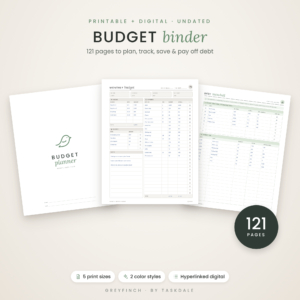
Greyfinch Budget Planner Printable & Digital
Price: $12.99 | Best for: disc planner budgeters who want a full set
Greyfinch is an undated budget binder with 121 pages across nine tabbed sections, in Happy Planner, Letter, A4 and A5 sizes plus a hyperlinked digital edition for tablets. It comes in an ink-saving Classic monochrome style and a soft Sage green, with currency-neutral amounts. Begin with the Start Here page and its 15-minute setup, fill in the Money Snapshot, then pick your categories on the Expense Category pages before printing your first month.
Setting up the budget section in your planner
Where the pages go matters as much as which pages you choose. A budget section buried at the back gets forgotten. A budget section that sits next to your weekly spread gets used.
A page order that works
- Divider tab: Money. Place it right after your monthly calendar.
- Money snapshot. One page with account balances, debts and savings, updated monthly.
- This month’s budget. Income, planned spending by category, and what is left.
- Bill tracker. Every bill, due date, amount and a paid checkbox.
- Spending log. One or two pages to record purchases through the month.
- Savings and debt trackers. Color-in progress pages for each goal.
Keep only the current month in the planner. Move finished months to a separate binder or storage box. That keeps your planner slim and stops the discs from overloading. If you want a home for those older months, our guide to what to put in a budget binder shows how to organize a year’s worth.
A monthly and weekly rhythm
On the last weekend of each month, print next month’s set, punch it and fill in the budget page. That takes about 30 minutes, and with a cup of tea and some washi tape, it becomes one of the nicer jobs of the month.
Each week, during your usual weekly spread setup, spend 10 minutes on the money pages. Log the week’s spending, tick off paid bills, and color in any savings progress. Tying the money check to a planning habit you already have is the trick. You are already sitting down with the planner open. The budget pages are right there.
An example month
Picture a nurse paid every other Thursday who budgets in a Classic planner. On the last Sunday of March she prints April: one budget page, one bill tracker, two spending log pages and her debt snowball tracker. She writes her two April paychecks at the top, assigns rent and the car payment to the first, utilities and the card payment to the second. Each Sunday after that she logs her week in about eight minutes. By the 30th, the snowball tracker has four more boxes colored in. Small, steady, and very satisfying.
Seasonal budgets: the holidays deserve their own pages
December is where many budgets fall apart. Gifts, food, travel, cards, teacher presents, decorations, parties. Squeezing all of that into one “gifts” line on a regular monthly page rarely works.
A dedicated holiday section, in the same planner size, keeps the season organized without wrecking the rest of your budget. Set a total holiday budget in October, split it across categories, and track each gift against a per-person amount. When the season is done, the pages also show you what to plan for next year.
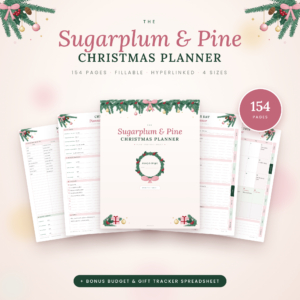
Sugarplum & Pine Christmas Planner
Price: $4.49 | Best for: families planning holiday spending early
Sugarplum & Pine is a 154-page printable and fillable Christmas planner in US Letter, A4, A5 and Happy Planner Classic, with clickable side tabs and a full index. It covers gifts, a Christmas budget tracker, meals, baking, parties, cards and travel, and includes a bonus Christmas Budget and Gift Tracker spreadsheet that adds up spending for you. Print the Planner Dashboard and budget pages first and set your total in early November.
Or skip paper: moving your budget to a tablet
Some planner fans find, after a year of printing and punching, that what they really love is the planning, not the paper. A hyperlinked digital planner on an iPad or Android tablet keeps the same feel: tabs, monthly spreads, stickers, handwriting with a stylus. But pages never run out and nothing needs punching.
It also suits people who travel a lot or who want their budget and calendar in one device they already carry. You lose the satisfying click of the discs. You gain a planner that weighs nothing and backs up to the cloud.
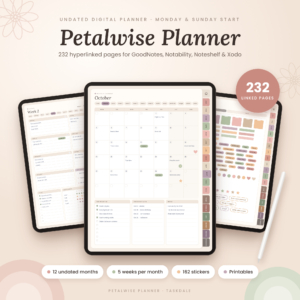
Petalwise Undated Digital Planner
Price: $4.49 | Best for: planner fans moving to an iPad
Petalwise is an undated digital planner for GoodNotes, Notability, Noteshelf and Xodo with 232 hyperlinked pages. Each month has 14 linked pages, including a calendar, five weekly spreads, a habit tracker and a budget page, with month tabs and a Money section tab on every page. US Letter and A4 printables are included too, so you can print any page you still want on paper.
Who should stick with store-bought pages
Printables are not for everyone, and that is fine. If any of these sound like you, a ready-made pack from the shop may suit you better.
- You have no printer, or a very slow one. Printing 10 to 15 pages a month adds up in time and ink.
- You hate trimming. Classic pages printed on Letter paper need cutting down. A paper trimmer makes it quick, but it is still a step.
- You love heavy, pre-punched cardstock. Home paper can come close, but shop pages often feel thicker.
- Your budget is simple. If one monthly page and a bill list is all you need, a basic pack may be plenty.
Plenty of people mix both: store-bought dashboards and covers they love, plus printable budget pages for the parts that need to match their own method.
Mistakes when switching to printable budget pages
- Printing a whole year at once. Your needs will change by month three. Print one or two months at a time.
- Printing at “fit to page”. It shrinks the layout and wastes space. Always print at actual size.
- Punching too many sheets together. Slots come out ragged and pages stick on the discs.
- Decorating more than budgeting. Stickers are fun. But if a spread takes an hour to decorate and two minutes to fill in, the numbers are getting the short end.
- Keeping old months in the planner. Overloaded discs make pages hard to turn. Archive monthly.
Frequently asked questions
What size are Happy Planner Classic pages?
Classic pages are 7 by 9.25 inches. Big is 8.5 by 11 inches, the same as US Letter, and Mini is about 4.6 by 7 inches.
Can I print Happy Planner inserts on a normal home printer?
Yes. Print on US Letter paper at actual size, trim along the marks if the file includes them, then punch with a disc planner punch.
Do I need a special punch for disc planners?
Yes. Disc planners use mushroom-shaped slots, so a regular three-hole punch will not work. Disc planner punches are sold by several brands and work across disc systems of the same size.
Can I use Letter-size budget pages in a Happy Planner?
Letter pages fit the Big size. For Classic, look for files made at Classic size rather than shrinking Letter pages, which leaves small writing spaces.
Are printable budget inserts reusable?
The file is. Print a fresh set each month for as long as you like. Undated pages work across any year.
What paper weight is best for planner budget pages?
Around 28 to 32 lb paper is a good middle ground. It feels sturdier than standard copy paper and handles gel pens and light markers without bleeding, while most home printers can still feed it.
Your next step
Pull out your current budget pages and list what you wish they had: a paycheck split, a sinking fund page, more rows for bills. That list is your checklist. Then print and punch a single month from the Greyfinch Budget Planner in Happy Planner size and slide it onto your discs this weekend.