A budget helper kit for first-time planners is a small set of tools that work together so your first budget has a fair chance of lasting. Not a single app. Not a stack of worksheets you print once and forget. A planning tool, a bill calendar, a paycheck plan, a few savings pots, a folder and a weekly date with your money. Six pieces, one afternoon, and you are set.
This guide is for someone starting from zero. Maybe you just moved out, got your first salaried job, finished college, or went through a change that left you in charge of money for the first time. It explains what each piece of the kit does, how to choose and set it up, what your first month will feel like, and what a beginner can safely skip. Along the way you will meet four Taskdale tools that cover most of the kit between them.
Quick picks: starter tools for a first budget
| Product | Best for | Price | Link |
|---|---|---|---|
| Soft Ledger Budget Planner Printable | A printable planner plus Excel in one | Original price was: $12.99.$8.99Current price is: $8.99. | View |
| Bloom Budget Planner | Planning each paycheck | Original price was: $2.79.$1.89Current price is: $1.89. | View |
| Seaglass Annual Budget Spreadsheet | Bill calendar and sinking funds in Excel | Original price was: $19.99.$9.99Current price is: $9.99. | View |
| Ultimate Annual Budget Spreadsheet | Dashboards in Excel or Google Sheets | $6.00 | View |
The six pieces of a beginner budget kit
Most first budgets fail for practical reasons, not because people are bad with money. A bill nobody wrote down. A paycheck that landed after rent was due. A car service in April that nobody saved for. Each piece of this kit closes one of those gaps.
- A place to plan: a planner, spreadsheet or both, where your monthly budget lives.
- A bill calendar: every regular bill, its amount and its due date, in one view.
- A paycheck plan: which bills and spending each paycheck covers.
- Savings pots: an emergency fund and a few sinking funds for known yearly costs.
- A money folder: one place for statements, payslips and important letters.
- A weekly money date: 15 minutes, same time each week, to keep it all current.
You do not need to buy six things. A good planner or spreadsheet can cover the first four on its own. The folder can be a cheap plastic wallet. The money date is free, though it is the piece that makes everything else work.
Piece one: a place to plan
Your planning tool is where you write your income, list your spending categories and compare your plan with what really happened. The big choice is paper or screen, and there is no wrong answer. Pick the one you will actually open.
Paper suits people who think better with a pen, who like a calm ritual, and who find screens full of numbers stressful. A spreadsheet suits people who want totals done automatically and who already sit at a computer most days. Many first-timers get on best with both: a printed page on the fridge for daily spending and a spreadsheet that does the adding up.
Whatever you choose, look for clear steps. A blank grid is hard for a beginner. A planner that says “write your income here, then your bills here, then your savings here” is far kinder. If you are leaning toward a tablet, our roundup of the best digital budget planners for GoodNotes and iPad compares the main options.
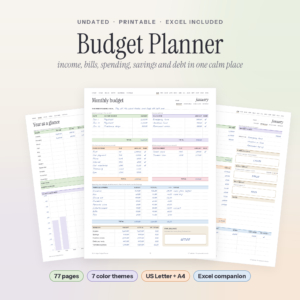
Soft Ledger Budget Planner
Price: Original price was: $12.99.$8.99Current price is: $8.99. | Best for: beginners who want paper and Excel together
Soft Ledger includes 14 printable PDFs (seven color themes in US Letter and A4) and an Excel spreadsheet with a dashboard, 12 month tabs, a transactions log, debt payoff and savings goals. Each month runs through a budget page, an overview with a weekly and daily spending number, a daily log and a review. A user guide covers setup step by step. Print the Money goals page first and fill it in over coffee.
Piece two: a bill calendar you can see
A missed bill is the most expensive beginner mistake. A late fee of $35 on a $60 phone bill hurts, and a missed card payment can affect your credit too. The fix is simple: write every bill down with its due date, in one place you look at weekly.
Go through your bank statement and pull out every regular payment. Rent, phone, internet, power, water, insurance, streaming, gym, loan payments. Next to each, write the amount, the due date and how it is paid: autopay, manual transfer or card. Then sort the list by date. Seeing “the 1st: rent, the 5th: phone, the 12th: car loan, the 20th: insurance” on one page takes the fear out of the month.
Mark which bills come out automatically. Autopay is handy, but it is also how forgotten subscriptions keep billing you for a year. Once a quarter, read down the list and ask whether you still use each one.
Piece three: a paycheck plan
If you are paid once a month, your monthly budget and your paycheck plan are the same thing. But many first jobs pay weekly or every two weeks, and that is where beginners get caught out. Rent is due on the 1st. Your paycheck lands on the 6th. For five days, the money is not there.
A paycheck plan solves this. List your paydays for the next two months. Then assign each bill to the paycheck that arrives before its due date. Your rent might come from the second paycheck of the previous month, held in your account until the 1st. It feels odd the first time. After a month, it is the reason you stop panicking on the 30th.
Here is a quick example. Jess is paid $1,240 every other Friday. Her rent of $950 is due on the 1st. She sets aside $475 from each paycheck for rent, so it builds up across two checks. The rest of each paycheck covers groceries, her bus pass, her phone and a little fun. No single paycheck has to carry the rent alone.
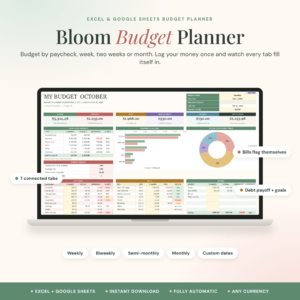
Bloom Budget Planner
Price: Original price was: $2.79.$1.89Current price is: $1.89. | Best for: first jobs paid weekly or biweekly
Bloom is a paycheck budget spreadsheet for Excel and Google Sheets that works from one transaction list. Choose weekly, biweekly, twice a month, monthly or custom dates, and the dashboard shows income, bills, debt, savings and a safe-to-spend-per-day number. Give each bill a due day once and it shows Paid, Partial, Overdue or Upcoming each period. Set your next payday as the start date to begin.
Piece four: savings pots for the expected and the unexpected
Savings for a beginner come in two kinds. The emergency fund covers things you cannot predict: a broken laptop, a vet bill, a week off sick. Sinking funds cover things you can predict but only pay once or twice a year: car registration, a holiday, Christmas, an annual software fee.
Start the emergency fund small. A first target of $500 or $1,000 is realistic and makes a real difference. Even $20 a week gets you to $1,000 in about a year. That first time an unexpected bill arrives and you just pay it, without borrowing or panicking, is a lovely feeling. It is the moment the budget starts paying you back.
For sinking funds, list every yearly cost you know about, add them up and divide by 12. If car insurance is $720, gifts are $400 and a summer trip is $600, that is $1,720 a year, or about $143 a month. Many banks let you open separate savings pots for free, so each fund has its own name and balance.
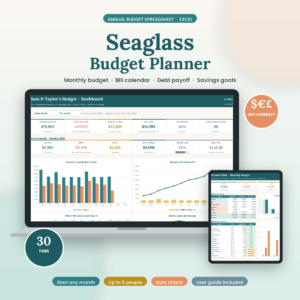
Seaglass Annual Budget Spreadsheet
Price: Original price was: $19.99.$9.99Current price is: $9.99. | Best for: Excel beginners planning a whole year
Seaglass is a 30-tab annual budget for Excel with a Start Here menu linking to every tab. It includes 12 monthly budget tabs, a dashboard, a bill calendar, debt snowball, sinking funds and a paycheck budget. Set up categories, paychecks and bills once in about 15 minutes, then log spending a couple of times a week. Fill in the sinking funds tab with every yearly cost you can think of.
Pieces five and six: a money folder and a weekly date
The money folder
Get one folder or binder, paper or digital, and keep every money document in it: payslips, bank statements, loan letters, insurance policies, tax forms, your lease. A first-time planner often has these scattered across email, a kitchen drawer and the back seat of the car. Pulling them into one place takes an hour, and it saves many hours of hunting later. A cloud folder with subfolders like Bank, Payslips, Insurance and Tax works just as well.
The weekly money date
This is the piece that holds the kit together. Pick a regular 15-minute slot, like Sunday at 5 pm or Thursday lunchtime, and protect it. Make it pleasant. A good drink, a favourite playlist, the same comfy chair.
In those 15 minutes, log the week’s spending, check upcoming bills, glance at your savings pots and make one small adjustment if something is off. That is it. People who keep a weekly money date tend to stick with budgeting far longer than people who only review once a month, because small problems get fixed while they are still small.
If you have never written a budget at all, our step-by-step guide on how to make a budget when you have never made one pairs well with this kit.
Putting the kit together in one afternoon
Here is a realistic schedule for a Saturday afternoon. Put the kettle on.
- 1:00 to 1:20: Gather payslips and your last bank statement into the money folder.
- 1:20 to 1:50: List every bill with its amount and due date. Sort by date.
- 1:50 to 2:10: Write your paydays for the next two months and assign each bill to a paycheck.
- 2:10 to 2:20: Break for a snack. You have earned it.
- 2:20 to 2:50: Fill in your planner or spreadsheet: income, bills, everyday spending estimates, savings.
- 2:50 to 3:10: Open a savings pot for your emergency fund and one for yearly costs. Set up automatic transfers on payday.
- 3:10 to 3:15: Put your weekly money date in your phone calendar as a repeating event.
By 3:15 you have a working budget system. It will not be perfect, and it does not need to be. You will refine it every week from here.
What your first 30 days will feel like
Knowing what is normal helps you stick with it when it feels clumsy.
Week one feels exciting and a little awkward. You will forget to log a few purchases. That is fine. Catch them on your money date.
Week two often brings a surprise. A category is already nearly spent, usually groceries or eating out. This is not failure. It is the budget doing its job by showing you something you did not know.
Week three is when motivation dips. The novelty has worn off. Keep the money date anyway, even if you only spend five minutes.
Week four brings your first month-end review. Compare your plan with what happened, adjust the categories that were off, and write next month’s plan. Most people find the second month noticeably easier, and by month three it feels like a normal part of life.
What a first-time kit can leave out
Beginners often overbuild. Here is what you can safely skip for now:
- Forty categories. Ten to twelve is plenty in your first year.
- Investment trackers. Get your emergency fund in place first.
- Net worth charts. Nice later. Not needed in month one.
- Several tools at once. One planning tool, used every week, beats three used once.
- Perfection. A budget that is 90 percent right and kept up is far more useful than a perfect one abandoned in week three.
Frequently asked questions
What should be in a beginner budget kit?
A planning tool, a list of bills with due dates, a paycheck plan, an emergency fund and sinking funds, a folder for money documents, and a regular weekly time to review it all.
Is a spreadsheet or a printable planner better for a first budget?
Either works. Choose paper if you like writing things down and want a calm routine. Choose a spreadsheet if you want automatic totals. Many beginners use both.
How much should a beginner save each month?
Start with any regular amount you can keep up, even $20 a week. Build to a starter emergency fund of $500 to $1,000, then raise the amount as your budget settles.
How long does it take to set up a first budget?
About two hours for the whole kit if your statements and payslips are handy. After that, 15 minutes a week keeps it running.
What if I keep forgetting to track spending?
Do not track every purchase daily at first. Catch up once a week on your money date using your bank app. Daily logging can come later, once the weekly habit feels natural.
Build your kit this weekend
Block out Saturday afternoon, gather your last bank statement and payslips, and follow the schedule above. If you want a planner and a spreadsheet in one download to anchor your kit, start with the Soft Ledger Budget Planner.