You bought the iPad. You even bought the Apple Pencil. And your money is still living in a messy notes app and a bank balance you check with one eye closed. A good digital budget planner fixes that without making you learn a new app. You open GoodNotes, tap a tab, write a number with the pencil, and move on.
The trick is picking the right one. Below you will find what to look for, what the common features really do, and six digital budget planners from Taskdale that work on iPad, ranked from cheapest to most feature-heavy.
Quick picks
| Product | Best for | Price | Link |
|---|---|---|---|
| Rosy Cents Digital Budget Planner | The lowest price, with an Excel budget calculator included | $0.99 | View |
| Linen & Ledger Digital Budget Planner | Savings challenges and a dark mode for late-night budgeting | $1.99 | View |
| Petalwise Budget Planner | An undated monthly budget with expense tracking | $3.20 | View |
| Even Keel Budget Planner | Paycheck budgeting on iPad or Android | $3.49 | View |
| Money Bloom Digital Budget Planner | Choosing a look from six themes | $4.49 | View |
| Cashmere Digital Budget Planner | Sinking funds and a debt snowball | $4.99 | View |
Why a Digital Budget Planner Beats a Budgeting App for Some People
Budgeting apps are great at one thing: pulling in transactions. But many people find that watching numbers appear on their own teaches them nothing. They glance, shrug and close the app. Writing a figure by hand, even with a stylus on glass, slows you down just enough to notice it.
A digital budget planner also has no monthly fee attached to it. You buy the PDF once and it is yours. There is no login to forget and no bank connection to worry about, since you type in what you choose to type in.
It is not for everyone. If you want automatic imports, an app wins. If you like seeing your money on a page and feeling in control, a planner wins. Plenty of people use both, and that works fine.
What to Look For in a Digital Budget Planner for GoodNotes
Skip the pretty cover for a minute. These are the things that decide whether you will use it in March.
Hyperlinked tabs
This is the big one. A hyperlinked planner lets you tap a tab at the top and jump straight to the bills page, the debt page or the savings page. Without links you are flicking through dozens of pages like a paper book, and that gets old fast. Several planners below are described as hyperlinked, so check the product title before you buy.
Undated versus dated
An undated planner has no fixed year. You can start in any month, and a missed month does not leave a dead page staring at you. For a budget this is usually the better choice. One product below, Money Bloom, comes in both 2027 and undated versions, so you can pick.
The right trackers for your actual problem
Be honest about what is going wrong. If paychecks arrive on odd days, you want a paycheck budget page. If you carry card balances, you want a debt payoff or debt snowball tracker. If you keep getting caught out by a yearly bill, you want sinking funds. Match the planner to the pain, not to the color scheme.
A printable backup
Several of these include a printable PDF as well. That is handy if the iPad is charging, or if you want one page taped to the wall. It costs you nothing extra and gives you a fallback.
How to Set Up Your First Digital Budget Planner in One Evening
Here is a plan that takes about an hour. It works with any of the six picks.
First, import the PDF into GoodNotes. Duplicate the file so you keep a clean copy. You will thank yourself next year.
Second, fill in your income. Use what actually lands in your account, not what your contract says. If it changes, use the lowest recent month.
Third, list your bills with their due dates. Pull up the last two bank statements and copy the real numbers. This is the dull part, and it is also where most of the value is. Do it once and you may spot a gym membership you have not used since spring.
Fourth, give every spare dollar a job. Some to savings, some to debt, some to the fun category. If you leave it blank it will vanish.
Finally, set a weekly five-minute check. Sunday evening works for many people. Open the planner, update the numbers, close it. That small ritual does more than any fancy layout.
Our Picks: Digital Budget Planner Options for iPad
All six below are real Taskdale products. The facts come straight from their listings. I have ordered them by price.
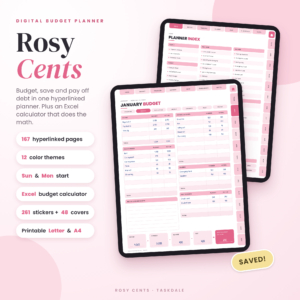
Rosy Cents Digital Budget Planner
Price: $0.99 | Best for: The lowest price, with an Excel budget calculator included
An undated, hyperlinked budget planner for iPad and tablets, with an Excel budget calculator. It has paycheck, bill, savings and debt trackers, and a printable version in Letter and A4.
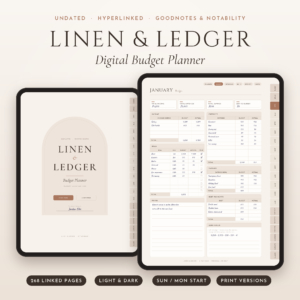
Linen & Ledger Digital Budget Planner
Price: $1.99 | Best for: Savings challenges and a dark mode for late-night budgeting
An undated, hyperlinked finance planner for GoodNotes and iPad with debt payoff, savings challenges and dark mode. There is also a printable Letter and A4 version.
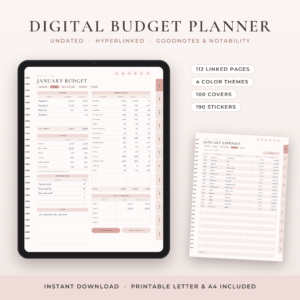
Petalwise Budget Planner
Price: $3.20 | Best for: An undated monthly budget with expense tracking
A digital budget planner for GoodNotes and iPad with an undated monthly budget, plus expense, bill, debt and savings trackers. A printable PDF is included.
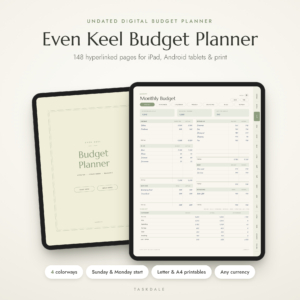
Even Keel Budget Planner
Price: $3.49 | Best for: Paycheck budgeting on iPad or Android
An undated, hyperlinked GoodNotes finance planner for iPad and Android, with paycheck, bill and debt trackers. A printable PDF comes with it.
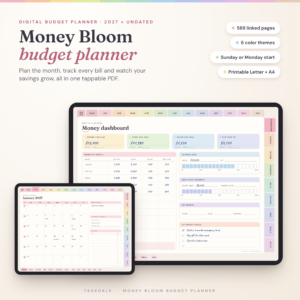
Money Bloom Digital Budget Planner
Price: $4.49 | Best for: Choosing a look from six themes
A hyperlinked PDF for GoodNotes and iPad in both 2027 and undated versions. It covers paycheck, bills, debt and savings trackers and comes in six themes.
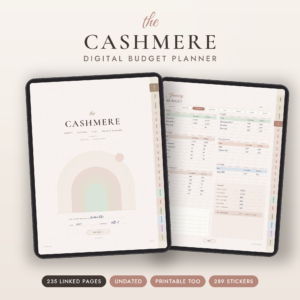
Cashmere Digital Budget Planner
Price: $4.99 | Best for: Sinking funds and a debt snowball
An undated finance planner for GoodNotes and Notability with a savings tracker, debt snowball, bill tracker and sinking funds. It also includes a printable Letter and A4 version.
Compare the Six Digital Budget Planner Options
| Product | Format | Price | Best for | Link |
|---|---|---|---|---|
| Rosy Cents Digital Budget Planner | Undated hyperlinked planner for iPad and tablets, Excel budget calculator, printable Letter and A4 | $0.99 | The lowest price, with an Excel budget calculator included | View |
| Linen & Ledger Digital Budget Planner | Undated hyperlinked GoodNotes and iPad planner, printable Letter and A4 | $1.99 | Savings challenges and a dark mode for late-night budgeting | View |
| Petalwise Budget Planner | Digital planner for GoodNotes and iPad, printable PDF | $3.20 | An undated monthly budget with expense tracking | View |
| Even Keel Budget Planner | Undated hyperlinked GoodNotes planner for iPad and Android, printable PDF | $3.49 | Paycheck budgeting on iPad or Android | View |
| Money Bloom Digital Budget Planner | Hyperlinked PDF for GoodNotes and iPad, 2027 and undated, 6 themes | $4.49 | Choosing a look from six themes | View |
| Cashmere Digital Budget Planner | Undated GoodNotes and Notability planner, printable Letter and A4 | $4.99 | Sinking funds and a debt snowball | View |
Sinking Funds, Debt Snowball and Other Terms Explained
Planner listings throw around a few money words. Here they are in plain language.
A sinking fund is a small pot you fill a little at a time for a bill you know is coming. Car insurance, a vet visit, Christmas. Instead of a nasty surprise, you set aside a bit each pay day, and the money is waiting when the bill lands.
A debt snowball means paying the smallest balance off first while you make minimum payments on the rest. When the small one is gone, you roll its payment onto the next. The wins come early, which keeps people going.
A paycheck budget simply plans your money pay by pay, instead of by calendar month. It suits anyone whose income arrives every week or every two weeks, or whose bills do not line up with the first of the month.
And a savings challenge, like the ones in Linen & Ledger, is a set pattern of small deposits that adds up over time. You fill in a box each time you save, which makes the progress easy to see.
How to Choose Between These Digital Budget Planners
If you only want to try the idea, start cheap. Rosy Cents costs under a dollar and includes an Excel budget calculator alongside the planner, which is useful if you like a spreadsheet to do the sums. Linen & Ledger is also a low-cost way in, and its savings challenges and dark mode suit people who budget in bed.
If paychecks are your headache, look at Even Keel, which lists a paycheck tracker, or Money Bloom, which lists paycheck, bills, debt and savings trackers. If you want a straightforward monthly budget with an expense log, Petalwise fits. And if you plan to save for irregular bills, Cashmere lists sinking funds and a debt snowball.
Not sure about the app? Several titles mention GoodNotes, and Cashmere also mentions Notability. Even Keel mentions Android as well as iPad. Check the listing for the device you own before you pay.
Common Mistakes With a Digital Budget Planner
Most people make the same few errors. Spotting them early saves a lot of frustration.
One: trying to track every coffee. Start with the big categories, like rent, food, transport and debt. You can add detail later if you want it.
Two: setting a budget you could never follow. If you spend $400 on groceries now, do not write $200. Start at $380 and trim over a few months.
Three: never opening it. Put the GoodNotes icon on your first home screen, and set a reminder. A planner you never open is just a nice PDF.
Four: forgetting to back up. GoodNotes can sync to the cloud, so turn that on. Losing a year of figures to a lost tablet is a real pain.
Frequently Asked Questions
What is the best digital budget planner for GoodNotes?
It depends on your needs. Rosy Cents is the cheapest, Money Bloom offers six themes, Cashmere has sinking funds and a debt snowball, and Linen & Ledger adds savings challenges and dark mode. Pick the one whose trackers match your biggest money problem.
Do I need an Apple Pencil to use a digital budget planner?
No. You can type with a keyboard or tap and write with a finger. A stylus feels closer to paper, and many people find it makes them slow down and notice their spending, but it is optional.
Can I use a digital budget planner on Android?
Some can. Even Keel names Android directly in its title, and Rosy Cents mentions tablets. Always check each listing for the app and device it supports before buying.
Is an undated digital budget planner better than a dated one?
For most budgets, yes. You can start in any month and a late start leaves no empty pages. Dated planners suit people who like a fixed calendar. Money Bloom comes in both 2027 and undated versions.
Can I print a digital budget planner?
Several include a printable PDF, such as Cashmere in Letter and A4, and Petalwise and Even Keel as printable PDFs. That gives you a paper backup or a wall copy. Check each product title for what is included.
Your Next Step
Here is the simple route. Decide which money problem is loudest right now, pick the planner whose trackers match it, and set it up tonight. If you just want a low-risk first try, Rosy Cents is $0.99. If you want more features and themes, look at Money Bloom. Either way, the best digital budget planner is the one you open on Sunday.