You find a gorgeous set of Happy Planner inserts online. You print them. They come out a little too big, the holes land on the text, and the whole stack goes straight in the recycling bin. Twelve sheets and a bad mood.
Printing happy planner inserts at home is easy once you know three things: which size you need, how to set your printer, and how to punch the holes without wrecking the page. This guide covers all three, with a few small tricks that save paper and patience.
| Product | Best for | Price | Link |
|---|---|---|---|
| The Everyday Planner Kit | 387 printable pages in the classic 7×9.25 disc planner size, with 2026 to 2028 dated calendars | $8.97 | View product |
| Bright Days Teacher Planner | A 140-page undated teacher planner with a Happy Planner size | $2.49 | View product |
| Petal & Pace Printable Weight Loss Planner | A Happy Planner sized fitness journal with meal, workout, water and weight trackers | $1.33 | View product |
What Happy Planner Inserts Actually Are
Happy Planner inserts are loose pages cut and punched to fit a disc-bound planner. You pull a page out, swap in a new one, and your planner changes shape whenever you want. Weekly spread this month, budget tracker next month, a workout log after that.
That flexibility is the whole appeal. It’s also why printing your own is so popular. Store bought refills cost more per page, and you can only get the designs someone else decided to make. A printable lets you print only what you need, when you need it.
The catch is size. A page that’s a few millimeters off won’t sit right on the discs, and nobody enjoys a planner that bulges at the side.
Get the Size Right First
Before you buy any set of happy planner inserts, check which size it comes in. Planners come in several sizes, and files are made for specific ones. The classic size is the most common, and printable sellers usually label it clearly.
Look for the size in the product title. For example, The Everyday Planner Kit names “Classic 7×9.25 Disc Planner Inserts” right in its title, and Bright Days Teacher Planner lists “Happy Planner” among its sizes next to Letter, A4 and A5. Petal & Pace does the same. That kind of detail tells you the file includes a version made for the layout you want.
If you aren’t sure which size your planner is, measure a page. Write it down on a sticky note and keep it on your printer. You’ll thank yourself later.
What if the file only comes in Letter?
Then you have two options. Print on Letter and trim the page down to your planner’s size, or pick a different set. Trimming works fine if you have a paper trimmer and a steady hand, but it wastes some paper and the margins may end up tight. If you print inserts often, buy files in your size.
Printer Settings That Save You From Wasting Paper
This is where most beginners go wrong. Your printer wants to be helpful, and it shrinks things to fit.
- Choose “Actual size” or “100%”. Never “Fit to page” or “Shrink to fit”.
- Set the paper size to match the file. If the PDF is A4, tell the printer A4.
- Pick a quality setting one step above draft. Draft mode makes small text look pale.
- Print one test page first. Always.
Hold the test page up to your planner. Does it match? Are the margins even? If the holes would land on writing, you’ll see it now instead of after fifty pages.
Double sided printing
Many weekly layouts work as two sided pages. If your printer supports duplex, great. If not, print the odd pages, flip the stack, and feed it back. Mark a small arrow on the first sheet so you remember which way it goes. Test this with two sheets before committing to the full set, because every printer feeds paper differently.
Choosing Paper for Your Inserts
Standard copy paper is thin. It works, but ink can show through, especially if you write with gel pens or use markers. A slightly heavier paper helps. Look for something labeled for planners or a mid weight paper that your printer can handle.
Don’t go too heavy, though. Thick cardstock can jam your printer and make your planner hard to close. A good middle ground is paper a bit thicker than copy paper but still bendy. Check your printer’s manual for the heaviest paper it accepts.
If you plan to use pens or highlighters, test them on a spare page. A pen that bleeds through is annoying on a page you’ve spent time printing.
How to Punch Holes at Home
You’ll need a punch made for the disc system. A regular office hole punch won’t line up with the discs. A proper planner punch makes the right shape, in the right spots.
Here’s a simple routine that keeps holes tidy.
- Print and let the ink dry for a few minutes.
- Trim any extra edges if needed.
- Slide the page into the punch, with the left edge against the guide.
- Press firmly. Check the first hole before doing the rest.
- Punch one page at a time, or two if the punch can handle it.
Always punch a test page before your real ones. Lay it over an existing page in the planner. If the holes match up, you’re good. If not, adjust where the page sits in the punch.
Keep the punch happy
Paper dust builds up. Empty the little tray often. If the punch gets stiff, stack a few sheets of plain paper and punch through them. That clears the blades and tidies the tray.
Happy Planner Inserts for Home, School and Fitness
Once your printing routine works, you can fill your planner with whatever you need. Here are three printable sets that name a size made for this kind of planner.
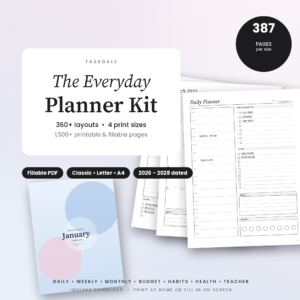
The Everyday Planner Kit
Price: $8.97 | Best for: an all-purpose set of planner pages in the classic disc planner size
The Everyday Planner Kit is a set of 387 printable and fillable planner pages. The title lists classic 7×9.25 disc planner inserts, Letter and A4 PDF files, and dated calendars for 2026 to 2028. It suits anyone who wants a big stack of pages to build their own planner from.
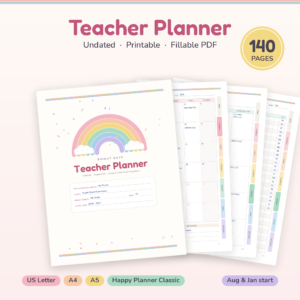
Bright Days Teacher Planner
Price: $2.49 | Best for: teachers who want a printable planner they can punch and carry
Bright Days is a 140-page printable and fillable undated teacher planner. The title lists a lesson planner, gradebook, attendance and a sub binder, in Letter, A4, A5 and Happy Planner sizes. A practical pick for a classroom or a homeschool desk.
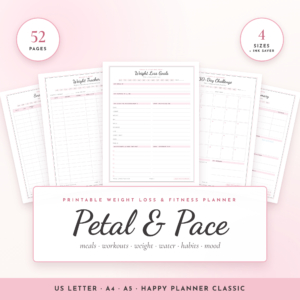
Petal & Pace Printable Weight Loss Planner
Price: $1.33 | Best for: a Happy Planner sized fitness journal
Petal & Pace is a 52-page printable fitness journal with meal, workout, water and weight trackers. The title lists US Letter, A4, A5 and Happy Planner sizes, so you can print the one that fits. It’s general planning, not medical or diet advice.
Fixing Common Printing Problems
Even with good settings, things go sideways. Here’s what to check when they do.
Page prints too small. Your printer scaled it. Go back to the print dialog and look for a scale or fit option. Set it to 100%.
Edges cut off. Some printers can’t print right to the edge of the paper. If the file has important content near the border, try a different size version, or let the printer scale slightly and then adjust your punch placement. Test again before you print the whole stack.
Colors look dull. Check the paper type setting in the printer menu. Plain paper mode uses less ink. If you want richer color, a higher quality mode helps, though it uses more ink and takes longer.
Ink smears when you punch. You printed and punched too fast. Give the pages a few minutes, especially on inkjet printers. Heavy color areas take the longest to dry.
Pages come out crooked. Straighten the paper in the tray and slide the guides snug against the stack. A loose stack drifts, and the print drifts with it.
Budget Your Ink and Paper
Printing at home adds up if you aren’t paying attention. A full color page with a big header costs more ink than a plain line layout. If a file comes in color and black and white, print the plain one for trackers you fill in daily.
Use draft mode for pages that don’t need to look great, like a scratch notes page. Save the best quality for the pages you’ll look at every day.
And print on both sides when it makes sense. Halving your paper use is easy when the layout allows it. A weekly spread on one side and a notes page on the back works for plenty of people.
Finally, don’t print what you can fill in on a screen. Many printable planners come as fillable PDFs. If a page is just a list of things you’ll type, like a prayer list or a food log, consider typing it first and printing the finished page. It’s tidier, and you’ll waste fewer pages on mistakes.
Plan What You Print Before You Print It
Printing everything at once feels productive. It’s also how people end up with 120 pages they never use. Instead, print a month at a time.
Start with a weekly spread, one tracker, and a notes page. That’s about enough to find out what you actually reach for. After a month, you’ll know. You might love the habit tracker and ignore the monthly overview. Print more of what you use, skip what you don’t.
Keep your master PDFs in one folder on your computer, named by size and topic. “Fitness_ClassicHP.pdf” is better than “final_v3_new.pdf”. When you want a fresh page six months from now, you’ll find it in seconds.
A small storage trick
Keep a zip pouch or folder with spare punched pages. When a page gets messy or you run out, you can swap in a fresh one immediately. No printing session needed.
Compare the Printable Sets
| Product | Format | Price | Best for | Link |
|---|---|---|---|---|
| The Everyday Planner Kit | 387 printable and fillable pages; classic 7×9.25 disc inserts, Letter and A4 PDF, 2026 to 2028 calendars | $8.97 | Building a full planner from one big set | View product |
| Bright Days Teacher Planner | 140-page printable and fillable undated planner; Letter, A4, A5, Happy Planner | $2.49 | Lesson plans, gradebook, attendance and sub binder | View product |
| Petal & Pace Printable Weight Loss Planner | 52-page printable; US Letter, A4, A5 and Happy Planner | $1.33 | Meal, workout, water and weight tracking | View product |
Frequently Asked Questions
What size are Happy Planner inserts?
Happy Planner comes in several sizes, and the classic size is the most common. Printable files are made for specific sizes, so check the product title for a label like Happy Planner or Classic HP. If it isn’t listed, measure your page and compare before you print.
Can I print Happy Planner inserts on a regular home printer?
Yes, happy planner inserts print fine at home. Most home inkjet and laser printers handle standard paper. Set the print scale to actual size, use the correct paper size, and print one test page first. Heavier paper may need a manual feed tray, so check your printer’s limits.
Do I need a special hole punch?
Yes, for the disc system. A regular office punch does not match the spacing or shape. Use a punch made for planner discs, and test on a spare page before you punch your real inserts. It saves a lot of ruined pages.
What paper is best for printable planner inserts?
Choose paper a little thicker than copy paper so ink and pens show through less. Avoid very thick cardstock unless your printer accepts it, since it can jam and make the planner hard to close. Test your favorite pens on a spare page.
How many pages should I print at once?
Print a month at a time. That gives you enough to learn what you really use without filling a drawer with pages you never touch. After a few weeks, print more of what works and skip what doesn’t.
So, here’s your next step: check your planner’s size, print one test page and see how it sits. If it fits, grab The Everyday Planner Kit for $8.97 for a full set of pages, or start small with Petal & Pace for $1.33 and print your first month.