A money organiser for bills, savings and goals is really just one tidy home for everything your money has to do. When the direct debits live in one place, the savings pots in another and the goals in your head, things slip. A bill bounces. A pot gets raided. A goal quietly disappears for another year. Bring them together and most of that stress fades.
This guide is for anyone whose money feels scattered. Three banking apps, a drawer of letters and a vague sense that something is due soon. You will learn a simple account layout, how to build a bills calendar, how to name and fill savings pots, and a monthly money admin hour that keeps it all organised. We also compare four Taskdale organisers, from low-effort apps to a full money and life spreadsheet.
Quick picks: money organisers on Taskdale
| Product | Best for | Price | Link |
|---|---|---|---|
| Lemonwise ADHD Budget Planner App | Low-energy days and one safe-to-spend number | $21.99 | View |
| Fernway Money and Life Planner | Bills, goals, habits and tasks in one workbook | $27.00 | View |
| Penny & Petal Income and Expense Tracker | Seeing every account and your net worth | $4.99 | View |
| Fernwell ADHD Budget Planner App | A guided next step and plain-English help | $16.00 | View |
What a money organiser actually does
Think of it like a kitchen. You can cook in a messy kitchen, but you waste time hunting for the grater and you burn things more often. An organised kitchen doesn’t make you a better cook. It just takes away the friction.
A money organiser does the same. It doesn’t earn you more. It shows you, in one place, what is coming in, what must go out and when, and what is set aside for later. That clarity saves money in quiet ways: no missed payments, no forgotten subscriptions, no dipping into the holiday pot because you didn’t realise council tax was due on the 1st.
It also saves something harder to measure. The low hum of worry. Many people describe the first month with an organised money setup as a relief more than anything else. They can stop carrying it all in their heads.
Step 1: Sort your accounts into three jobs
Before you choose any tool, simplify the accounts themselves. Most households only need three, each with one clear job.
- Bills account: your salary lands here and every direct debit and standing order leaves from here. You rarely touch it.
- Spending account: a set amount moves here each payday for food, fuel, nights out and everyday bits. When it is gone, it is gone.
- Savings account with pots: one account split into named pots, like Emergency, Car, Christmas and Holiday.
This split is the single most useful thing in this whole guide. You can glance at the spending account and know exactly what is free to spend, because the bills money is somewhere else entirely.
A worked example
Take a nurse in Leeds with a take-home of £2,600 a month. Her bills come to £1,420: rent £950, council tax £160, energy £120, phone £25, broadband £30, insurance £45, streaming and apps £18, and a gym at £72 she is about to cancel. She moves £700 a month into her spending account and £480 into savings pots. That leaves no money sitting about without a job, and she knows where every pound lives.
If two of you share bills, the same layout works with a joint bills account. Our guide on how to budget as a couple covers the 50/50 versus split-by-income question.
Step 2: Build a bills calendar you can trust
A bills calendar is the backbone of any money organiser. List every bill with four details: amount, due date, which account pays it, and whether it is a direct debit or a manual payment.
| Bill | Due | Amount | How |
|---|---|---|---|
| Rent | 1st | £950 | Standing order |
| Council tax | 1st | £160 | Direct debit |
| Energy | 8th | £120 | Direct debit |
| Phone | 15th | £25 | Direct debit |
| Broadband | 20th | £30 | Direct debit |
| Car insurance | 22nd | £45 | Direct debit |
Move due dates closer to payday
If you are paid on the 28th, a bill due on the 25th is at the very end of your month, when the account is at its lowest. Ask the company to move it to the 1st or 2nd. Most will, and it takes one phone call or a few clicks. Grouping bills just after payday means the money leaves while it is definitely there.
Don’t forget the yearly ones
Car tax, MOT, the TV licence, a breakdown cover renewal, an Amazon or warehouse club membership. These are easy to forget because they come once a year. Add each one to the calendar with a reminder a month before, and set a small monthly amount aside in a pot so the money is ready.
If you would rather have an app that keeps the calendar, pots and spending in one view, and won’t overwhelm you on a tired evening, Lemonwise is made for that.
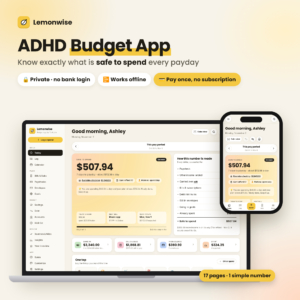
Lemonwise ADHD Budget Planner App
Price: $21.99 | Best for: busy or easily overwhelmed brains
Lemonwise is a paycheck budget app in a single file that opens in Chrome or Edge, works offline and needs no bank login. It shows how much is safe to spend until payday after bills, debt minimums, envelopes and savings goals are covered, and explains every line of that number. Calm view hides everything but your number and a Log button. Set your currency to pounds, add your payday and bills, then one goal.
Step 3: Name your savings pots and give them a monthly amount
An account called Savings gets raided. A pot called Car Repairs mostly doesn’t. Names give money a purpose, and purpose makes you think twice before moving it.
Split savings into two kinds of pots. Sinking funds are for costs you know are coming: Christmas, car service, birthdays, school uniforms. Goals are for things you want: a holiday, a deposit, a new sofa. Both get a monthly amount.
- Emergency: £150 a month until it reaches one month of bills.
- Car: £60 a month for MOT, tyres and repairs.
- Christmas: £50 a month, so December is already paid for.
- Holiday: £120 a month toward a week away next summer.
- Birthdays and gifts: £30 a month.
That is £410. The nurse in our example has £480, so she adds the spare £70 to the holiday pot. Each pot gets a target and a date where it makes sense, so you know when it is full.
Goals with a reason
Write one line for each goal pot: why it matters. Holiday: first trip abroad with my sister in six years. When a tempting sale pops up in October, that line is what keeps the pot intact. If you find that your goals keep getting raided no matter what, it may be worth looking at the habits underneath. Our set of money mindset workbook exercises is a good starting point.
For a workbook that keeps the pots, the bill calendar and even your habits and to-dos together, Fernway is a tidy option.
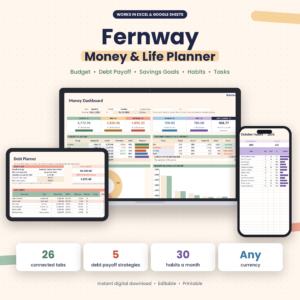
Fernway Money and Life Planner
Price: $27.00 | Best for: people who like everything in one file
Fernway is a budget planner spreadsheet for Excel and Google Sheets that puts a monthly budget, debt payoff calculator, savings goals, bill calendar, habit tracker and task list in one workbook. Log a transfer to a goal and it moves, and add a card and its due date lands on the calendar. The debt planner handles up to 30 debts with five strategies. Pick your currency in Settings, then add your bills and goals.
Step 4: Tidy the paperwork once
Organising money isn’t only numbers. It is also the letters, contracts and logins that pile up. Spend one afternoon sorting them, and you will save hours of hunting next year.
- One folder per category: home, car, insurance, utilities, tax, bank. Paper or digital, whichever you will actually use.
- A contracts list: each contract with its end date. Phone, broadband, energy and insurance deals often get pricier at renewal, so you want to know when.
- Payslips and tax letters: keep them together for the year.
- A shred box: anything older than you need goes in it.
If you love paper, a budget binder can hold all of this in one place. Our guide to what to put in a budget binder lists the sections worth having.
The monthly money admin hour
Once everything is set up, keep it organised with one hour a month. Pick a regular slot, like the first Sunday after payday, and work through this list.
- Check bills (10 minutes). Did every direct debit go out? Did any amount change? Update the calendar.
- Check spending (15 minutes). Look at last month’s spending account. Where did it go over? Pick one category to watch.
- Top up pots (5 minutes). Make sure each pot got its monthly amount.
- Look ahead (10 minutes). What is due in the next two months? Birthdays, renewals, car tax, school trips.
- Review goals (10 minutes). How full is each goal pot? Is any date at risk?
- File and shred (10 minutes). Deal with any post that arrived.
Put the kettle on, put some music on and make it a slightly nice hour, not a dreaded one. A lot of people end up quite enjoying it. There is real satisfaction in seeing every pot a little fuller than last month.
If you want a spreadsheet that shows every account balance and your net worth at a glance during that hour, Penny & Petal is built for the bigger picture.

Penny and Petal Income and Expense Tracker
Price: $4.99 | Best for: people who want every account in view
Penny & Petal is an income and expense tracker for Excel and Google Sheets with an accounts dashboard showing balances for current, savings, cash and investment accounts plus what you owe on cards and loans. Transfers between your own accounts sit on their own tab, so pot top-ups never look like spending. It tracks up to 15 savings goals and your net worth over time. Set the currency cell to pounds, then add your accounts.
Common money organising mistakes
Too many accounts. Seven accounts across four banks is not organised. It is scattered. Three jobs, as few accounts as possible.
Pots with no monthly amount. A pot with nothing going in is just a label.
Organising once and never again. Bills change, contracts end, prices creep. The monthly hour keeps the system true.
Making it too complicated. Colour-coding, 40 categories, three trackers. Fun for a week, abandoned by the next. Keep it simple enough to run on a bad day.
Not telling your partner. If you share money, the organiser only works when both of you know how it is set up.
Who a full money organiser may not suit
If your money is already simple, say one account, a few direct debits and a single savings pot, you may not need much more than a bills list and a calendar reminder. That is fine. Organising should save effort, not add it.
And if you find spreadsheets draining, skip them. An offline app like Lemonwise or Fernwell gives you the key number with far less to look at, which is often what keeps people going past the first month.
Frequently asked questions
What is a money organiser?
It is one place that holds your bills, savings pots and goals, with dates and amounts, so you can see what is due, what is set aside and what is free to spend. It can be an app, a spreadsheet or a paper binder.
How many bank accounts should I have to organise my money?
Many people find three works well: one for bills, one for everyday spending and one savings account split into named pots.
How do I organise bills so I never miss one?
List every bill with its amount, due date and payment method, move due dates to just after payday, and set direct debits where you can. Review the list once a month.
What savings pots should I have?
Start with an emergency pot, then add pots for costs you know are coming, like Christmas, car repairs and birthdays, and one or two for goals such as a holiday.
Is an app or a spreadsheet better for organising money?
An app suits people who want one quick number and little to manage. A spreadsheet suits people who like seeing every figure and building charts. Both work if you open them regularly.
Your next step
This weekend, write down every account you have and give each one a job: bills, spending or savings. Close or empty any that don’t fit. Then put your bills and pots into the Lemonwise budget planner app so you can see what is safe to spend each day.