At senior level, a job title tells the reader surprisingly little. “Director of Operations” could mean a team of six or a division of six hundred. “Head of Sales” could mean a regional patch or a whole country. Search consultants and board members know this, so they skip past titles and hunt for the things that actually separate one leader from another: scope, decisions and results.
This guide is for directors, heads of department, general managers, senior public sector leaders and anyone moving into the executive tier. It shows how to add a scope line to every role, how to write bullets that prove impact rather than list responsibilities, how to build a key achievements block, how to handle confidential numbers, and how to keep a plain version for the screening systems many search firms and large employers use.
The aim is a CV that a busy chair can read in two minutes and come away knowing exactly what you changed, where and by how much.
Quick picks: templates and tools for senior applications
| Product | Best for | Price | Link |
|---|---|---|---|
| Ashford Resume Template Bundle | An executive layout with a matching ATS set | $7.99 | View |
| Slatewell ATS Resume Kit | A single-column executive layout with career highlights | $7.49 | View |
| Meridian ATS Resume Kit | A plain two-page version with key achievements | $4.79 | View |
| Offerline Job Application Tracker | Long, multi-stage senior processes | $5.99 | View |
Why job titles alone do not sell senior candidates
Titles vary wildly between organisations. A Vice President at a bank and a Vice President at a 40-person start-up hold very different jobs. Titles also drift upwards over time, so readers have learned not to take them at face value. What they trust is evidence: how big was the remit, what did you decide, and what changed because you were there?
The good news is that most senior people have that evidence. It is just hidden. It sits in board papers, annual plans and appraisal notes rather than on the CV, which still reads like a list of responsibilities copied from old job descriptions. Moving that evidence onto the page is the single biggest improvement most executive CVs can make.
Add a scope line to every senior role
Directly under each job line, add a single line in plain or italic text that sets the scale. Think of it as the frame for everything below it. It should cover whichever of these apply: team size, budget or P&L, revenue, number of sites or countries, and who you reported to.
For example, under “Operations Director, Harbourside Foods”: Led 420 staff across 3 manufacturing sites and a central logistics team. Budget around £30m. Reported to the CEO and sat on the executive committee.
Or for a public sector leader: Head of Housing Services for a council of around 250,000 residents. Team of 85, revenue budget of about £12m, reporting to the Director of Place.
One line, maybe two. With that in place, every bullet below it reads in context. A 6% cost saving means much more when the reader knows it was 6% of thirty million.
Writing bullets that prove impact
A strong executive bullet compresses a whole story into one or two lines: the situation, what you decided or did, and what changed. Numbers carry the weight. The most persuasive ones are usually about revenue, cost, margin, time, risk, quality or people.
Before: “Responsible for customer service across the UK.” After: “Took over a contact centre with falling satisfaction scores and moved it from the bottom quartile to the top third of the group within 18 months, by redesigning shift patterns and adding a callback service.”
Before: “Oversaw the IT transformation programme.” After: “Led a three-year move off legacy systems for 2,000 users, delivered on budget, which let the business close one of its two data centres.”
Before: “Managed the sales team.” After: “Rebuilt a 30-person sales team after two years of decline, returning the region to growth within a year and growing revenue around 22% over the next two.”
Notice that each one names the starting point. Impact is clearer when the reader sees where things began. Aim for four to six bullets for your current or most recent role and two to four for earlier senior roles, with the strongest first.
A key achievements block at the top
Senior careers are long, and your best result may be from two roles ago. A short key achievements block, placed just below your profile, solves that. Pick three or four results from across your career that best match the job you are going for, each in one line.
Something like: Grew a regional business from about £18m to £41m revenue in four years. Led the integration of two acquired companies, keeping key client retention above target. Cut operating costs by around 9% without redundancies through procurement and property changes.
Change this block for each application. For a turnaround role, lead with the recovery story. For a growth role, lead with expansion. It is the fastest way to make a long CV feel tailored, and the reader gets your best evidence before they reach a single job line.
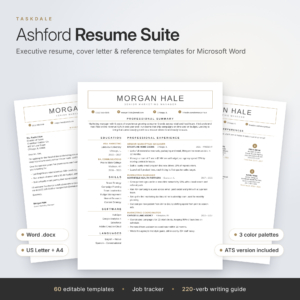
Ashford Resume Template Bundle
Price: $7.99 | Best for: directors and senior managers
Ashford gives you an executive layout with a framed name block, an icon contact bar and a tidy sidebar, in 1, 2 and 3 page versions, plus a separate single-column ATS set for portals. A matching cover letter, reference page and thank-you letter are included in three colour palettes and two paper sizes, with 10 filled examples and a job application tracker. The placeholder text prompts you to show results with numbers. Start with the 2 page executive file and fill the space under your profile with three key achievements.
An executive profile that earns the space
At this level, the profile should read like a short introduction a chair might give before you walk into the room. Four sentences at most. What kind of leader you are, the scale you work at, two or three results that define you, and what you are looking for next.
Operations leader with fifteen years in food manufacturing and logistics, most recently running three sites and 420 staff. Known for turning around underperforming sites and building strong second-line leaders. Led the group’s largest site from loss to profit in two years. Looking for a Chief Operating Officer role in a mid-sized manufacturer.
Avoid stacks of adjectives such as “visionary, dynamic, strategic”. Every executive CV has them, which means none of them land. The numbers and the specific situation do the persuading.
When results are confidential or shared
Two worries stop senior people writing strong bullets. The first is confidentiality. You can usually show impact without revealing sensitive figures. Use percentages instead of absolute numbers, ranges instead of exact amounts (“a budget in the tens of millions”), or relative terms (“from the lowest-performing region to second of seven”). For listed companies, avoid anything that is not already public.
The second worry is credit. Executive results are almost always team results. That is fine, and readers expect it. Use verbs that show your actual role honestly, such as led, sponsored, designed, negotiated or chaired, and mention the team where it adds context: “Led a cross-functional team of 12 that…” Claiming credit plainly for what you led is not boasting. It is the job of the CV.
Board roles, trusteeships and leadership beyond the day job
Non-executive roles, trusteeships, school governor positions, industry committees and mentoring programmes all say something about how others see your judgement. Give them their own short section with the organisation, your role and the years. Add a line of impact if there is one: “Trustee and chair of the finance committee for a regional charity with a turnover of around £4m, through a period of merger.”
Speaking engagements, published articles and recognised awards can go here too, as long as they are relevant and recent. Keep it short. This section supports the main story rather than replacing it.
A plain version for search firms and portals
Many executive search firms and large employers store and search CVs in screening systems. A heavily designed two-column CV can come through those systems jumbled. So keep a single-column version with the same content: standard headings, real text, no tables or text boxes, and contact details in the body of the page rather than the header.
Send the designed version when you email a search consultant or chair directly, and the plain version whenever you upload to a portal. Our guide to the executive resume template covers what senior hiring managers expect to see in each.
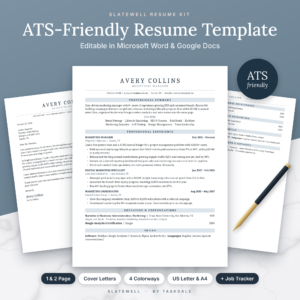
Slatewell ATS Resume Kit
Price: $7.49 | Best for: executives uploading to search firm portals
Slatewell is a single-column kit with an Executive layout that includes Career Highlights and Core Competencies sections, built to read cleanly in screening systems while still looking polished. You get four resume layouts, two cover letters, a references page and a thank-you letter, in four calm colourways and both US Letter and A4, all set in Cambria. A Job Search Tracker for Excel and Google Sheets is included. Copy your key achievements into the Career Highlights section first.
Length, and what to leave out
Two pages is the norm for executive CVs. Three can work for very long careers or roles that need publications or board detail, but the first page must still carry the whole story. If a reader stopped at page one, they should know your scope, your best results and what you want.
Summarise early career roles in one or two lines: “Earlier roles in sales and account management with two national distributors, 2004 to 2011.” Drop school details entirely. Cut any skills list that only contains generic leadership words. Readers will judge your leadership from your results, not from the word “leadership” in a box.
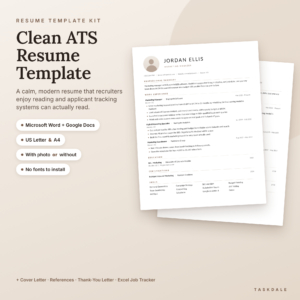
Meridian ATS Resume Kit
Price: $4.79 | Best for: a clean two-page plain version
Meridian is an ATS resume kit in Word that also opens in Google Docs, with one and two page resumes in photo and no-photo versions. The two page version adds Key Achievements, and every file uses Calibri with dates set on proper right tab stops so they stay aligned as you edit. A matching cover letter, references page and thank-you letter come in US Letter and A4, with an Excel Job Application Tracker, a 12-page Job Search Toolkit and a 17-page guide. Use the no-photo two page file as your portal version.
Running a senior job search
Executive searches move differently. Processes are longer, often with five or six stages: search consultant, longlist, shortlist, panel, board, references, and sometimes psychometric assessments or a presentation. Many roles are never advertised and come through networks and search firms. Keeping track of who you spoke to, which version of your CV they hold and what the next step is becomes a real job in itself.
A simple tracker helps. One row per opportunity, with the search firm, the consultant’s name, the client if known, the stage, the date of the last contact and the next action. Our walkthrough on running a job search from one spreadsheet shows a layout that works.
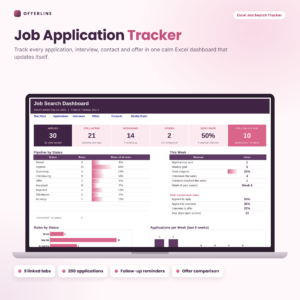
Offerline Job Application Tracker
Price: $5.99 | Best for: multi-stage senior hiring processes
Offerline is an Excel workbook with nine linked tabs. Log each opportunity and its status, and it works out follow-up dates, counts down to interviews and shows which sources lead to interviews. The offer comparison tab weighs year-one pay, ongoing pay, time off and commute hours with a weighted score, which is useful when two senior offers arrive close together. Enter your current conversations with search firms first so nothing slips between stages.
Mistakes that keep executive CVs ordinary
The most common is the responsibilities list: “Responsible for strategy, budgets and people” under every role. The second is burying the best result on page two. The third is jargon from your current organisation, such as programme names and internal acronyms, which mean nothing to an outside reader. The fourth is a profile full of adjectives with no numbers. And the fifth is a CV that never mentions the people side: hiring, developing leaders, succession. Boards care a great deal about whether you leave a stronger team behind you.
Frequently asked questions
How do I show impact on an executive CV?
Add a scope line under each role showing team size, budget and remit, then write bullets that name the starting point, what you did and the measurable result. Put your three or four best results in a key achievements block near the top.
How long should an executive CV be?
Two pages for most senior leaders. Three can work for very long careers or roles needing board or publication detail, but page one must carry the main story on its own.
How do I show results if figures are confidential?
Use percentages, ranges or relative terms, such as “from bottom quartile to top third” or “a budget in the tens of millions”. Avoid any figure that is not already public for listed companies.
Should an executive CV have a key achievements section?
Yes. Three or four one-line results just under your profile give a busy reader your strongest evidence first, and you can change them for each application.
Do executive CVs need to be ATS-friendly?
Many search firms and large employers store CVs in screening systems, so keep a single-column plain version for uploads alongside your designed version for direct emails.
Should I include non-executive roles on my CV?
Yes, in a short separate section with the organisation, your role and the years, plus a line of impact where relevant. They show how others value your judgement.
Your next step
Write a scope line for each of your last three roles tonight, then pick the three results that best fit your next target and turn them into a key achievements block. Those two changes alone will lift your CV above a list of titles. When you are ready to lay it out, start with the executive files in the Ashford Resume Template Bundle.