If you send fewer than 30 invoices a month, the choice between an online invoice generator vs downloadable templates comes down to three things: how often you bill, where you work, and whether you want to own your records. Both can make a clean invoice. They just ask different things of you.
This guide is for freelancers, tradespeople, makers and small service businesses who are tired of rebuilding invoices by hand, or tired of paying for software they barely open. You will see what each option does well, where each one pinches, a real month of billing done both ways, and the mistakes people make when they switch.
No hard sell. Some people really are better off with an online tool, and we will say so.
Quick picks: downloadable invoice templates on Taskdale
| Product | Best for | Price | Link |
|---|---|---|---|
| Client Billing Hub Invoice Tracker Spreadsheet | Generator-style invoices plus payment tracking in Excel or Google Sheets | $6.49 | View |
| PaidPath Client & Invoice Hub | Service businesses that want invoices, expenses and profit in one Excel file | $9.49 | View |
| Ledgerline Business Forms Kit | Contractors who want Word forms plus an Excel invoice maker | $2.99 | View |
| Maker’s Business Forms Kit | Crafters taking custom orders at markets and online | $3.00 | View |
What an online invoice generator actually does
An online invoice generator is a website or app where you type the client, the items and the amounts, and it produces a finished invoice. Many will email it for you, send a reminder when it goes late, and take card payments through a link. That last part is the big draw. A client who can tap “Pay now” on their phone often pays the same day.
The trade-off is that you are renting the tool. Most online generators run on a login, and plenty move useful features behind a monthly plan once you pass a set number of invoices or clients. Free tiers often carry the provider’s branding, limit how many invoices you can store, or show ads. Card payments usually carry a processing fee on every invoice paid that way.
None of that is a scandal. It is simply how online services pay for themselves. The question is whether the convenience is worth it for the way you work.
Where online tools shine
- You bill from your phone on site. A plumber finishing a job at 4pm can send the invoice before he reaches the van.
- You want automatic reminders. The tool nudges the client on day 7 and day 14 so you do not have to.
- You take a lot of card payments. A payment link built into the invoice saves a lot of back and forth.
Where they pinch
- Costs creep. A plan that felt cheap in year one is another bill in year three.
- Your records live on someone else’s server. If you stop paying, export rules decide what you keep.
- You need an internet connection to see your own invoice history.
What you get with a downloadable invoice template
A downloadable template is a file you buy or download once and keep on your own computer: a Word document, an Excel workbook, a Google Sheet, or a PDF you print and fill by hand. You open it, type over the placeholder text, save it as a PDF and email it. No account. No renewal date.
The basic versions are just a pretty page. You type every number and add up the totals yourself, which is fine for three invoices a month and painful for thirty. The better spreadsheet versions behave a lot like a generator. You pick a client from a dropdown, pick an item, type a quantity, and the subtotal, tax and balance due fill in. Some go further and keep a log of every invoice, mark the late ones and show who owes you what.
If you are still weighing up file types, our guide to invoice templates in Word, Excel and PDF walks through what each format is good at.
Online invoice generator vs downloadable templates, side by side
Here is the plain comparison. Read across the row that matters most to you and ignore the rest.
| Question | Online invoice generator | Downloadable template |
|---|---|---|
| Ongoing cost | Often free to start, then a monthly or yearly plan for more features | One purchase, or free for basic files |
| Login needed | Yes | No |
| Who holds the records | The provider, on their servers | You, in a file you control |
| Works offline | Usually not | Yes, apart from Google Sheets |
| Payment reminders | Often automatic | You send them, but a tracker tells you when |
| Card payment link | Often built in | Paste your own payment link or bank details |
| Design control | Limited to the tool’s layouts | Full: logo, colors, wording, extra columns |
| Speed per invoice | Fast | Fast with a calculating spreadsheet, slow with a blank page |
So the honest summary: online tools win on automation, templates win on ownership and cost over time. A good spreadsheet closes most of the speed gap.
A worked example: one month of billing, both ways
Meet Dana, a freelance designer with 6 regular clients. In March she sends 9 invoices worth a total of $4,350. Two clients pay late, one pays half up front.
With an online generator
Dana logs in, picks each client, adds her line items and clicks send. Reminders go out on their own. The client who pays by card is settled in two days, minus a processing fee. At month end she exports a report. Total time: about 40 minutes. The catch is the plan cost every month, whether she sends 9 invoices or 2, and the fact that her invoice history lives in an account she has to keep paying for.
With a calculating spreadsheet
Dana opens her workbook, picks each client from a dropdown, chooses her services and types the hours. The totals and due dates fill in. She saves each one as a PDF and emails it from her own inbox. On the 15th she opens the tracker, sees two invoices marked overdue, and sends two short reminder emails. She logs the half payment, and the status changes to partly paid. Total time: about 55 minutes. No monthly bill, and every record sits in one file on her laptop.
That extra 15 minutes is the real cost of the template route. For Dana, it was worth it. She liked seeing her whole year in one place, and she liked not having another subscription leave her account on the 1st.
Spreadsheets that work like an invoice generator
The sweet spot for most small businesses is a spreadsheet that does the generator’s job without the login. You type each client and price once, and every invoice after that is a few picks from a list. Add a payment log and you also get the “who owes me” view that online tools sell as a premium feature.
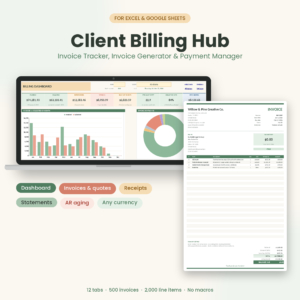
Client Billing Hub Invoice Tracker Spreadsheet
Price: $6.49 | Best for: Freelancers sending a few invoices a week
A 12-tab workbook for Excel and Google Sheets that builds print-ready invoices and quotes, logs full and part payments, prints numbered receipts and creates client statements. The dashboard shows what came in this month and what is 60 days late, with an aging view by client. Start by filling in the Settings tab with your business details and payment terms, then add your clients and services once.
If you work only in Excel and want your expenses beside your income, there is a second option worth a look below.
When you want profit, not just invoices
Many online generators stop at billing. You can see what you invoiced, but not what you actually kept after costs. A small business with $3,000 of invoices and $1,100 of expenses has a very different month from one with $3,000 of invoices and $400 of expenses. You want to see that gap.

PaidPath Client and Invoice Hub
Price: $9.49 | Best for: Service businesses tracking profit and overdue clients
An Excel workbook that links clients, services, invoices, quotes, payments and expenses. Statuses update on their own, overdue invoices rise to the top of the dashboard, and a list shows everything due in the next 14 days. It prints a one-page invoice, quote or statement on US Letter or A4. Begin on the Setup tab with your currency and default payment terms, then add your service list.
One small win people mention after switching to a tracker like this: the end-of-month panic disappears. The numbers are already there.
Paper forms and Word templates for jobs on site
Not every business lives at a desk. A landscaper quoting in someone’s garden, or a crafter taking an order at a Saturday market, often needs a form they can fill by hand or type into quickly. Here a downloadable kit has an edge no online tool can match: it works with a pen.
The trick is matching forms. Your quote, estimate, invoice and receipt should look like they came from the same business. Clients notice when they do not. If you are not sure which document goes out when, our explainer on quote vs estimate vs invoice sorts it out in a few minutes.
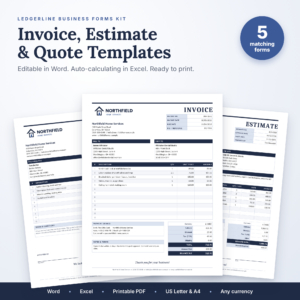
Ledgerline Business Forms Kit
Price: $2.99 | Best for: Contractors and home service pros
Five matching forms (quote, job estimate, invoice, sales receipt and purchase order) as Word templates and printable PDFs in US Letter and A4, plus an Excel Invoice Maker that fills in client details, calculates totals and marks invoices PAID or OVERDUE. It is licensed for use in your own business. Add your logo to the Word forms first, then set your payment terms in the Excel Settings tab.
Crafters with custom orders may prefer the Maker’s Business Forms Kit from the quick picks table, which pairs 33 fillable order and sales forms with an Excel order manager.
How to choose in five minutes
Answer these honestly and the choice usually makes itself.
- How many invoices do you send a month? Under 30, a calculating template handles it easily. Well over 100, an online tool’s automation starts to earn its fee.
- Do most clients pay by card? If yes, a built-in payment link is a real plus. If they mostly pay by bank transfer, it matters far less.
- Do you invoice from a phone? If you are always on site, an online tool fits. If you invoice at a desk on Friday afternoon, a template is fine.
- Do you want to own your records? If losing access would worry you, keep a file you control.
- How do you feel about one more subscription? Be honest. Many small owners already pay for six.
Some people use both. They keep a spreadsheet as the master record and use a free online tool only to send a card payment link to the odd client who insists on it. That works fine.
Mistakes people make when they switch
Starting a new numbering sequence. If your last online invoice was number 0147, your first template invoice should be 0148. A gap or a restart confuses clients and your own bookkeeping.
Forgetting to export history. Before you cancel an online plan, download every invoice and a full payment report. Do it on a quiet afternoon, not the day the plan ends.
Choosing a blank page over a calculating file. A Word page with ten empty rows looks simple, but typing totals by hand is where errors creep in. One wrong tax figure on a $1,200 invoice is an awkward phone call.
Not setting payment terms once. Good templates let you set your default terms, such as 14 days, so every due date fills in. Skip that step and you will type dates by hand forever.
Skipping the follow-up routine. A template will not chase late payers for you. Put a 10-minute slot in your calendar every Friday to check the tracker and send reminders.
Frequently asked questions
Is an online invoice generator better than a template?
Not always. An online generator is better if you need automatic reminders and card payment links. A calculating template is better if you want no monthly fees and full control of your records. For most businesses sending under 30 invoices a month, a good template is enough.
Can a spreadsheet invoice look professional?
Yes. A well-designed spreadsheet prints a clean one-page invoice with your logo, business details and payment instructions. Save it as a PDF before you email it so the client sees a finished document, not a spreadsheet.
Do downloadable invoice templates work in Google Sheets?
Some do. The Client Billing Hub works when you upload the file to Google Drive and open it with Sheets. Others are built for Excel only, so check the listing before you buy.
How do I take card payments without an online invoicing tool?
Most payment processors let you create a payment link or a button. Paste that link into the payment instructions on your template, next to your bank details. The client clicks it and pays as usual.
What happens to my invoices if I stop paying for an online tool?
It depends on the provider. Some keep a read-only archive, others limit access. Export every invoice and a payment report before you cancel so you are never caught short at tax time.
Your next step
Pull up last month’s invoices and count them. If the number is under 30 and most clients pay by bank transfer, try a calculating spreadsheet for one full month and see how it feels. The Client Billing Hub Invoice Tracker Spreadsheet is a good place to start, and your first invoice can go out this afternoon.