If you want to send a clean invoice without signing in to anything, an invoice template that lives on your own computer does the job. You open the file, type the client and the amount, save a PDF, and email it. No account, no password reset, no app asking you to upgrade.
This guide is for freelancers, tradespeople and small shop owners who looked at Zoho Invoice or a similar online tool and thought, “I just need to bill six people a month.” You will see what a template setup can and cannot do, which Taskdale files fit which kind of business, and how to build a simple billing routine that takes about 15 minutes a week.
Quick picks: invoice templates you can use without a login
| Product | Best for | Price | Link |
|---|---|---|---|
| PaidPath Client & Invoice Hub | Service businesses tracking who owes what | $9.49 | View |
| Ledgerline Business Forms Kit | Quote, estimate, invoice and receipt in one matching set | $2.99 | View |
| Ledgerline Invoice, Quote & Receipt Kit | Auto-calculating Excel invoice with a log and statements | Original price was: $3.00.$1.50Current price is: $1.50. | View |
| Maker’s Business Forms Kit | Crafters taking custom orders | $3.00 | View |
Why people look for a Zoho Invoice alternative
Zoho Invoice is an online invoicing service. Like most cloud tools, it asks you to create an account, sign in, and keep your client records on its servers. For plenty of businesses that is fine. It can send reminders, take online payments and sync with other apps in the same family.
Others find it is more than they need. A dog walker with eight regular clients does not want a dashboard full of menus. She wants one page with her logo, the dates, the walks and the total. Then she wants to get back to the dogs.
Here are the usual reasons people go looking for something simpler:
- They are tired of logins. One more password, one more two-step code on the phone, one more “your session has expired” while a client waits on the line.
- They want the file. A Word or Excel invoice is yours. You can open it in five years without checking whether an account is still active.
- They bill rarely. If you send three invoices a month, a whole platform can feel like hiring a forklift to move a chair.
- They work offline. A contractor writing up a job in a van with patchy signal can still fill in a spreadsheet.
- Plans and terms change. Online services set their own limits, features and pricing, and they can change them. A file on your laptop stays the way you bought it.
None of this makes online software bad. It just means the right tool depends on how many invoices you send and how much you want the software to do for you.
What a no-login invoice setup really gives you
A template-based system is plain. You keep a folder on your computer, one master template, and a simple log of what you sent. That is it.
So what do you gain? Speed, mostly. Once your logo, bank details and payment terms are in the template, a new invoice takes about two minutes. You also gain control. You decide the layout, the wording on late fees, the order of the columns. If a client asks for their purchase order number at the top, you add a line and move on.
You also keep your client list private in the sense that it sits where you put it. It is on your own drive, in your own cloud backup if you use one, and nowhere else.
For a deeper look at the file types, our guide to invoice templates in Word, Excel and PDF compares the three side by side.
Pick a template set that matches how you bill
Not every business bills the same way. A wedding photographer sends one big invoice per client. A cleaner sends twenty small ones. A candle maker sends a quote, waits for a deposit, then invoices the rest. Match the file to the pattern.
You bill clients for services every month
If most of your invoices go to the same handful of clients, a tracker with a built-in invoice saves the most time. You type each client once. After that, every invoice pulls their details, and the workbook keeps count of who has paid.

PaidPath Client and Invoice Hub
Price: $9.49 | Best for: freelancers and service businesses
PaidPath is an Excel workbook that links clients, services, quotes, invoices, payments and expenses. Log a payment and the invoice status, client balance and dashboard all update, with overdue invoices pushed to the top. It handles discounts, up to three taxes and shipping, and prints a clean invoice, quote or client statement on US Letter or A4. Start by entering your business details and your five most common services.
The win here is the overdue list. Instead of scrolling through sent emails on the 1st of the month, you open one tab and see that the Patel job is 18 days late. That is the whole reason most people wanted invoicing software in the first place.
You quote first, then invoice
Builders, landscapers and handymen usually send a quote or estimate before any work starts. If your paperwork comes in that order, look for a set where the quote and invoice match, so the client sees the same layout from first price to final bill.
You make things to order
Crafters have a different problem. The order details matter more than the invoice. Glitter color, shirt sizes, names spelled a certain way. The Maker’s Business Forms Kit handles that side with 33 fillable forms, including an invoice, price quote, receipt and a deposit agreement, plus an Excel order tracker.
A matching paper trail for quotes, invoices and receipts
A business that sends a quote in one font, an invoice in another and a receipt scribbled on notepaper looks smaller than it is. Matching forms fix that in an afternoon. They also make your own records easier, since every document has the same fields in the same place.
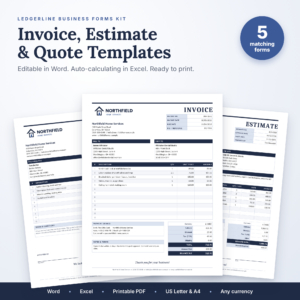
Ledgerline Business Forms Kit
Price: $2.99 | Best for: trades and home service pros
This kit gives you five matching forms: quote, job estimate, invoice, sales receipt and purchase order. Use the Word versions to type and go, or the Excel Invoice Maker when you want totals worked out for you, and there are printable PDFs too. Fill in your business name and payment details on the invoice first, then copy them across to the other four.
If you are not sure whether a job needs a quote, an estimate or an invoice, our plain-English explainer on quote vs estimate vs invoice clears it up in a few minutes.
Setting up your first template in under an hour
You do not need a free weekend for this. Block out 45 minutes, make a coffee, and work through the list in order.
- Make a folder. Call it something boring like “Invoices 2026”. Inside it, make one subfolder for sent PDFs and one for paid ones.
- Add your details once. Business name, address, email, phone, tax number if you have one, and how clients pay you. Bank transfer details go here.
- Set your terms. Write one line such as “Payment due within 14 days” and keep it the same on every invoice. Consistency gets you paid faster than clever wording.
- Choose a numbering system. Something like 2026-001, 2026-002. Never reuse a number. Never skip one.
- Save a master copy. Name it “MASTER do not edit” and make it read-only. Every new invoice starts as a copy of this file.
- Test it. Make a fake invoice to yourself for 3 hours at $45 an hour plus $12 in materials. Check that the total shows $147, then save it as a PDF and open the PDF on your phone. If it looks right on a phone, it will look right to clients.
That last step catches more mistakes than any other. A column that looked fine on a laptop can wrap badly on a small screen.
Worked example: a month of billing without an app
Meet Dana, a freelance bookkeeper with seven monthly clients. She used to put off invoicing until the weekend, then rush through it on Sunday night. Here is how a template routine looks for her now.
Week one
On the 1st, she opens her tracker and creates seven invoices. Four are flat monthly fees. Three are hourly, so she copies the hours from her time log. Each invoice gets the next number, a due date 14 days out, and a PDF saved to the “Sent” folder. Total time: about 25 minutes.
Week two
Payments start landing. Each time one arrives, she marks it paid in the log. Five clients pay within ten days. She moves those PDFs to “Paid”.
Week three
On the 15th, two invoices are still open. One client simply forgot. A short, friendly email with the PDF attached fixes it the same day. The other asked for a week’s grace, which she notes in the log.
Week four
Everything is in. Dana looks at her totals for the month and feels that small, quiet relief of knowing exactly where she stands. No surprises. No logging in to find out.
If you want a full system for chasing late payers, our guide to building an invoice tracker spreadsheet walks through the columns and the reminder schedule.
An auto-calculating invoice with a built-in log
Some people like the Word layout but hate adding up line items by hand. A middle ground is an Excel invoice that does the sums and keeps a running list of every invoice you have sent. You still own the file. You just stop reaching for the calculator.
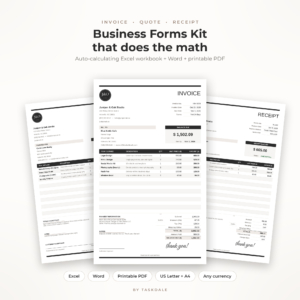
Ledgerline Invoice, Quote and Receipt Kit
Price: Original price was: $3.00.$1.50Current price is: $1.50. | Best for: small firms wanting math done for them
This kit pairs an auto-calculating Excel invoice with matching Word templates and printable PDF forms. Pick a client from a dropdown and the address fills in, pick an item and the price appears. An invoice log holds up to 300 invoices and flags late ones, and a statement page shows any client’s balance with aging. Set up your client and item lists first, then try one practice invoice.
The client statement is handy when a client pays in bits. One page shows them every invoice, every payment and what is left, so the conversation is about facts rather than memory.
What you give up when you skip online software
Being fair matters here. A template is not a full invoicing platform, and pretending otherwise would just set you up for a bad month.
- No automatic reminders. You send the follow-up emails yourself. A calendar alert on the 10th and the 20th covers most of it.
- No pay-now button. Clients pay by bank transfer, card through your own payment provider, or a payment link you paste in. That works, but it is a manual step.
- No team access by default. If three people send invoices, you will need a shared drive and a clear rule about who edits what.
- Backups are on you. If your laptop dies and the folder was only on that laptop, the invoices go with it.
So who is a template not right for? A business sending 200 invoices a month to customers who expect to click and pay. That business has outgrown files. For everyone else, the trade is usually worth it.
Keeping your invoice files safe and tidy
A no-login setup is only as safe as your habits. These take two minutes a week.
- Keep the invoice folder inside a synced folder you already use, so there is always a second copy.
- Every Friday, check that the last invoice number in your log matches the last PDF in your “Sent” folder.
- At the end of each quarter, copy the whole year’s folder to a USB stick and put it in a drawer.
- Name every PDF the same way: number, client, date. For example, 2026-014 Harbor Cafe 2026-03-01.pdf. Searching becomes easy.
That last habit pays off at tax time. Your accountant asks for March, and you have it in seconds.
Frequently asked questions
Is there an invoice template that needs no account or sign-up?
Yes. Word and Excel invoice templates open straight on your computer with no account. You fill them in, save a PDF and email it. The Taskdale kits above are downloads you keep, so there is nothing to log in to after you buy.
Can an Excel template replace Zoho Invoice for a freelancer?
For many freelancers, yes. A tracker such as PaidPath creates invoices, logs payments and shows what is overdue. What it will not do is email reminders or take card payments for you, so you handle those steps yourself.
How do clients pay an invoice made from a template?
Put your payment details on the invoice: bank transfer details, a payment link from your card processor, or a note on accepted methods. Keep the wording identical on every invoice so clients never have to guess.
Are offline invoices legal and professional?
An invoice is about its contents, not the software. Include your business details, the client’s details, a unique number, the date, a clear list of work, the total and payment terms. Check local rules on tax numbers if you are registered for sales tax or VAT.
What happens if I outgrow my invoice template?
Your old PDFs and logs stay yours, so moving to software later is simple. Many owners keep the spreadsheet as a backup record even after they switch.
Your next step
Pick the file that matches how you bill, then spend tonight’s 45 minutes on the setup list above and send yourself a test invoice. If you bill the same clients every month and want to see who owes you at a glance, start with the PaidPath Client & Invoice Hub.