Short answer: if you miss things because nobody reminded you, go electronic. If you miss things because you never looked, go printed. Most people asking “electronic calendar planner or printed calendar?” are really asking which of those two problems they have.
This guide lays out what each option does well, where each one lets you down, and how real households split the job between them. You will see a side-by-side comparison, five quick scenarios, a hybrid routine that takes five minutes a week, and four Taskdale calendars that cover both sides.
There is no single right answer here. There is only the one you will still be using in March.
Quick picks
| Product | Best for | Price | Link |
|---|---|---|---|
| Smart Monthly Scheduler Spreadsheet | Events and appointments in Excel or Sheets | $2.00 | View |
| MonthMosaic Monthly Calendar Planner | Daily tasks with a year dashboard | $8.40 | View |
| Wayfold 2027 Digital Planner | Handwriting on a tablet with calendar buttons | $27.99 | View |
| Twelvefold 2027 Printable Calendar | A paper calendar you print at home | $2.99 | View |
What “electronic” really covers
People lump very different tools together under the word electronic. It helps to split them, because each behaves differently.
- Phone calendar apps. Great for alerts and invitations. Weak at showing a month at a glance on a small screen.
- Spreadsheet calendars. Excel or Google Sheets files that lay out months, weeks and dashboards. Strong at sorting, counting and repeating dates. No pop-up alerts on their own.
- Tablet planners. Hyperlinked PDFs you write in with a stylus in apps like GoodNotes or Notability. They feel like paper but live on a screen.
So the real choice is often three-way, not two-way. A parent who hates typing but loves a stylus might be miserable with a spreadsheet and happy with a tablet planner. A small business owner who wants to count how many client calls they had last quarter will find a spreadsheet far more useful than either paper or an app.
What a printed calendar does better
Paper has one big advantage that screens cannot copy: it is always on. A calendar on the kitchen wall shows the month to everyone who walks past, without anyone tapping anything. That passive glance is how a teenager notices the dentist on Thursday, or how a partner sees that Saturday is already taken.
Writing by hand also slows you down in a good way. When you have to physically write “car service” in a box, you notice that the same box already holds a school play and a work deadline. On a phone, the third event slides in quietly and you discover the clash on the day.
Then there is calm. A paper calendar does not buzz. It does not sit next to your email. For people who find their phone a constant source of small worries, moving planning onto paper can feel like a window opening.
What an electronic planner does better
Electronic tools win anywhere memory or repetition is involved. A birthday typed once can show up every year. A bill due on the 15th can appear every month without you writing it twelve times. And a reminder at 7:45 a.m. about the 9:00 meeting is something a wall calendar will never give you.
They are also easy to change. Plans move. A paper calendar after three reschedules looks like a crime scene. A spreadsheet just updates the cell.
A spreadsheet that handles events for you
If your month is full of meetings, appointments and deadlines, a spreadsheet that takes one list of events and spreads it across every view saves a lot of copying.
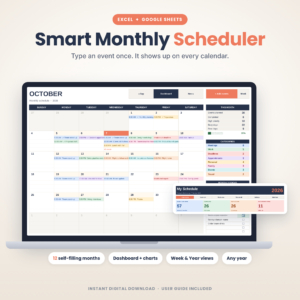
Smart Monthly Scheduler Spreadsheet
Price: $2.00 | Best for: busy professionals and parents
A monthly scheduler for Excel and Google Sheets. You add each event once to an Event Log with category, priority and start and end times, and it lands on the right day across 12 monthly calendars, a week view, a year at a glance with busy days shaded, and a live dashboard listing your next 10 events. It works on a PC, Mac, tablet or phone. Start by logging every event already booked for the next 30 days.
The countdown column (Today, Tomorrow, In 5 days) is a quiet nudge that sits somewhere between paper and a phone alert. You see it when you open the file, without being pinged all day.
Side by side: the comparison that matters
| Need | Printed calendar | Electronic planner |
|---|---|---|
| Seen by the whole household | Strong, if hung in a busy spot | Weak, unless everyone opens it |
| Reminders before events | None | Strong in phone apps; tablet planners can link to them |
| Repeating dates | Write each one by hand | Type once, appears every time |
| Changing plans | Messy after a few edits | Clean every time |
| Seeing a full month | Easy on a large sheet | Easy on a laptop, hard on a phone |
| Counting and reports | Not really | Spreadsheets do it well |
| Calm, no notifications | Yes | Depends on the tool |
| Works with a flat battery | Always | No |
Read down the table and circle the three rows that matter most to you. That will usually point clearly one way.
Five quick scenarios
The family of five
Three kids, two working parents, sports four nights a week. The biggest risk is someone not knowing where they need to be. A large printed month on the fridge is the backbone, with one parent keeping a spreadsheet copy for repeating events like training nights and school fees.
The freelancer with eight clients
Deadlines, calls and invoices. Electronic wins here, mainly a spreadsheet that can count hours and flag overdue jobs. A small printed week on the desk is a nice extra, not the core.
The retiree
Fewer events, but each one matters: medical appointments, grandchildren’s birthdays, a bridge club on Tuesdays. A printed calendar with large boxes is often the right fit, perhaps with a phone alarm for the day-before reminder.
The student
Lectures, assignments and exams that shift around. A spreadsheet or tablet planner handles the changes better, and exam weeks can be printed out and stuck above the desk as a countdown.
The couple planning a wedding
Lots of moving dates and suppliers. Electronic is the clear winner for shared planning. Our post on why a wedding checklist spreadsheet beats a printed list explains the reasons in detail.
Four questions to ask before you decide
If the table and scenarios still leave you torn, answer these four questions honestly. Write the answers down. It takes two minutes and saves a lot of second-guessing.
Where do you make most of your plans?
If plans get made at the school gate, on the phone or in a meeting, you need something in your hand at that moment. That leans electronic, or a pocket paper card. If plans get made around the kitchen table, a wall calendar is right there.
Who else needs to know?
Count the people. One person can run any system. Two people can share an app if both are willing. Four or more people, especially children, usually need something on a wall that they cannot avoid seeing.
How often do your plans change?
Think about last month. If more than five events moved, a paper calendar will look like a battlefield by the 20th. If almost nothing moved, paper will stay neat and readable all month.
What happened last time?
Be honest about past calendars. If you have downloaded three planner apps and opened none of them after week two, the answer might be paper. If you have a drawer of half-used paper diaries, try a spreadsheet this time. Your own history is better evidence than any comparison chart.
The tablet middle ground
A tablet planner sits between the two worlds. You write by hand, which keeps the slow, thoughtful feel of paper. But the pages are linked, nothing runs out, and you can carry three years of plans in one bag. For people who love paper and hate carrying it, this is often the happy compromise.
The weak spot has always been reminders. A handwritten note in a PDF cannot ping you. Some planners now bridge that gap with buttons that open your phone calendar on the right date.
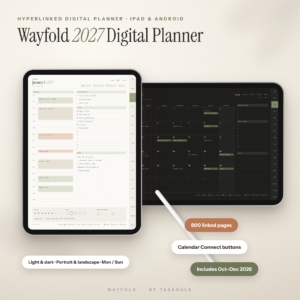
Wayfold 2027 Digital Planner
Price: $27.99 | Best for: stylus users who want reminders too
A hyperlinked digital planner for iPad and Android tablets with 800 linked pages, including 66 weekly spreads and 457 dated daily pages for 2027, plus an October to December 2026 starter section. Calendar Connect buttons on each daily page open Apple Calendar or Google Calendar on that exact date, so you can turn a handwritten plan into a phone alert. It comes in portrait or landscape, light or dark mode, and Monday or Sunday start.
If you are unsure which note app to use, GoodNotes and Notability both open hyperlinked PDF planners. Try the free version of one first and see whether writing on glass feels natural to you.
Running both without double work
Plenty of households end up with both a printed and an electronic calendar. That is fine. The trouble starts when nobody knows which one is right. The fix is to pick a master and treat the other as a copy.
A five-minute hybrid routine
- Choose the master. For most people, that is the electronic one, because it holds repeating dates.
- Add new events to the master first. Always, even if the wall calendar is closer.
- Once a week, print or copy. On Sunday, print the coming month from the spreadsheet, or copy new entries onto the wall by hand.
- Use a different pen for late additions. Anything written on the wall mid-week goes in red, so you remember to add it to the master on Sunday.
A spreadsheet calendar that prints cleanly makes step three painless.

MonthMosaic Monthly Calendar Planner
Price: $8.40 | Best for: households that print a month each Sunday
A monthly calendar for Excel and Google Sheets with twelve monthly tabs, five task lines under each date and a year dashboard with totals, best month and a key-dates countdown. Choose your year and week start and the dates and US holidays fill in on their own. Key dates added once appear every year, which makes it a good master copy for a household that also keeps a printed month on the wall.
For a closer look at how self-filling months work, see our guide to a monthly calendar spreadsheet that fills itself in.
If you choose paper, choose it properly
A printed calendar only works if it is big enough, hung in the right place and easy to write on. Flimsy free printables with tiny boxes tend to end up behind the fruit bowl by February.
Look for large date boxes, a page for notes or bills, and a year view so you can see beyond the current month. A black and white version is handy if you print often.
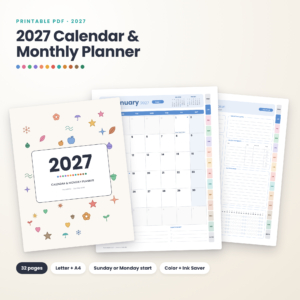
Twelvefold 2027 Printable Calendar
Price: $2.99 | Best for: families who want paper on the fridge
A 32-page 2027 printable calendar in Letter and A4, Sunday or Monday start. Each month gets a calendar grid with big date boxes and shaded weekends, plus a plan page with top goals, about 20 to-dos, a bills table and a habit tracker. It also has a 2027 year at a glance with US holidays, a birthdays page and Ink Saver files for cheap black and white printing. Print January and the birthdays page first and hang them together.
Mistakes people make when choosing
- Choosing by looks alone. A beautiful calendar that does not fit your week will still be abandoned.
- Switching every January. Each switch costs a few weeks of lost dates. Give one system three full months before judging it.
- Keeping two masters. Two calendars that both claim to be right will drift. One leads, one follows.
- Ignoring who else needs to see it. If your partner never opens apps, a phone-only calendar will keep surprising them.
- Expecting paper to remind you. It will not. Pair it with a single daily phone alarm to check the calendar if you need a nudge.
Frequently asked questions
Is a paper calendar better than a digital one?
Paper is better for being seen by everyone at home and for calm planning. Digital is better for reminders, repeating dates and plans that change often. Many people do best with one of each, with the digital one as the master copy.
Can a spreadsheet calendar send me reminders?
Not on its own. A spreadsheet can show countdowns and overdue flags when you open it, but pop-up alerts come from a phone calendar app.
What is a good compromise between paper and digital?
A tablet planner. You write by hand with a stylus, the pages are linked, and some planners have buttons that open your phone calendar on the right date.
How do I keep a wall calendar and a digital calendar in sync?
Make the digital one the master, add new events there first, and copy or print the coming month to the wall once a week.
Which is better for a family calendar?
Usually a printed calendar in the kitchen, backed by one parent’s spreadsheet or phone calendar for repeating events and reminders.
Your next step
Take the comparison table above, circle your three most important rows, and choose the side they point to. If it points electronic, log the next 30 days of events in the Smart Monthly Scheduler Spreadsheet tonight and see how the month looks laid out in one place.