A timeline planner for projects and events does one job that a to-do list cannot: it puts every task in order against the calendar, so you can see today whether the big day is still on track. A list tells you what to do. A timeline tells you when, and what happens to everything else if one piece runs late.
This guide is for anyone holding a date they cannot move. A school fundraiser in ten weeks. A kitchen refit before the in-laws visit. A product launch, a wedding, a holiday dinner for 18. You will learn how to count back from the date, set milestones, build in buffer, and keep the plan honest week by week, with worked examples you can copy.
By the end you will have a plan that fits on one screen or one sheet of paper. And, with luck, a bit more sleep.
Quick picks
| Product | Best for | Price | Link |
|---|---|---|---|
| Plumrise Project Hub | Several projects with Gantt timelines in Google Sheets | $17.95 | View |
| Kickoff to Close Digital Project Planner | Project timelines on an iPad | $6.99 | View |
| Rosewater Wedding Planner Spreadsheet | Wedding checklists that move with the date | $11.99 | View |
| Gather & Gravy Thanksgiving Planner | A dinner cooking timeline counted back from serving time | $9.99 | View |
Projects and events need different timelines
They look alike on paper, but they behave differently, and knowing which one you have shapes the whole plan.
An event has a fixed end. The wedding is on June 14. The fundraiser is on a Saturday in March. Nothing about the date can slide, so you plan backward from it. Every task asks: how late can this happen and still be ready in time?
A project usually has a fixed start and a hoped-for end. You begin the bathroom refit on Monday, and it takes as long as it takes. You plan forward from day one, and the finish date is the result of all the tasks in a row.
Many real plans are both. A shop renovation might start on the 3rd and need to finish before a grand opening on the 28th. In that case, plan forward from the start, then check the finish against the fixed date. If they do not meet, you know now, while you can still hire help or cut scope. Not on the 27th.
Step 1: List every task, then group them into phases
Start with a brain dump of every task you can think of. Do not worry about order yet. For a school fundraiser, that list might include booking the hall, asking local shops for raffle prizes, printing tickets, recruiting 12 volunteers, sorting a card reader, making signs and arranging a float of cash.
Then group tasks into three to six phases. For the fundraiser:
- Book: hall, date, permission from the school.
- Gather: prizes, volunteers, donations of cakes.
- Promote: posters, newsletter, social posts, ticket sales.
- Prepare: signs, float, rota, setup plan.
- Run and wrap up: the day, the count, thank-you notes.
Phases make the timeline readable. Thirty loose tasks blur together. Five phases with six tasks each tell a story you can follow at a glance.
Step 2: Count back from the date
For an event, take your fixed date and work backward one phase at a time. Ask how long each phase needs, and when it must be done.
Here is the fundraiser, set for Saturday, March 21:
| Phase | Done by | Weeks before |
|---|---|---|
| Book hall and get approval | January 10 | 10 |
| Prizes and volunteers confirmed | February 21 | 4 |
| Posters up, tickets on sale | February 28 | 3 |
| Rota, float and signs ready | March 14 | 1 |
| Thank-yous sent | March 28 | 1 after |
Notice that ticket sales start three weeks out, not one. Families need time to plan. That one decision shifts the poster deadline earlier, which shifts the prize deadline earlier too, because posters look better when they list the prizes. Counting back makes those knock-on effects visible.
The same idea runs every good holiday plan. This guide to when to start planning a trip lays out a six-month countdown the same way.
Step 3: Mark milestones and dependencies
A milestone is a moment that matters, not a task. “Hall booked.” “All prizes in.” “Tickets on sale.” Put a small diamond or star on the timeline for each one. When a milestone passes on time, you can breathe out a little.
A dependency is a task that cannot start until another one finishes. The plasterer waits for the electrician. Invitations wait for the venue. Posters wait for the prize list. Draw an arrow, or write “after” with the task number, so you can see the chain.
Chains matter because delays travel along them. If the electrician runs three days late, the plasterer, painter and floor fitter all move three days. A linked timeline in a spreadsheet moves them for you. On paper, you redraw the bars, which is fine for a short plan and painful for a long one.
If you are managing several projects at once, a spreadsheet with linked Gantt bars saves a lot of rubbing out.
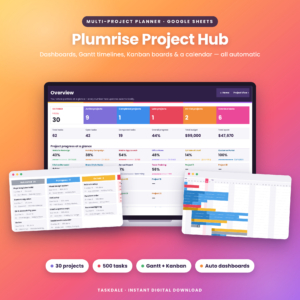
Plumrise Project Hub
Price: $17.95 | Best for: people running several projects at once
Plumrise is a Google Sheets template that holds up to 30 projects and 500 tasks in one master list. It builds two Gantt charts, a project timeline and a task timeline with daily, weekly and monthly views, plus Kanban boards, a due-date calendar, team workload and budget tracking. Every project gets an automatic health label such as On track, At risk or Late. Add your phases as buckets first, then type tasks with start and due dates.
Step 4: Add buffer where things usually slip
Every timeline that has no buffer will run late. Not because you planned badly, but because life happens. Suppliers miss deliveries. People get sick. Printers jam the night before.
Add buffer in two places:
- Before each milestone. If prizes realistically take three weeks to collect, give them four.
- Before the final date. Aim to have everything ready a few days early. For an event, that means a “ready day” one week out. For a project, finish the last task a few working days before the true deadline.
A small refit company planning a 15-day job might add two spare days at the end and quietly schedule the client walk-through for day 17. If nothing goes wrong, they finish early and look brilliant. If something does, nobody knows.
Buffer is not padding for laziness. It is the bit of the plan that protects your nerves.
Step 5: Keep it current every week
A timeline is only useful if it tells the truth. Once a week, ideally the same day, spend ten minutes on it:
- Mark finished tasks done.
- Move anything that slipped, and follow the chain to see what moves with it.
- Check the next two weeks for tasks with nobody assigned.
- Look at the next milestone. Is it still realistic? If not, decide now: add help, cut a task, or move the milestone.
Share the updated version in one place. If your team works from three copies of the plan, at least two are wrong.
If you track projects for clients, this guide to what to track in a client project tracker covers the extra columns worth adding.
Timelines on an iPad
Not everyone wants a spreadsheet. If you plan by hand on a tablet, a hyperlinked project planner gives you Gantt pages you can draw on with a stylus, with each project’s pages one tap apart.
This suits freelancers and small business owners juggling a few projects with fewer moving parts. A wedding photographer with four shoots in May. A designer with three client launches. You sketch the bars, color in progress as you go, and keep meeting notes on the same project.
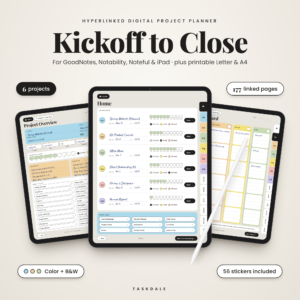
Kickoff to Close Digital Project Planner
Price: $6.99 | Best for: freelancers who plan on a tablet
Kickoff to Close is a hyperlinked PDF for GoodNotes, Notability and Noteful that holds six projects, each with 27 linked pages. Every project has an overview, charter, milestones, two Gantt timelines, a Kanban board, task lists, budget, risks, meeting notes and a closeout checklist, with a Home dashboard showing all six at once. Start with one project’s overview and milestones page before filling the Gantt.
Worked example: a wedding timeline
Weddings are the classic event timeline. The date is fixed, there are dozens of suppliers, and the order matters. Venue first, because it sets the date and the guest limit. Then photographer and caterer, who book up early. Then invitations, which need the venue and the date. Then the smaller pieces.
A 12-month plan might put the venue at month 12, the photographer and caterer at months 10 to 11, invitations out at month 3, final numbers to the caterer at week 3, and the day-of timeline finished at week 2. If the engagement is only eight months, every step compresses, and the venue and photographer become urgent in the first fortnight.
On the day itself, the timeline shrinks to hours: hair and makeup at 9:00, photos at 12:30, ceremony at 14:00, dinner at 17:30. For a full hour-by-hour example, see this wedding day timeline.
The easiest way to plan a wedding timeline is a checklist that moves when the date moves.
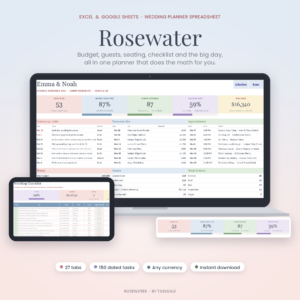
Rosewater Wedding Planner Spreadsheet
Price: $11.99 | Best for: couples planning their own wedding
Rosewater is a 27-tab wedding planner for Excel and Google Sheets. Type your wedding date and budget once and it dates 150 checklist tasks, sets budget targets and counts RSVPs and meal choices. Change the date and every task moves with it. It also includes a day-of timeline, guest list, seating chart and vendor tracker. Enter your date on the setup tab and check the dashboard’s next eight tasks.
Worked example: a holiday dinner by the hour
Some timelines run in hours, not weeks. Cooking a big dinner is one of them. The meal is at 4:00pm, so every dish counts back from there. The turkey needs to rest, so it comes out of the oven around 3:15. Before that it roasts for hours, so it goes in late morning. Sides that share the oven need slots that do not clash.
This is exactly the same thinking as the fundraiser: fixed end, count back, mark the dependencies, add a little buffer. A 20-minute cushion before serving time saves a lot of panic when the potatoes refuse to brown.
The thaw is a timeline too. A large frozen bird can need several days in the fridge, so that step lands on the calendar days before the dinner. Miss it and no amount of clever planning on the day will save you.
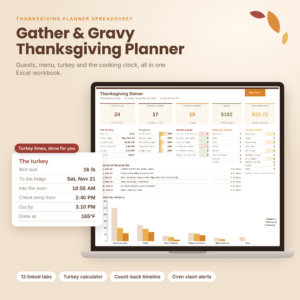
Gather and Gravy Thanksgiving Planner
Price: $9.99 | Best for: hosts cooking for a crowd
Gather & Gravy is an Excel workbook that counts back from your dinner time to give every task a start time. It sizes your turkey from your guest count, plans the thaw date, flags oven temperature clashes in red, and tracks who is bringing which dish. You only type in the peach cells. Enter your dinner time and guest list first, then add your dishes.
Common timeline mistakes
Planning only the big pieces
“Book caterer” is one line, but it hides five steps: shortlist, tasting, quote, deposit, final numbers. Break big tasks into steps that each fit in a week.
Forgetting lead times
Printed items, custom orders and hired equipment often need weeks. Ask suppliers early and put their lead time on the plan.
No owner for each task
A task owned by “the committee” is owned by nobody. Put one name beside each line.
Building it once and never looking again
A timeline made in January and opened again in March is a history book. Ten minutes a week keeps it a plan.
Frequently asked questions
What is the difference between a timeline and a schedule?
A timeline shows the order and dates of tasks across the whole project or event, usually in weeks. A schedule shows what happens on a given day, usually in hours. Most plans need both.
How do I make a project timeline in Google Sheets?
List tasks with a start date, end date and owner, then shade cells across a row of dates to make bars. A template with a built-in Gantt chart, such as Plumrise, draws the bars for you.
How far ahead should I plan an event timeline?
It depends on size. A small party needs two to four weeks. A fundraiser or conference often needs two to three months. A wedding is usually planned over 8 to 18 months.
What is a milestone in a project timeline?
It is a key moment rather than a task, such as “venue booked” or “tickets on sale.” Milestones help you check progress, because missing one is an early warning.
How much buffer should I add to a timeline?
A common habit is around 10 to 20 percent of each phase, plus a few spare days before the final date. Add more where you depend on outside suppliers.
Your next step
Write your fixed date at the top of a page, list every task you can think of, and group them into five phases. Then count back from the date and give each phase a done-by date. If you are running more than one project, set it up in the Plumrise Project Hub and let the Gantt chart draw the bars.