Google invoice templates in Docs and Sheets come from two places. Some are in Google’s own template galleries, free and ready to copy. Others start life as Word or Excel files that you upload to Google Drive and open in Docs or Sheets. Both can work well. The trick is knowing which kind you have, and checking it properly before the first real invoice goes out.
This guide is for small business owners who already run their life in Google: Gmail for clients, Drive for files, Calendar for jobs. You will learn what to expect from the free galleries, how to bring in a downloaded template without breaking it, a checklist for testing any template, three ready-made options that work in Google, and how to set up a tidy invoicing folder.
Quick picks: templates that work in Google
| Product | Best for | Price | Link |
|---|---|---|---|
| Client Billing Hub Invoice Tracker Spreadsheet | Service businesses: invoices, payments, receipts and statements in Sheets | $6.49 | View |
| Petal & Ledger Small Business Hub | Makers who invoice from orders and track stock in Sheets | $13.99 | View |
| CollisionDesk Auto Body Repair Estimate Template | Body shops wanting an estimate and invoice in Google Docs and Sheets | Original price was: $4.99.$2.99Current price is: $2.99. | View |
| Tallyhive Small Business Spreadsheet | Larger product shops with orders, invoices and packing slips | $35.99 | View |
What Google’s free template galleries give you
Open Google Docs or Sheets and look for the template gallery at the top of the home screen. Depending on your account, you may see a handful of business layouts, sometimes including an invoice. Click one and Google makes your own copy.
The free gallery templates are a decent starting point for someone billing two or three clients a month. They tend to be one page, clean, and easy to edit. The limits show up as you grow:
- No saved client list, so you retype addresses every time.
- No invoice log, so tracking who has paid lives somewhere else.
- In Docs, no maths at all. In Sheets, only basic totals.
- Limited design choice, so your invoice may look like plenty of others.
So use them to get started, or to test whether you like invoicing in Google at all. When you start wishing it remembered things, it is time for something more capable.
Docs templates vs Sheets templates
A quick way to decide which side of Google suits your invoice:
Choose a Docs template if
- Your invoices are mostly words: a project description, a few fixed fees.
- You want a polished, letter-style look with your logo.
- You send fewer than ten invoices a month and do not mind checking totals by hand.
Choose a Sheets template if
- You bill hours, quantities or several line items.
- You charge tax, discounts or shipping.
- You want a running list of invoices and payments in the same file.
Many people end up using both: Sheets for the numbers and the log, Docs for longer documents like proposals and agreements.
Bringing a Word or Excel template into Google
Most downloadable invoice templates are built as Word or Excel files. Plenty of them work in Google, but you need to bring them in properly.
- Upload the file to Google Drive. Drag it into a folder, or use New, then File upload.
- Open it with the right app. Right-click the file, choose Open with, then Google Docs for .docx or Google Sheets for .xlsx.
- Save it as a Google file. Use File, then Save as Google Docs or Save as Google Sheets. This makes a native copy that edits smoothly.
- Keep the original. Leave the Word or Excel file in the folder as a backup.
- Test it with the checklist below before you use it for a real client.
Conversion is usually clean for simple layouts. Complex formatting, unusual fonts and some advanced formulas can shift. That is why the test step matters. If you are still deciding between formats, our comparison of invoice templates in Word, Excel and PDF is a good primer.
A ten-point test for any Google invoice template
Before a template touches a real client, give it ten minutes with a fake invoice. Use easy numbers so you can spot mistakes: 2 hours at $50, 3 items at $10.
- Do all line totals calculate correctly? (2 x $50 should show $100.)
- Does the subtotal add every line, including the last one?
- Does tax apply at the right rate, and only where it should?
- Does any discount come off before or after tax, as you expect?
- Does the balance due subtract any amount already paid?
- Do dropdowns still work after conversion?
- Does your logo sit where you want it, at a sensible size?
- Does the invoice print or download as a PDF on one page?
- Do fonts look right, or has Google swapped them?
- Does the currency symbol show correctly?
If everything passes, delete the fake invoice and start for real. If something fails, fix it now, while nobody is waiting on you.
A worked example: setting up in Sheets in one sitting
Nadia runs a small candle business and sells at two weekend markets plus her own website. She decides to move her invoicing into Google Sheets.
20 minutes: she uploads a downloaded small business workbook to Drive, opens it with Sheets and saves it as a Google Sheet.
30 minutes: she enters her business details, currency and sales tax rate, then adds her 14 products with their prices and material costs.
10 minutes: she runs the ten-point test with a fake order of 2 jar candles at $24 and 1 gift set at $38. The total, $86 before tax, comes out right, and the invoice downloads as a one-page PDF.
15 minutes: she logs her three open wholesale orders and prints their invoices.
About an hour and a quarter. From then on, her invoices, stock and sales numbers all live in one Google Sheet she can check from her phone at the market stall. She feels, in her words, “finally caught up”.
A Sheets invoice system for service businesses
If you sell services, the best Google invoice template is one that pairs a print-ready invoice with a payment log. That way, each invoice you send also lands in a list that tells you what is still owed.
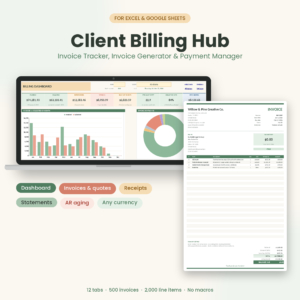
Client Billing Hub Invoice Tracker Spreadsheet
Price: $6.49 | Best for: Consultants, cleaners and tutors
A 12-tab .xlsx workbook that you upload to Google Drive and save as a Google Sheet, with formulas, dropdowns, colors and charts carrying over. Choose an invoice number and a print-ready invoice or quote fills in. It logs full and part payments, prints receipts, builds client statements and shows an aging dashboard. The 14-page guide has the Google Sheets steps, so follow those first.
Once converted, share the file with nobody but yourself, or with a business partner only. Clients get PDFs.
A Sheets template for makers and shops
Product sellers need invoices that come from orders, with several items, shipping and a paid or unpaid stamp. Building that yourself in Sheets is a weekend project. A connected template does it from day one.
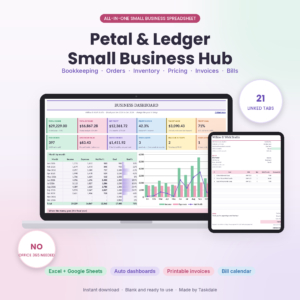
Petal and Ledger Small Business Hub
Price: $13.99 | Best for: Handmade sellers and small shops
A 21-tab workbook for Excel and Google Sheets. Log an order and its invoice is ready, with up to 12 lines per order, a PAID or UNPAID stamp and your own thank-you note. It also tracks stock through product recipes, compares pricing methods, plans tax and shows bills on a color-coded calendar. It arrives blank with a 20-page guide. Add your products and materials before your first order.
If your shop is bigger, the Tallyhive workbook in the quick picks table adds production batches, packing slips and more dashboards.
A Google Docs template for trade estimates and invoices
Some trades need a document-style form rather than a spreadsheet, because the paperwork has a standard look that insurers or customers expect. Body shops are a good example. An estimate has to show parts, labour hours, paint, sublet work and the insurance split in a familiar layout.
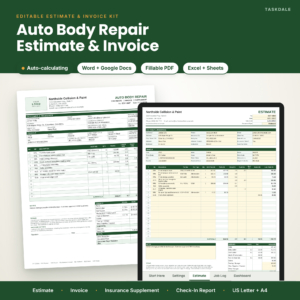
CollisionDesk Auto Body Estimate Template
Price: Original price was: $4.99.$2.99Current price is: $2.99. | Best for: Collision and auto body repair shops
One form that works as an estimate, invoice or supplement, available in Word, Google Docs and fillable PDF in US Letter and A4, plus an auto-calculating Excel and Google Sheets estimator with a job log for 300 jobs and a dashboard. Repair lines use standard op codes, and the summary shows the deductible, what insurance pays and what the customer pays. Start by setting your labour and paint rates in the estimator.
Our guide to the auto body repair estimate template explains what every body shop estimate should include.
Sharing your invoice file with a partner or bookkeeper
One real strength of Google is easy sharing with the people who should see your numbers. A husband-and-wife painting business can both log payments in the same Sheet. A bookkeeper can look over your invoice log at the end of the quarter without you emailing files back and forth.
Keep it tight, though:
- Share by name, not by link. Add each person’s email address so you know exactly who has access.
- Give view access where you can. A bookkeeper who only needs to read the log does not need edit rights.
- Agree who types what. Two people editing the same invoice at once is how a number gets overwritten.
- Check version history if something looks wrong. Sheets keeps earlier versions, so you can see what changed and when.
That last one is a quiet lifesaver. When a total looks odd on a Thursday night, you can roll back a single change instead of rebuilding the week.
When Google is not the right home for your invoices
Google suits a lot of small businesses, but not all. If you often work where there is no signal, a file on your laptop in Excel may be more reliable. If your template is a heavy workbook with many tabs and charts, it can feel slower in a browser than in desktop Excel. And if a template’s listing says it has only been tested in Excel, believe it and keep it there.
There is no prize for forcing everything into one place. Pick the home where you will actually open the file every week.
Organizing your Google invoicing folder
Google Drive gets messy fast. Set up a simple structure once.
- Business / Templates: your master invoice files, starred. Never type a real invoice here.
- Business / Invoices / 2026: one PDF per invoice, named with number, client and month.
- Business / Receipts / 2026: photos or PDFs of what you spent.
- Business / Backups: a monthly download of your Sheets workbook as an Excel file.
Turn on two-step sign-in for your Google account. Your invoices hold client names, addresses and amounts, so they deserve a locked door.
Common mistakes with Google invoice templates
- Editing a file that is still in Word or Excel format. It works, but saving as a Google file avoids odd glitches.
- Skipping the test. A formula that broke during conversion can quietly underbill a client.
- Sharing a link instead of a PDF. Clients may see more than one invoice, or nothing at all if access is off.
- Letting Google pick the paper size. Check US Letter or A4 in the print settings.
- One copy only. Download a monthly backup, so a locked account never means lost records.
Frequently asked questions
Does Google Docs have an invoice template?
The Docs and Sheets template galleries include business templates, and depending on your account you may find an invoice among them. If not, you can upload a Word or Excel invoice template and open it in Google.
Can I use an Excel invoice template in Google Sheets?
Often, yes. Upload it to Drive, open it with Google Sheets and save it as a Google Sheet. Then test the totals, dropdowns and print layout before using it.
Will my formatting change when I convert to Google?
Simple layouts usually convert cleanly. Unusual fonts, complex formatting and some advanced formulas may shift, so check with a test invoice.
Is Google Sheets good enough for small business invoicing?
For many small businesses, yes. A good Sheets template handles invoices, payments and simple reports, and you can reach it from any device.
How do I send an invoice from Google Docs?
Use File, Download, PDF document, then attach the PDF to an email in Gmail with the amount and due date in the message.
Can I work on a Google invoice template offline?
Google offers an offline mode for Docs and Sheets in some browsers, which you switch on in Drive settings. Test it before you rely on it, or keep an Excel copy for days without signal.
Your next step
Make a Business folder in Google Drive today with Templates and Invoices inside it. Then upload a template, save it as a Google file and run the ten-point test with a fake invoice. For service businesses, the Client Billing Hub Invoice Tracker Spreadsheet is a strong place to start.