Net 30 on an invoice means the full amount is due within 30 days of the invoice date. No discount for paying early, no extra time after day 30. Send an invoice dated 10 March on Net 30 terms and payment is due by 9 April.
That is the short answer. The longer one matters if you run a small business, because Net 30 shapes your cash flow, your follow-ups and sometimes your relationships with clients. This guide explains how Net 30 works, how it compares with other payment terms, how to write it on an invoice, whether you should offer it at all, and how to track it so a 30-day wait never quietly turns into 90.
Quick picks: tools that keep Net 30 invoices on track
| Product | Best for | Price | Link |
|---|---|---|---|
| PaidPath Client & Invoice Hub | Seeing what is due in the next 14 days | $9.49 | View |
| Client Billing Hub Invoice Tracker | Aging reports for late payers | $6.49 | View |
| Ledgerline Invoice, Quote & Receipt Kit | Invoices that set the due date for you | Original price was: $3.00.$1.50Current price is: $1.50. | View |
| Tallyhive Small Business Spreadsheet | Product sellers with wholesale accounts | $35.99 | View |
What Net 30 means, in plain words
“Net” refers to the full amount owed. “30” is the number of days the client has to pay it. Put together, Net 30 says: pay the whole invoice within 30 days.
A few details trip people up:
- Calendar days, not working days. Weekends and public holidays count. Day 30 is day 30.
- The clock usually starts on the invoice date. Not the date the work finished, and not the date the client opened your email. Some businesses agree to count from the delivery date instead, so write it down if you do.
- “Within 30 days” means by the end of day 30. Paying on day 30 is on time. Day 31 is late.
A quick example
A freelance copywriter finishes a website project on 3 March. She sends the invoice on 10 March, Net 30. The due date is 9 April. If the client pays on 9 April, they are on time. If they pay on 15 April, they are six days late, even though it “feels” like about a month.
That small gap between how people feel about dates and what the calendar says is where most payment arguments start. Writing the actual date on the invoice closes it.
Net 30 compared with other payment terms
Net 30 is one of many terms you will see. Here is how the common ones compare. Meanings can vary a little between industries, so spell out anything unusual on the invoice.
| Term | What it usually means | Often used by |
|---|---|---|
| Due on receipt | Pay as soon as you get the invoice | Small jobs, one-off clients |
| Net 7 | Full amount due within 7 days | Freelancers, tradespeople |
| Net 15 | Full amount due within 15 days | Service businesses, regular clients |
| Net 30 | Full amount due within 30 days | Business-to-business work, wholesale |
| Net 60 | Full amount due within 60 days | Larger companies, some agencies |
| EOM | Due at the end of the month the invoice is dated | Monthly billing |
| Net 30 EOM | Due 30 days after the end of the invoice month | Suppliers, wholesale |
| 2/10 Net 30 | 2% off if paid within 10 days, otherwise full amount in 30 | Suppliers wanting faster cash |
| COD | Cash (or payment) on delivery | Deliveries, first orders |
Notice how “Net 30” and “Net 30 EOM” can differ by almost a month. An invoice dated 2 May on Net 30 is due 1 June. On Net 30 EOM it is due 30 June. Same number, very different wait.
How to write Net 30 on an invoice
Put the terms in two places: the details box at the top, and the terms line near the bottom. Always add the real due date beside them.
Good wording looks like this:
- Top box: “Terms: Net 30. Due date: 9 April 2026.”
- Terms line: “Payment due in full within 30 days of the invoice date.”
- With an early payment discount: “2/10 Net 30. Take 2% off if paid by 20 March 2026. Full amount due by 9 April 2026.”
Some clients’ accounts systems read “Net 30” and schedule payment automatically. Others are run by one busy person who just wants a date. Giving both covers everyone.
Want to see where the terms sit on a full invoice? Our invoice example with every section explained shows the details box and terms line in context.
Should your small business offer Net 30?
Offering Net 30 is a choice, not a rule. Bigger clients often expect it. Many will not even consider a supplier who asks for payment in seven days. So there are good reasons to say yes. There are also costs.
The case for Net 30
- It can win business with companies that pay all suppliers on set cycles.
- It signals that you are an established business, not a one-off seller.
- Wholesale buyers often need time to sell your stock before they pay for it.
The cost of Net 30
You do the work now and get paid a month later. Say you invoice $4,000 a month on Net 30. In practice, that means about $4,000 of your own money is always tied up in unpaid invoices. If clients run a little late, it is more. Meanwhile rent, software and wages leave your account on fixed dates.
That is why many small businesses use mixed terms. Net 30 for established business clients who pay on time. Net 7 or 14 for individuals and new clients. A deposit up front for big jobs. Simple, fair, and much kinder to your bank balance.
If you do offer Net 30, plan for it. A cash flow forecast shows the weeks where money out comes before money in, so you can see the pinch before it arrives.
Tracking Net 30 invoices so none slip
Net 30 gives clients a month. It also gives you a month to forget. An invoice sent on the 10th can easily drift out of your mind by the 9th of the next month, especially when you have new work arriving.
The fix is a list you check every week, sorted by due date. Not your inbox. Not memory. A list.
Here is a simple weekly check that takes five minutes on Monday morning:
- Look at invoices due in the next 7 days. Send a friendly heads-up to anyone with a large amount due.
- Look at anything past due. Send a polite reminder with the PDF attached.
- Mark anything paid since last week.

PaidPath Client and Invoice Hub
Price: $9.49 | Best for: service businesses billing on terms
PaidPath works out due dates for you, then lists everything due in the next 14 days on its dashboard, with overdue invoices pushed to the top and sorted by how late they are. It links clients, invoices, quotes, payments and expenses in one Excel workbook, and you can set your default payment terms in the settings. Enter your open invoices first so the due list is right from day one.
When Net 30 turns into Net 60
It happens. A client agrees to 30 days and pays on day 52. Sometimes it is a cash flow problem on their side. More often the invoice sat in someone’s inbox, or it was missing a PO number and got bounced quietly.
A calm, steady follow-up plan works better than one angry email on day 59. Try this rhythm:
- Day 25: “Just a heads-up that invoice 1048 is due on Friday. Let me know if you need anything from me.”
- Day 31: “Invoice 1048 was due yesterday. I have attached it again. Could you let me know when payment is scheduled?”
- Day 45: a phone call. Ask who handles payments and whether anything is holding it up.
- Day 60: a firm email that mentions any late fee in your agreement and pauses new work until the account is settled.
Most invoices get paid by the day 31 nudge. The relief of seeing it land after one short email is real, and it costs you thirty seconds.
To know which stage each client is at, look at aging. Aging groups unpaid invoices by how late they are: current, 1 to 30 days late, 31 to 60, 61 to 90, and over 90. One glance tells you who needs a nudge and who needs a call.
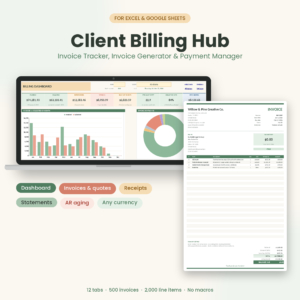
Client Billing Hub Invoice Tracker
Price: $6.49 | Best for: businesses with several clients on terms
Client Billing Hub shows accounts receivable aging client by client, in five buckets from current to over 90 days late. It also logs full and part payments, prints numbered receipts, and builds a statement for any client and date range. It works in Excel 2010 or newer and in Google Sheets, with no macros or monthly fees. Add your clients and their unpaid invoices, then check the aging page.
For a step-by-step guide to setting up your own tracking columns, see who still owes you: build an invoice tracker spreadsheet.
Late fees and Net 30
Can you charge a fee when a Net 30 invoice is paid late? Often yes, but only if the client agreed to it before the work started, usually in your contract, quote or terms. Adding a surprise fee to a late invoice tends to delay payment further and sour the relationship.
Some businesses charge a small monthly percentage on overdue balances, such as 1% or 1.5% a month. Others charge a flat fee. Rules on late fees and interest differ by country and state, so check what is allowed where you work. Whatever you choose, write it clearly on every invoice: “Invoices unpaid after 30 days may incur a late fee of 1.5% per month, as set out in our terms.”
In practice, many small businesses keep the late fee in writing and waive it for a good client who simply forgot. The clause is there for the rare client who makes a habit of paying late.
Net 30 when you are the one paying
Net 30 works both ways. If a supplier gives you Net 30, that month can help your own cash flow, as long as you treat the due date with the same respect you want from your clients.
Take a small candle business that buys $900 of wax and jars on Net 30 from a wholesaler. The stock arrives on 1 October. The candles are made in the first week and sold at a market on the 18th. The supplier invoice is due on the 31st. The sales pay for the materials before the bill comes due. That is Net 30 doing exactly what it is meant to do.
A few habits keep it working for you:
- Put every supplier due date on a bill calendar the day the invoice arrives.
- Pay on or just before the due date, not weeks early, unless there is an early payment discount worth taking.
- Take 2/10 discounts when you can afford to. Two percent saved on every order adds up over a year.
- Never let a supplier invoice go late. A record of paying on time is what earns better terms next year.
Product sellers with wholesale accounts on both sides, buying on terms and selling on terms, may like a workbook with a bill calendar built in. Tallyhive, for example, shows bills as paid, upcoming or overdue on a monthly calendar next to your orders and invoices.
Setting Net 30 in an Excel invoice template
Working out due dates by hand is where small errors creep in. Is 30 days from 28 January the 27th of February or the 1st of March? A spreadsheet answers in a blink: 27 February, in a non-leap year.
In most Excel invoice templates, you set your default terms once, in days. Every new invoice then shows the due date automatically. You can still change the terms for one client, say Net 15 for a new customer, without touching the rest.
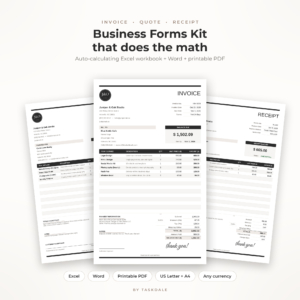
Ledgerline Invoice, Quote and Receipt Kit
Price: Original price was: $3.00.$1.50Current price is: $1.50. | Best for: anyone tired of counting days by hand
On the Settings sheet you choose your payment terms along with your currency and tax rate, and each invoice fills in from there. The invoice log holds up to 300 invoices and updates each status on its own: Paid, Partially Paid, Open, Due Soon or Overdue, plus days late. A client statement shows aging from current to over 90 days. Matching Word templates and printable PDFs are included.
Frequently asked questions
Does Net 30 mean 30 business days?
No. Net 30 means 30 calendar days, counting weekends and holidays. If you mean business days, write that out in full on the invoice.
When does Net 30 start counting?
Usually from the invoice date. Some agreements count from the delivery date or the date the client receives the invoice. If yours is different, state it on the invoice and in your contract.
What does 2/10 Net 30 mean?
The client can take 2% off if they pay within 10 days. Otherwise the full amount is due within 30 days. On a $1,000 invoice, paying by day 10 means paying $980.
Is Net 30 good for a small business?
It can help you win larger clients, but it delays your cash. Many small businesses offer Net 30 only to established business clients and use shorter terms or deposits for everyone else.
What happens if a client pays after Net 30?
The invoice is overdue. Send a polite reminder with the invoice attached, then follow up by phone if it stays unpaid. Charge a late fee only if your agreed terms include one.
Your next step
Look at your last five invoices. Does each one show the terms and the actual due date? If not, fix your template today, then set a five-minute Monday check. A tracker like the PaidPath Client & Invoice Hub puts every due date on one screen so none of them slip.