Below is a complete invoice example, followed by a plain explanation of every part of it. What each box is for, what to write in it, and the small mistakes that slow down payment. Read it once and you will be able to build or check any invoice with confidence.
It is written for people sending their first invoices, and for anyone who has been sending them for years but never quite knew why a client’s accounts team keeps emailing back with questions. The example uses a photographer, but every section applies to a cleaner, a tutor, a web designer or a bakery.
Quick picks: templates that fill these sections for you
| Product | Best for | Price | Link |
|---|---|---|---|
| Ledgerline Invoice, Quote & Receipt Kit | An auto-calculating invoice with every section built in | Original price was: $3.00.$1.50Current price is: $1.50. | View |
| PaidPath Client & Invoice Hub | Tracking due dates and overdue invoices | $9.49 | View |
| Client Billing Hub Invoice Tracker | Receipts and client statements after payment | $6.49 | View |
| Tallyhive Small Business Spreadsheet | Product sellers who invoice per order | $35.99 | View |
The full invoice example
Here is a finished invoice from a small, made-up photography business to a made-up bookshop. Every section below refers back to it.
| JUNIPER LANE PHOTOGRAPHY 12 Mill Street, Ashford, OH 43000 hello@juniperlanephoto.example | (555) 014-2290 Tax ID: 00-1234567 | INVOICE Invoice no: JLP-2026-031 Date: 3 March 2026 Due: 17 March 2026 PO number: 4471 | ||
| Bill to: Bellweather Books Ltd, Attn: Accounts, 88 Harbor Road, Ashford, OH 43001 Project: Spring catalog product shoot | |||
| Description | Qty | Rate | Amount |
| Product photo shoot, half day, 24 February | 4 hrs | $95.00 | $380.00 |
| Edited, web-ready images | 40 | $6.00 | $240.00 |
| Studio hire (flat fee) | 1 | $120.00 | $120.00 |
| Subtotal | $740.00 | ||
| Returning client discount 5% | -$37.00 | ||
| Sales tax 6% on $703.00 | $42.18 | ||
| Total | $745.18 | ||
| Deposit paid 2 February | -$200.00 | ||
| Balance due | $545.18 | ||
| How to pay: Bank transfer to Juniper Lane Photography, account details on request or as agreed. Please use JLP-2026-031 as the reference. Terms: Payment due within 14 days. Notes: Thank you for working with us again. Final images delivered by link on 28 February. | |||
The tax rate and ID number here are examples only. Tax rules depend on where you work and what you sell, so check what applies to you.
Header: who the invoice is from
Business name and logo
This tells the client who is asking for money. Use the exact name the client knows you by. If you trade under a business name but are registered under your own name, show both: “Juniper Lane Photography (Sam Ortiz)”. A logo is nice but optional. Clarity is not.
The word “Invoice”
It sounds obvious. Still, documents titled “Bill”, “Statement” or nothing at all cause confusion in accounts departments. A clear “INVOICE” at the top makes sure it lands in the right pile.
Your contact details and tax number
Address, email and phone let the client reach you if something is unclear. If you are registered for sales tax, VAT or GST, your registration number usually belongs here too. Leave it off if you are not registered. An unregistered business showing a tax number is a mistake that can cause real trouble.
The invoice details box
This little box in the top corner does more work than any other part of the page.
Invoice number
Every invoice needs a unique number that you never reuse. JLP-2026-031 tells you the business, the year and that it is the 31st invoice. Clients use it to match payments. You use it to find the file in two seconds when someone calls.
Invoice date
The day you issue the invoice, not the day you did the work. The work date goes in the description. Payment terms count from this date.
Due date
Write the actual date, “17 March 2026”, not just “Net 14”. Busy clients do not do date math. A clear date also makes your follow-up emails simple: “This was due on 17 March.”
PO number or client reference
Larger clients often issue a purchase order number before work starts. If they gave you one, put it on the invoice. Many accounts teams will not pay an invoice without it. Skipping it can easily add two weeks to your wait.
Bill to and project details
The “Bill to” section names who pays. Use the legal or trading name of the business, plus the person or department who handles payment. “Attn: Accounts” is often better than the name of the person who hired you, since they may not be the one who pays.
A short project line helps everyone remember what the invoice is about months later. “Spring catalog product shoot” is enough. If the work happened at a different address from billing, add a “Job site” line as well. Cleaners, gardeners and builders need this often.
If you sent a quote first, reuse the same project name you used there. Our guide on how to write a price quote shows how to set that up so the quote and invoice line up neatly.
The line items table
This is the heart of the invoice. Four columns, one row per thing you are charging for.
Description
Say what you did or sold, specifically. “Product photo shoot, half day, 24 February” is far better than “Photography”. Include a date for work done on a set day. Vague descriptions are the top reason invoices get queried.
Quantity
Hours, items, visits or square feet. Use decimals for part hours, such as 3.5. For a flat fee, the quantity is 1.
Rate
The price per unit before tax. Keep rates consistent across invoices for the same work, unless you have told the client about a change.
Amount
Quantity times rate. In a spreadsheet this calculates on its own. On a paper or Word invoice, check it twice. In our example, 40 images at $6 is $240. Easy to read, easy to trust.
Filling in four columns by hand on every invoice gets old quickly. A template that pulls the client and the item from a list and works out each line saves real time.
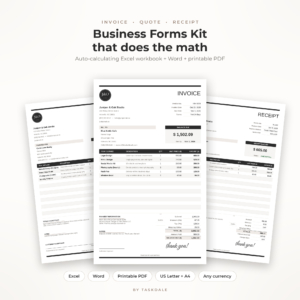
Ledgerline Invoice, Quote and Receipt Kit
Price: Original price was: $3.00.$1.50Current price is: $1.50. | Best for: anyone wanting every section prebuilt
The Excel workbook has every section from the example already laid out. Pick a client from a dropdown and the address fills in, pick an item and the description and price appear, type a quantity and the subtotal, discount, tax, shipping and balance due work themselves out. There is a big Balance Due box that reads PAID IN FULL once settled. Matching Word templates and printable PDFs are included, in US Letter and A4.
The totals block
This short stack of numbers sits under the line items, aligned right. It walks the reader from the raw subtotal to what they owe today.
- Subtotal. All line amounts added. $740.00 in the example.
- Discount. Shown as its own line with the reason and percentage, so the client sees the favor you did them. -$37.00.
- Tax. The tax name, the rate and the amount, worked out on the discounted figure. $42.18.
- Total. The full value of the invoice. $745.18.
- Amount paid. Any deposit or part payment, with its date. -$200.00.
- Balance due. What the client needs to pay now. $545.18, in bold.
The balance due is the one number the client really looks for. Make it the boldest thing on the page. If someone glances at your invoice for three seconds, that is what they should see.
Payment details, terms and notes
How to pay
List every way the client can pay, with all the details they need. Bank name and account details, a card payment link, or cash and check instructions. Ask them to use the invoice number as the payment reference. It saves you a guessing game when three payments arrive on the same day.
Payment terms
One line that matches what you agreed. “Payment due within 14 days.” If you charge late fees, say so here, and only if they are in your agreement. Keep the wording the same on every invoice.
Notes
A short thank-you and any useful detail. “Final images delivered by link on 28 February” quietly reminds the client the work is done. Keep notes to one or two lines. Long notes get skipped.
Terms only help if you watch the dates. A tracker that shows what is due soon and what is overdue makes the follow-up easy, and takes the dread out of chasing.

PaidPath Client and Invoice Hub
Price: $9.49 | Best for: freelancers watching due dates
PaidPath links your clients, services, invoices, payments and expenses in one Excel workbook. Overdue invoices rise to the top of the dashboard, sorted by how late they are, with a separate list of everything due in the next 14 days. It calculates discounts, up to three taxes, shipping and due dates, and prints a clean invoice or client statement. Set your default payment terms in the settings before your first invoice.
After you send it: receipts and statements
The invoice is not quite the end. Two more documents close the loop.
A receipt confirms a payment. It shows the amount, the date, the method and what is still owed, if anything. Some clients need one for their own records, and it is a nice touch even when they do not ask.
A client statement lists every invoice and payment for one client over a period. If Bellweather Books has three invoices open and pays two, a statement shows exactly where the account stands. It is the calmest way to settle a “we thought we paid that” conversation.
Once the money arrives, log it in your books under the right month. Our guide to a self-employed bookkeeping spreadsheet shows how income from each invoice feeds into your tax records.
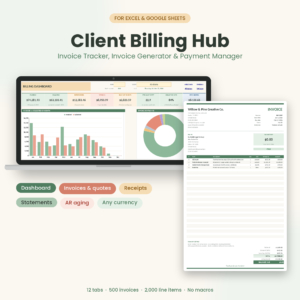
Client Billing Hub Invoice Tracker
Price: $6.49 | Best for: businesses taking part payments
Client Billing Hub works in Excel and Google Sheets. Log a full or part payment and the invoice status moves from Unpaid to Partly Paid to Paid, and each payment gets a numbered, one-page receipt showing what is still owed. You can build a statement for any client and date range with a five-bucket aging strip. Enter your clients and prices once, then log your next payment to see a receipt appear.
Common errors, section by section
Most rejected or delayed invoices fail on something small. Here is a quick check you can run against each part of the example before you press send.
- Header: an old address or a phone number you no longer use. Update the master template the day anything changes.
- Details box: a duplicated invoice number, a due date before the invoice date, or a missing PO number.
- Bill to: the wrong company name. A client called “Bellweather Books” may be registered as “Bellweather Books Ltd”. Ask once and save it.
- Line items: “Misc” or “Services” with no detail. Or a quantity of 4 hours multiplied by the wrong rate.
- Totals: tax worked out on the full subtotal instead of the discounted one, or a deposit left off.
- Payment details: an old bank account, or no reference instruction, so the payment arrives with no clue who sent it.
Two minutes with this list catches nearly all of it. The first time an invoice goes out with every box right and gets paid in four days, you will feel the difference. If you are still choosing between file types for your template, our comparison of invoice templates in Word, Excel and PDF can help you settle it.
Frequently asked questions
What are the main parts of an invoice?
A header with your business details, an invoice number and dates, the client’s details, a table of line items, a totals block ending in the balance due, payment details and terms. The example above shows all of them.
What is the difference between the invoice date and the due date?
The invoice date is when you issue it. The due date is when payment is expected, usually 7 to 30 days later depending on your terms. Show both as real dates.
Do I need a PO number on my invoice?
Only if the client gave you one. Larger businesses often require it before they can pay, so always add it when you have it.
Where do I show a deposit on an invoice?
Under the total, as “Deposit paid” or “Amount paid” with the date and a minus sign, followed by the balance due.
Can I invoice for products and services on the same invoice?
Yes. Give each its own line with a clear description, quantity and rate. If tax applies to one but not the other, mark which lines are taxed. Product sellers who invoice per order often use a workbook like Tallyhive, which builds the invoice straight from the order.
Should I put my bank details on an invoice?
Yes, if clients pay by bank transfer. Put them in the payment section and ask clients to use the invoice number as the reference so you can match each payment.
Your next step
Hold your latest invoice next to the example above and tick off each section. Anything missing, add it to your template today. If you would rather start from a layout with every section already built and the math done, open the Ledgerline Invoice, Quote & Receipt Kit and fill in the settings sheet first.