When you work for yourself in the US, your bookkeeping has one main audience: Schedule C. Every dollar you log eventually lands on one of its lines. So the smartest self employed bookkeeping spreadsheet is one that’s organised around that form from day one, rather than one you have to translate in a panic every April.
This guide covers how to set up your categories, what to record for each transaction, how to keep a mileage log that holds up, and the small habits that make tax time boring (in the best way).
Quick note: this is general information about record-keeping, not tax advice. Your situation may differ, so check the details with a tax professional.
Set up your self employed bookkeeping spreadsheet around Schedule C
Schedule C (Profit or Loss From Business) is the form sole proprietors and most single-member LLCs use to report business income and expenses. Its expense section has numbered lines, and your categories should map to them. Some of the ones freelancers and small sellers use most:
- Line 8: Advertising
- Line 9: Car and truck expenses
- Line 10: Commissions and fees (think Etsy or payment processor fees)
- Line 11: Contract labor
- Line 15: Insurance (other than health)
- Line 17: Legal and professional services
- Line 18: Office expense
- Line 22: Supplies
- Line 24a and 24b: Travel, and deductible meals
- Line 25: Utilities
- Line 27a: Other expenses (software subscriptions often end up here)
You can use friendlier names in your spreadsheet. “Canva and Adobe” is easier to pick from a dropdown than “Other expenses”. What matters is that each of your categories points to a line, so totals roll up correctly.
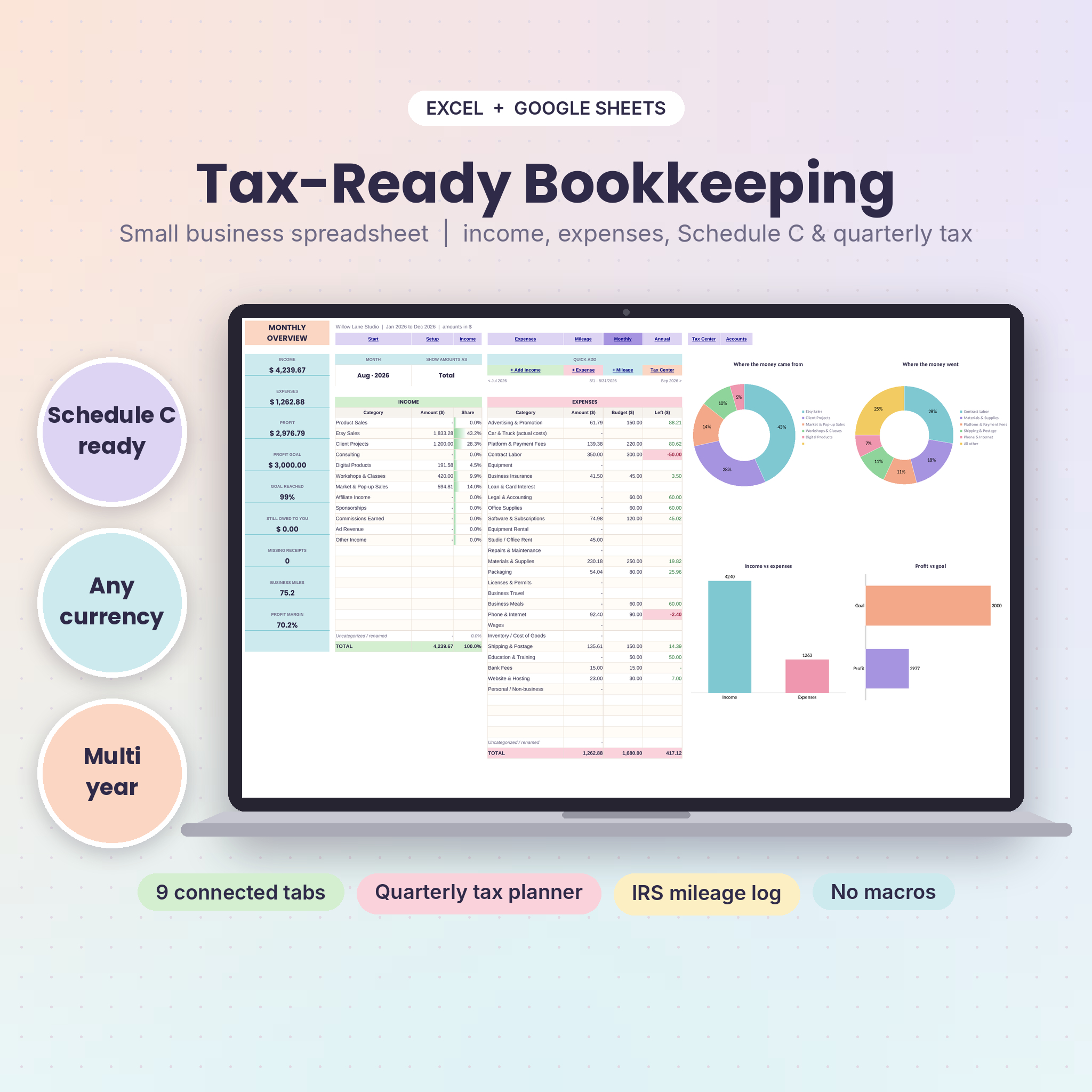
TallyBloom does this out of the box. Its 26 ready-made expense categories already point to the right Schedule C line, meals count at 50% on their own, and personal spending stays out. You can rename any of the 30 expense categories and pick their Schedule C lines yourself.
What to record for every transaction
For each income or expense line, capture:
- Date
- Who paid you, or who you paid
- Category (mapped to a Schedule C line)
- Amount, with any sales tax split out
- Account it went through (bank, card, PayPal, Stripe, cash)
- Receipt: yes or no
Two extra fields are worth adding if you’re self-employed.
Business use percentage. Your phone, internet or laptop might be used partly for personal things. If your phone is 60% business, only 60% of the bill belongs on Schedule C. Record the full amount and the percentage, and let a formula work out the business share.
1099 type on income. If clients or platforms send you 1099-NEC, 1099-K or 1099-MISC forms, tag the income they cover. At year end you can compare your totals with the forms and catch mismatches before the IRS does.
TallyBloom has both: a business use % column for shared costs and 1099-NEC, 1099-K and 1099-MISC tags on income. It also lets you mark income as Paid or Pending, so an unpaid invoice shows as money owed rather than income you’ve received.
Keep a mileage log that would survive a question
If you drive for work (to clients, suppliers, the post office, a craft fair), mileage can be one of your bigger deductions. But it only counts if you record it properly. For each business trip, log:
- Date
- Starting point and destination
- Business purpose (“delivery to client”, “supply run”)
- Miles driven (and whether it was a round trip)
Write it down at the time or the same day. Reconstructing six months of trips from memory in March is both painful and unconvincing. As a general rule, your regular commute doesn’t count, so check what qualifies for your setup.
TallyBloom’s mileage log handles the arithmetic. It’s set up for the 2026 rate change: trips before July 1, 2026 use 72.5 cents a mile and trips from July 1 use 76 cents, with the rate picked by date. The deduction feeds into the Tax Center’s Schedule C snapshot.
Track receipts as you go
A receipt column with a simple yes/no flag saves you at year end. Snap a photo when you buy, save it to a folder named by month, and tick the box. Missing receipts are easy to chase in the week you bought something. In January they’re gone forever.
TallyBloom flags missing receipts in pink and shows a missing receipts count on the monthly dashboard, which is a gentle nudge every time you open it.
Check your numbers monthly
Once a month, spend 20 minutes on three things:
- Reconcile accounts. Does the spreadsheet balance for each account match the bank?
- Review profit. How much did the business actually make this month?
- Check what’s owed. Which invoices are still pending?
TallyBloom’s monthly dashboard covers this with a month picker and nine summary cards: income, expenses, profit, profit goal, goal reached, money owed, missing receipts, business miles and profit margin. The Accounts tab shows live balances for up to 12 accounts, and there’s a transfer log for moving money between your own accounts.
At tax time
If you’ve kept your self employed bookkeeping spreadsheet up to date, tax time is mostly handing over a page. TallyBloom’s Tax Center gives a Schedule C snapshot from Line 1 to Line 31, including the mileage deduction and the simplified home office deduction, plus a 1099 check by form type and record checks for missing receipts and pending income. Quarterly estimated payments have their own planner too.
It works in Excel 2010 or newer and Google Sheets, and if you’re outside the US, everything except the Tax Center and mileage rates works in any currency.
FAQ
What records do self-employed people need to keep?
Income records, expense receipts, mileage logs for business driving, bank and card statements, and any 1099 forms you receive. Keep them organised by year. Ask a tax professional how long you need to hold on to them.
Can I use a spreadsheet instead of accounting software?
Yes, many sole proprietors do. A spreadsheet that maps categories to Schedule C lines gives your tax preparer what they need without a monthly subscription.
Are meals 100% deductible for the self-employed?
Generally, business meals are 50% deductible, with some exceptions. That’s why it helps when your spreadsheet applies the 50% automatically. Check the current rules with a tax professional.
Does TallyBloom work for single-member LLCs?
Yes. It’s designed for sole proprietors and single-member LLCs that file a Schedule C.