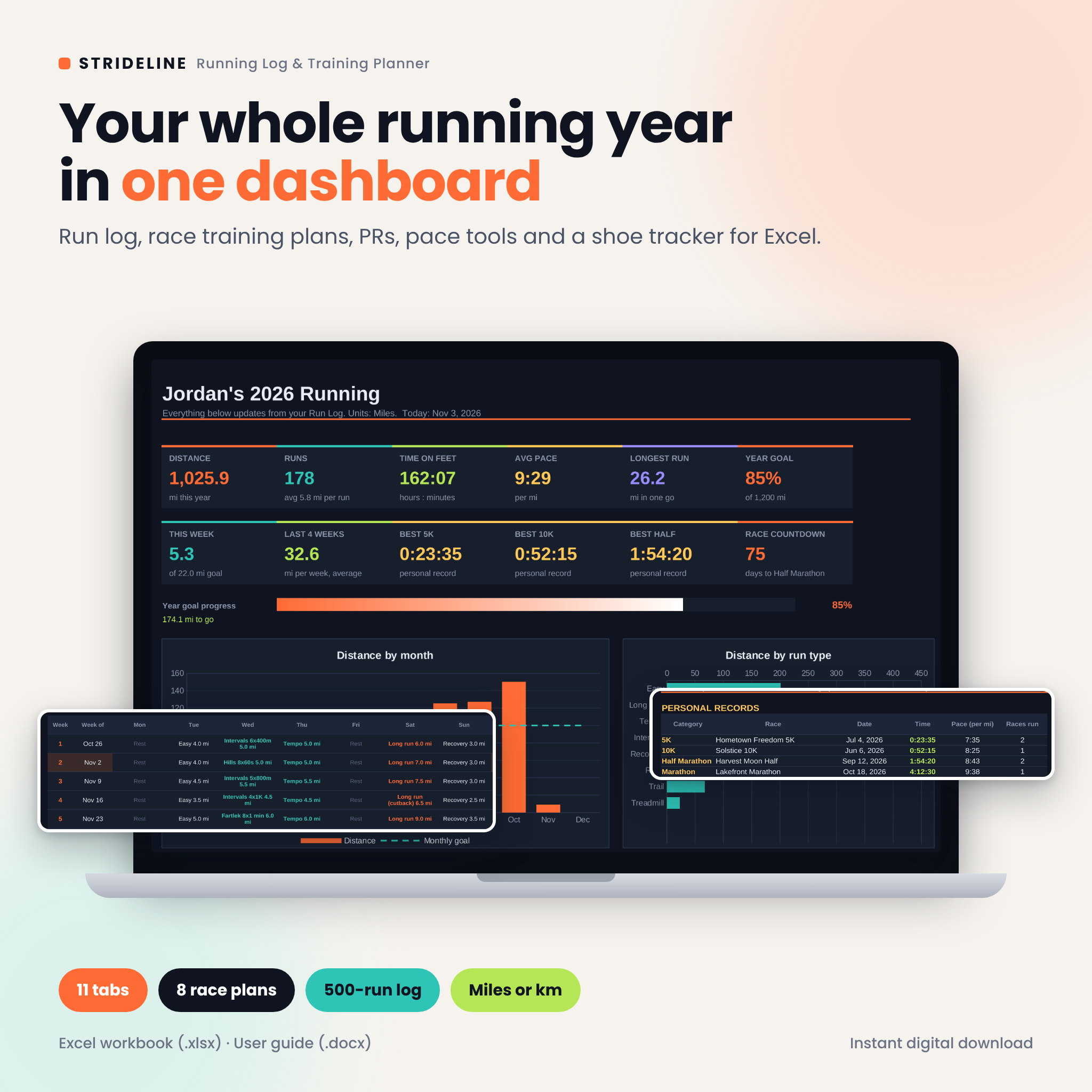
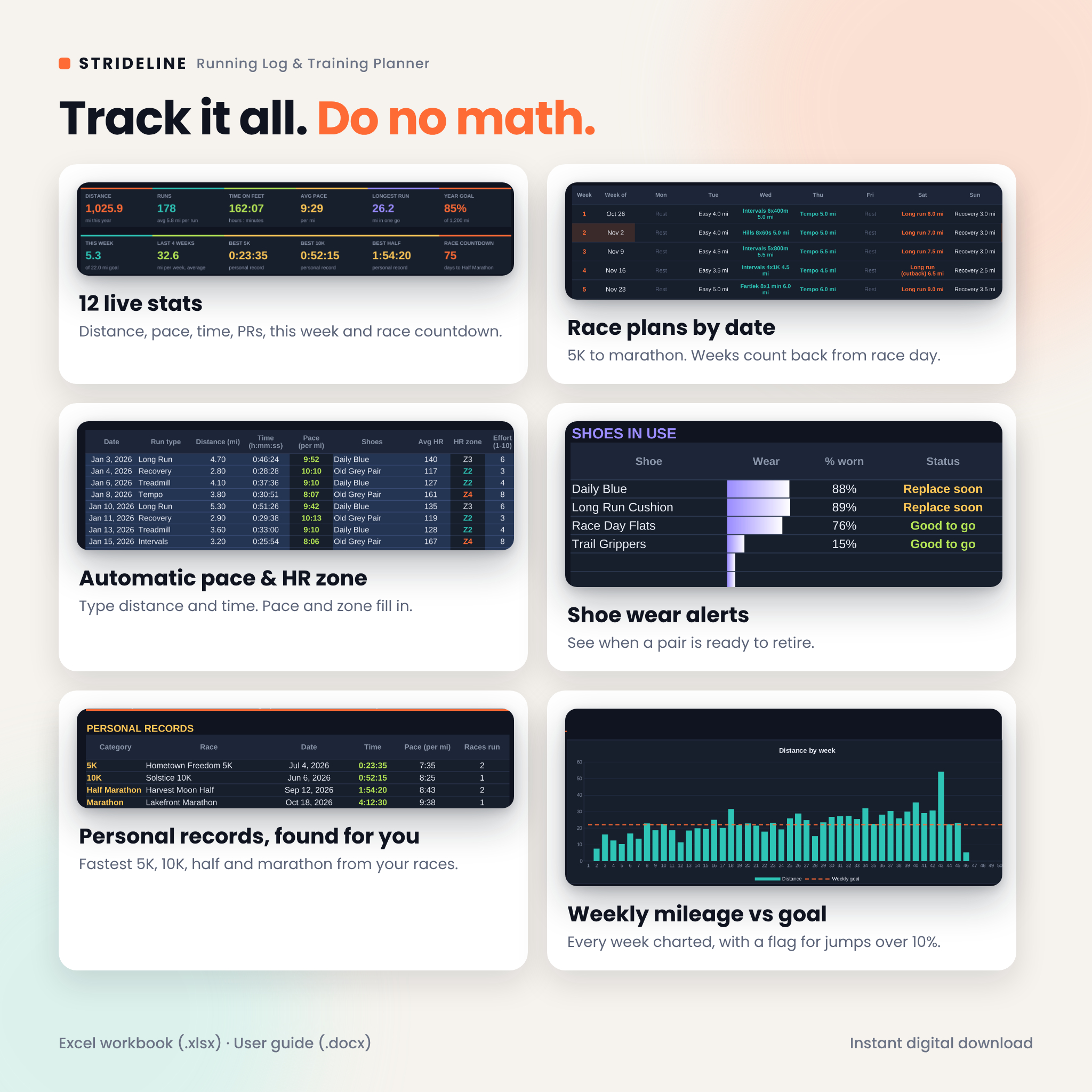
Strideline is a running log spreadsheet for Excel that does the math for you. Type the date, run type, distance and time after each run. The workbook fills in your pace and heart rate zone, adds up every week and month, finds your personal records, counts the miles on each pair of shoes and shows the whole year on a clean dark dashboard. If you are training for a race, pick the distance, your level and race day, and a week-by-week plan lines up so the final week ends on the start line.
A running log spreadsheet with a real training plan inside
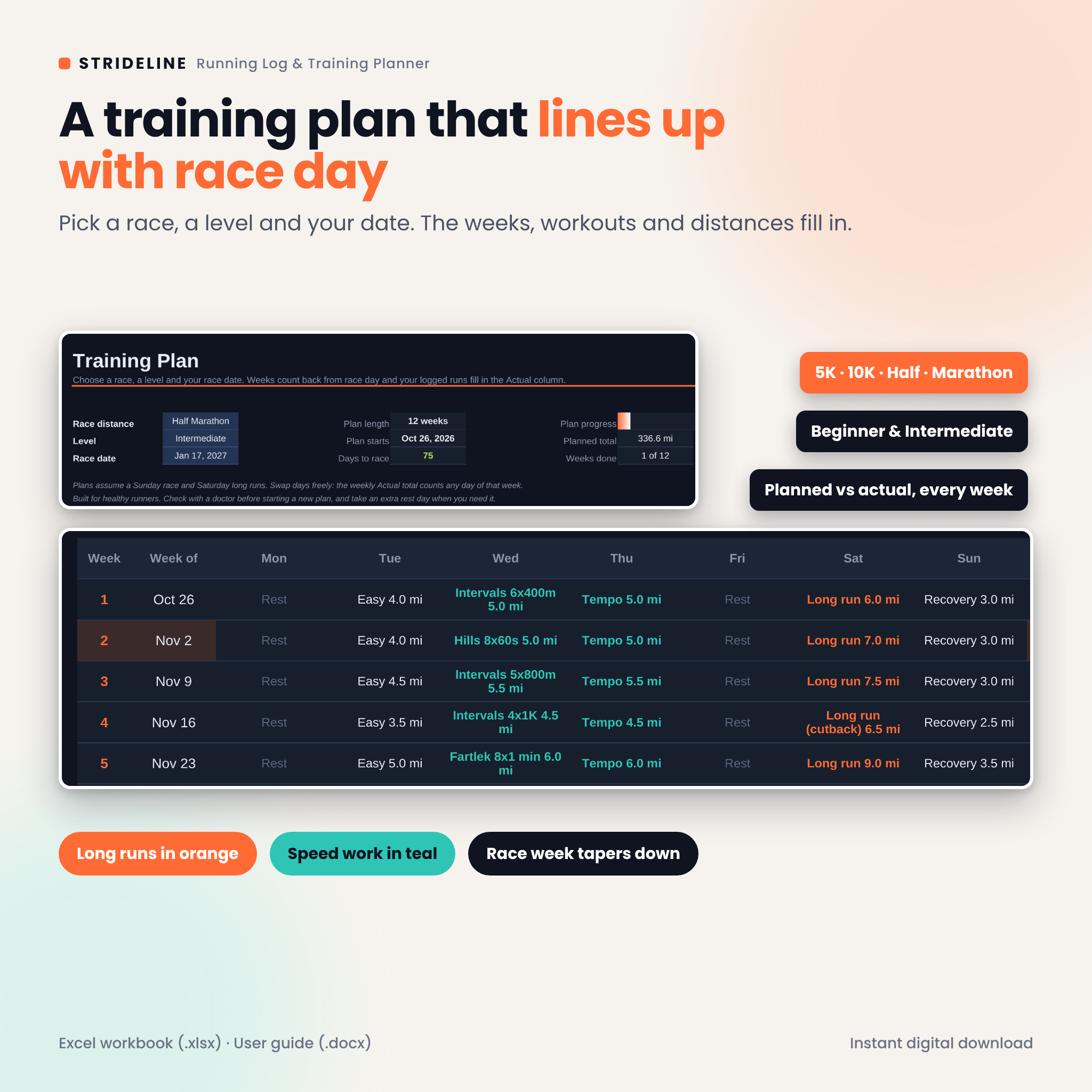
Most run trackers stop at a list of runs and a chart. Strideline goes further. It holds 8 training plans (5K, 10K, half marathon and marathon, each at Beginner and Intermediate level) and shows them next to what you actually ran. Each week gets a Planned and an Actual total, a % done figure and a status: Upcoming, This week, Done, Partial or Missed. You always know where you stand.
Who it is for
- New runners building up to a first 5K or 10K
- Half marathon and marathon runners who want structure without a coaching app
- Anyone chasing a yearly mileage goal, like 1,000 miles or 1,000 km
- Runners who forget how old their shoes are
- People who like their data in a file they own, with no subscription
What you get on the dashboard
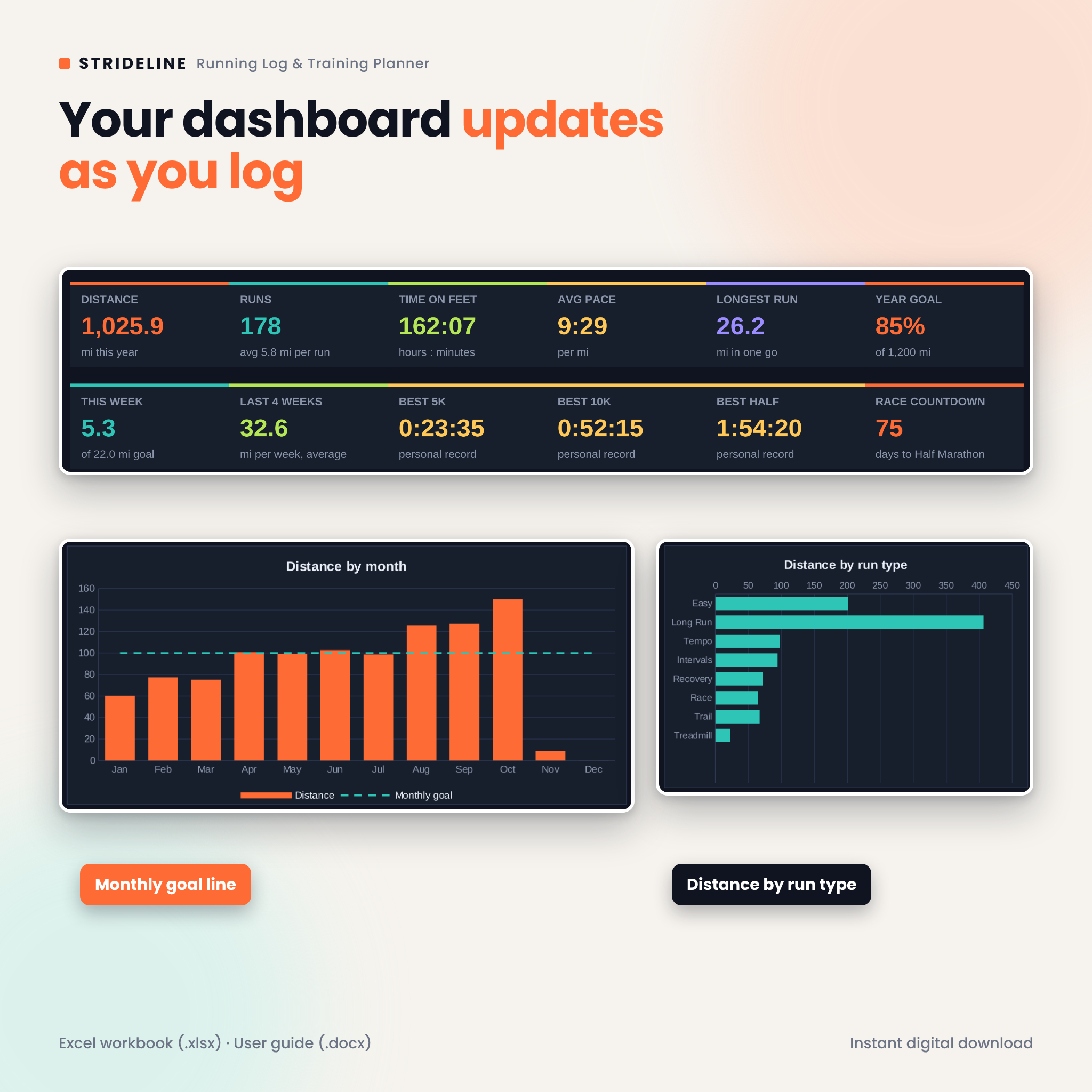
Twelve stat tiles: total distance, runs, time on feet, average pace, longest run, year goal %, this week, last 4 weeks average, best 5K, best 10K, best half and a race countdown. Under the tiles sit a year goal progress bar, a distance by month chart with your monthly goal line, a distance by run type chart, an hours by month chart, your shoes in use with wear bars and your top 3 months.
Features
Run Log
- Room for 500 runs with date, run type, distance, time, shoes, average HR, effort (1 to 10), elevation gain, feel and notes
- Automatic pace per mile or km, HR zone (Z1 to Z5), week and month
- Dropdowns for run type, shoes and feel, plus input checks that catch typos
- A “Check time” warning when a time looks wrong for the distance
Training Plan
- 5K (8 weeks), 10K (10 weeks), half marathon (12 weeks) and marathon (18 weeks)
- Beginner and Intermediate levels with easy runs, tempo runs, intervals, hills, long runs, cutback weeks and a taper
- Week dates count back from your race date; distances switch to your unit
- Color cues: long runs in orange, speed work in teal, rest days dimmed, race day highlighted
- Plan progress, planned total, weeks done and days to race at the top
Weekly and Monthly
- Every Monday to Sunday week of the year with distance, runs, time, long run, goal and % of goal
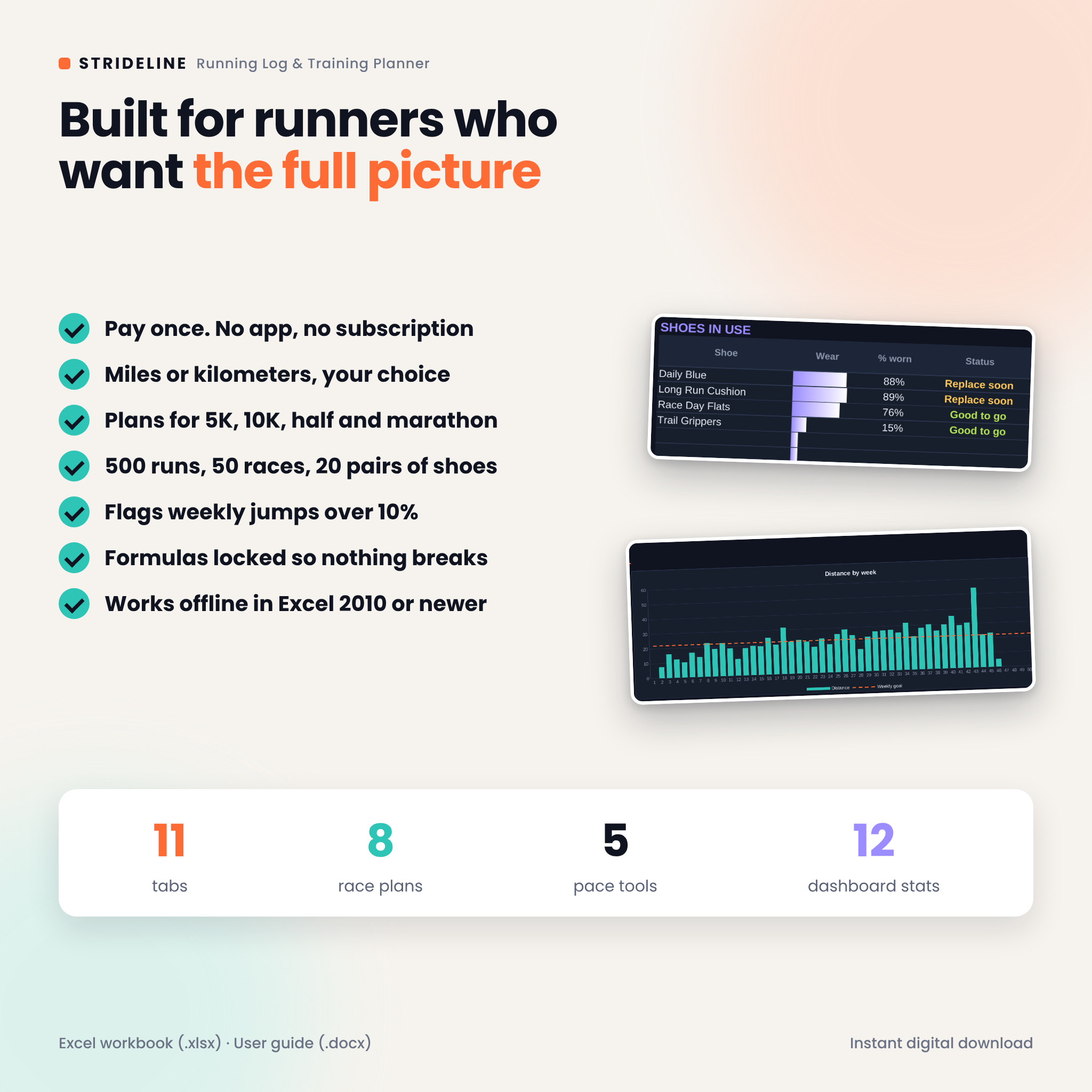
- Change vs last week and a “Big jump” flag above 10%
- Monthly distance, runs, time, average pace, longest run and % of goal
- Distance and runs by run type, plus your top 5 months
Race Log and PRs
- Up to 50 races with finish time, pace, overall place and age group place
- A personal records table that finds your fastest 5K, 10K, half and marathon, and marks each PR race
Pace Tools
- Pace calculator (pace per mile and per km, plus speed)
- Finish time calculator from a target pace
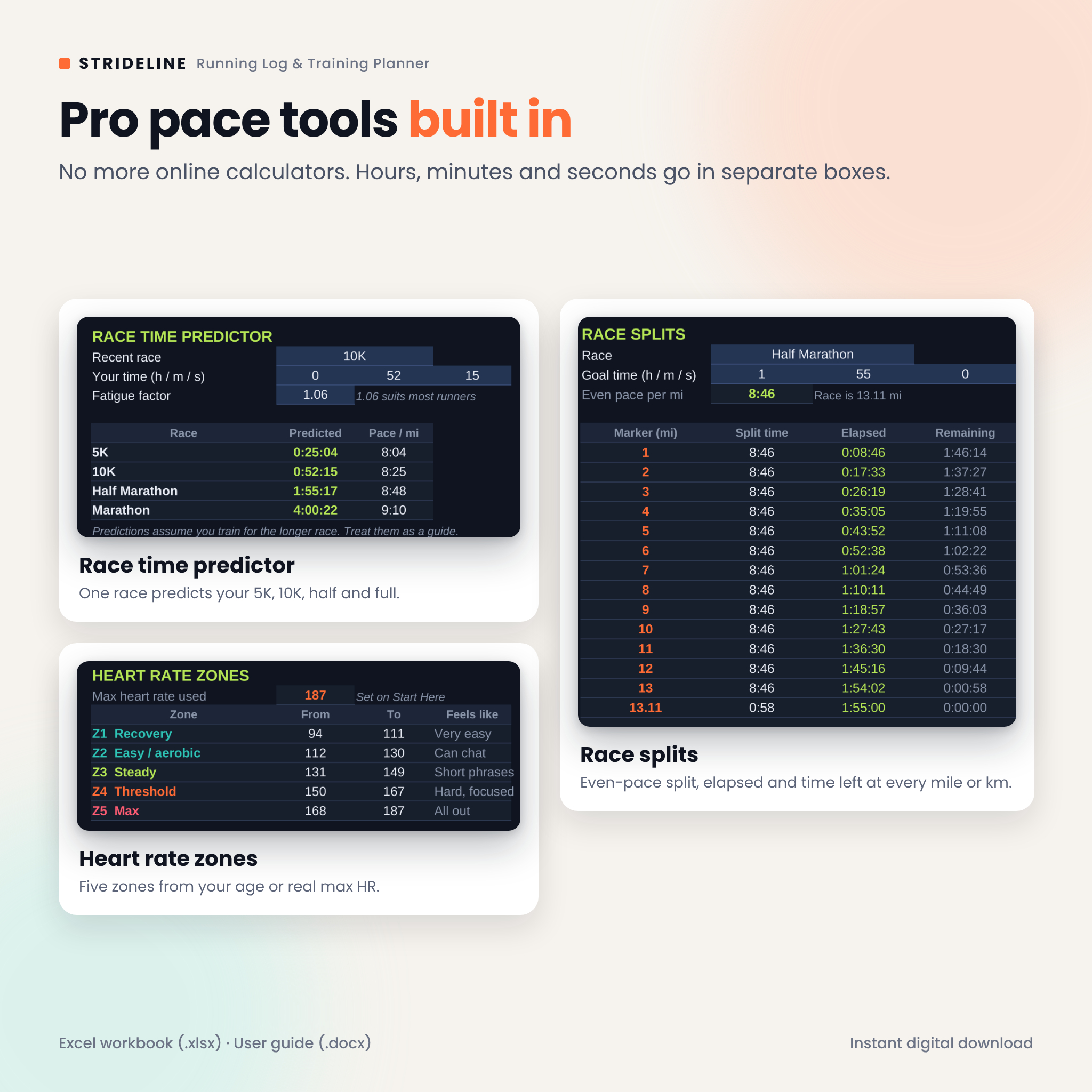
- Race time predictor based on a recent race, using the Riegel formula
- Even-pace race splits with elapsed and remaining time at every mile or km
- Five heart rate zones from your age or your real max HR
Shoe Tracker
- Up to 20 pairs with cost, first run date and any distance from before you started logging
- Distance used and left, % worn, cost per mile or km in your currency
- Status: Good to go, Replace soon, Replace now or Retired
What is included
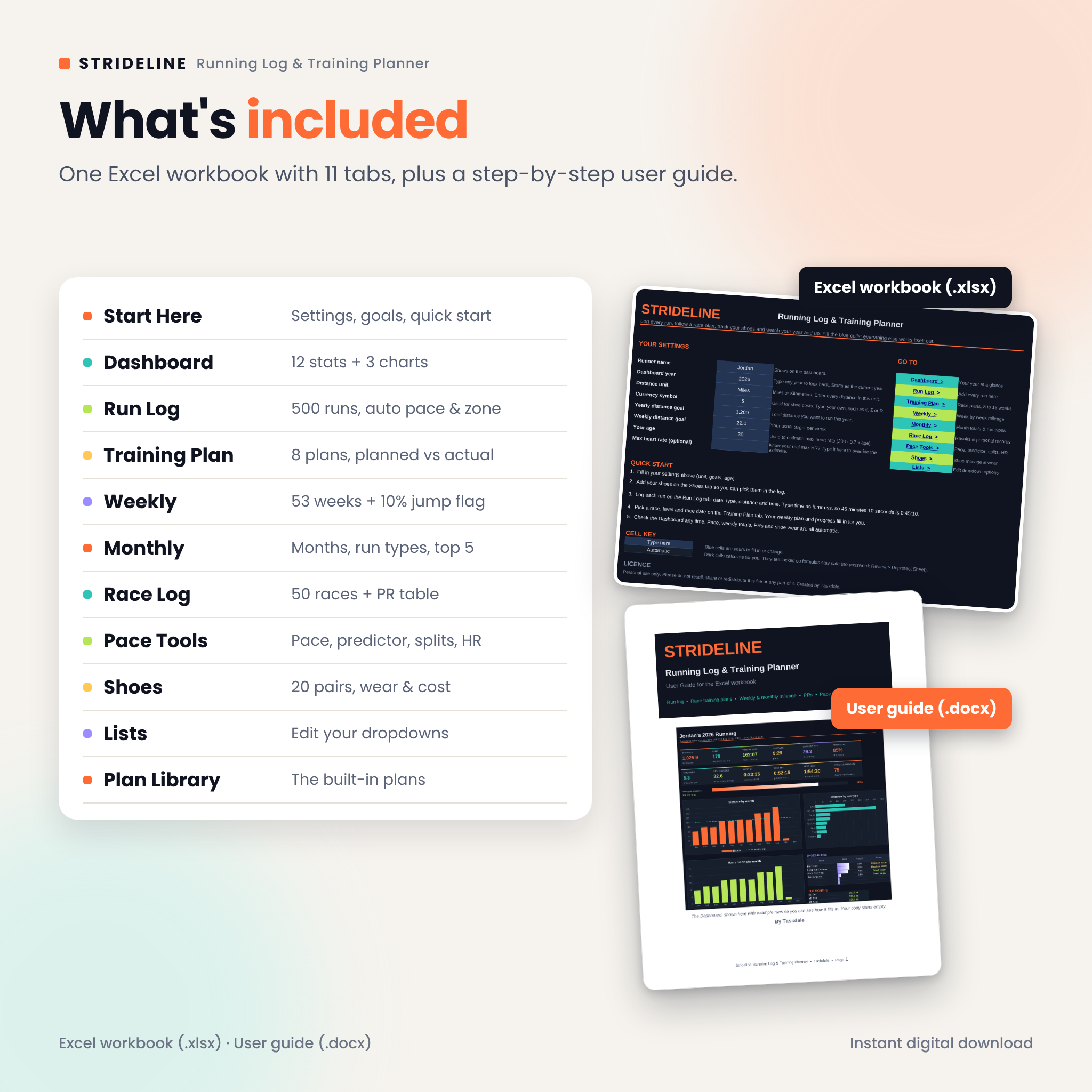
- Strideline workbook (.xlsx) with 11 tabs: Start Here, Dashboard, Run Log, Training Plan, Weekly, Monthly, Race Log, Pace Tools, Shoes, Lists and Plan Library
- User guide (.docx) with setup steps, every feature explained, tips, troubleshooting and FAQ
How it works
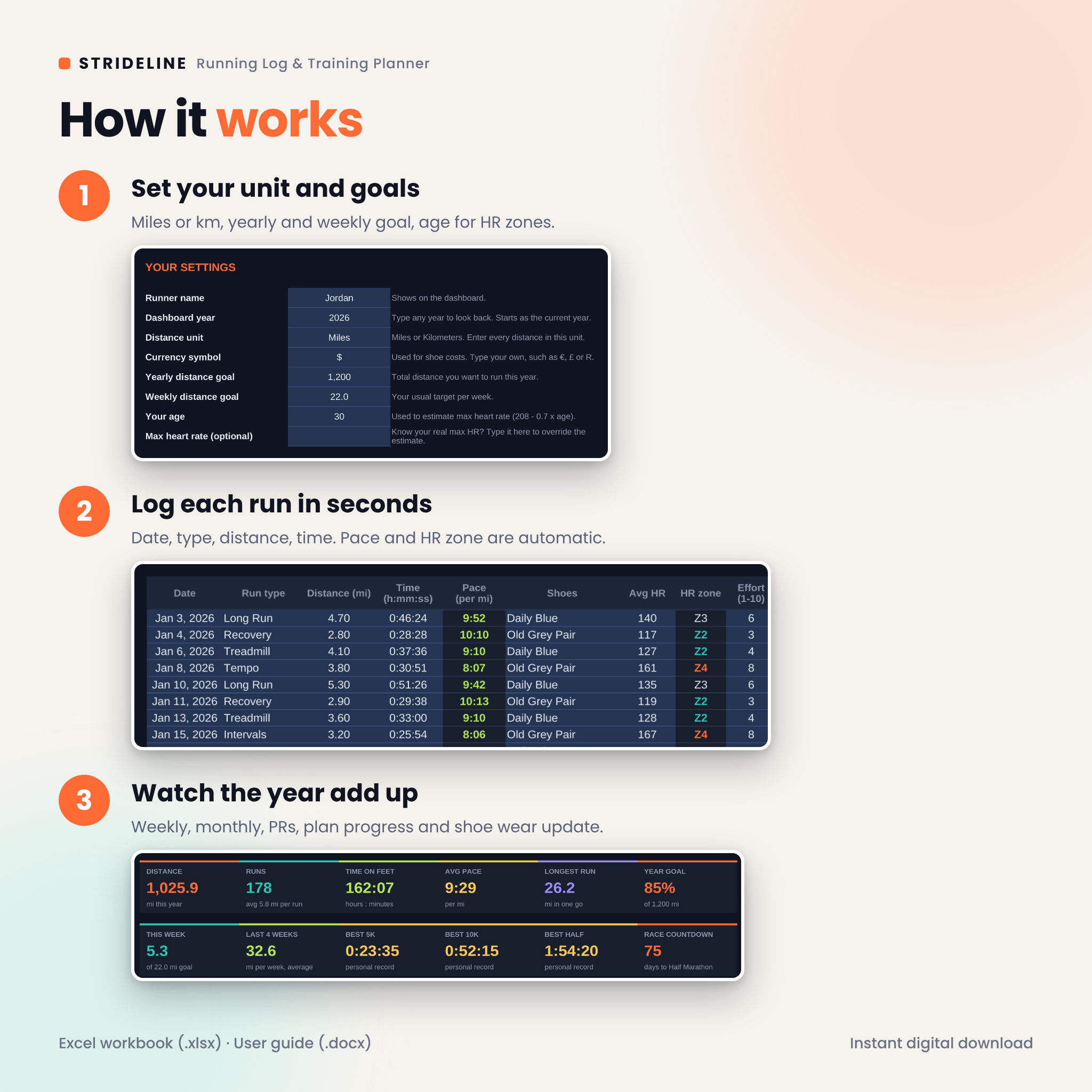
- Open Start Here and set your unit, goals, currency symbol and age.
- Add your shoes on the Shoes tab.
- Log each run on the Run Log tab. It takes about 20 seconds.
- Pick your race, level and date on the Training Plan tab.
- Check the dashboard whenever you like. Everything updates on its own.
File format and software
You get one Excel workbook (.xlsx) and one Word user guide (.docx) in a ZIP file. The workbook needs Microsoft Excel 2010 or newer, including Microsoft 365, and was also tested in LibreOffice Calc. There are no macros and no add-ins, and it works offline. It is not built for Google Sheets, Numbers or Notion.
Make it yours
Switch between miles and kilometers in one cell. Type your own currency symbol for shoe costs. Rename run types or add new ones such as Parkrun or Hill Repeats. Change your yearly or weekly goal and every chart and percentage follows. Formula cells are locked without a password, so you cannot break them by accident, and input cells stay open.
Real ways runners use it
- Following an 18-week marathon plan and checking each Sunday whether the week was Done or Partial
- Logging treadmill runs all winter and watching the hours by month chart climb
- Seeing a shoe hit “Replace soon” at 85% and buying the next pair before the old one hurts
- Using the predictor after a 10K to set a fair goal for a spring half
- Printing race splits for a goal time and taping them to a water bottle
Digital download
This is a digital product. No physical item will be shipped. After checkout you can download the ZIP file right away from your order page and your email receipt.
FAQ
Does this running log spreadsheet work on Mac?
Yes. It is a standard Excel workbook that only uses functions found in Excel 2010 and newer, so it opens in Excel for Mac and Windows, including Microsoft 365.
Can I use kilometers?
Yes. Choose Kilometers on Start Here. Plans, race distances, pace and shoe limits switch to km.
Does it sync with my watch or Strava?
No. You type each run in, which takes about 20 seconds. Many runners like the habit of a short review after each run.
Is there a marathon training plan?
Yes. There are 18-week Beginner and Intermediate marathon plans, plus plans for 5K, 10K and half marathon.
Can I log more than one run a day?
Yes. Add a row for each run and the totals add them together.
Will it work in Google Sheets?
It was built and tested for Excel and LibreOffice Calc only, so Google Sheets is not supported.
Can I use it next year too?
Yes. Type a new year in the Dashboard year cell, or start a fresh copy each January.
License: for personal use only. Please do not resell, share or redistribute the files. The training plans are general guides for healthy runners and are not medical advice.
Reviews
There are no reviews yet.