



Deductory is a tax write-off tracker spreadsheet for freelancers, 1099 contractors and self-employed people who want to keep more of what they earn. Log your business purchases, income and miles in simple tables, and Deductory turns them into deductible totals, a Schedule C summary, quarterly tax estimates and a dashboard that shows exactly where you stand. It works in Google Sheets and Microsoft Excel, and it is ready to use the moment you download it.
A Tax Write-Off Tracker That Does the Math for You
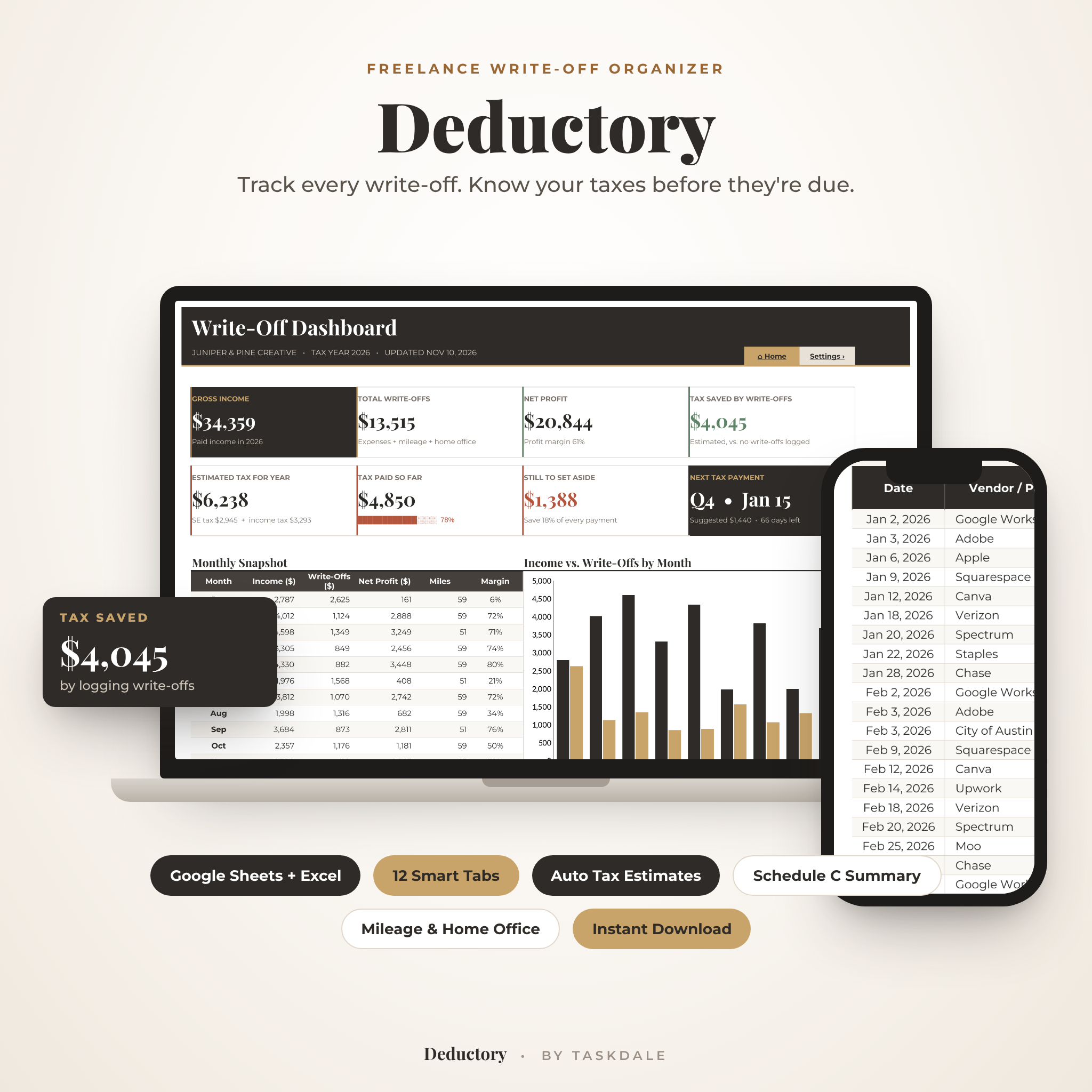
Most write-off logs are just a list. Deductory reads every row and does the work: it applies business-use percentages, counts business meals at 50%, maps each category to its IRS Schedule C line, adds platform fees from your income log, switches the standard mileage rate on the right date, and compares both home office methods. Then it estimates your self-employment tax and income tax so you know how much to set aside before the IRS asks.
Who It’s For
- Freelance designers, writers, photographers, developers, coaches and consultants
- 1099 contractors, gig workers and side-hustlers who file Schedule C
- Online sellers and creators who get paid through Stripe, PayPal, Etsy or Upwork
- Single-member LLC owners who want simple, organized records without bookkeeping software
Main Benefits
- Find more deductions: 27 Schedule C categories plus a checklist of 36 commonly missed write-offs.
- No tax-season panic: suggested quarterly payments, due dates, days left and a safe-harbor check.
- Know what to save: every payment you log shows how much to move into tax savings.
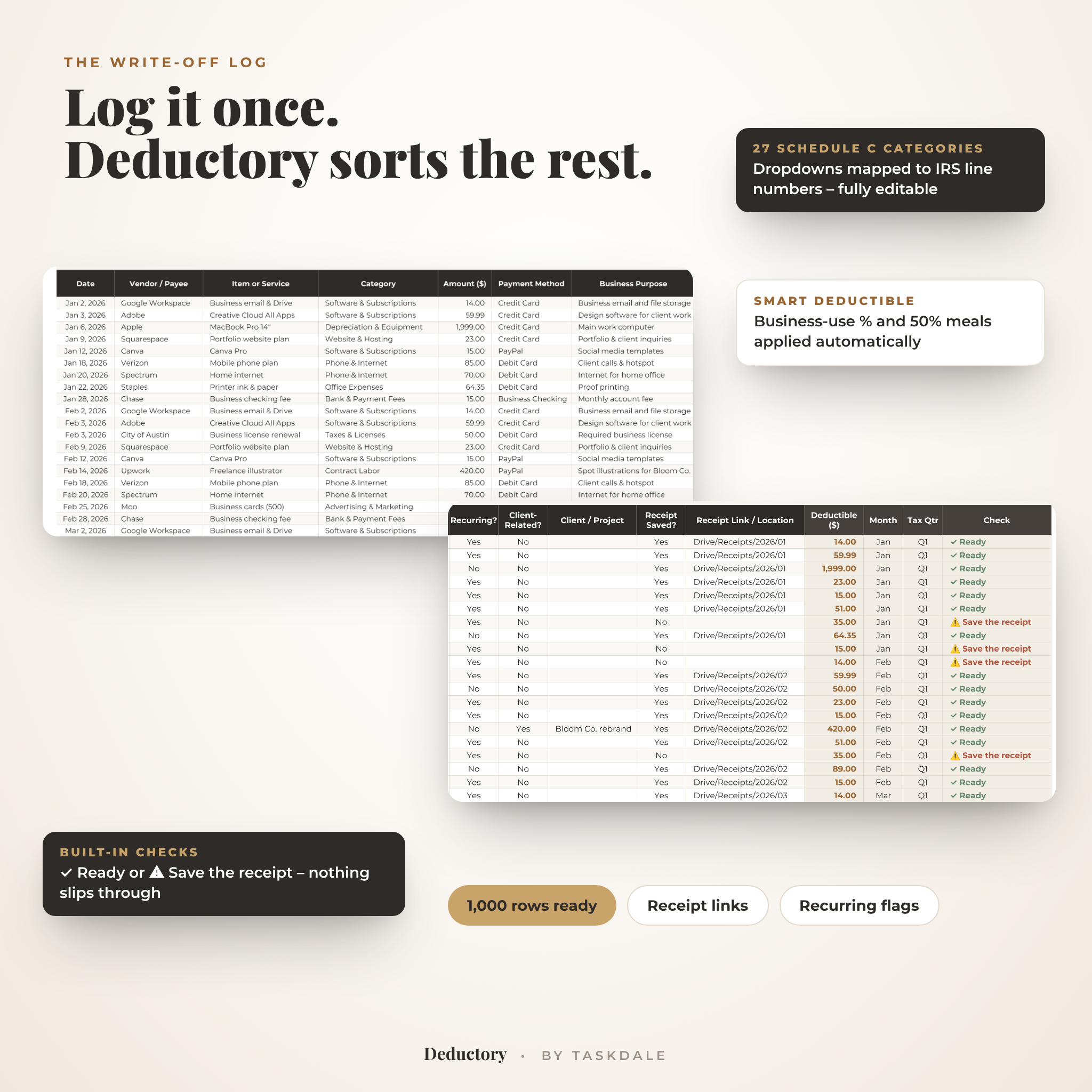
- Audit-ready records: business purpose, receipt links and automatic “missing receipt” flags.
- Accountant-friendly: a print-ready Schedule C summary by line and month.
Features
Write-Off Dashboard
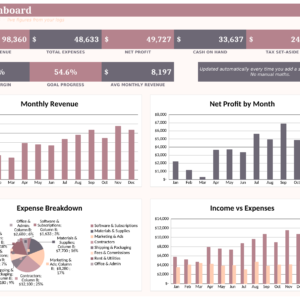
Eight headline cards show gross income, total write-offs, net profit, estimated tax saved by your write-offs, estimated tax for the year, tax paid so far, how much is still to set aside and your next quarterly payment with days left. Below them: a monthly snapshot, an income vs write-offs chart, your top 8 write-off categories ranked automatically, a quarterly tax tracker and health checks for missing receipts, pending invoices, miles and recurring costs.
Expense Log (Write-Off Log)
1,000 ready rows with date, vendor, item, category dropdown, amount, payment method, business purpose, business-use %, recurring and client-related flags, receipt saved and receipt link. The deductible amount, month and IRS quarter fill in automatically, and a check column flags anything missing.
Income Log
Record payments with client, invoice number, income type, gross amount, platform fees, 1099 form type and paid or pending status. Fees count as a write-off automatically, and a set-aside column tells you how much of each payment to save for taxes.
Mileage Log
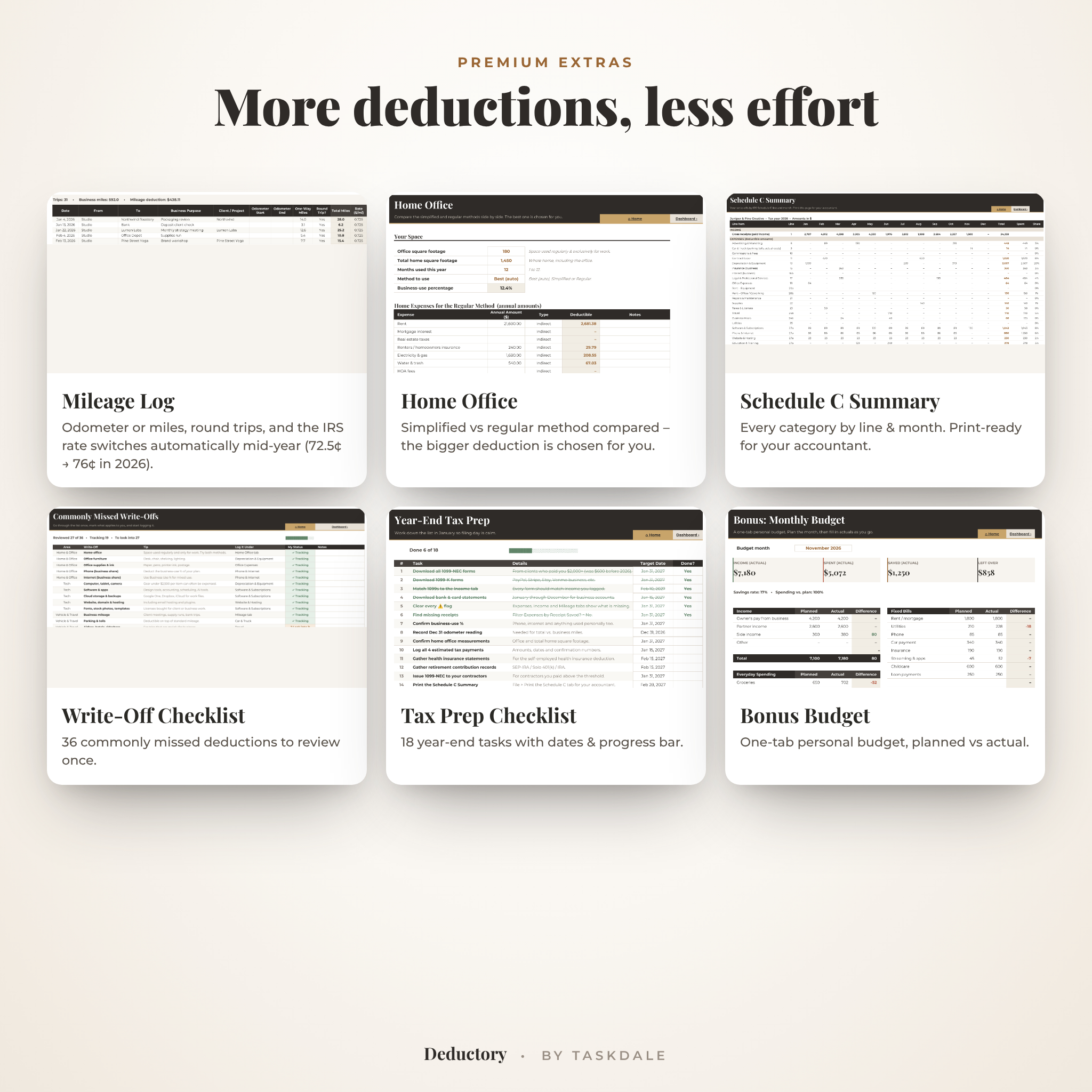
Enter odometer readings or one-way miles with a round-trip option. The 2026 IRS standard mileage rate switches automatically from 72.5¢ to 76¢ on July 1, and you can edit both rates for any year.
Home Office Calculator
Compare the simplified method ($5 per sq ft, up to 300 sq ft) with the regular method side by side. Deductory picks the larger deduction and limits it to your business profit.
Quarterly Estimated Tax Planner
Income, write-offs and profit for each IRS period, a suggested payment that adds up to your full-year estimate, a payment log with confirmation numbers, automatic status (Paid, Due soon, Overdue) and a safe-harbor check based on last year’s tax.
Schedule C Summary, Checklists and Bonus Budget
The Schedule C tab totals every category by line and month and prints on one page. The Write-Off Checklist covers 36 commonly missed deductions, the Tax Prep Checklist gives you 18 year-end tasks with target dates, and a bonus one-tab monthly budget helps with personal spending.
What’s Included
- Deductory Freelance Write-Off Organizer (.xlsx) for Google Sheets and Excel – 12 tabs
- Sample file filled with a full year of example data
- Illustrated 14-page user guide (.docx and PDF)
- Google Sheets setup guide (PDF)
- Bonus: Commonly Missed Write-Offs cheat sheet (US Letter and A4 PDF)
How It Works
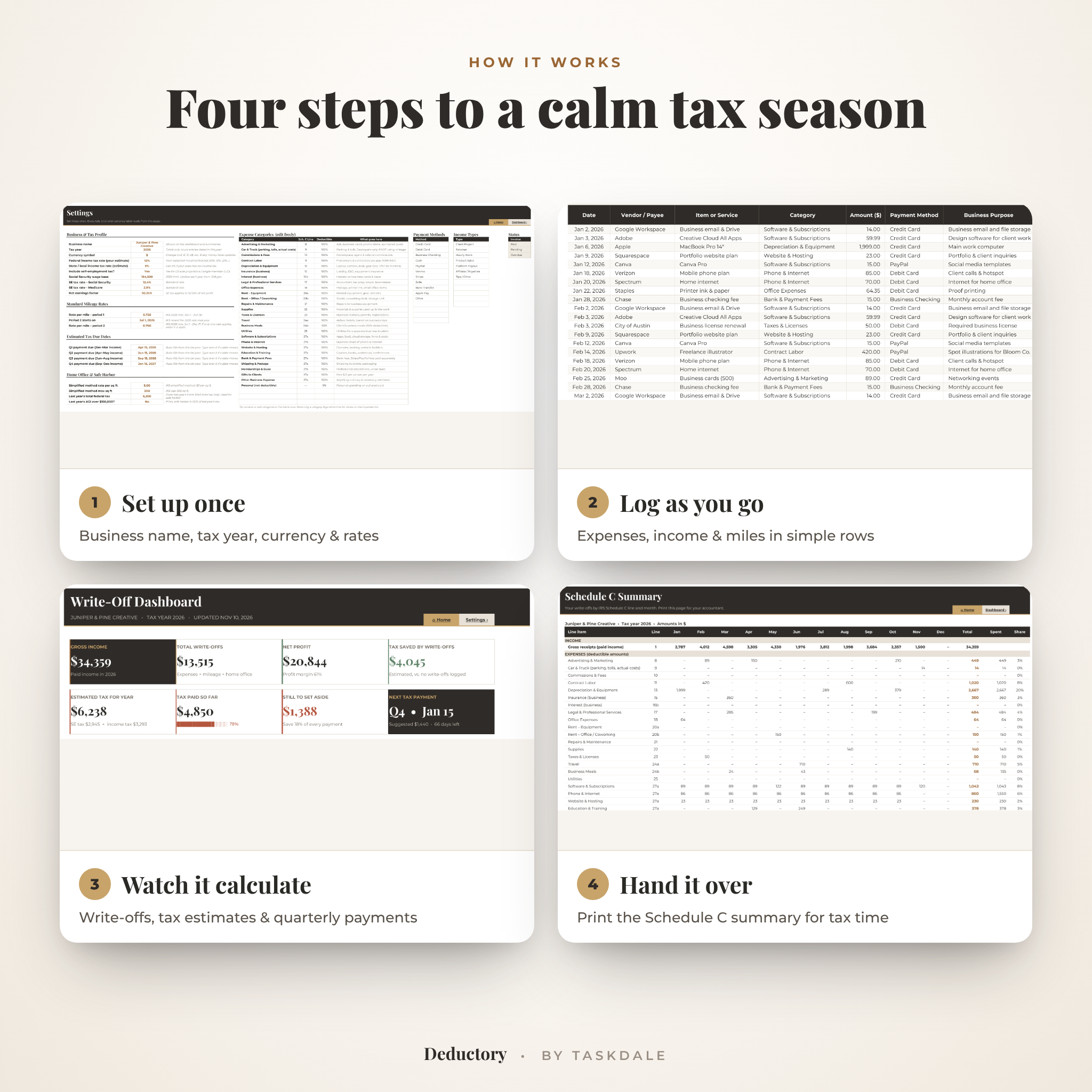
- Set up once: add your business name, tax year, currency symbol and estimated tax rates on the Settings tab.
- Log as you go: add expenses, income and trips in the white input cells. Dropdowns keep entries tidy.
- Watch it calculate: the dashboard, quarterly planner and Schedule C summary update instantly.
- Hand it over: clear any flags and print the Schedule C summary for your tax pro or tax software.
File Formats and Software Requirements
You receive an .xlsx workbook that opens in Microsoft Excel 2019 or newer (including Microsoft 365) on Windows and Mac, and in Google Sheets with a free Google account. The setup guide shows how to save it as a Google Sheet in about two minutes. It works on desktop, and you can log entries on a tablet or phone with the free Google Sheets or Excel app.
Customization
One currency setting controls every money label, so you can use $, £, €, R or any symbol. Rename or add expense categories, payment methods and income types, set your own deduction rates, change the tax year and mileage rates, and adjust colors. Formula cells are protected in Excel with no password, so you can unlock them whenever you like.
Digital Download
This is an instant digital download. No physical item will be shipped. Your files are available right after checkout from your order confirmation and your account downloads page.
Real-Life Use Cases
- A freelance designer logs Adobe, Canva and a new laptop, and sees her tax saved grow on the dashboard.
- A rideshare or delivery driver tracks every trip and gets the right IRS rate before and after July 1.
- An Etsy seller records monthly payouts with fees and knows exactly what to save for quarterly taxes.
- A consultant prints the Schedule C summary in January instead of sorting a shoebox of receipts.
FAQ
Does this tax write-off tracker work in Google Sheets?
Yes. Upload the .xlsx to Google Drive and save it as a Google Sheet. The included setup guide walks you through it.
Does it work in Excel?
Yes, in Excel 2019 or newer, including Microsoft 365, on Windows and Mac.
Will it calculate my quarterly estimated taxes?
It estimates self-employment tax and income tax from your profit and the rates you choose, and suggests a payment for each IRS quarter. Treat it as a planning guide and confirm with a tax professional.
Can I use it outside the US?
Yes, as a write-off organizer. Set your currency and tax rates and turn off self-employment tax. Schedule C lines and IRS mileage rates are US-specific.
Can I reuse it next year?
Yes. Make a copy, clear the logs and update the tax year and mileage rates in Settings.
Is it beginner friendly?
Yes. A Start Here tab, clickable navigation, header tips, a sample file and an illustrated user guide get you going in about 10 minutes.
Is this tax advice?
No. Deductory is an organizing and estimating tool, not tax, legal or financial advice.
License: for the original purchaser’s personal business use only. Please don’t resell, share or distribute the files. © Taskdale.

Reviews
There are no reviews yet.