Looking for a free digital weight loss planner that is actually nice to use? You can download a 73-page sample of the SlimStride Weight Loss Planner below at no cost. It is a real, working, hyperlinked PDF for GoodNotes, Notability and other PDF apps, with a complete month of trackers, weekly meal and workout pages, 31 daily food and fitness pages, a calorie goal calculator and a pound-by-pound countdown. Enter your email, download it, and start tracking today.
This guide shows you what is inside the free planner, how to set it up in about ten minutes, and how to get the most from your first month. If you love it, the full planner is there when you are ready for the other eleven months.
Want the whole year now? The full SlimStride Digital Weight Loss Planner has all 12 months, 688 pages, printables and a user guide for $4.99.
What’s inside the free weight loss planner
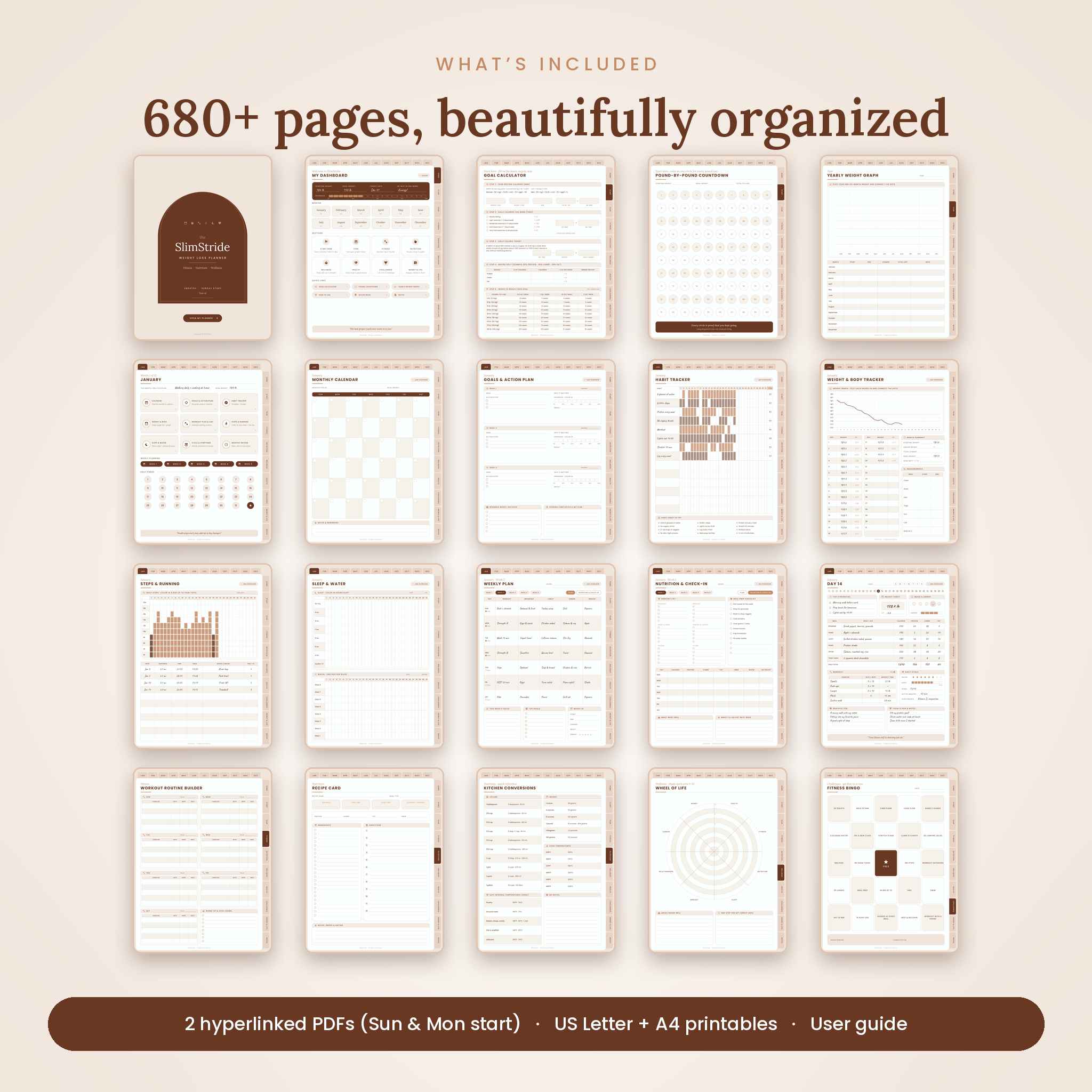
The free sample is not a handful of blank pages. It is one full, linked month of the SlimStride planner, plus a few of the most useful extras:
- Home dashboard with a goal strip and a 20-step progress bar
- Goal calculator: work out your BMR, daily calorie burn (TDEE), calorie target, macros and how many weeks it may take to reach your goal
- About Me & My Why page to write down the reason you are doing this
- Pound-by-pound countdown with 100 circles to color in
- Yearly weight graph
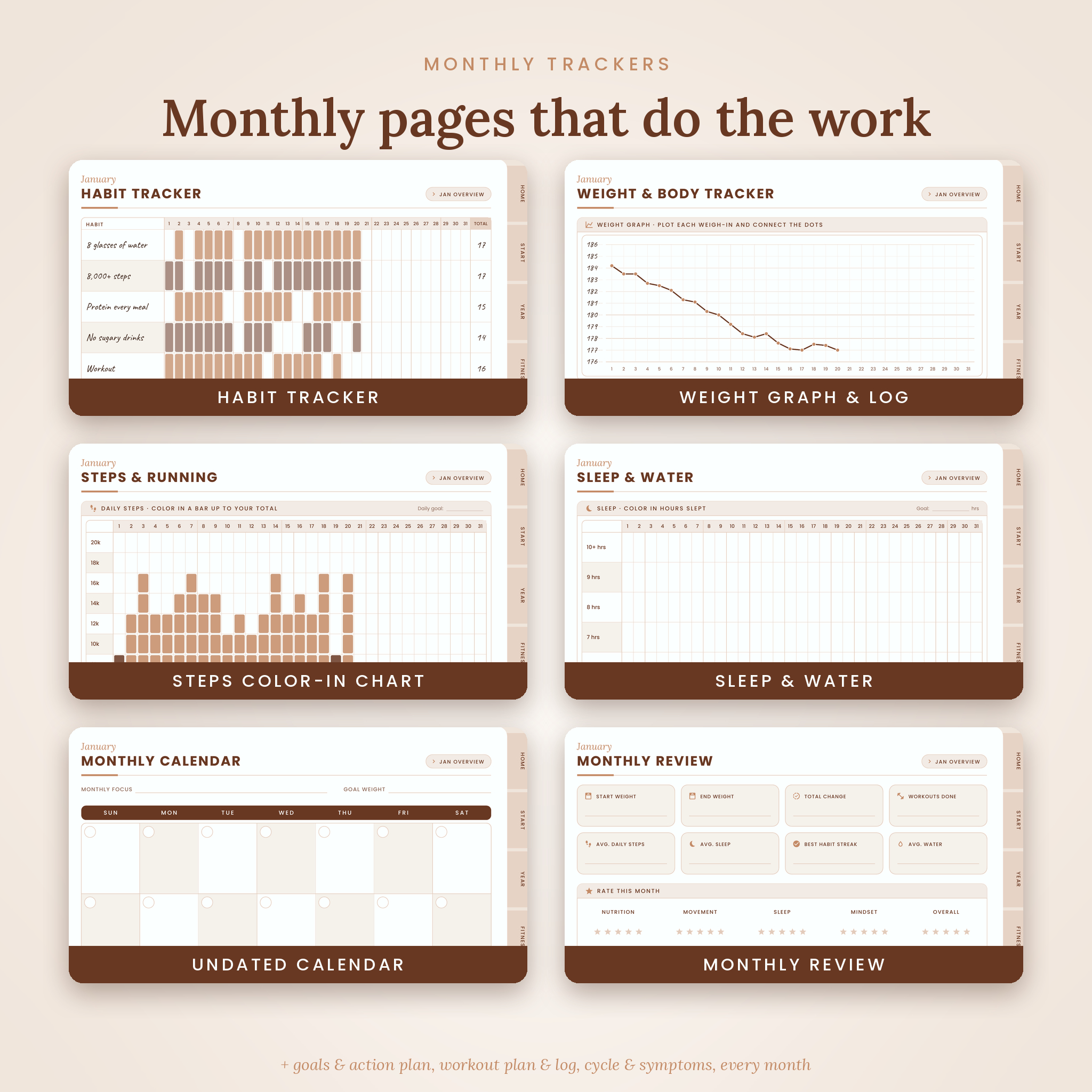
- A complete month: month overview hub, undated calendar, goals and action plan, habit tracker, weight and body tracker with a graph, workout plan and log, steps and running chart, sleep and water tracker, cycle and symptom tracker, and monthly review
- 10 weekly pages: a weekly meal and workout plan plus a grocery list, meal prep checklist and calorie and macro totals for every week
- 31 daily pages with meals, calories, protein, carbs and fat, a workout log, water, sleep, steps, mood, gratitude and a daily quote
- Recipe card, 30-day challenge, gratitude journal and a lined notes page
Download the free digital weight loss planner
Enter your email in the box below and the PDF downloads straight away. It is about 0.4 MB, so it opens quickly on an iPad, Android tablet or computer.
Free Digital Weight Loss Planner (SlimStride Sample)
73 free pages from the SlimStride Weight Loss Planner: a full month (calendar, habit, weight, workout, sleep and cycle trackers, 10 weekly pages and 31 daily pages), the goal calculator, pound countdown, recipe card, 30-day challenge and more. Hyperlinked PDF for GoodNotes, Notability and other PDF apps. Want all 12 months, 680+ pages and the printables? Upgrade to the full planner.
Want everything unlocked?
SlimStride Digital Weight Loss Planner: Undated GoodNotes Fitness, Meal & Habit Tracker + Printable
The free file is a sample. The full version has every page, tab and feature, plus the user guide.
See the full versionThe free planner is for your personal use. Please share the link to this page rather than the file itself.
How to set up your free planner in GoodNotes (10 minutes)
- Import the PDF. Open the downloaded file, tap Share, choose GoodNotes and select “Import as new document”. In Notability, Noteshelf or Xodo, import it as a new note.
- Learn the taps. The month tabs run across the top and the section tabs run down the right side. On month pages, the Overview button takes you back to the month hub. Daily pages have a 1–31 strip so you can jump to any day. In GoodNotes, links work in read-only mode or when you tap with your finger.
- Fill in My Why and the goal calculator. Write your reason in a sentence or two, then follow the five steps of the calculator. It walks you through the Mifflin-St Jeor equation, your activity level and your daily calorie target.
- Write your dates on the calendar. The planner is undated, so it works whenever you start.
- Pick 5 to 8 habits. Add them to the habit tracker. Small habits, such as drinking water or a 20-minute walk, are easier to keep than big promises.
A simple four-week plan for your first month
Here is an easy way to use the free planner for four weeks without feeling overwhelmed.
Week 1: track honestly
Log what you eat on the daily pages without changing anything yet. Weigh in each morning and note your water, sleep and steps. This gives you a real starting point.
Week 2: one small change
Look at your first week and pick one change, such as a protein-rich breakfast or swapping soda for sparkling water. Plan your meals on the weekly page and write your grocery list.
Week 3: add movement
Schedule three workouts on the workout plan and log each one. Color in your steps chart. A daily walk counts.
Week 4: review and reward
Plot your weigh-ins on the weight graph and fill in the monthly review. Look at the trend, not single days, and celebrate the wins that are not on the scale, like better sleep or more energy.
Free planner vs the full SlimStride planner
The free sample gives you one complete month. The full planner gives you the whole year and much more.
| Feature | Free sample | Full planner |
|---|---|---|
| Pages | 73 | 688 per version |
| Months | 1 | 12 |
| Weekly pages | 10 | 120 |
| Daily pages | 31 | 372 |
| Fitness section (routine builder, strength and cardio logs, PRs, measurements, fitness test) | No | Yes |
| Nutrition section (recipe book, healthy swaps, conversions, portion guide, grocery list) | 1 recipe card | Yes |
| Wellness and health sections | Gratitude journal | Yes |
| Challenges | 30-day | 6 challenges |
| Sunday and Monday start | Sunday | Both |
| US Letter and A4 printables | No | Yes |
| User guide | No | Yes |
| Price | Free | $4.99 |
SlimStride Digital Weight Loss Planner
Price: $4.99 | Best for: anyone who wants a full year of food, fitness and habit tracking
The complete SlimStride planner has 688 hyperlinked pages and more than 28,000 links: 12 monthly hubs, 120 weekly meal and workout pages, 372 daily pages, a goal calculator, fitness, nutrition, wellness, health and money sections, and six challenges. It comes in Sunday and Monday start versions with US Letter and A4 printables and a step-by-step user guide.
Tips for tracking your weight loss
- Weigh in at the same time each day, ideally in the morning, and focus on the weekly trend. Daily weight can move up and down with water and salt.
- Track food for a few weeks, even if you do not plan to count calories forever. It shows you where the easy wins are.
- Plan meals before you shop. The weekly page and grocery list keep healthy food in the house.
- Measure more than weight. Waist and hip measurements, photos and how your clothes fit often change before the scale does.
- Aim for steady progress. Losing about 1 to 2 pounds a week is a common healthy pace. Talk to your doctor or a registered dietitian before starting a new diet or exercise program.
Want to compare other formats, such as printable or spreadsheet weight loss trackers? See our guide to the best weight loss planners. If you track macros, the macro meal planner guide explains protein, carbs and fat in plain terms, and this guide shows how to use a digital planner across your tablet, phone and computer.
Free weight loss planner FAQ
Is the free weight loss planner really free?
Yes. Enter your email and download the 73-page sample at no cost. There is no subscription.
Does the free digital planner work with GoodNotes?
Yes. It is a hyperlinked PDF that works in GoodNotes, Notability, Noteshelf, Xodo and other PDF apps that support links.
Can I print the free weight loss tracker?
You can print any page of the free PDF. The full planner also includes dedicated US Letter and A4 printable versions of every template.
Is it dated?
No. The planner is undated, so you can start in any month.
What happens to my free planner if I upgrade?
The full planner uses the same design, so you can keep the free month and simply carry on in the full version for the rest of the year.