If you get paid on a 1099, nobody takes tax out of your checks. The IRS still wants its share four times a year. This guide walks you through how quarterly estimated taxes work, how to figure your payment in a few minutes, and how much to set aside from every payment. You can also grab our free quarterly estimated tax calculator spreadsheet for Excel and Google Sheets right below.

Free Quarterly Estimated Tax Calculator (Quarterwell Lite)
A free 2027 quarterly estimated tax calculator spreadsheet for 1099 income. Enter your expected income, expenses and filing status to see self-employment tax, federal income tax, state tax, each quarterly payment, the 2027 due dates and your set-aside percentage. Excel and Google Sheets.

Want everything unlocked?
The free file is a sample. The full version has every page, tab and feature, plus the user guide.
See the full versionWhat is in the free quarterly tax calculator
The free download, Quarterwell Lite, is a one-page calculator for tax year 2027. Type in five numbers and it shows:
- Your projected net profit
- Self-employment tax (Social Security and Medicare)
- Federal income tax using the 2027 brackets for your filing status
- A flat state income tax estimate
- Each quarterly payment and the four 2027 due dates
- The share of every payment you should set aside
It opens in Microsoft Excel. For Google Sheets, upload it to Google Drive and open it with Google Sheets.
Who has to pay quarterly estimated taxes?
You generally need to make estimated payments if you expect to owe at least $1,000 in federal tax for the year after subtracting any withholding and refundable credits. That covers most freelancers, independent contractors, gig workers, creators and online sellers who earn a steady side income.
If you also have a W-2 job, the tax withheld from your paychecks counts. Sometimes it covers your side income on its own. Sometimes it falls short, and the gap is what you pay quarterly.
The 2027 estimated tax due dates
Estimated tax periods are not equal quarters, which catches a lot of people out:
- Q1 (income from January 1 to March 31): due April 15, 2027
- Q2 (April 1 to May 31): due June 15, 2027
- Q3 (June 1 to August 31): due September 15, 2027
- Q4 (September 1 to December 31): due January 18, 2028, because January 15 falls on a weekend and the next Monday is a federal holiday
Still finishing 2026? Your last 2026 payment is due January 15, 2027.
How to calculate your quarterly estimated tax in 5 steps
1. Estimate your profit for the year
Take your expected business income and subtract your expected business expenses. That is your net profit, the number at the bottom of Schedule C. If your income swings, use what you earned last year as a starting point and adjust.
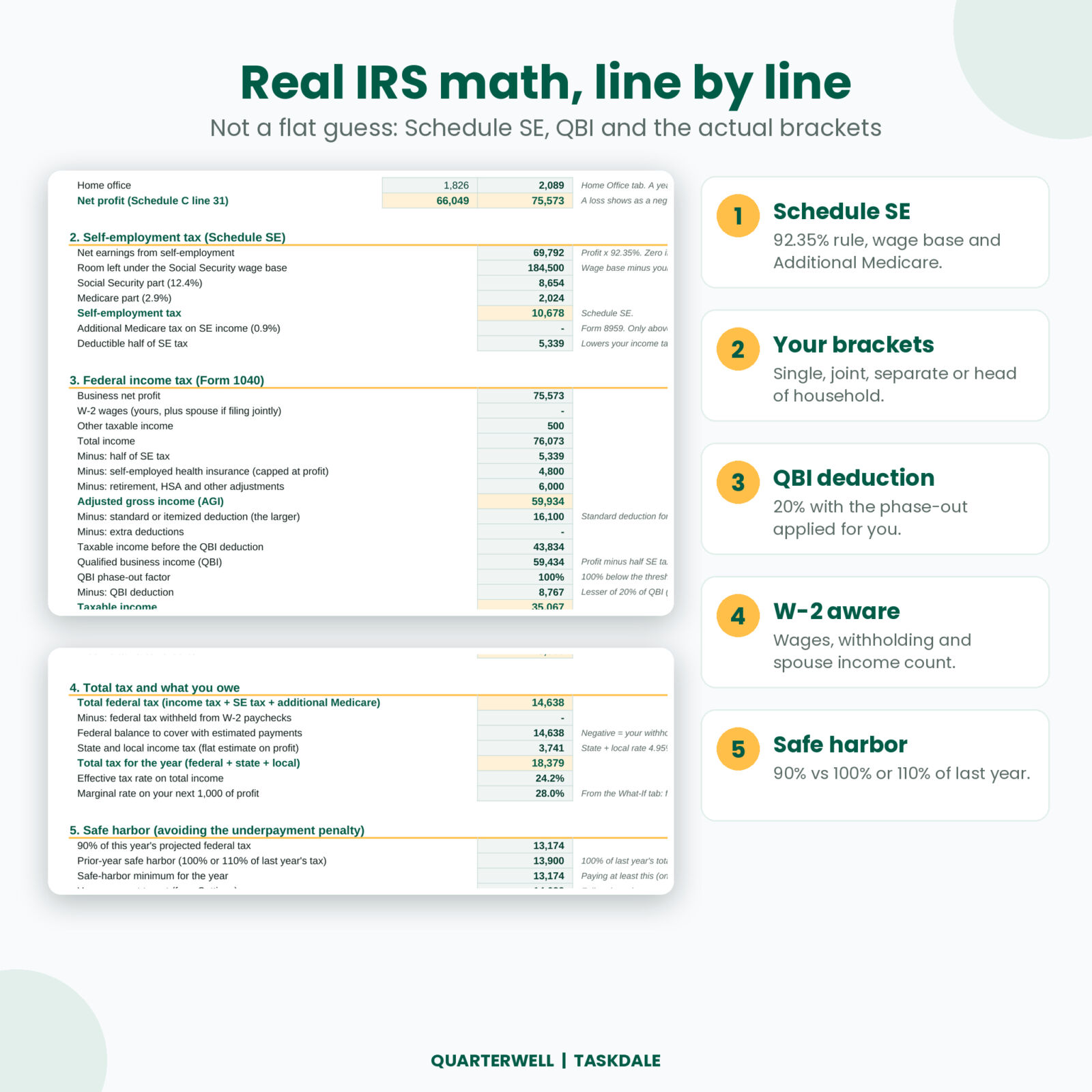
2. Work out self-employment tax
Self-employment tax is 15.3% on 92.35% of your profit: 12.4% for Social Security and 2.9% for Medicare. For a $60,000 profit, that is about $8,478. The Social Security part stops at the wage base, which is $192,300 for 2027, and W-2 wages use up part of that room.
3. Work out federal income tax
Add your profit to any other income, subtract half of your self-employment tax, then subtract the standard deduction ($16,600 for single filers in 2027, $33,200 for joint filers). Most sole proprietors also get the 20% qualified business income (QBI) deduction. Run what is left through the tax brackets for your filing status.
4. Add your state tax
Most states also want estimated payments. A flat rate on your profit gets you close enough to plan. If your state has no income tax, skip this step.
5. Divide by four
Subtract any W-2 withholding, then split what is left into four payments. The free calculator does all five steps the moment you type your numbers.
How much should you set aside from each payment?
You will hear “save 25 to 30%” a lot. It is a rough rule, and it can be far off in both directions. A part-time freelancer with a small profit might need 15%. Someone in a high-tax state with a strong year might need 35%.
A better way is to divide your projected total tax by your projected gross income. That gives your own set-aside rate. The free calculator shows it on the last line. Every time a payment lands, move that percentage into a separate savings account and leave it alone until a due date comes around.
Avoiding the underpayment penalty: the safe harbor rule
The IRS charges a penalty when you pay too little, too late. You can avoid it if your payments, made on time in four parts, add up to at least the smaller of:
- 90% of this year’s tax, or
- 100% of last year’s total tax (110% if last year’s adjusted gross income was over $150,000, or $75,000 if married filing separately)
The prior-year option is popular because you know the number already. Your income can jump and you still will not owe a penalty, though you will owe the balance in April. The free version keeps things simple and does not run this check. The full Quarterwell planner compares both options and tells you the penalty-free minimum.
Common mistakes freelancers make with estimated taxes
- Forgetting self-employment tax. It often costs more than income tax for people with moderate profits.
- Recording net instead of gross. A 1099-K shows the gross amount before platform fees. Log the gross and deduct the fees, or your records will not match.
- Skipping a quarter and paying double later. Penalties build up per quarter, so a late Q1 costs you even if Q2 catches up.
- Missing deductions. Mileage, a home office, software, phone and internet all lower the profit you pay tax on.
- Mixing tax savings with spending money. A separate account makes the set-aside stick.
Free calculator vs the full Quarterwell planner
The free calculator is great for a quick number. When you want the whole year handled, the full planner tracks it for you.
| Feature | Free Lite | Full Quarterwell |
|---|---|---|
| SE tax, federal brackets, state estimate | Yes | Yes |
| Tax years | 2027 | 2026 and 2027 |
| Safe harbor check (90% vs 100% or 110%) | No | Yes |
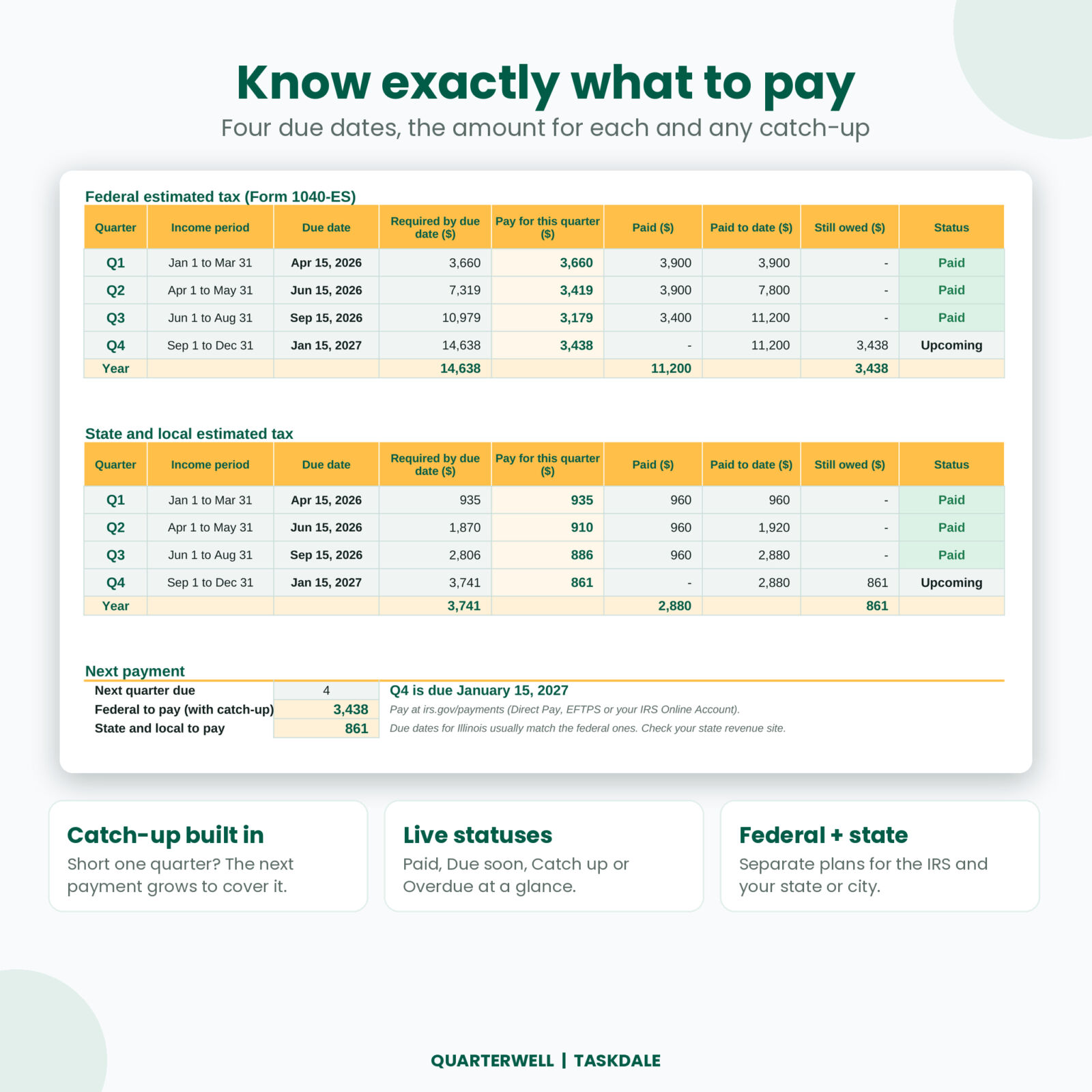
| Quarterly plan with payments and automatic catch-up | No | Yes |
| Income, expense and mileage logs that project your year | No | Yes |
| QBI phase-out, Additional Medicare, W-2 spouse wages | No | Yes |
| Set-aside calculator at average and marginal rate | No | Yes |
| Dashboard, Schedule C summary, 1099 match, home office, What-If | No | Yes |
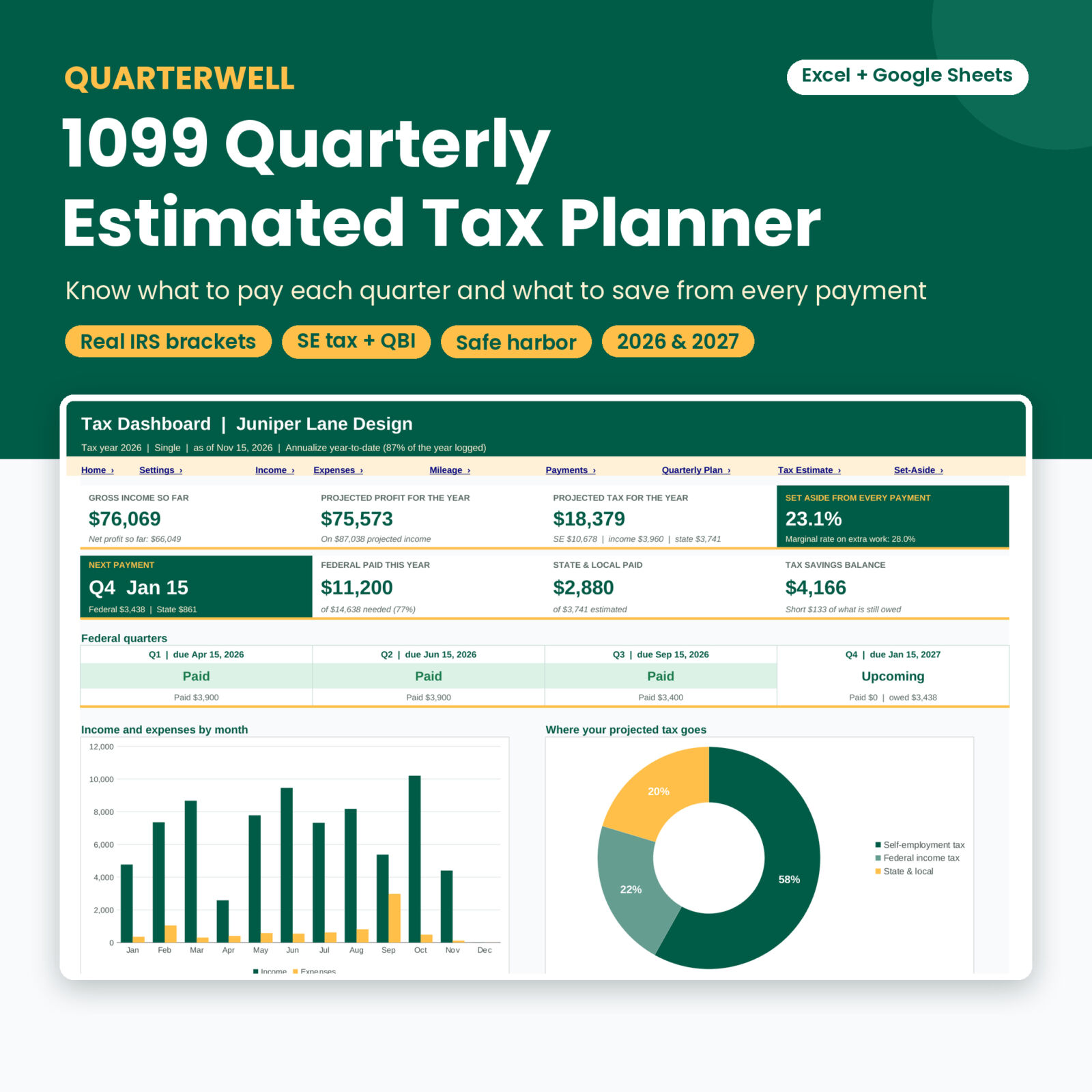
Quarterwell has 16 connected tabs and a 17-page guide. You log income as it comes in, and it projects your year, works out your tax line by line, shows what to pay by each due date, and turns each quarter green when it is paid. At tax time, the Schedule C summary has your totals ready by line.
See the full Quarterwell 1099 tax planner ›
Frequently asked questions
Is the quarterly tax calculator really free?
Yes. Enter your email in the box above and the file downloads straight away.
Does it work in Google Sheets?
Yes. Upload the .xlsx to Google Drive and open it with Google Sheets.
How do I pay estimated taxes?
Pay the IRS online through IRS Direct Pay, EFTPS or your IRS Online Account at irs.gov/payments. Pay your state through its revenue department website.
What if my income changes during the year?
Update your numbers and recalculate. If you underpaid earlier, increase the next payment to catch up. The full Quarterwell planner does that catch-up math for you.
Is this tax advice?
No. The calculator is an estimating tool. Check your final numbers with IRS Form 1040-ES or a tax professional.
Get your free quarterly tax calculator
Five numbers in, your 2027 quarterly payment out.