



Quarterly Estimated Tax Calculator Spreadsheet for 1099 Freelancers
Quarterwell is a quarterly estimated tax calculator spreadsheet for anyone paid on a 1099. Log your income, expenses and business miles, and it tells you what to pay the IRS by each due date, how much of every payment to set aside, and what you can deduct. It works in Microsoft Excel and in Google Sheets.
No flat 25% guess. Quarterwell runs the real math: Schedule SE self-employment tax, the QBI deduction, the actual federal brackets for your filing status, your state rate and the safe harbor rules. Then it splits the result into four payments with the IRS due dates, and it rolls any shortfall into the next quarter so you can catch up.
Who it is for
- Freelancers, contractors and consultants paid on 1099-NEC
- Gig workers, creators and online sellers paid through apps and platforms (1099-K)
- Side hustlers with a W-2 job plus self-employment income
- Sole proprietors and single-member LLCs that file Schedule C
- Married couples filing jointly where one or both spouses freelance
Why this 1099 tax planner is different
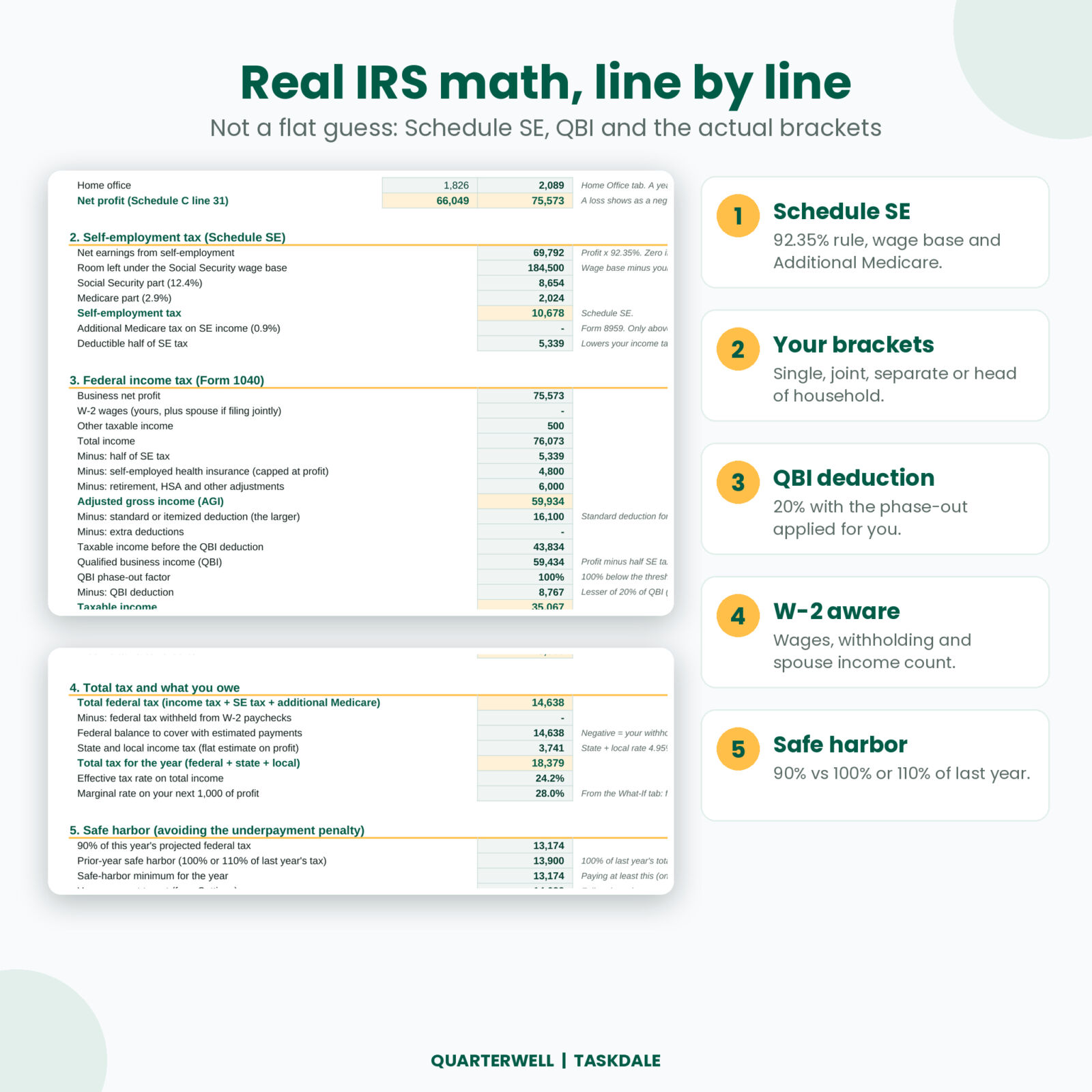
Most self-employed tax trackers stop at a rough set-aside rate. Quarterwell does the full estimate, line by line, so you can see where every dollar comes from:
- Real federal brackets for Single, Married filing jointly, Married filing separately and Head of household, with the standard deduction for each.
- Self-employment tax with the 92.35% rule, the Social Security wage base (reduced by any W-2 wages) and the 0.9% Additional Medicare tax.
- QBI deduction at 20%, with the income phase-out applied for you.
- Safe harbor check: 90% of this year’s tax versus 100% or 110% of last year’s, so you know the smallest penalty-free amount.
- Tax years 2026 and 2027 built in. Switch with one dropdown. Every IRS figure sits on an editable Tax Rates tab.
Features
Quarterly Plan
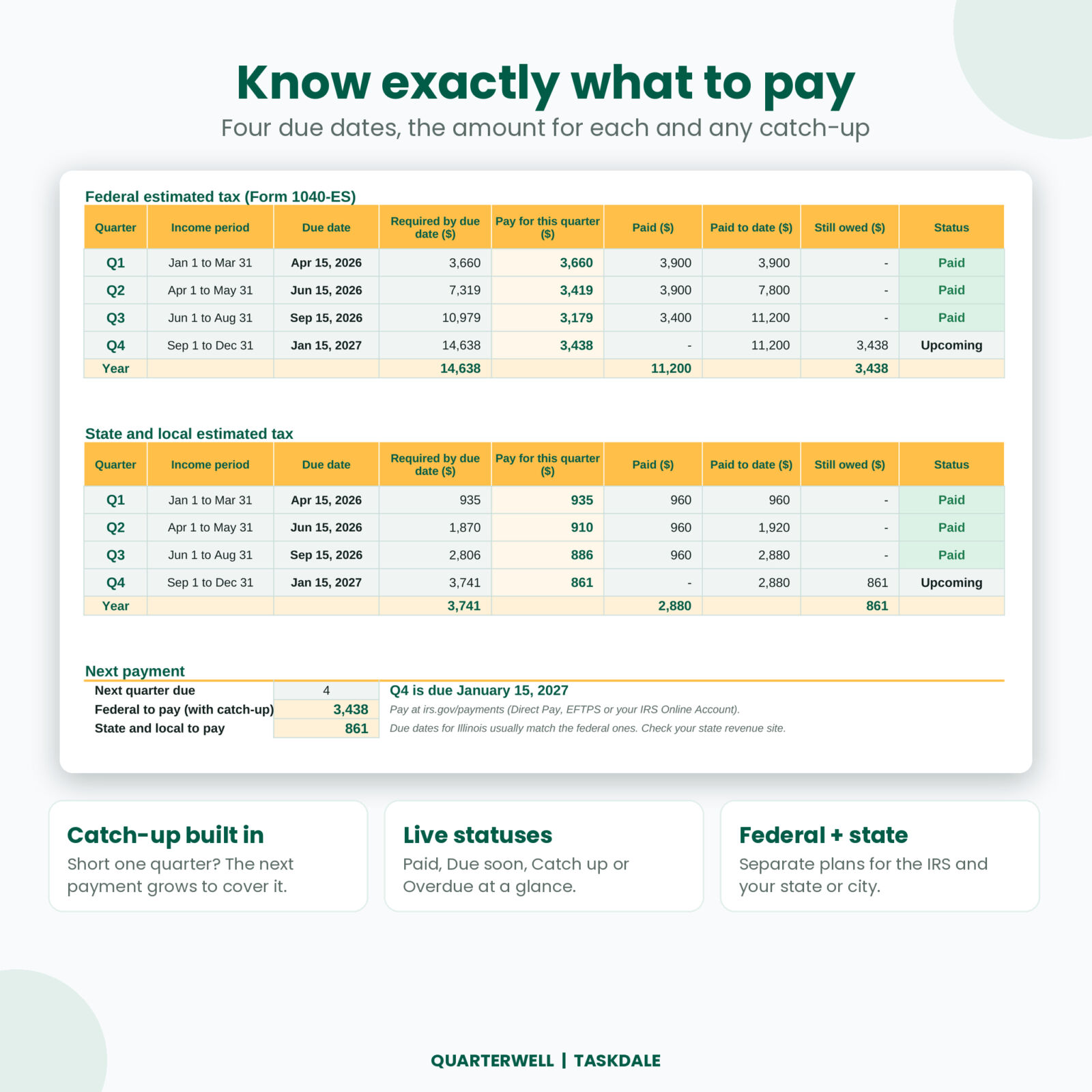
Four due dates, the amount required by each, what you paid, what is still owed and a status that reads Paid, Due soon, Catch up or Overdue. There is a separate plan for state and local estimated tax, plus a Next Payment box with the exact federal and state amounts to send.
Set-Aside calculator
Type a payment you just received and see what to move to savings at your average rate and at your marginal rate. A check-up compares your tax savings with what you still owe this year, and a cheat sheet covers common payment sizes.
Income, expenses and mileage logs
- 500 income rows with gross amount, platform fees, a suggested set-aside on each payment and what you actually saved
- 1,000 expense rows with 26 categories mapped to Schedule C lines, business-use %, the 50% meals rule and a receipt check
- 500 mileage rows at the IRS rate for each trip date, including the mid-2026 rate change, plus parking and tolls
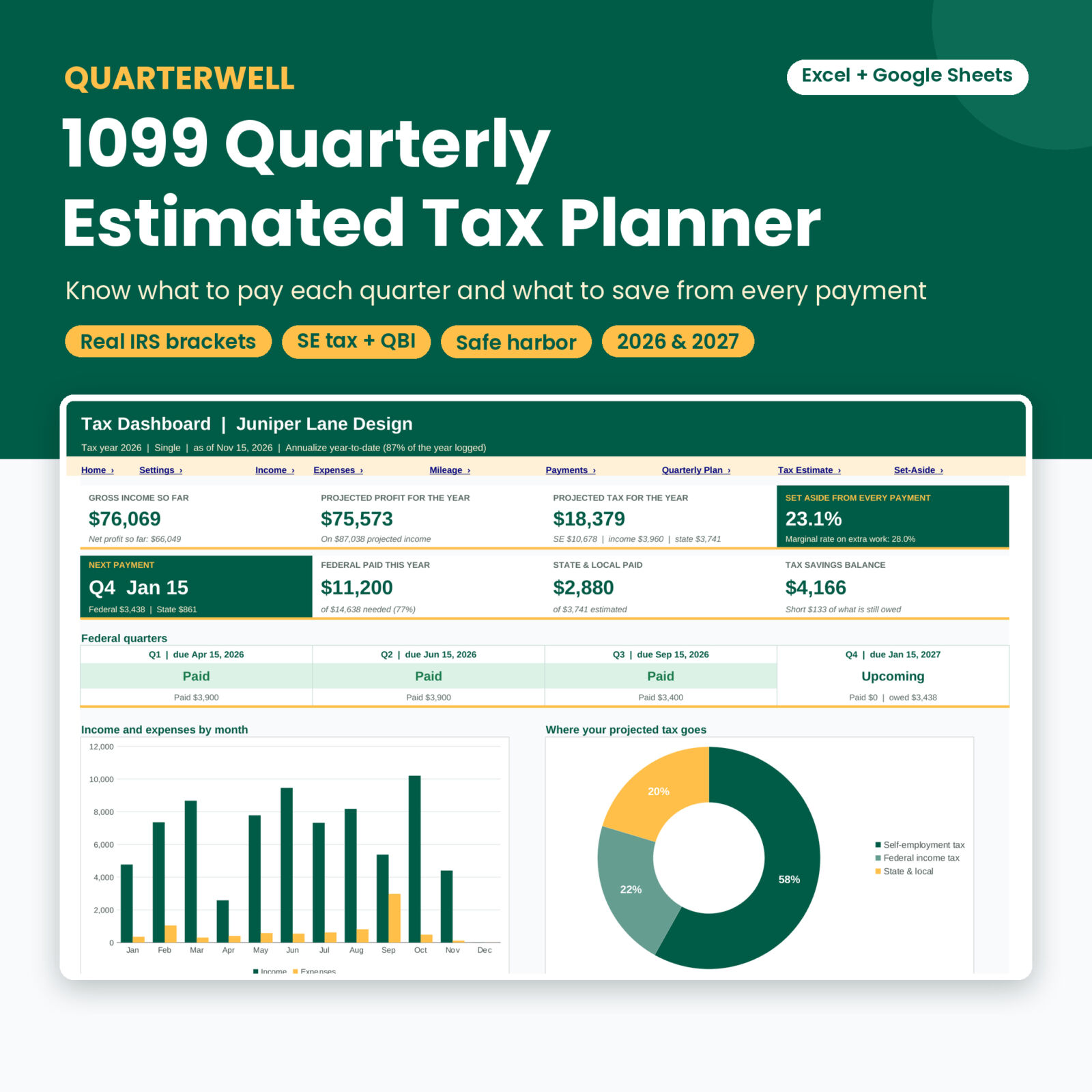
Tax dashboard
Gross income, projected profit, projected tax, your set-aside rate, the next payment, federal and state paid, your tax savings balance and a status strip for all four quarters. Four charts show income and expenses by month, where your tax goes, installments versus payments and your top deductions.
More tabs that save you time
- Home Office: simplified and regular methods side by side, with the profit limit
- 1099 Match: compare every 1099-NEC, 1099-K and 1099-MISC with what you logged
- Schedule C Summary: totals by Schedule C line and quarter, ready for your tax preparer
- What-If: your tax at 12 profit levels you choose, plus your marginal rate on extra work
- Payments: a log of every federal, state and local estimated payment with confirmation numbers
What is included
- Quarterwell 1099 Quarterly Estimated Tax Planner (.xlsx), 16 connected tabs, blank and ready for your numbers
- Quarterwell User Guide (.docx), 17 pages with setup steps, a walkthrough of every tab, troubleshooting and FAQ
How it works
- Set up once. Pick the tax year and filing status, add last year’s tax and AGI, any W-2 wages and your state rate. About 10 minutes.
- Log as you go. Add income when it lands, plus expenses and business trips.
- Save. Move the suggested set-aside to a separate tax savings account.
- Pay. Before each due date, send the amount on the Quarterly Plan and record it. The status turns to Paid.
Early in the year, or before the year starts, choose “My own forecast” and type your expected income and expenses. Once you have a few months of data, switch to “Annualize year-to-date” and Quarterwell scales your real numbers to a full year.
File formats and software
- Microsoft Excel 2010 or newer, including Microsoft 365 (Windows and Mac)
- Google Sheets: upload the file to Google Drive and open it with Google Sheets
- No macros and no add-ins. Formulas are locked without a password so you cannot break them by accident, and white cells are open for typing.
Customize it
Rename or add expense categories and pick the Schedule C line for each. Change the currency symbol, the profit levels on What-If, the cheat sheet amounts and a safety cushion on your set-aside rate. If the IRS updates a figure, type it on the Tax Rates tab and everything recalculates.
Real situations it handles
- A designer with three steady clients who wants one number to pay each April, June, September and January
- A delivery driver logging miles across the July 2026 mileage rate change
- A nurse with a W-2 job and a weekend side business who wants to know if her withholding already covers it
- A couple filing jointly where one spouse freelances and the other earns wages
- A seller whose 1099-K does not match their records and needs to find the gap
Digital download
This is an instant digital download. Nothing ships. You get the files right after checkout and can download them from your account.
Frequently asked questions
How do I calculate quarterly estimated taxes as a 1099 worker?
Estimate your profit for the year, work out self-employment tax and income tax, subtract any W-2 withholding and divide by four. Quarterwell does each step for you and shows the math.
What are the estimated tax due dates?
For 2026: April 15, June 15 and September 15, 2026, then January 15, 2027. For 2027: April 15, June 15 and September 15, 2027, then January 18, 2028. They are on the Tax Rates tab.
How much should I set aside for taxes from each payment?
It depends on your profit, filing status and state. Quarterwell works out your own set-aside percentage and applies it to every payment you log.
What is the safe harbor rule?
You generally avoid the underpayment penalty if you pay at least 90% of this year’s tax or 100% of last year’s (110% if last year’s AGI was over $150,000) on time. Quarterwell compares both.
I have a W-2 job too. Will it work?
Yes. Add your wages and federal withholding. Wages reduce your Social Security tax room and withholding reduces what you pay each quarter.
Does it file taxes or send payments?
No. Quarterwell is an estimating and organizing tool, not tax advice. You pay through the IRS and your state, and you should confirm final figures with Form 1040-ES or a tax professional.
Can I share the file?
Your purchase covers personal use by one buyer. Please do not resell, share or redistribute the file.

Reviews
There are no reviews yet.