

A VBS planner that does the busywork for you
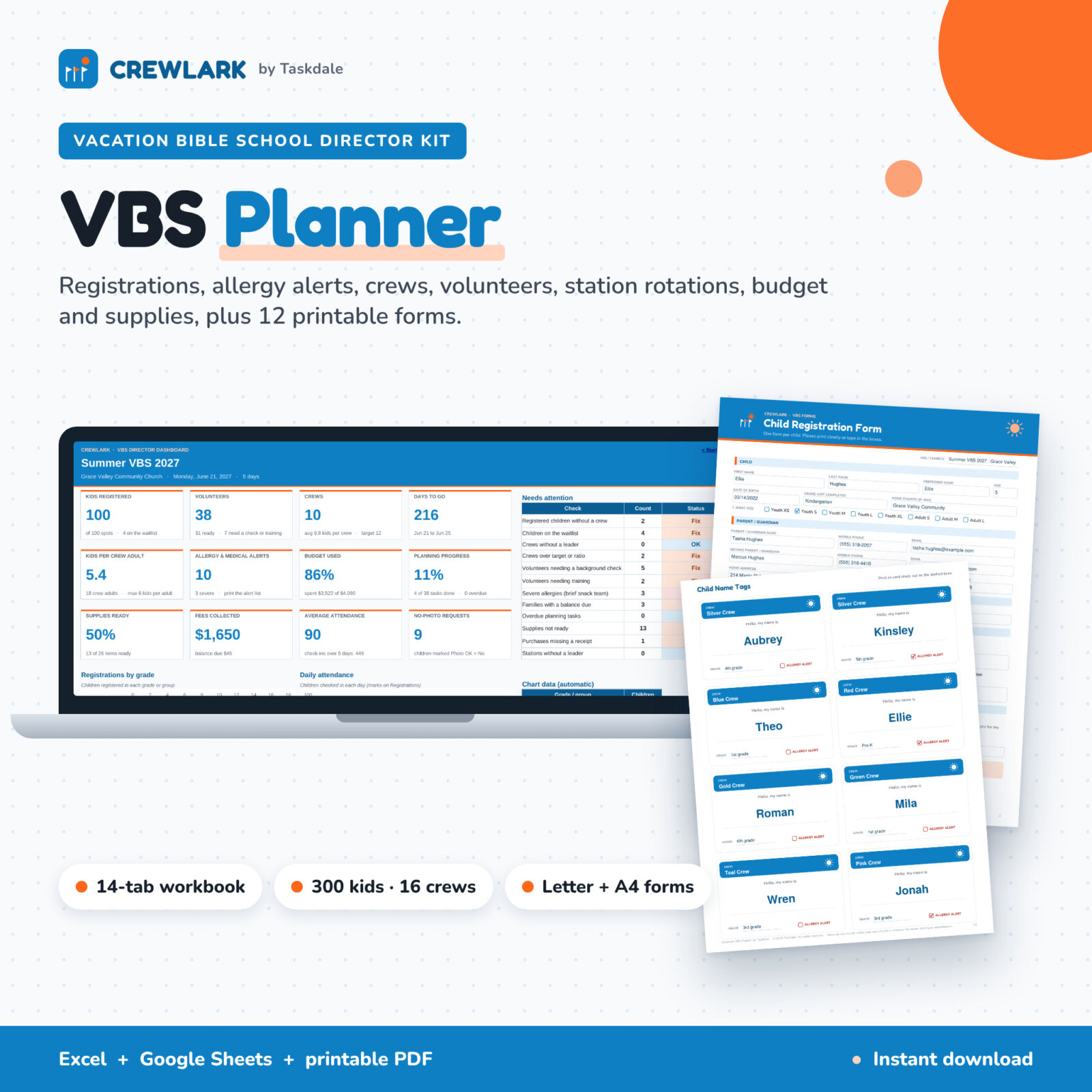
Running Vacation Bible School means juggling registration slips, allergy notes, crew lists, volunteer forms, a station schedule, receipts and a supply closet, usually all at once. The Crewlark VBS Planner brings all of it into one Excel and Google Sheets workbook, then turns your data into the lists you need during VBS week: crew rosters, an allergy and medical alert list, child name tags and a station rotation chart with times. A matching PDF kit gives you 12 printable, fillable forms for everything that still happens on paper.
It is curriculum-neutral, so it works with any theme you buy or write yourself, for a 1 to 5 day program, morning or evening.
Who it is for
- VBS directors and children’s ministry leaders planning a summer program
- Church administrators who handle registrations, fees and the budget
- First-time directors who want a clear plan and a countdown checklist
- Small churches with 20 kids up to large programs with 300 kids, 16 crews and 150 volunteers
What is included
- Crewlark VBS Planner workbook (Excel / Google Sheets): 13 working tabs plus a Start Here tab
- Filled-in example workbook with a complete sample VBS to explore
- VBS Forms Kit PDF, 13 pages, fillable, in US Letter and A4 versions
- User guide (Word) with screenshots, troubleshooting and FAQs
Features of the VBS planner spreadsheet
Live dashboard
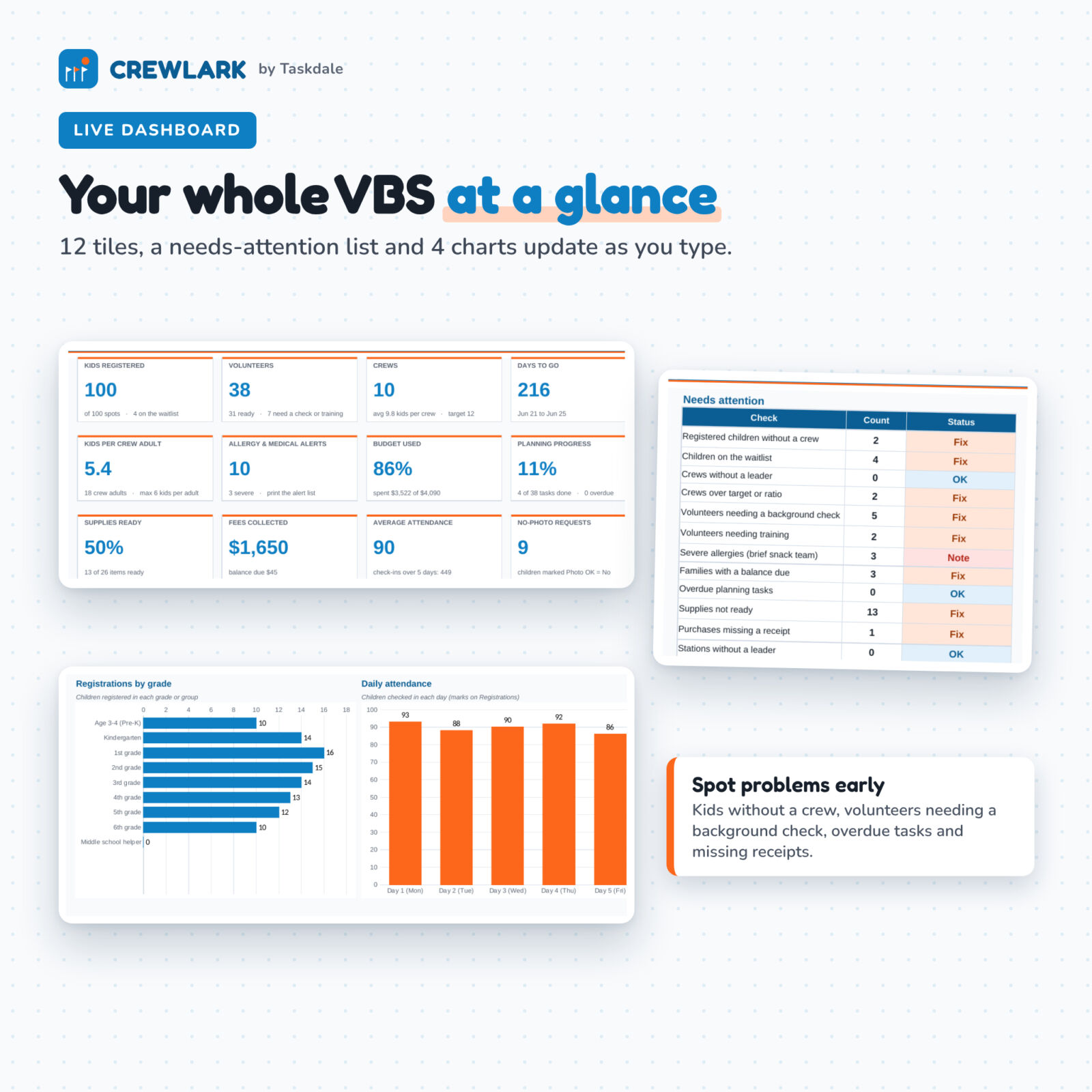
Twelve tiles show kids registered, waitlist, volunteers ready, crews, days to go, kids per crew adult, allergy and medical alerts, budget used, planning progress, supplies ready, fees collected and average attendance. A Needs attention list flags 12 checks with OK or Fix, such as registered children without a crew, crews without a leader, volunteers needing a background check, overdue tasks and purchases missing a receipt. Four charts show registrations by grade, daily attendance, budget planned vs actual and volunteer readiness.
Registrations with allergy alerts
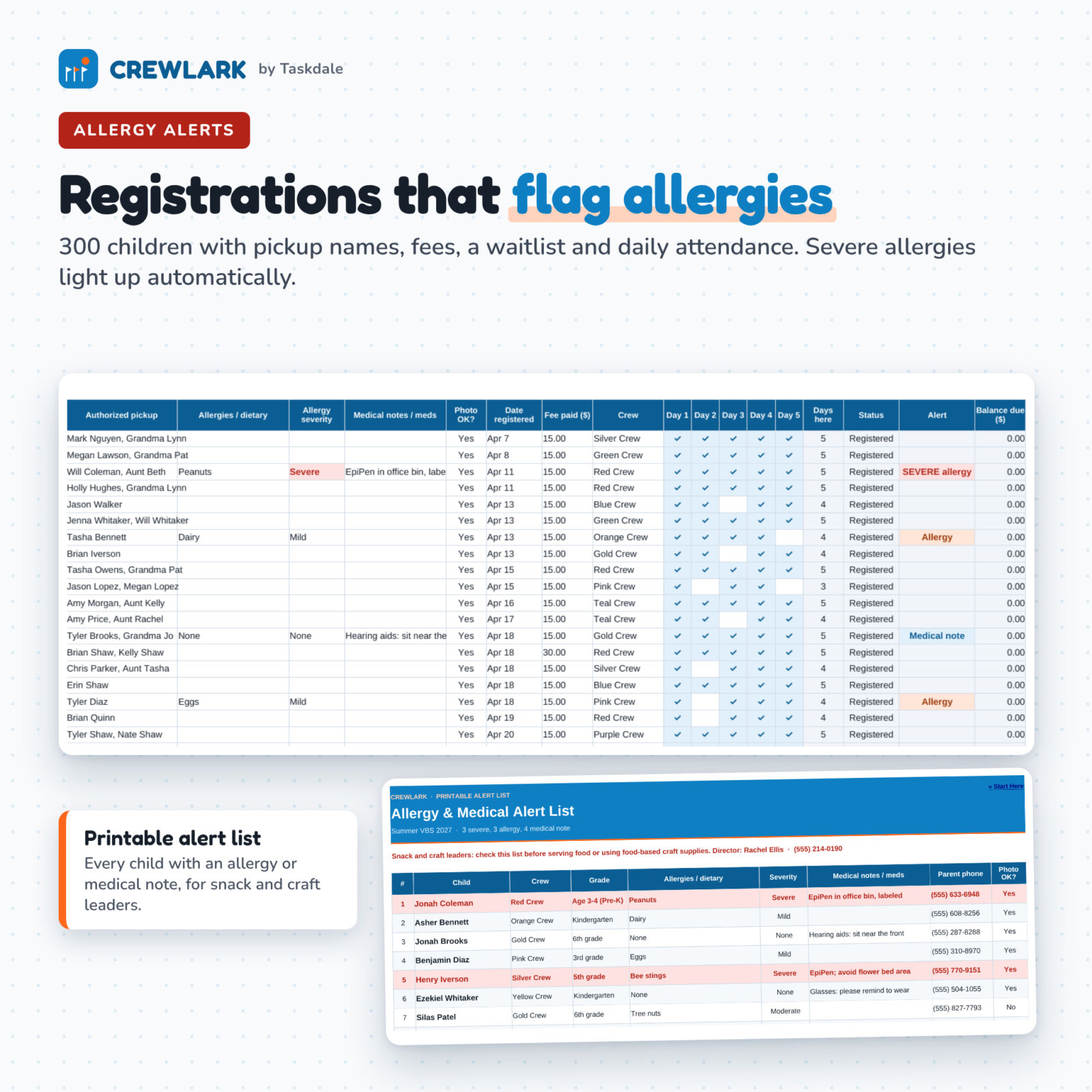
- Room for 300 children: grade, age, shirt size, parent contact, authorized pickup names, allergies, severity, medical notes and photo permission
- Alerts fill in by themselves: SEVERE allergy, Allergy or Medical note (entries like “None” are ignored)
- Registration cap with an automatic waitlist in sign-up order
- Fees paid and balance due, plus daily attendance check marks
Crews and volunteers
- Up to 16 crews with leader, assistant, grades and meeting spot; kids assigned, open spots, kids per adult and allergy count per crew
- Up to 150 volunteers with role, crew or station, days available, shirt size, background check date and safety training
- Status shows Ready, Needs check, Check expired (based on the years you set) or Needs training
Automatic station rotations and daily schedule
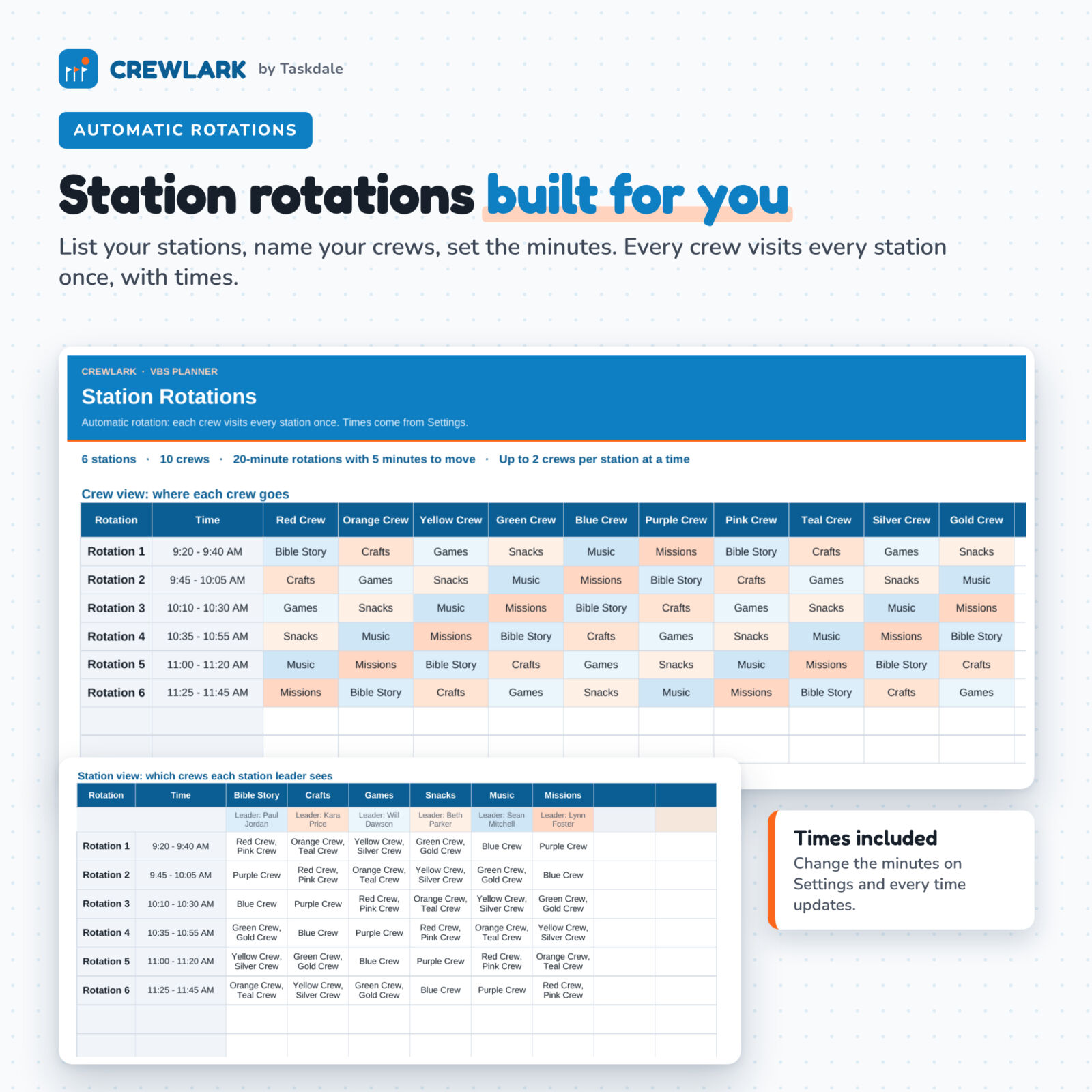
List up to 8 stations and set the minutes for check-in, opening, each rotation, moving between stations, closing and pickup. The rotation chart sends every crew to every station once with start and end times, and a station view shows each station leader which crews arrive when. The Daily Schedule tab builds the run of show automatically and adds a day-by-day plan for theme, Bible story, key verse, snack, craft, game, missions focus and songs.
Budget, supplies and countdown
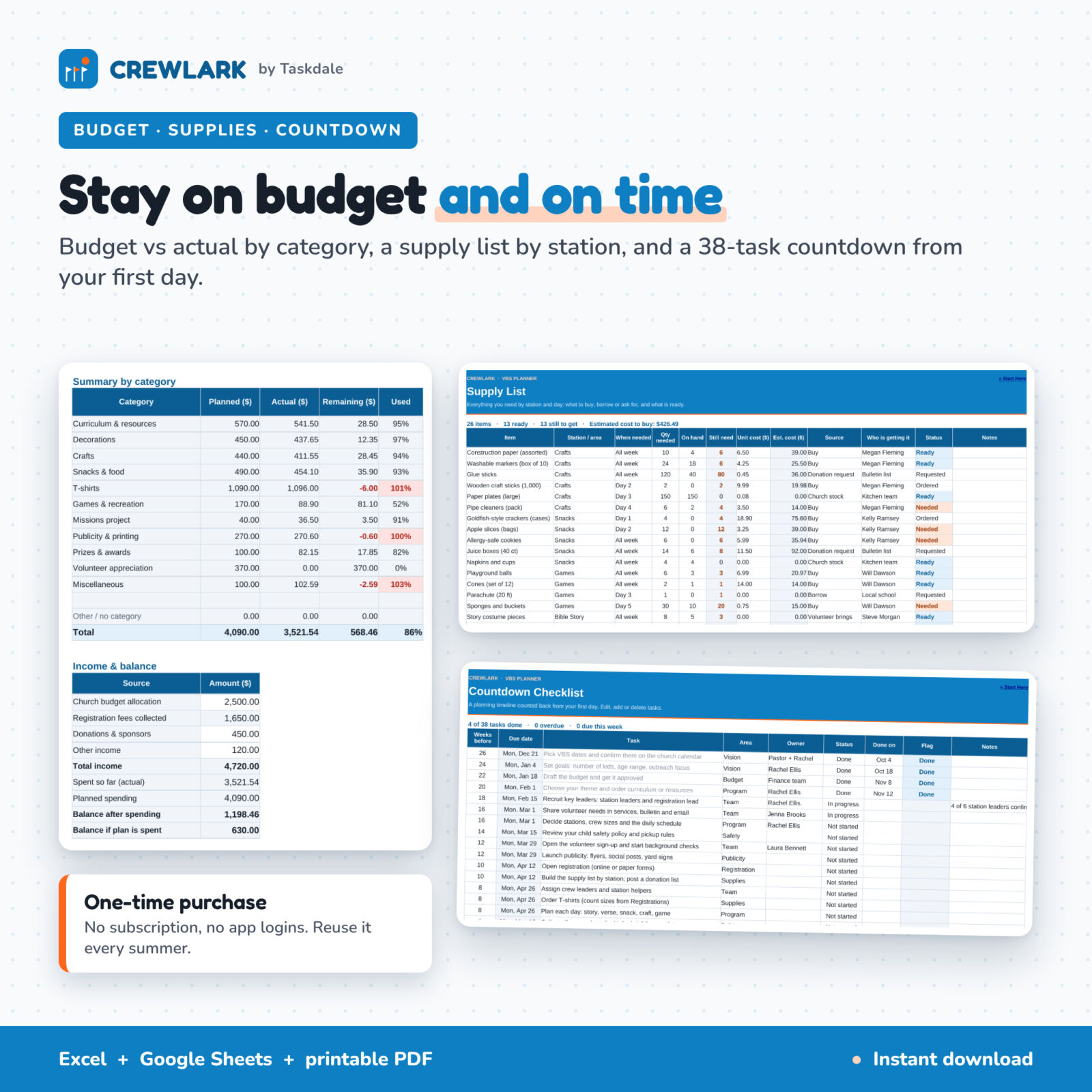
- Budget vs actual: 150 lines, 12 editable categories, receipts, reimbursements, income (church allocation, registration fees, donations) and remaining balance
- Supply list: 200 items by station and day with quantity needed, on hand, still need, estimated cost, source and status
- Countdown checklist: 38 planning tasks from 26 weeks out to after VBS, with due dates counted back from your first day and overdue flags
Print-ready lists from your data
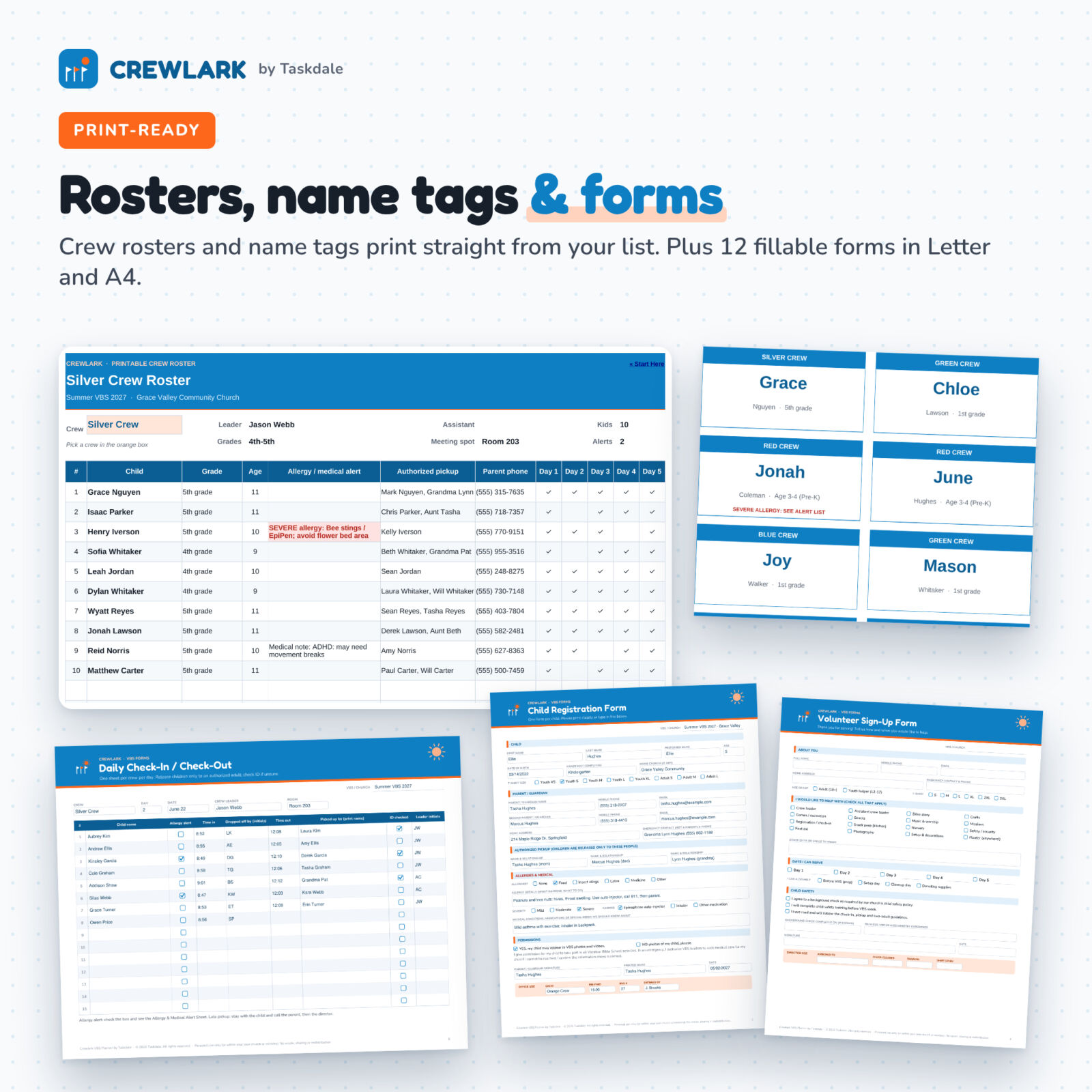
- Crew Roster: pick a crew and print children, alerts, pickup names, phone numbers and attendance
- Alert List: every child with an allergy or medical note for snack, craft and crew leaders
- Name Tags: 10 per page with crew, grade and an allergy flag, for all crews or one crew
The printable VBS forms kit
Type into the fields in a free PDF reader or print blank copies: child registration form (with pickup authorization, medical consent and photo release), allergy and medical alert sheet, volunteer sign-up form, volunteer sign-up sheet, daily check-in / check-out sheet, crew roster, station rotation chart, daily schedule run sheet, supply checklist, incident and first-aid report, child name tags and volunteer name tags.
How it works
- Enter your VBS name, first day, number of days, currency, times and stations on Settings.
- Name your crews and add leaders.
- Add volunteers and registrations, then pick a crew for each child.
- Watch the dashboard, rotation chart and schedule update, then print rosters, alert lists and name tags.
File formats and requirements
- .xlsx workbook for Microsoft Excel 2016 or newer, Microsoft 365, Excel for Mac and Google Sheets (free Google account)
- Fillable PDF for Adobe Acrobat Reader (free) or another desktop PDF reader; prints on any home or office printer
- .docx user guide for Word, Google Docs or any word processor
- No macros, add-ons or subscriptions
Customization
Choose any currency symbol once on Settings. Edit grades, shirt sizes, volunteer roles and budget categories. Set your registration cap, target crew size, kids-per-adult limit and background check validity to match your church’s child safety policy. Every tab is protected with no password, so formulas stay safe but you can unlock anything you want to change.
Instant digital download
After checkout you get the workbook, filled-in example, forms kit (Letter and A4) and user guide right away. Nothing is shipped.
Use cases
- A morning VBS with 120 kids, 10 crews and 6 stations
- An evening family VBS over three nights
- A small-church VBS where one person handles registration, budget and supplies
- A day camp or summer kids club run by a children’s ministry team
FAQ
Does this VBS planner work in Google Sheets?
Yes. Upload the .xlsx file to Google Drive and open it with Google Sheets. Formulas, dropdowns, color alerts and charts carry over.
Does it include a VBS curriculum or theme?
No. It is a planning and organizing tool that works with any curriculum or theme.
How many children and volunteers can it track?
300 children, 16 crews, 8 stations, 150 volunteers, 150 budget lines, 200 supply items and 60 tasks.
Can I type into the forms?
Yes. The forms PDF is fillable in Adobe Acrobat Reader and other desktop PDF readers, or you can print blank copies.
Can I use it for a shorter or evening VBS?
Yes. Set 1 to 5 days and any start time on Settings; every time and date updates.
Can I use my own currency?
Yes. Type your symbol once on Settings and every money summary uses it.
Is it a subscription?
No. It is a one-time purchase you can reuse every summer.
License: personal use only, or use within your own church or ministry. You may not resell, share, or redistribute the files. © 2026 Taskdale. All rights reserved.
Reviews
There are no reviews yet.