Most families have a cook whose recipes live only in their head. “A handful of this, cook it till it looks right.” Then one day you want that exact soup and there’s no one left to ask.
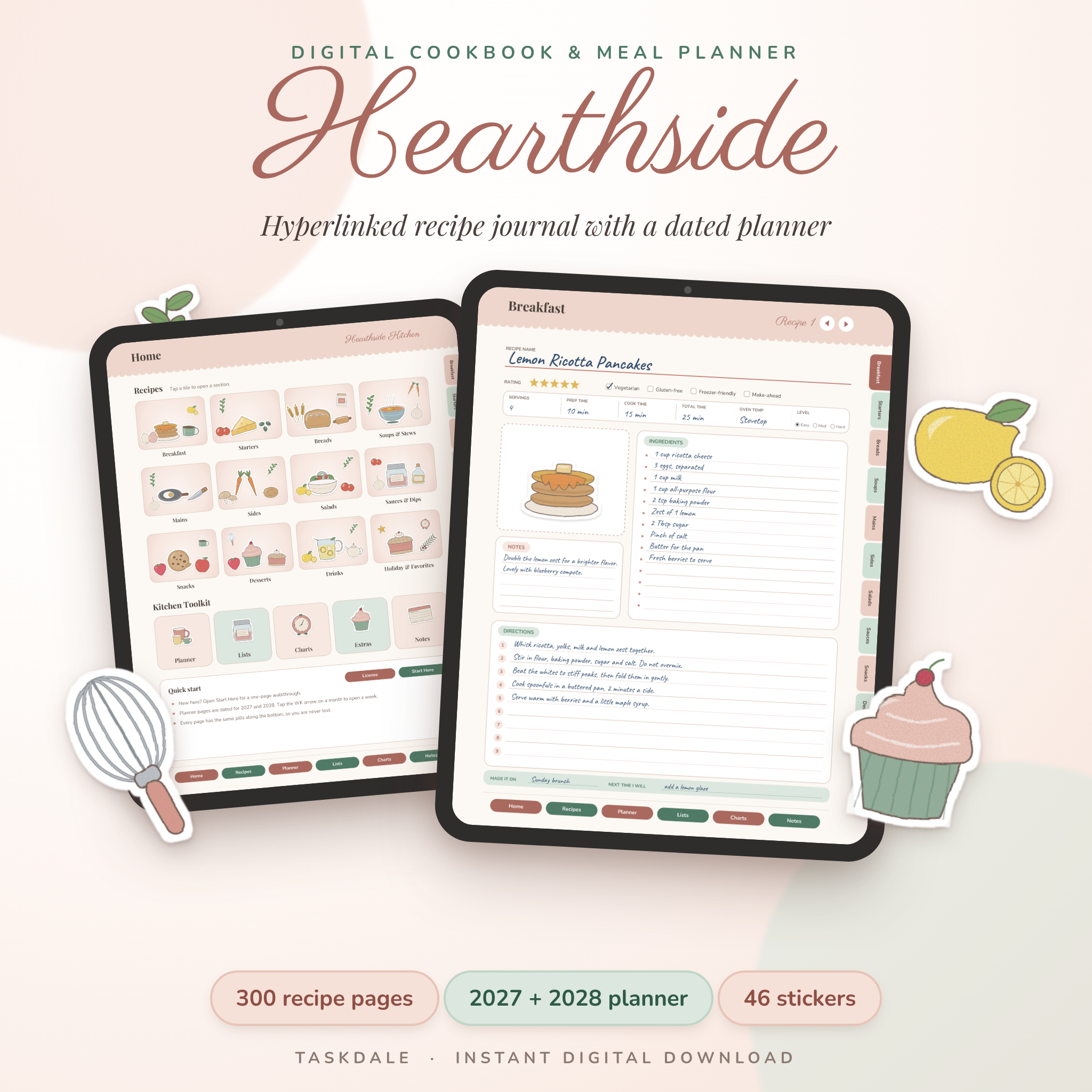
A digital cookbook template is a quick way to stop that happening. You get the structure of a real cookbook (sections, an index, a consistent page for every recipe) and you fill it with your family’s food. On a tablet it behaves like an app. Printed, it becomes a binder you can hand down. This guide covers how to build one properly, using the Hearthside Digital Recipe Book as the example.
What a digital cookbook template gives you
A blank notes app can hold recipes. It can’t make them feel like a book. A good template adds three things:
- Sections with dividers, so desserts don’t get mixed up with soups
- An index per section, so you can find a recipe in two taps
- Matching recipe pages, so every recipe has times, servings, ingredients, method and notes in the same place
Hearthside is a 504-page hyperlinked PDF built this way. Tabs run down the side, buttons sit along the bottom, and every page has a quick way back home. It comes in US Letter and A4, and you can fill it on a tablet, type on a laptop or print the pages and write by hand.
Step 1: Collect the recipes before you write any
Start a list of the dishes that make your family yours. Holiday food. Birthday cakes. The Sunday stew. The thing your aunt brings to every gathering. Then go and get them:
- Ask in person, with your phone recording. Older cooks explain better while talking than writing. You’ll catch “I add a pinch of sugar, don’t tell anyone” moments.
- Cook alongside them. Measure their “handful” with a real measuring cup as they go.
- Photograph old cards and notebooks. The handwriting is part of the story.
- Send a group message. Ask each relative for their two best recipes. Set a deadline or it’ll take a year.
Step 2: Sort into sections
Hearthside has 12 sections and 300 recipe pages: Breakfast, Starters, Breads, Soups and Stews, Mains, Sides, Salads, Sauces and Dips, Snacks, Desserts, Drinks, and Holiday and Favorites. Each opens with an index listing 25 recipe slots. Tap a number and you land on that page.
The Holiday and Favorites section is the one to fill first in a family cookbook. Those are the recipes people will look for.
Step 3: Pick a page style for each dish
This is where Hearthside differs from most templates. Instead of one recipe layout, there are five, and every section mixes them:
- Classic Photo: a photo frame for dishes that deserve a picture
- Journal Lined: room for stories and long instructions
- Minimal Dotted: clean and simple
- Kitchen Card: compact, like a traditional recipe card
- Baker’s Page: cups, grams and ounces columns for people who weigh their flour
Recipe pages include a star rating, diet checkboxes (vegetarian, gluten-free, freezer-friendly, make-ahead), prep and cook times and a notes box.
For a family cookbook, use the Journal Lined page for recipes with a story attached. “Grandad made this every Christmas Eve after midnight mass” belongs on the page, right above the ingredients.
Step 4: Write it so someone else can cook it
The test of a family recipe is whether a cousin who’s never made it can follow it. A few rules:
- Convert vague amounts. “A handful of rice” becomes “about 75 g (1/3 cup)”.
- Give oven temperatures in both C and F if family lives in different countries.
- Add visual cues: “until golden and the edges pull away from the pan”.
- Note who the recipe came from and roughly when.
- Write the tricks in the notes box. That’s where the family secrets go.
Hearthside’s quick-reference charts help here: measurement conversions, oven temperatures, food safety, ingredient substitutions, and a cups-to-grams and pan size chart.
Step 5: Make it look like yours
The template includes 46 transparent PNG stickers in two packs (Kitchen Tools, and Food and Ingredients): teapots, whisks, lemons, cupcakes and more. Drop them onto pages in your notes app. Paste in photos of the finished dish, or of the person whose recipe it is.
Step 6: Print it, share it or both
Keep the digital copy as your master and back it up. Print the favourites for the kitchen, or print the whole thing as a gift. One tip: Hearthside’s tabs and header bands run to the page edge, and most home printers can’t print right to the edge, so some trimming may happen. The user guide has printing tips, and a print shop can handle full-bleed pages.
A family cookbook makes a lovely gift for a parent’s big birthday, a new couple or a grown child moving into their first place.
The bonus meal planner
Hearthside also includes a dated meal planner for 2027 and 2028: two year-at-a-glance pages, 24 monthly calendars and 106 weekly pages. Weeks start on Sunday, beginning December 27, 2026. Each week has a meal grid with prep ahead, grocery needs and notes, plus six grocery list pages sorted by aisle, pantry and freezer pages and spending trackers.
Who it suits, and who it doesn’t
It suits families preserving recipes, bakers who care about grams, home cooks with a growing pile of favourites, and anyone making a cookbook as a gift.
It’s not ideal if you want an undated planner (the planner part is dated 2027 to 2028, though the recipe pages work any year), or if you expect recipes already filled in. The pages arrive blank, and the sample entries in the listing photos are only examples. It’s also a PDF you write on, not an editable layout, so headings and design stay fixed.
Digital cookbook template FAQ
What app do I need for a digital cookbook template?
Any PDF reader or note-taking app that can follow internal links and let you type or draw, such as GoodNotes, Notability or Xodo. Try a few taps after importing, since link behaviour varies between apps.
Can I print my digital cookbook?
Yes, for personal use. Print at 100 percent. Pages with edge-to-edge tabs may get trimmed slightly on home printers.
How many recipes should a family cookbook have?
Thirty to fifty well-written recipes make a meaningful book. Hearthside has room for 300, so it can keep growing over years.
Can I use the stickers elsewhere?
Yes, in your own personal planners and notes. Selling or sharing them isn’t allowed.