Notion is brilliant and slightly dangerous. You open a blank page to plan your week, and three hours later you’ve built a colour-coded database of your houseplants and planned nothing. If your brain likes shiny new systems, an ADHD Notion template can save you from that trap: the structure is already there, so you just use it.
This guide looks at what a good one should do, how to run a messy real-life week through it, and an honest take on one template built for this, Calm Chaos, including who’d be better off with something else.
What an ADHD Notion template should do
Most Notion setups fail for the same reasons paper planners do. Too many pages, too much maintenance, and a sense of failure after a messy week. A good template flips that:
- One home page. You open one dashboard and see today. Everything else waits until you need it.
- Fast capture. A brain dump inbox where thoughts land in two seconds, sorted later (or never).
- Planning by energy. Some days you can do deep work. Some days you can reply to one email. Both should have a list.
- Nothing that scolds. Overdue tasks should be flagged, not shouted about.
- One check-in instead of five trackers. Mood, sleep, water and habits in one quick entry.
Running a real week through an ADHD Notion template
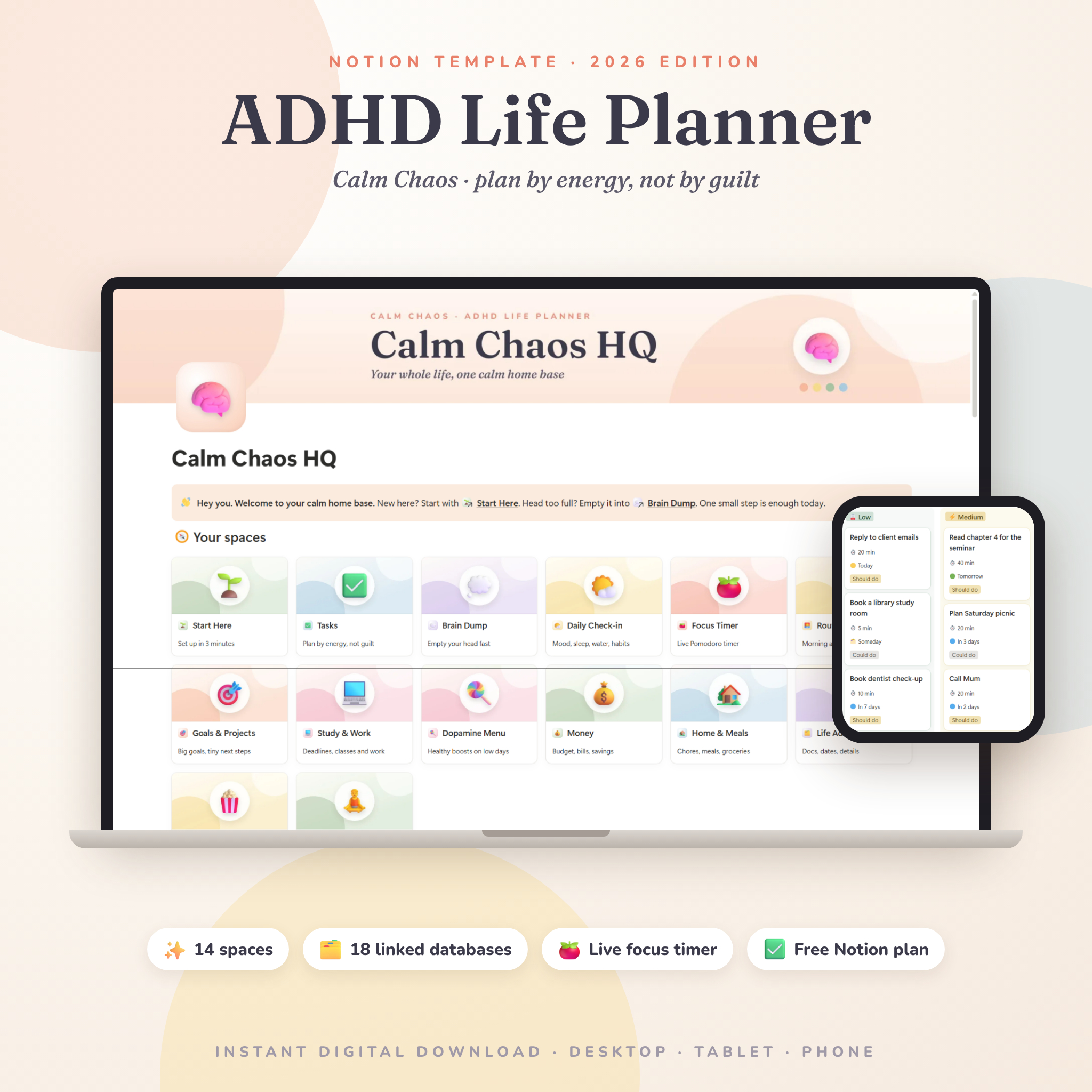
Here’s how a normal, slightly chaotic week looks with Calm Chaos, the ADHD Notion planner on Taskdale.
Monday, 8:30am: open HQ
The HQ dashboard shows what’s due today, a few quick wins under 15 minutes, your unsorted brain dump, bills due this week and the chores that need you. That’s the whole morning view. You pick one task and start.
Monday, 2pm: energy crash
Every task in Calm Chaos has a Low, Medium or High energy level. Switch to the “By energy” board and pick something from the Low column, like booking the dentist. Still a win.
Tuesday: can’t get started
Open the Focus Timer. It runs inside Notion with a live clock and a soft chime, with presets for a Tiny start (10 minutes on, 2 off), Classic 25/5, Deep work 50/10 or your own custom length. Ten minutes is a very low bar. Often that’s enough to get going.
If even that feels like too much, the Dopamine Menu lists quick boosts you’ve chosen for stuck, bored or low days, organised like a restaurant menu: starters, mains, sides, desserts and specials.
Wednesday: the “quick” task that wasn’t
You estimated 20 minutes for an expense report. It took 70. A smart column compares your estimate with the real time. After a few weeks, you have honest data on how long things take you, which makes planning far less painful.
Thursday: life admin
The Life Admin space keeps documents and renewals with expiry alerts, plus important dates. Passport, car licence, insurance. The birthday countdown even shows the age someone is turning, which saves an awkward card.
Friday and the weekend: totally ignored
It happens. Nothing breaks. Overdue tasks show a warning without guilt, chores reschedule themselves, and on Sunday the Weekly Reset gives you a 20-minute checklist to tidy up and start fresh.
Everything else inside Calm Chaos
The template has an HQ plus 14 spaces and 18 connected databases:
- Tasks: Today, a Now / Next / Later board, By energy board, Quick wins, Calendar, All tasks and Done.
- Brain Dump: fast capture, an Unsorted view and an Idea garden.
- Daily Check-in: mood calendar, mood board, habit tracker, sleep and water.
- Routines: morning launch, evening wind-down, an out-the-door check and a routine builder.
- Goals and Projects: goals linked to projects linked to tasks, with automatic progress bars.
- Money: monthly budget, spending and income, bills and subscriptions, and savings jars. Budget bars turn orange near the limit and red past it.
- Home and Meals: chore rotation, meal calendar and a grocery list sorted by aisle.
- Study and Work boards, and Read and Watch for books, films, series, podcasts and games.
Every database has sample entries so you can see how it works, and you delete them when you’re ready.
Setting it up
After you buy, you open the Access Guide PDF, click the template link, and hit Duplicate in Notion. The whole planner copies into your workspace. A Start Here page walks you through a 3-minute setup. There’s also a 19-page user guide covering every space, customising, troubleshooting and FAQs.
The free Notion plan works for every feature. It runs in the Notion app on Windows, Mac, iPhone, iPad and Android, and in any modern browser.
Who it’s for, and who should skip it
Good fit:
- Adults with ADHD, or anyone whose brain works a little differently
- People who like the idea of Notion but get lost building it
- Students, parents, freelancers and busy professionals
- Total beginners. No Notion skills needed
Probably not for you if:
- You think best with a pen. A paper or stylus planner will suit you better.
- You work offline a lot. The Focus Timer needs an internet connection.
- You want something tiny. With 14 spaces, it’s a whole life system, even if you only use HQ at first.
My suggestion: use only HQ and the Brain Dump for the first week. Add the Daily Check-in in week two. Let the rest wait.
FAQ
Do I need Notion experience?
No. You duplicate the template with one click and follow a 3-minute setup page. Sample entries show how each part works before you add your own.
Is an ADHD Notion template better than a paper planner?
It depends on where you already spend your day. If you’re on a laptop or phone constantly, Notion keeps your plan where your attention already is. If screens pull you into distraction, paper may suit you better.
Does it work on my phone?
Yes. It works in the Notion app on iPhone and Android, as well as on tablets and computers. Setup is easiest on a computer.