The best weekly planner layout is the one that matches the shape of your week. A nurse on rotating shifts needs hours. A parent with three kids needs room for lists. A student needs subjects. Pick the wrong layout and you will feel like the planner is fighting you by Wednesday, even if it is pretty.
Below, the six most common weekly layouts are compared side by side: what each one looks like, who it suits, where it falls short, and which Taskdale printable uses it. There is also a simple way to test a layout for a week before you print fifty pages of it.
If you have bought planners before and left them half empty, there is a fair chance the layout was the problem, not you.
Quick picks
| Product | Best for | Price | Link |
|---|---|---|---|
| Washi Doodle Weekly Planner | Trying several layouts in one set | $5.00 | View |
| FocusFrame Weekly Planner Dashboard | Seeing the whole week on one landscape page | $4.99 | View |
| Clearweek Weekly Planner Printable | Editing the layout in Word | $5.00 | View |
| Rainbow Days Homeschool Weekly Planner | Subjects by day for homeschool families | $6.99 | View |
The six layouts at a glance
| Layout | What it looks like | Best for | Weak spot |
|---|---|---|---|
| Seven boxes | One open box per day, often with a goals corner | Light weeks, notes and reminders | Boxes overflow on busy days |
| Hourly columns | Seven columns with time slots down the side | Appointments, shifts, time blocking | Little room for to-do lists |
| Category lists | Lists grouped by area: Work, Home, Errands, Calls | Long task lists, households | Days and times are vague |
| One-page dashboard | Landscape page with schedule, goals, habits and notes | Goal-focused weeks | Small writing space per day |
| Lined week with priorities | Seven lined sections plus a main focus and Top 3 | Freelancers, students, mixed weeks | Plainer look |
| Subject grid | Subjects down the side, weekdays across | Homeschool, tutors, classes | Only useful for lessons |
Now for the detail on each one.
Seven boxes: the classic week
This is the layout most people picture. Seven boxes, one per day, sometimes with an eighth box for goals or notes. It is open, friendly and quick to fill. You write “dentist 3pm” and “bins out” and you are done.
It shines for weeks that are mostly routine. A retired couple tracking clubs, a grandchild’s birthday and the window cleaner will find seven boxes plenty. It also works as a family fridge page, where everyone glances at the day and moves on.
Where it breaks: busy days. A Tuesday with four meetings, a school pickup and six errands simply does not fit in a box the size of a sticky note. People then start writing in the margins, and the page turns to soup.
A useful fix is a lined or checklist version of the same layout. Lines make you write smaller and neater, and tick boxes make finished tasks easy to see.
If you are not sure which layout suits you, a set that includes several gives you room to test.
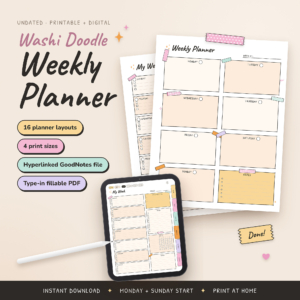
Washi Doodle Weekly Planner
Price: $5.00 | Best for: testing several layouts before choosing
Washi Doodle has 16 layouts in a soft peach style: classic seven-box, lined and checklist weeks, a one-page My Week, an hour-by-hour schedule from 6am to 9pm, and a category to-do list. It comes as a printable in US Letter, A4, A5 and Half Letter, a fillable PDF, and a 255-page hyperlinked PDF for GoodNotes, Notability, Noteshelf and Samsung Notes. Print one of each weekly layout and use a different one each week for a month.
Hourly columns: when your week runs on a clock
An hourly layout gives each day a column with time slots, usually from early morning to evening. You can see at a glance that Thursday is booked from 9 to 2 and free after 3. That is something boxes can never show.
This layout suits people whose time is not their own. Shift workers, therapists with back-to-back clients, students with a fixed timetable, parents whose afternoons are a relay of clubs. It is also the natural home for time blocking, where you give each task a slot before the day starts.
Take a physiotherapist seeing 22 clients a week across two clinics. A box layout tells her she has clients on Wednesday. An hourly layout tells her she has a 40-minute gap at 11:20, just enough to write up notes. That gap is gold.
The weak spot is lists. There is rarely room for “buy printer ink” or “call the bank” unless you squeeze them into a slot. Pair it with a separate to-do page, or choose a version with a small task strip down the side. For more on this style, see this guide to an hourly planner printable in 30-minute blocks.
Category lists: for weeks made of errands
Some weeks are not about times at all. They are about a pile of jobs: emails to send, calls to make, things to pick up, forms to sign. A category layout splits the page into groups like Must Do, Work, Home, Errands, Calls and Emails, with a brain dump space for anything else.
This suits households and anyone who batches. You do all the calls while waiting for the kettle. You do all the errands in one trip on Saturday. Grouping makes that easy, because the calls are already sitting together.
A mum of three running a small cake business might have 30 tasks in a week, but only four appointments. For her, a category list carries the week and a small calendar strip covers the rest.
The weak spot is timing. A list does not tell you when anything happens, so deadline tasks can slide. Put a date beside anything with a hard due date, and circle it.
One-page dashboard: the whole week at once
A dashboard layout turns the page sideways and puts everything on it: the week’s schedule along the top, two or three goals in the middle, habits and notes along the bottom. Nothing hides on another page.
This suits people working toward something. Training for a first 10K. Finishing a course. Saving for a deposit. The goals sit right beside the days, so on Thursday night you can see that you have run twice but not studied once. That small nudge is the whole value.
The weak spot is space per day. Each day gets a narrow strip, so very busy weeks feel cramped. Many people solve this by pairing the dashboard with a daily page on heavy days.
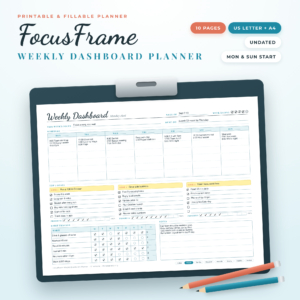
FocusFrame Weekly Planner Dashboard
Price: $4.99 | Best for: goal-focused weeks on one page
FocusFrame is an undated landscape weekly dashboard with the schedule at the top, three goals with progress bars in the middle and habits and notes at the bottom. You get 10 planning pages in two color themes, in US Letter and A4, as a fillable PDF you can print or type into, plus a user guide. Fill in the dashboard on Sunday night and use its Weekly Review page on Friday.
Lined week with priorities: the all-rounder
This layout keeps seven day sections but adds lines and a strip at the top for a main focus and three priorities. It sits between boxes and lists. Plain, readable and hard to outgrow.
It suits mixed weeks. A freelancer with client calls, admin and a dentist appointment. A university student with lectures, a part-time job and a deadline on Friday. The priority strip stops the week from being only about what is urgent.
One version detail matters more than people expect: Monday start or Sunday start. If your week mentally begins on Monday, a Sunday-start page will feel wrong every single time you open it. Check before you print.
Another is whether you can edit the page. A Word file lets you rename the priority strip, add a column for your side business, or change colors to save ink.
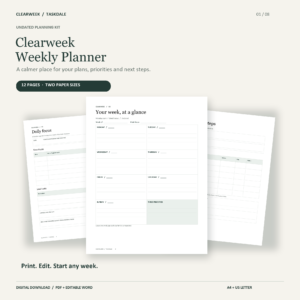
Clearweek Weekly Planner Printable
Price: $5.00 | Best for: freelancers and students who like to tweak
Clearweek gives you Monday-start and Sunday-start weekly pages in lined and open versions, each with a week-of field, main focus and three priorities, in US Letter and A4. It includes editable Word files so you can change labels, fonts and table colors, plus six worksheets such as a task inbox, daily focus and weekly review. Choose your start day and lined or open, then change one label to fit your work.
Subject grid: for lessons, not life
The subject grid is a table: subjects down the left, Monday to Friday across the top. Each cell holds that day’s lesson. It is the standard layout for teachers, tutors and homeschool families, because it answers the only question that matters on a school morning: what are we doing in math today?
A family homeschooling two children, aged 7 and 10, might run eight subjects each. That is 80 lesson cells a week. A seven-box planner cannot hold that. A grid holds it neatly, and tick boxes in each cell let a child mark their own work.
The weak spot is that it only plans lessons. Doctor appointments and grocery runs need to live somewhere else.
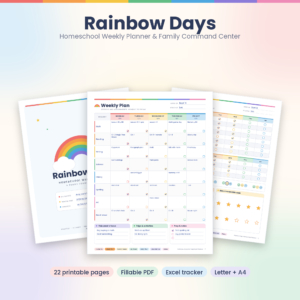
Rainbow Days Homeschool Weekly Planner
Price: $6.99 | Best for: homeschool families with one to four kids
Rainbow Days is a 22-page undated planner in US Letter and A4, in full color and an ink saver version. Each Weekly Plan holds up to 8 subjects across Monday to Friday with a tick box in every lesson cell, and kids get matching My Week pages. A spreadsheet counts attendance days, totals hours and works out grades. Fill one Weekly Plan per child and print a My Week for each of them.
Homeschool parents usually keep a second, simpler weekly page for the household side. If that is you, these weekly planner printable options cover the everyday styles that sit well beside a lesson grid.
Mixing two layouts in one binder
You do not have to pick just one. Plenty of people run a pair: one layout for time, one for tasks. The trick is to give each a clear job so you never wonder where something went.
A common pairing is hourly columns on the left page and a category list on the right. Appointments go left, loose jobs go right. A teacher might pair a subject grid for school with a seven-box page for home. A small business owner might run a dashboard for goals and a lined week for client work.
Two rules keep a pair working. First, each item lives in one place only; copying a task onto both pages is how things get lost. Second, both pages face each other when the binder is open, so you see them together. A pair that sits ten pages apart turns into two planners, and nobody keeps two planners going for long.
How to test a layout before you commit
Do not print 52 weeks of anything until you have lived with it for one. Here is a quick test:
- Print last week, not next week. Fill in what actually happened. If it does not fit, the layout is wrong for you.
- Count your appointments and tasks. More than 10 fixed-time items a week points to hourly columns. More than 25 loose tasks points to category lists.
- Use one layout for a full week. Notice where you write in the margins. That is where the layout is short.
- Swap and compare. Try a second layout the next week. Most people know by the end of week two.
It is a little like trying on shoes. The pair that looks nicest on the shelf is not always the pair you walk in.
Paper or tablet?
Every layout above works on paper, and most also work on a tablet. Paper is calmer and you can see the whole week without zooming. A tablet lets you move tasks without rubbing out, and the pages never run out.
If you lean digital, look for a hyperlinked PDF with tabs for each week, so you can jump to next Thursday in one tap. This roundup of the best digital planners for 2027 compares four hyperlinked picks.
Frequently asked questions
What is the most popular weekly planner layout?
The seven-box layout, with one open box per day, is the most common. It is quick and simple, but busy weeks outgrow it. Lined and hourly versions suit fuller schedules.
Is vertical or horizontal better for a weekly planner?
Vertical columns suit people who plan by time, because hours run down the page. Horizontal rows suit people who write lists and notes, because each day gets a long line.
Should a weekly planner start on Monday or Sunday?
Pick whichever day your week feels like it begins. Many workers prefer Monday so the weekend sits together. Many families prefer Sunday. Clearweek includes both.
What weekly layout is best for ADHD?
Layouts with a short Top 3 and plenty of white space tend to work better than crowded pages. A one-page dashboard or a lined week with priorities keeps focus on a few things at a time.
Can I use a weekly planner without a daily planner?
Yes. Most people only need a weekly page. Add a daily page just for the heaviest days, such as a moving day or a big work deadline.
What size should I print a weekly planner?
Letter or A4 gives hourly and dashboard layouts enough room to write. A5 and Half Letter suit seven-box and lined layouts that travel in a bag. Print one test page at your chosen size before printing a stack.
Your next step
Pull out last week’s calendar and count two numbers: fixed appointments and loose tasks. That tells you whether you need hours, lists or something in between. If you still cannot decide, print a few layouts from the Washi Doodle Weekly Planner and give each one a week.