Sometimes you do not want software, a login or a tutorial. You want a clean invoice page, ready to fill in, so you can bill a customer this afternoon. Blank invoice templates ready to fill in do exactly that: you print them and write, or type straight into the boxes on screen, and send.
This guide is for anyone who bills occasionally or on the go: a dog groomer, a mobile mechanic, a tutor, a market trader, a handyman, a babysitter with regular families. You will learn what a blank invoice must include, how to fill one in line by line, a worked example, where free blanks come from and when a paid set is worth having, and how to print forms that look sharp.
No jargon. Just the parts of the page and what goes in each box.
Quick picks: blank invoice forms on Taskdale
| Product | Best for | Price | Link |
|---|---|---|---|
| Ledgerline Invoice, Quote & Receipt Template Kit | Printable PDF invoices to fill by hand or on screen, plus Word and Excel versions | Original price was: $3.00.$1.50Current price is: $1.50. | View |
| Maker’s Business Forms Kit | Crafters who want fillable PDF invoices, quotes, receipts and order forms | $3.00 | View |
| ScopeSigned Contract and Proposal Template Kit | Contractors who need a blank invoice plus quote, agreement and change order forms | $2.99 | View |
| Ledgerline Business Forms Kit | Matching invoice, estimate, quote, receipt and purchase order forms | $2.99 | View |
What “ready to fill in” should really mean
A lot of so-called blank invoices need work before you can use them. The layout is half finished, the boxes are too small, or the page prints with a gray background that eats your ink. A truly ready-to-fill invoice works three ways.
By hand
Print it, and the lines are spaced wide enough for normal handwriting. The totals area has room for a subtotal, tax, any deposit and a balance due. A pen and a clipboard are all you need.
On screen
Open the PDF in a free reader and type into the fields. Save, attach to an email, done. No printer needed at all.
In Word or Excel
For people who want to add a logo or change the wording, an editable version lets you set it up once and reuse it. Excel versions can also add up the totals for you.
If you are weighing up those formats, our comparison of invoice templates in Word, Excel and PDF goes deeper.
The parts of a blank invoice, top to bottom
Every invoice, however simple, needs these boxes. If a template is missing one, add it or pick a different template.
- The word “Invoice”. Big and clear, so nobody mistakes it for a quote.
- Your name or business name, address, phone and email.
- Invoice number. Unique, in order, never reused.
- Invoice date. The day you issue it.
- Due date. A real date, not just “14 days”.
- Bill to. The customer’s name and address, or the company and contact person.
- Line items. Description, quantity, rate and amount for each thing you charge.
- Totals. Subtotal, any discount, tax if it applies, total, amount already paid and balance due.
- Payment details. Bank details, a payment link, or who to make a cheque out to.
- A short note. “Thank you” and, if needed, a line about late payment or warranty.
Some places require extra details, such as a tax registration number. Check your local rules once and add them to your master copy.
How to fill in a blank invoice, line by line
Fill it in the same order every time. It becomes a two-minute habit.
- Write the invoice number first. Check your last one. If it was 0057, this is 0058.
- Add today’s date and the due date. Count the days on a calendar rather than in your head.
- Fill in the customer’s details. Spell their name exactly as they write it. People notice.
- List each item on its own line. One job or product per line, with a clear description.
- Do the line maths. Quantity times rate equals amount. Write it down, do not round.
- Add up the subtotal, take off any discount, add any tax, and write the total.
- Subtract anything already paid, such as a deposit, to get the balance due.
- Check the sums twice. On a calculator, not by eye.
- Add payment details and sign or initial, if you like a personal touch.
- Keep a copy. Photo, scan or a saved PDF before it leaves your hands.
A filled-in example
Here is a blank invoice completed by Rosa, a mobile dog groomer, after a Saturday visit to a family with two dogs.
| Description | Qty | Rate | Amount |
|---|---|---|---|
| Full groom, medium dog (Biscuit) | 1 | $65.00 | $65.00 |
| Bath and tidy, small dog (Pip) | 1 | $40.00 | $40.00 |
| Nail trim add-on | 2 | $10.00 | $20.00 |
| Travel charge, outside 10-mile area | 1 | $12.00 | $12.00 |
| Subtotal | $137.00 | ||
| Loyalty discount (10% on grooming) | -$10.50 | ||
| Balance due by 15 November | $126.50 |
Invoice 0058, dated 8 November, payment by bank transfer with “0058” as the reference. The discount applies only to the two grooming lines, $105, so 10% is $10.50. Simple, clear, and the family can see exactly what each dog cost. Tax is left off here because rules vary; add a line if it applies to you.
Free blank invoice templates: where they come from
You can find free blank invoices in a few places. Word, Excel and Google Docs each include invoice layouts in their template galleries. Many accounting and payment companies give them away as a way to introduce their services. Office supply shops sell paper invoice books with carbon copies, which are cheap rather than free but handy for cash trades.
Free blanks are good for:
- A one-off invoice for a side job.
- Testing whether you like invoicing by hand or on screen.
- Very small operations with two or three customers a month.
Where they fall short: the designs can look generic, they often come in one paper size only, and they usually stop at the invoice. When you also need a quote, a receipt and maybe an order form that match, you end up mixing styles from three different sources. Customers notice, even if they never say so.
When a paid blank invoice set is worth it
A paid set makes sense once you send invoices every week, or once you want quotes, invoices and receipts that look like they belong together. You also tend to get both US Letter and A4, editable versions for your logo, and a spreadsheet that does the maths for the days you do not want to.
Think of it this way. If you send 6 invoices a month, that is 72 a year. A matching set you buy once and use 72 times is a small cost per invoice, and every one of them looks like it came from a proper business.
Printable invoices you can fill by hand or on screen
For most people searching for a blank invoice, this is the sweet spot: a clean printable PDF for days you write by hand, the same layout as a typeable form, and an Excel version for days you want automatic totals.
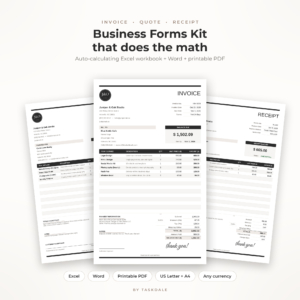
Ledgerline Invoice Quote and Receipt Kit
Price: Original price was: $3.00.$1.50Current price is: $1.50. | Best for: Anyone who bills by hand and on screen
Four printable PDFs with the invoice, quote and receipt in Classic Black and Soft Taupe, each in US Letter and A4, which you can print and write on or type into on screen. You also get 6 Word templates and an auto-calculating Excel workbook with an invoice log, statements and dashboard. It is licensed for use in your own business. Print five blank invoices for your clipboard and keep the Excel file for busier weeks.
The two color options are a small, nice touch. Classic Black prints crisply on any printer, while Soft Taupe looks a little warmer for creative and wellness businesses.
Fillable PDF forms for makers and custom orders
Makers selling at markets and taking custom orders need more than an invoice. They need an order form that captures the details (the spelling of a name, the color of a tumbler, six youth sizes and two adult) and an invoice and receipt that match it.
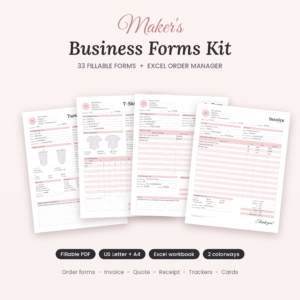
Maker’s Business Forms Kit
Price: $3.00 | Best for: Crafters taking custom orders
33 printable and fillable PDF forms in US Letter and A4, including an invoice, price quote, sales receipt, deposit agreement and nine order forms for apparel, tumblers, mugs, signs, decals and more. It adds an Excel Order Manager that builds invoices and receipts from your orders. Licensed for personal and small business use. Type into the PDFs with free Adobe Acrobat Reader, or print and write.
At a craft fair, a printed order form and a blank invoice on a clipboard can feel calmer than tapping on a phone while a queue forms.
Blank forms for jobs that need a contract
Contractors, remodelers, cleaners and event services often need a signed agreement before they invoice. A bare invoice is not enough on a $4,000 deck build. You want the quote, the agreement, any change orders and the invoice to match.
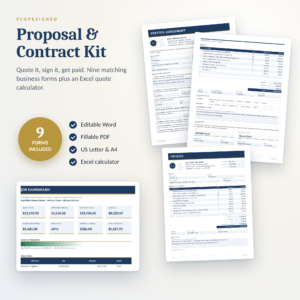
ScopeSigned Contract and Proposal Kit
Price: $2.99 | Best for: Contractors and service businesses
Nine matching business forms, each as an editable Word template and a fillable PDF in US Letter and A4: project proposal and quote, a plain-English service agreement, a one-page proposal and contract, change order, payment schedule, receipt, invoice and more. A bonus Excel calculator works out totals, tax, deposit and payment plan. Start with the one-page proposal for your next small job.
Our guide to quote vs estimate vs invoice explains which of those documents to send at each stage.
Printing tips for blank invoices
- Use the right paper size. US Letter in the US, Canada and Mexico. A4 almost everywhere else. Printing the wrong one shrinks or crops the form.
- Print at 100%. Turn off “fit to page” if the boxes come out smaller than expected.
- Choose a slightly heavier paper for invoices you hand over in person. It feels more professional than thin copy paper.
- Print a small batch. Ten at a time is plenty. Your details may change.
- Keep them flat. A clear plastic folder in the van or bag stops creases and coffee rings.
Keeping copies and numbering
Handwritten invoices have one weakness: once they leave your hand, you have no record unless you make one. Photograph every invoice before you hand it over, and save the photo in a folder named by month. For typed PDFs, save them with the number and customer name, such as “0058 Patel.pdf”.
Keep a simple list of numbers used, either on paper or in a spreadsheet. If you ever spoil an invoice, write “VOID” across it and keep it. Never reuse its number. Tidy numbering makes tax time much less painful.
Common mistakes with blank invoices
- No invoice number. Without it, payments and records are hard to match.
- No due date. The customer pays when they remember.
- Messy maths. A crossed-out total looks careless. Start a fresh form instead.
- Missing payment details. If the customer has to ask how to pay, you lose days.
- No copy kept. If you did not photograph or save it, it did not happen as far as your records are concerned.
Frequently asked questions
Where can I get a blank invoice I can print?
Word, Excel and Google Docs include free invoice layouts, and many sites offer free printables. For matching invoice, quote and receipt forms in US Letter and A4, a printable kit like the Ledgerline Invoice, Quote and Receipt Template Kit is a good choice.
Can I fill in a PDF invoice on my computer?
Yes, if it is a fillable or typeable PDF. Open it in a free PDF reader, click into each field, type, then save and email it.
Is a handwritten invoice legal?
In many places, yes, as long as it includes the details your local rules require. Keep a copy, write clearly and number it in sequence.
What should I write in the description box?
Name the job or product, the date and any detail that helps the customer recognize it, such as “Full groom, medium dog, 8 Nov”. Specific lines get paid faster than vague ones.
Do I need a different invoice for each customer?
Yes. Each invoice gets its own number, date and customer details. You can use the same blank template for everyone.
What is the difference between a blank invoice and an invoice template?
A blank invoice is usually a printable page you fill in each time. An invoice template can also be an editable file with your details saved, and sometimes it adds up the totals for you.
Your next step
Print three blank invoices tonight, fill one in for your most recent job, and photograph it before it goes out. If you want forms that match your quotes and receipts, the Ledgerline Invoice, Quote and Receipt Template Kit gives you printable, typeable and Excel versions in one download.