A downloaded budget template starts as somebody else’s idea of your life. Their categories, their payday, their goals, their colors. It is useful, but it is not yet yours. The people who stick with a budget for years almost always reshape the template until it reads like their own notebook.
This guide shows how to turn any download into my budget template for personal planning: the one that fits your pay rhythm, uses your words for categories, tracks your goals and follows a few rules you chose yourself. You will start with a one-page money profile, then adjust the template piece by piece, with a worked example and a monthly money date to keep it alive.
Quick picks: templates that are easy to make your own
| Product | Best for | Price | Link |
|---|---|---|---|
| Budget Planner Spreadsheet for Excel and Google Sheets | Matching your exact pay rhythm | $2.00 | View |
| Cashcove Budget Planner for Google Sheets | Personal goals, debt and net worth in one file | $26.00 | View |
| Ultimate Annual Budget Spreadsheet | Choosing a color theme you enjoy | $6.00 | View |
| Seaglass Annual Budget Spreadsheet for Excel | A dashboard that flags what needs attention | Original price was: $19.99.$9.99Current price is: $9.99. | View |
What turns a template into “my” template
A generic template asks you to fit your life into its boxes. A personal one does the opposite. Its boxes fit you. The difference shows up in small ways:
- The categories use your words. “Ziggy” instead of “pet expenses.”
- The budget period matches when you actually get paid.
- The goals on the dashboard are the ones you care about, with your dates.
- The colors and layout are ones you like looking at.
- There are a few written rules at the top that you made, not ones copied from a blog.
None of that takes long. An hour of tailoring at the start can be the difference between a template you open twice and one you open every week for years. People get attached to a file that feels like theirs, a bit like a favorite notebook.
Start with a one-page money profile
Before you touch the template, answer eight questions on a single page. This is your money profile, and it tells you exactly how to set the template up.
- How and when am I paid? Monthly, twice a month, every two weeks, weekly, irregular?
- What are my fixed bills and their dates?
- What do I owe? Each debt, its balance and minimum.
- What are my top three goals this year? With an amount and a date.
- What do I love spending on? The things that make life feel good.
- What do I regret spending on? Be honest. Everyone has a list.
- Who else is involved? A partner, a roommate, a parent you help out.
- When will I check my budget? Pick a day and time.
Questions 5 and 6 are the ones most templates ignore, and they matter most. If you love live music and regret late-night food delivery, your budget should protect the first and gently squeeze the second. A plan that ignores what you value feels like punishment. A plan built around it feels like support.
Rename and trim categories in your own words
Open the template’s category list and edit it with your profile beside you. Delete anything that does not apply. Merge anything small. Rename the rest so they make sense at a glance to you.
For example, a 29-year-old renter with a dog and a climbing hobby might end up with:
- Rent and renter’s insurance
- Bills (power, internet, phone)
- Getting around (bus pass, ride shares)
- Groceries
- Ziggy (dog food, vet, walker)
- Climbing (gym membership, gear)
- Eating out and coffee
- Clothes and personal care
- Gifts
- Student loan
- Savings and goals
- Oops fund
Twelve lines, every one meaningful. “Climbing” gets its own line because it matters, and that makes it easy to protect. “Oops fund” sounds lighter than “buffer,” and lighter matters when you are logging a parking ticket on a bad day.
If you have rebuilt your spreadsheet categories every month in the past, our piece on tired of rebuilding your monthly budget spreadsheet explains how to set categories once and leave them alone.
Match the template to your pay rhythm
A monthly budget is awkward when you are paid every other Friday. A weekly one is fiddly when you are paid once on the 25th. Set your template to your real rhythm, using question 1 from your profile.
- Monthly pay: budget by calendar month, or from payday to payday (the 25th to the 24th).
- Twice a month: split bills into two halves, one per paycheck.
- Every two weeks: plan each paycheck separately and treat the two extra checks a year as bonuses with jobs.
- Weekly: plan a weekly amount for flexible spending and let bills come from specific weeks.
Many templates let you choose the period. If yours does not, a payday-to-payday version will feel far more natural than forcing everything into calendar months.
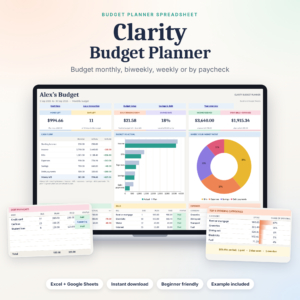
Budget Planner Spreadsheet
Price: $2.00 | Best for: matching a budget to any payday
This Excel and Google Sheets budget can run monthly, weekly, biweekly or payday to payday, and moving to the next period means changing one date. Everything goes on a single Transactions sheet, and the dashboard shows money left, days left, daily spending room, savings rate, income received and spent. Bills show Paid, Due soon, Upcoming or Overdue. Any currency works once you type your symbol. Set your period to match your payday first.
Put your personal goals on the dashboard
Personal planning goes beyond bills. It is about the life you want the money to pay for. So take the three goals from your profile and give each a home in the template with a target, a date and a monthly amount.
A worked example
Jun is 27, a graphic designer taking home $3,600 a month. Her three goals for the year:
| Goal | Target | By | Monthly amount |
|---|---|---|---|
| Emergency fund to three months of essentials | $5,400 (has $1,800) | December | $300 |
| Design course to move into UX work | $1,200 | June | $200 |
| Pay off store card | $900 | May | $180 plus minimum |
That is $680 a month across goals. Her fixed costs and everyday spending take $2,770, leaving a $150 oops fund. Tight, but it fits, and every goal ties to something she wants: security, a career move, and getting rid of a card she is slightly embarrassed by.
When the store card is gone in May, its $180 rolls into the course fund, which then finishes early. That little rolling effect is a lovely thing to watch on a dashboard.
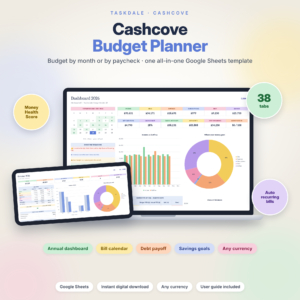
Cashcove Budget Planner
Price: $26.00 | Best for: tracking personal goals and debt together
Cashcove is an all-in-one budget planner for Google Sheets. Set your accounts, categories and budgets once, enter repeating bills and paychecks a single time, and log spending as it happens. Dashboards, a bill calendar, savings goals, a debt payoff plan and a net worth tracker update on their own, and you can budget by month or by paycheck. It runs on standard formulas with no add-ons. Add your three goals as savings goals with target dates.
Make it look like yours
This sounds trivial. It is not. People open things they enjoy looking at. A budget in colors you like, with your name at the top, gets opened more often than a grey grid.
- Pick a theme you like. Many templates include more than one color scheme.
- Try dark mode if you budget at night. It is easier on tired eyes, and our article on why a dark mode budget spreadsheet is easier to stick with explains the appeal.
- Add your name and the year to the title. “Maya’s Money 2027” feels different from “Budget Template v3.”
- Hide tabs you will not use instead of deleting them. You can bring them back later.
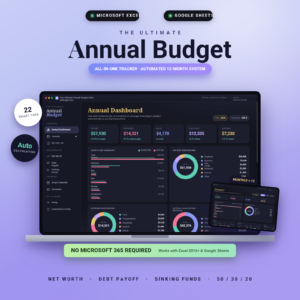
Ultimate Annual Budget Spreadsheet
Price: $6.00 | Best for: people who want to pick their own look
The Ultimate Annual Budget Spreadsheet comes in three color themes, Midnight, Rose and Sage, and lets you edit colors and fonts. It runs in Excel, Google Sheets and LibreOffice, works in any currency and can start in any month. Inside are 22 tabs including an annual dashboard, twelve monthly dashboards, a 50/30/20 view, sinking funds, debt payoff and net worth. Choose your theme, then fill the gold cells on the setup tab.
Write your own money rules
Rules you chose are easier to keep than rules you were given. Write three to five at the top of your template’s first tab. Here are some that people often find useful. Pick the ones that fit you, or write your own.
- Savings move on payday, before anything else.
- Anything over $100 that is not in the plan waits 48 hours.
- Climbing (or your version) is protected. It is the last line to cut.
- Bonuses and tax refunds are split: half to goals, half to fun.
- If I go over in one category, I fix it from another the same week.
Read the rules once a month. They are a note from a calm version of you to a tired version of you, and they help more than you would expect.
Your monthly money date
The last piece of a personal template is a regular time to look at it properly. Not just logging, but thinking. Call it a money date, put it in your calendar for the same day each month, and make it pleasant: a favorite drink, a quiet corner, 30 minutes.
- Log anything missing from the month.
- Compare plan and actual in each category.
- Check each goal’s progress bar or number.
- Read your money rules.
- Change one thing for next month, and only one.
After a few months, this becomes a small ritual many people actually look forward to. It is the hour where you see your own progress clearly, and that is motivating in a way nothing else is. Our guide on running your money from one personal finance dashboard has more ideas for what to watch.
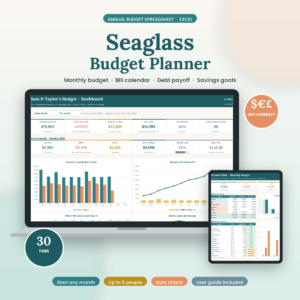
Seaglass Annual Budget Spreadsheet
Price: Original price was: $19.99.$9.99Current price is: $9.99. | Best for: a monthly review in desktop Excel
Seaglass is an annual budget spreadsheet for Excel with a dashboard that shows your whole year on one page, a focus month you can switch, a top 10 spending chart and a short list of things that need attention. Its twelve monthly tabs compare budget and actual, and a bill calendar shows paid, due and overdue status. Couples can tag spending to up to six people. Use the attention list as the agenda for your money date.
When life changes, update the template
A personal template is a living thing. Big life changes deserve a proper update, not just a new number in one cell. Here is what to adjust for the most common ones.
New job or a raise
Update income first. Then decide, before the first bigger paycheck lands, where the extra goes. A common split is half to goals and half to everyday life. A $300 monthly raise becomes $150 more for the emergency fund and $150 more breathing room. Decide it on paper and the raise does not quietly vanish.
Moving home
Rent, utilities and transport all change at once. Update each line, and add a short-term “moving” category for deposits, boxes and the first big grocery shop. Close it once the move is done.
Moving in with a partner
Add a shared costs section and agree how you split it: 50/50 or in proportion to income. Keep your own personal categories too, so each of you still has spending that is yours.
A new baby or a new pet
Add a category for them straight away, even if the first month’s numbers are guesses. Childcare, diapers, food, vet visits. Adjust after three months of real costs.
Losing income
Switch to a bare-essentials version: housing, utilities, food, transport, minimum debts. Pause goals without deleting them. When income returns, turn them back on. Seeing them still sitting there, waiting, can be oddly comforting.
After any change, rewrite your money profile. It only takes a few minutes, and it keeps the template honest about who you are now, not who you were last year.
Frequently asked questions
How do I personalize a budget template?
Write a one-page money profile first, then rename and trim categories, set the budget period to your payday, add your own goals with dates, pick a look you like and write a few personal money rules.
Can I change the categories in a budget template?
In most good templates, yes. Look for an editable category list on the setup tab. Renaming categories in your own words makes logging faster.
What should a personal budget template include?
Your income on your pay rhythm, fixed bills with dates, your own spending categories, debts, two or three goals with targets and dates, and a small buffer.
How often should I review my personal budget?
Log spending once or twice a week and hold a 30-minute review once a month.
Should I use the same template every year?
If it worked, yes. Copy it, clear the transactions and keep your categories, rules and layout. Starting from a familiar file makes January much easier.
Is a spreadsheet or a printed planner better for personal budgeting?
A spreadsheet suits people who want automatic totals and phone access. A printed planner suits people who like writing. Choose the one you enjoy opening.
Your next step
Tonight, write your one-page money profile. It takes about 20 minutes, and it will make every later choice easier. Then open your template and do just two things: set the budget period to your payday and rename the categories in your own words. If your paydays are irregular or biweekly, start with the Budget Planner Spreadsheet for Excel and Google Sheets.