Best Business Planner: Which Template Suits Your Business?
The best business planner is the one that matches the decision in front of you this month. A plan-writing kit suits starting out or asking for funding, a connected spreadsheet suits running a business day to day, and a project planner suits deadlines. The options here cover all three.
Choosing can feel harder than it should, because "planner" covers very different tools. We'll separate them so you can pick one with confidence.
Key facts at a glance
- A business plan template is a written document with a financial forecast, and it suits people who are starting up or seeking funding.
- A business spreadsheet is a workbook that records income, invoices, stock or clients, and it suits people already trading.
- A project planner organises tasks, timelines and budgets for one piece of work at a time, and Inkstride Project HQ is built for the Kindle Scribe.
- Every product here is a digital download, so you need Word, Excel, Google Docs, Google Sheets or a Kindle Scribe to use them.
- Your business stage and the device you work on should decide the choice before any feature list does.
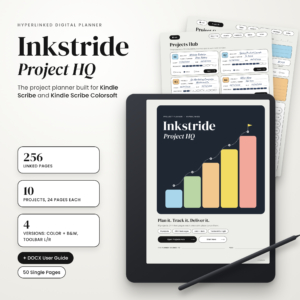 Kindle Scribe Project Planner | Inkstride Project HQ Hyperlinked PDF Project Management Template for Kindle Scribe Colorsoft with Kanban Board, Gantt Timeline, Task Tracker & Budget
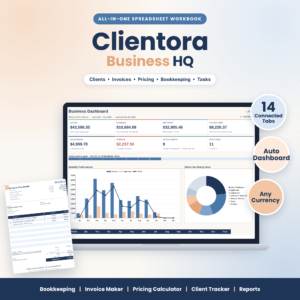 Small Business Spreadsheet Template – Bookkeeping, Invoice Maker, Pricing Calculator & Client Tracker | Clientora Business HQ (.xlsx)
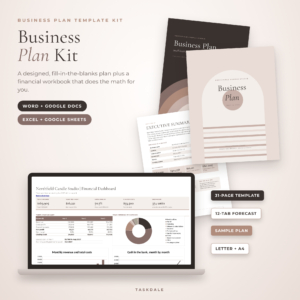 Clarity Business Plan Kit: Business Plan Template for Word & Google Docs + Excel Financial Forecast
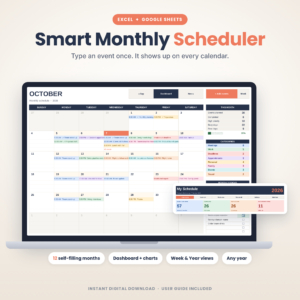 Monthly Scheduler Spreadsheet | Smart Monthly Scheduler Digital Calendar Planner for Excel & Google Sheets | Event, Meeting & Appointment Tracker
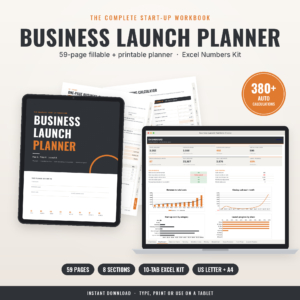
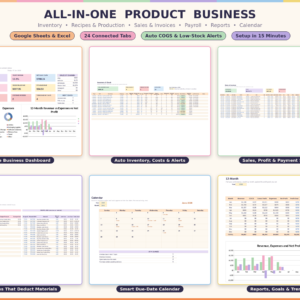
Table of Contents
Toggle
- What should you look for in the best business planner?
- How do the best business planners compare?
- Who does each business planner suit?
- How do you use a business planner so it gets finished?
- What mistakes should you avoid when choosing a business planner?
- What affects the price of a business planner?
- Which business planner should you choose?
- Common questions
What should you look for in the best business planner?
A good business planner fits your stage, works on the device you already own, and does the sums for you. Five factors separate the useful ones from the ones that end up unopened in a downloads folder.
Fit with your business stage
A business stage is the point you have reached: idea, launch, trading or growing. The Clarity Business Plan Kit and the Business Launch Planner are made for the first two. Clientora Business HQ and the All-in-One Product Business Template are made for businesses that already have customers and invoices.
Using a launch tool for a trading business, or the reverse, is the most common reason a planner gets abandoned.
Format and the device you work on
Some planners are documents, some are workbooks, and one is built for a pen. The Clarity Business Plan Kit works in Word and Google Docs, with its forecast in Excel and Google Sheets. The Business Launch Planner is a fillable PDF that you can type into, print, or use on a tablet.
Inkstride Project HQ is the only one designed for a Kindle Scribe, with a colour edition for Kindle Scribe Colorsoft and a black and white edition. If you like to write by hand, that matters more than any feature.
Calculations that update themselves
A planner that calculates for you saves the errors that creep into hand-built sums. The Business Launch Planner has 380+ automatic calculations. Clientora Business HQ updates its dashboard, monthly report and annual profit and loss as you enter figures.
The All-in-One Product Business Template goes further. Sell an item and the stock drops, and finish a batch and the materials deduct themselves.
Guidance, prompts and worked examples
A blank template is harder to use than one that shows you what good looks like. The Clarity Business Plan Kit puts a writing prompt in every section and includes a finished sample plan. The All-in-One Product Business Template arrives with a sample business loaded, so you can watch it work before you type anything.
Every product here also comes with a user guide, ranging from a DOCX guide to a 16-page one.
Currency, tax and paper size
These details are dull until they are wrong. Clientora Business HQ works with any currency and up to two sales taxes, which suits anyone who charges VAT or a second tax. The Clarity Business Plan Kit and Business Launch Planner come in both US Letter and A4, so the page size matches your printer.
How do the best business planners compare?
The table below compares what each planner is for, the format it uses and the part of your business it covers. Browse all 6 options on this page once you know which column matters most to you.
Who does each business planner suit?
Each planner suits a different person, and the overlaps are smaller than the names suggest. Here is how they divide up.
Inkstride Project HQ suits anyone who owns a Kindle Scribe and wants to plan by hand. Each project gets 24 linked pages, including a brief, milestones, a 12-week timeline, a Kanban board, 78-task lists, a budget and a final review. It's a project tool rather than a financial one.
Clientora Business HQ suits freelancers, consultants and anyone who bills clients. You track income and expenses, make and print invoices and quotes, and price your time with the hourly rate calculator.
Clarity Business Plan Kit suits people who need a written plan, perhaps for a lender, a partner or their own discipline. The 12-tab workbook covers startup costs, three-year sales, profit and loss, cash flow and break-even.
Business Launch Planner suits first-time founders who prefer something printable. It combines a 59-page planner with a numbers kit for startup costs, pricing, break-even, sales and cash flow.
Monthly Scheduler Spreadsheet suits anyone whose main problem is time rather than money. Type each event once and it appears on 12 colour-coded monthly calendars, a week view and a year view. It starts on Sunday or Monday and works for any year.
All-in-One Product Business Template suits makers and small producers. Its tabs cover inventory, recipe costing, production, sales, invoicing, purchasing and payroll, so it's the heaviest option here and the most useful if you hold stock.
How do you use a business planner so it gets finished?
You use a business planner by setting it up once, entering real figures, and reviewing it on a fixed day each week. Skipping any of those steps is where most planners fail.
- Read the user guide first. Every product here includes one, and it takes less time than fixing a wrongly set up file.
- Make a working copy before you type anything, and keep the original download untouched.
- Replace sample figures with your own. If a sample business is loaded, as in the All-in-One Product Business Template, clear it only after you've seen how the tabs connect.
- Enter your currency, tax rates and paper size before your first real entry.
- Choose a weekly review slot of 15 to 30 minutes and keep it.
- Back the file up somewhere other than the device you use it on.
For a plan document, work through the prompts in order and leave the forecast until the writing sections are done. Your numbers will be steadier once you've described what the business actually does.
What mistakes should you avoid when choosing a business planner?
The main mistakes are buying for a stage you haven't reached, ignoring your device, and expecting a template to make decisions for you. Each one is easy to avoid with a minute of thought.
- Choosing the biggest tool. A 24-tab workbook is wasted on someone with six clients and no stock. Clientora Business HQ is the sensible size for that situation.
- Mixing up scheduling and planning. The Monthly Scheduler Spreadsheet tells you when things happen. It doesn't forecast your cash.
- Skipping the device check. Inkstride Project HQ is for the Kindle Scribe, and the spreadsheets need Excel or Google Sheets.
- Treating the forecast as fact. A forecast is an informed estimate. Use cautious sales figures and check them against real results each month.
- Never opening the sample. A sample plan or sample business shows you what a finished version looks like, and it takes minutes to look at.
What affects the price of a business planner?
The price of a business planner mostly reflects how much of the business it covers and how much calculation is built in. Narrow tools cost less, and broad connected ones usually cost more up front.
A single-purpose file, such as the Monthly Scheduler Spreadsheet, does one job. A bundle with a written template, a multi-tab workbook, worksheets and a sample plan, such as the Clarity Business Plan Kit, gives you more to work with. The All-in-One Product Business Template sits at the broad end, because it connects inventory, production, sales and payroll.
Compare cost against the work you'd otherwise do by hand. A planner that saves you building invoices or stock sheets from scratch is cheaper in time than a cheap one that leaves the building to you. Current prices are shown on the product cards.
Which business planner should you choose?
Choose by the job you need done this month, then check the format fits your device.
- Writing a plan or seeking funding: Clarity Business Plan Kit.
- Launching and pricing something new, with a printable option: Business Launch Planner.
- Billing clients and tracking money: Clientora Business HQ.
- Making and selling products: All-in-One Product Business Template.
- Managing projects by hand on a Kindle Scribe: Inkstride Project HQ.
- Organising events and appointments: Monthly Scheduler Spreadsheet.
If two seem to fit, pick the one covering the part of your business that currently causes the most worry.
Common questions
Can one business planner replace the others?
Not usually. The planners here cover different jobs: writing a plan, tracking money, managing stock, scheduling and project work. Pairing two, such as the Clarity Business Plan Kit with Clientora Business HQ, often works better than hoping one file does everything.
Do I need Excel to use these planners?
Most work in both Microsoft Excel and Google Sheets, including the All-in-One Product Business Template and the Monthly Scheduler Spreadsheet. The Clarity Business Plan Kit also works in Word and Google Docs. Inkstride Project HQ is the exception and needs a Kindle Scribe.
Which planner is easiest for a complete beginner?
The Clarity Business Plan Kit is the gentlest start, because every section has a writing prompt and there's a finished sample plan to copy the approach from. The Business Launch Planner also includes a 16-page user guide.
Can I use these planners if I don't charge sales tax?
Yes. Clientora Business HQ handles up to two sales taxes, but that is a capacity rather than a requirement. You can leave tax fields empty or set them to suit your own situation, and the currency can be changed to match your own.
How long does setup take?
Setup time varies with the tool. The All-in-One Product Business Template takes about 15 minutes to set up, according to its description. The others don't state a setup time, so read their user guides first and expect the larger workbooks to take longer.