Nothing deflates a coloring session faster than a gray smear across the page you just spent an hour on. Or a marker dot that went straight through to the dining table. Both problems are common with printed pages, and both are almost always fixable before you pick up a single pen.
This guide is about choosing coloring paper for printer projects and setting up your printer so the lines stay crisp and the color stays put. It is written for parents printing a stack for the kids, adults who color in the evening, and anyone who has watched a fresh page turn messy for no obvious reason.
We will split the problem in two, bleeding and smudging, because they have different causes. Then you get a troubleshooting table, a printing checklist and a few printable books that behave well on home printers.
Quick picks: printable books that print cleanly at home
| Product | Best for | Price | Link |
|---|---|---|---|
| Pretend Play Coloring Book | Kids who color with markers | $2.99 | View |
| Friendship Fun Coloring Book | Low-ink pages for crayon days | $2.99 | View |
| Easy Mandala Coloring Book | Center-out marker practice | $3.49 | View |
| Snug Hours Cozy Coloring Book | Paper or smudge-free tablet coloring | $5.99 | View |
Bleeding and smudging are two different problems
People use the words loosely, but they point to different fixes.
Bleeding is when color travels where you did not put it. It soaks through to the back of the sheet, spreads past the outline in tiny hairs, or leaves a shadow on the page underneath. Bleeding is mostly about the paper and the type of marker.
Smudging is when something already on the page gets dragged across it. That might be the printer’s black outline, still damp from an inkjet. It might be soft pencil pigment picked up by the side of your hand. Smudging is mostly about printer settings, drying time and how you move across the page.
Work out which one you have and you are halfway to fixing it. A page with a dark halo on the back is bleeding. A page with a gray streak running left to right is smudging.
Choosing paper that will not bleed
Thicker paper holds more liquid before it lets go. That is the whole idea. Here is a simple guide for printed pages:
- Crayons and colored pencils: any printer paper works. Everyday 20 lb copy paper (about 75 gsm) is fine.
- Gel pens and fineliners: 24 to 32 lb printer paper (90 to 120 gsm), smooth finish.
- Water-based markers: 65 lb cover cardstock (about 176 gsm). This stops most bleed and pilling.
- Alcohol markers: 80 lb cover or heavier, plus a scrap sheet underneath every time. Alcohol ink will find a way through almost anything.
Smooth, bright white paper also helps. Rough or recycled paper has loose fibers that wick ink outward, which is where those fuzzy edges come from. For a deeper breakdown of weights and what each one feels like, see our coloring paper guide.
Avoid glossy photo paper for coloring. It looks tempting because it is thick, but marker ink beads up on the slick coating and pencil will not grip at all. It smudges if you breathe on it.
Printer settings that stop smudges before they start
Most smudging comes from the printer, not the pen. Four settings make the biggest difference.
Tell the printer what paper you loaded
In the print dialog, find the paper type or media type option. If you load cardstock but leave the setting on plain paper, an inkjet may lay down the wrong amount of ink and feed the sheet at the wrong speed. Choose cardstock, heavy paper or matte, whichever matches. It is a ten-second change that saves a lot of smears.
Print one side only
Double-sided printing doubles the chances of trouble. Marker ink bleeds into the picture on the back, and the second pass through the printer can rub the first side. One picture, one sheet.
Use the right quality mode
Best or high quality gives solid black lines. Draft mode gives pale, broken ones. You might think lighter lines would smudge less, but faint lines just look washed out next to bright marker color. Go with best and give it time to dry.
Print at actual size
Choose 100% or actual size, and pick the PDF that matches your paper, US Letter or A4. Squashing an A4 page onto Letter paper, or the other way round, thins the lines and crops the edges.
Inkjet or laser: why it matters
Laser printers melt powdered toner onto the paper with heat. Once a page comes out, the lines are fixed. Markers, water and gel pens will not move them. If you color with markers a lot, a basic black and white laser printer is one of the best upgrades you can make.
Inkjet printers spray liquid ink, and many of those inks stay a little soluble. Fresh off the printer, a page can smudge from a fingertip. A wet marker crossing a line can pick up a trace of black and carry it into your yellow. That is where muddy colors come from.
The fix for inkjet users is simple: wait. Leave printed pages on the table for at least ten minutes, longer on humid days or on cardstock, which takes ink more slowly. Better still, print a batch the night before. A stack printed on Friday evening is bone dry for Saturday morning.
Here is a set that suits kids with markers, because each page is one large scene with clear outlines and nothing printed on the back.
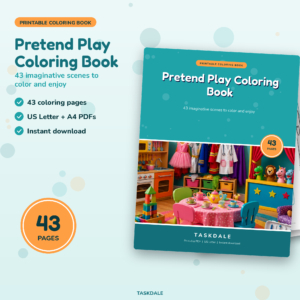
Pretend Play Coloring Book
Price: $2.99 | Best for: kids who love markers and role play
This book has 43 one-page scenes of jobs and adventures, such as a chef in a toy kitchen, a vet with a puppy and an astronaut at a control panel. It comes as separate US Letter and A4 PDFs with sharp, dark lines, and only the cover is in color, so it is easy on ink. Print a few scenes on cardstock the night before, and hand over the markers once they are dry.
How to color without dragging through your work
Even on a perfectly dry page, your own hand can cause smudges. Soft colored pencils leave pigment that rubs off on skin. Gel pen ink stays wet for a few seconds. And the side of your palm is always resting on something.
- Use a guard sheet. Slide a clean piece of paper under your hand. Move it as you go. This one habit fixes most pencil smudges.
- Work in the right direction. Right-handed colorists should work from top left to bottom right. Left-handed colorists, top right to bottom left. Your hand then rests on paper you have not colored yet.
- Color mandalas from the center out. The middle is done first, so your hand moves outward over blank space.
- Save gel pens for last. Add highlights and sparkle once everything else is finished, and leave the page alone for five minutes afterwards.
- Keep hands clean. A quick wash halfway through a long pencil session stops you from leaving faint gray prints on white areas.
Mandalas are a good place to practise the center-out habit, because the shape makes the order obvious.
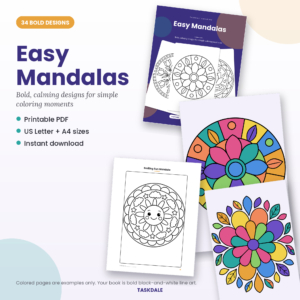
Easy Mandala Coloring Book
Price: $3.49 | Best for: adults practicing clean marker work
This printable book has 34 bold mandalas with thick outlines and big open spaces, so markers fill each section without spilling into the next. Each design is on its own page, in US Letter and A4 PDFs. Print one on cardstock, start in the center, and work outward ring by ring so your hand never rests on wet ink.
Troubleshooting table: symptom, cause and fix
| What you see | Likely cause | Fix |
|---|---|---|
| Gray streaks across the page | Inkjet lines not dry, or hand dragging pencil | Let pages dry 10 minutes or more, use a guard sheet |
| Dots on the table or next page | Marker bleeding through thin paper | Use 65 lb cardstock or heavier, add a scrap sheet |
| Fuzzy edges around shapes | Rough or soft paper wicking ink | Switch to smooth, bright white paper |
| Muddy yellows and pinks | Wet marker picking up inkjet black | Wait longer before coloring, or print on a laser printer |
| Little fuzz balls on the surface | Water-based marker on soft paper, too many passes | Heavier paper, fewer passes, let each layer dry |
| Toner rubs off with a finger | Laser fuser not heating enough for the paper type | Set paper type to heavy or cardstock in the print dialog |
| Streaky stripes in the print | Clogged inkjet nozzles | Run the printer’s head cleaning tool, then print a test page |
A worked example: one family, one rainy Saturday
Picture a family with two kids, ages 5 and 9. The younger one uses chunky crayons. The older one has just discovered a big pack of markers. Here is how a smudge-free morning looks.
- Friday night: print six pages for the 5-year-old on copy paper and four for the 9-year-old on 65 lb cardstock. Set the paper type to cardstock for the second batch. Leave them all on the counter to dry.
- Saturday, 9 am: cover the table with an old placemat or newspaper. Give the older child a few scrap sheets to slide under each page.
- While coloring: remind the marker artist to work top to bottom and to cap pens between colors so they do not dry out and streak.
- When finished: lay marker pages flat for five minutes before stacking them. Crayon pages can go straight on the fridge.
Nobody cries over a ruined page. No marker on the table. A small win, but on a wet weekend it counts.
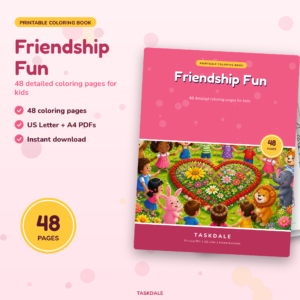
Friendship Fun Coloring Book
Price: $2.99 | Best for: young kids on everyday copy paper
This book has 48 friendly scenes of kids sharing, playing and helping, each with a short kind message at the top. The US Letter and A4 PDFs were cleaned up so lines print sharp and dark without a gray haze, and only the cover uses color. Print a stack on plain paper for crayon days and keep cardstock for marker pages.
Finishing and storing pages so they stay clean
A finished page can still smudge weeks later if it rubs against others in a pile. Colored pencil pages are the worst for this, because soft pigment transfers to whatever sits on top.
- Interleave with plain paper. Put a blank sheet between finished pencil pages in a folder.
- Use sheet protectors. Clear plastic sleeves in a binder keep pages flat and clean. Children love flipping through their own book.
- Try a fixative spray for keepers. Art stores sell workable fixative for pencil and pastel. Spray outdoors, in light coats, and only on pages you plan to frame.
- Keep marker pages out of strong sun. Many marker inks fade on a sunny windowsill within weeks. A frame behind glass, away from direct light, helps them last.
If you would rather skip paper problems entirely now and then, digital coloring is worth a try. There is no ink to dry and nothing to smudge.
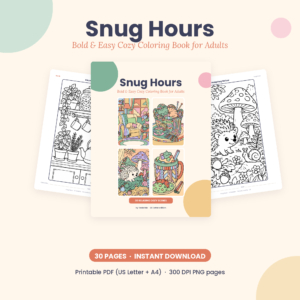
Snug Hours Cozy Coloring Book
Price: $5.99 | Best for: adults who color on paper and tablet
Snug Hours has 30 bold and easy cozy scenes, like a rainy window seat and a fireside puppy, with thick outlines and large shapes. The download includes US Letter and A4 PDFs for printing plus 300 DPI PNG pages and transparent line art for tablet apps. Color the same scene both ways and see which you enjoy more.
Quick printing checklist
Stick this inside the printer lid:
- Pick the PDF that matches your paper, US Letter or A4.
- Load the right paper for the tool: copy paper for crayons, cardstock for markers.
- Set paper type in the print dialog to match.
- Print at 100%, best quality, one side only.
- Let inkjet pages dry at least ten minutes.
- Put a scrap sheet under every marker page.
For more ideas on where to find good pages to print in the first place, our guide to printable coloring pages covers free and paid options. And if you color mostly with markers on big, bold designs, the advice on large coloring books for adults goes further on marker-friendly paper.
Frequently asked questions
Why do my printed coloring pages smudge?
Usually because inkjet ink was not fully dry, or because your hand dragged across soft pencil. Let pages dry for at least ten minutes, set the correct paper type when printing, and keep a guard sheet under your hand.
What printer paper stops markers bleeding through?
65 lb cover cardstock stops most water-based marker bleed. For alcohol markers, use 80 lb or heavier and still put a scrap sheet underneath, because alcohol ink can soak through almost any paper.
Is a laser printer better for coloring pages?
For markers, yes. Laser toner is fused with heat and does not run when wet marker ink crosses it. Inkjet pages work fine too, as long as you give them time to dry before coloring.
Can I print coloring pages on cardstock with an inkjet?
Most inkjets handle 65 lb cardstock. Choose cardstock or heavy paper in the print settings, use the rear or manual feed tray if you have one, and allow extra drying time.
How do I stop colored pencil from smudging?
Rest your hand on a clean guard sheet, work in a direction that keeps your hand on blank paper, and store finished pages with a blank sheet between them. For framed pages, a light coat of fixative spray helps.
Your next step
Tonight, print two pages: one on your usual setting and one with the paper type set to match your paper and the quality on best. Leave both overnight, then color them tomorrow with the same marker. The difference will be easy to see. For a kid-friendly first test, print a scene from the Pretend Play Coloring Book.