A freelancer and an electrician both send invoices, but they are not sending the same invoice. The copywriter bills for three articles and an hour of edits. The electrician bills for six and a half hours of labour, a box of fittings, a call-out charge and a deposit already paid. Good invoice creator templates for freelancers and trades handle both without you rebuilding the page each time.
This guide is for self-employed people who bill clients directly: designers, writers, tutors, photographers, plumbers, electricians, painters, cleaners and handypeople. You will learn what each kind of work needs on the invoice, see two worked examples with real sums, and get a short list of templates that do the maths and keep track of who has paid.
Quick picks for freelancers and trades
| Product | Best for | Price | Link |
|---|---|---|---|
| Ledgerline Business Forms Kit | Trades who need quotes, estimates, invoices and receipts that match | $2.99 | View |
| PaidPath Client & Invoice Hub | Freelancers with retainers, deposits and several clients a month | $9.49 | View |
| Clarity Books Easy Bookkeeping Spreadsheet | Keeping income, expenses, mileage and tax estimates behind your invoices | $3.00 | View |
| Maker’s Business Forms Kit | Custom-order makers such as sign, apparel and tumbler sellers | $3.00 | View |
What makes a template an invoice creator
A blank invoice template is a page with boxes. You type every word and every number. An invoice creator template does some of the work for you. You pick a client and their address appears. You pick a service and its price appears. You type a quantity and the line total, tax and balance due fill in.
That difference sounds small until you send your fortieth invoice. Typing the same client address 40 times is boring. Adding up totals by hand 40 times is how a $1,240 job ends up invoiced as $1,420.
The better creator templates also remember what they made. Each invoice lands in a log with a number, a date and a status, so you can see who has paid without scrolling your inbox.
What a freelancer’s invoice needs
Freelance work tends to fall into three billing styles. Your template should handle whichever one you use most.
Hourly work
Show the date or week, a short description and the hours. “Website edits, 3 to 7 Nov, 4.5 hrs” is clearer than “Design work”. Clients pay faster when they can match the line to what they remember.
Project work
List the deliverables, not the hours: “Logo design, 3 concepts, 2 rounds of changes”. If you took a deposit, show it as a payment so the balance due is right.
Retainers
Bill the same amount on the same date each month, with the month in the description. A template with saved clients and a default rate makes this a two-minute job.
Every freelance invoice also needs your name or business name, contact details, the client’s details, an invoice number, the date, payment terms, a due date and how to pay. Miss the last one and you will get an email asking for your bank details, which costs you a day.
What a trade invoice needs
Trade invoices carry more moving parts, and clients look at them more closely because the totals are bigger. A homeowner who just paid for a new boiler reads every line.
- Job address. It may not be the billing address. A landlord lives in one town and owns flats in another.
- Labour and materials on separate lines. Clients want to see what was time and what was parts.
- Call-out or travel charge, if you have one, as its own line.
- Deposit or stage payments already received, taken off the total.
- A short note on guarantees or warranty terms, if you give them.
- A reference to the quote, so the client can see the invoice matches what they agreed.
That last point saves a lot of arguments. If the job grew, say so on the invoice: “Extra socket in hallway, agreed on site 4 Nov”. If you need help writing that first price, our guide on how to write a price quote covers the format.
Worked example: an electrician’s invoice
Jordan rewires a kitchen. He quoted the job, took a $200 deposit, and finished in one long day.
| Line | Qty | Rate | Amount |
|---|---|---|---|
| Labour: kitchen rewire as per quote Q-0087 | 6.5 hrs | $70.00 | $455.00 |
| Materials: cable, sockets, back boxes, fittings | 1 | $212.40 | $212.40 |
| Call-out charge | 1 | $45.00 | $45.00 |
| Subtotal | $712.40 | ||
| Tax at 8% (example rate) | $56.99 | ||
| Total | $769.39 | ||
| Less deposit received 28 Oct | -$200.00 | ||
| Balance due by 18 Nov | $569.39 |
Notice what is doing the work here. The quote number ties the invoice back to the agreement. The deposit is visible, so the client is not confused about why the balance is lower than the total. And the due date is a real date, not “14 days”. Use your own local tax rules; the 8% is only there to show the maths.
Worked example: a freelance writer’s invoice
Maya writes blog posts for a garden centre. In October she delivered three posts at $180 each, plus one hour of extra edits at $60.
- Blog post: “Spring bulbs for clay soil”, 1,200 words: $180
- Blog post: “Five shrubs for shade”, 1,100 words: $180
- Blog post: “Winter care for potted roses”, 1,300 words: $180
- Extra edits on September post, 1 hr: $60
- Total: $600, due 14 November
Short, specific and easy to approve. The marketing manager can forward it to accounts without adding a note. That is the goal with every freelance invoice: nobody should need to ask a question before paying it.
Templates built for trades
Trades need a paper trail more than most. A quote, then maybe a revised estimate, then an invoice, then a receipt when the balance is paid. If those four documents look like they came from four different businesses, clients notice. A matching set helps you look as solid as your work.
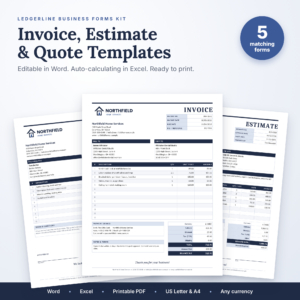
Ledgerline Business Forms Kit
Price: $2.99 | Best for: Plumbers, painters, landscapers and handypeople
Five matching forms (quote, job estimate with labour and materials split, invoice, sales receipt and purchase order) as Word templates and printable PDFs in US Letter and A4. The Excel Invoice Maker saves clients and items, fills due dates from your terms and marks invoices PAID or OVERDUE, with a tracker for up to 300 invoices. Add your logo to the Word forms, then set your terms in Excel.
Keep the printable PDF estimate in the van for jobs where you price on the spot, and type the final invoice at home in Excel. Two minutes per job, and the paperwork matches.
Templates built for freelancers
Freelancers juggle more clients with smaller invoices, and their biggest headache is usually tracking who has paid. A design studio with 15 active clients can easily lose sight of a $350 invoice that went quiet six weeks ago. A creator template with a live client balance stops that from happening.

PaidPath Client and Invoice Hub
Price: $9.49 | Best for: Freelancers with many clients
A 12-tab Excel workbook linking clients, services, invoices, quotes, payments and expenses. Prices fill in from your service list, due dates follow your payment terms, and partial, split and installment payments are tracked. The dashboard lists overdue invoices by how late they are and everything due in the next 14 days. Start by adding your services and rates on the Services tab.
It also tracks lead source, so you can see whether referrals or your website bring in the better-paying clients. A nice thing to know when you plan next year.
Keep the books behind your invoices
Invoices are only half of the money story. You also need to know what you spent, how many miles you drove for work and roughly what to set aside for tax. A simple bookkeeping file next to your invoice creator answers those questions without accounting software.
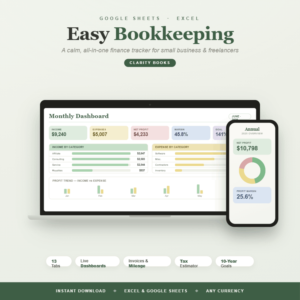
Clarity Books Easy Bookkeeping Spreadsheet
Price: $3.00 | Best for: Sole traders who want simple books
A 13-tab spreadsheet for Google Sheets and Excel with income and expense logs, an invoice list with automatic Paid, Unpaid and Overdue status, a mileage log, account balances, monthly and annual dashboards, and a profit and loss, cash flow and tax summary with quarterly estimates. It comes with a PDF user guide. Start on the Setup tab and choose your categories and tax rate.
Our 20-minute weekly bookkeeping system for freelancers shows how to keep a file like this current without it eating your weekend.
Set up your invoice creator in one evening
Give yourself about 90 minutes and a cup of tea. Then you never do it again.
- Business details. Name, address, phone, email, and any registration or tax number you are required to show.
- Logo. Drop it into the placeholder. A simple text logo is fine if you do not have one.
- Payment details. Bank details, card payment link, and who to make cheques out to, if you still take them.
- Default terms. Pick a number of days, such as 14, and set it once.
- Clients. Add your regular clients with full addresses and emails.
- Services or items. Add your standard rates, call-out charge and common materials.
- Test invoice. Make one for an imaginary client, print it, save it as a PDF, then delete it.
The test invoice catches the small things: a typo in your email, a logo that prints too large, a bank number missing a digit. Better to find those yourself than have a client find them.
Numbering and file names
Pick a numbering style and stick with it. Plain numbers like 0001, 0002 work well. Some people add the year: 2026-014. Avoid restarting at 1 each month, and never reuse a number, even for a cancelled invoice. Mark that one void instead.
Save PDFs with a pattern you can search: number, client, month. “0142 Greenleaf Nov-2026.pdf” is easy to find two years later when the tax office asks a question.
A weekly invoicing rhythm that sticks
Templates make invoices quick, but only a habit gets them sent. Trades and freelancers who get paid on time usually follow some version of this.
- Same day: send the invoice when the job ends or the deliverable goes out. For trades, that can mean typing it up in the van before the next job.
- Monday morning: log any payments that came in over the weekend and look at what falls due this week.
- Friday afternoon: check the overdue list and send a short, friendly reminder to anyone past their date.
- Last day of the month: bill retainers, type in receipts and save a dated backup of the file.
It adds up to about 30 minutes a week. The payoff is not having that knot in your stomach when you wonder whether a client ever paid for the June job.
Mistakes freelancers and trades make on invoices
- Vague descriptions. “Work done” invites a phone call. Name the job, date and place.
- No due date. “Payable on receipt” is often read as “whenever”. Put a date.
- Forgetting the deposit. If it is not shown, the client may think you are charging twice.
- Waiting to invoice. Send it the day the job ends. An invoice sent two weeks late tends to be paid two weeks late too.
- Mixing up quotes and invoices. A quote is a price offer. An invoice is a request for payment. Keep them as separate documents with separate numbers.
Frequently asked questions
What should a tradesperson put on an invoice?
Your details, the client’s details, the job address, an invoice number and date, separate lines for labour and materials, any call-out charge, tax if it applies, any deposit received, the balance due, a due date and how to pay.
Is Excel or Word better for freelance invoices?
Excel is better if you send more than a few invoices a month, because it does the maths and can keep a log. Word is fine for the occasional invoice and is easy to restyle.
How do I show a deposit on an invoice?
List the full job total first, then add a line such as “Less deposit received 28 Oct” with the amount taken off. The balance due shows what the client still owes.
Can I use one template for hourly and project work?
Yes. Save both an hourly rate and fixed project prices as items in your price list, then pick whichever fits each job. The invoice layout stays the same.
Can I write on these templates by hand?
The Ledgerline kit includes printable PDFs you can fill in with a pen, which suits jobs priced on site. For automatic totals, use the Excel version.
Should I charge for materials at cost or with a markup?
That is your pricing choice, and many trades add a handling margin to cover buying, collecting and storing parts. Whatever you decide, keep materials on their own line so the client can see them clearly.
Your next step
Take the last job you finished and rebuild its invoice in a creator template tonight, with the labour, materials and any deposit on separate lines. If you work in a trade, the Ledgerline Business Forms Kit gives you the quote, invoice and receipt in one matching set, so your next job is covered start to finish.