You spend an hour building a CV on a site that says free in big letters. You fill in every job, pick a nice layout, and click Download. Then a box pops up asking for your card details. Almost everyone who has job hunted has hit that wall at least once, and it stings, because you have already done all the work.
This guide helps you create a CV online free without nasty surprises. We look at the tools that really are free, the different kinds of free you will meet, the catches to check for before you type a single word, and how to build a solid CV at no cost in about 30 minutes. We also explain, honestly, when paying for a one-off template is worth it and when it is not.
If money is tight right now, you can absolutely build a good CV for nothing. You just need to know where to do it.
Quick picks: one-off CV templates for when free is not enough
| Product | Best for | Price | Link |
|---|---|---|---|
| Hollis Resume Template | Files that open the same in Word, Google Docs and LibreOffice | $8.99 | View |
| Marlowe Resume Template | A full matching set with a writing playbook | $4.79 | View |
| Alder Resume Template with Photo | Google Docs users who want a photo CV and tracker | $4.79 | View |
| Sloane Resume Template | A modern two-column CV that stays put | $4.49 | View |
The four kinds of free you will meet
Not all free means the same thing. When you search for a free CV maker, you will usually land on one of four types.
- Truly free. You build the CV and download it as a PDF or Word file, with no payment at any point. Usually a word processor or a public service.
- Free to build, pay to download. Typing and designing cost nothing. Getting the finished file out does.
- Free trial that rolls into a subscription. A small charge for a few days of access, which turns into a recurring monthly fee unless you cancel in time.
- Free with limits. A basic plain template is free, while nicer layouts, extra pages or file formats sit behind a paywall. Some add a watermark or a logo to the free version.
None of these is a scam in itself. The paid models are a normal way for a business to earn money. The problem is only when you do not realise which kind you are using until the end.
Tools that really are free
These options let you make and download a CV without paying anything. Some need a free account.
Google Docs
Free with a Google account. Open Docs, choose the template gallery and you will find a handful of resume layouts. You can also upload a Word template and edit it there. Download as PDF or Word at no cost. Our step-by-step guide on how to make a resume in Google Docs walks through it.
Microsoft Word for the web
The browser version of Word is free with a Microsoft account and includes a set of CV templates. It has fewer features than the desktop version, but it is plenty for writing and exporting a CV.
LibreOffice
A free office suite you install on your computer. It opens and saves Word files and exports PDFs. Handy if you do not want an online account at all.
Europass
The European Union runs a free CV builder on the official Europass website. It follows a fixed European format and lets you download a PDF. Good for EU applications, exchange programmes and anyone who wants a standard structure.
Your LinkedIn profile
LinkedIn lets you save your own profile as a PDF. The result is plain and not as tidy as a proper CV, but it can be a quick starting point to copy text from.
All of these are honest about what they are. The trade-off is usually design and guidance: the layouts are basic, and nobody tells you what to write.
Free help with the writing, not just the layout
A layout is only half a CV. The harder half is knowing what to say, and there is free help for that too, often closer than you think.
- University and college careers services. Most offer CV checks to current students, and many keep helping graduates for a year or more after they leave. Book a 20-minute slot and bring a printed draft.
- Public employment and careers services. Many countries run free careers advice for adults, including CV reviews, by phone, online or in person.
- Public libraries. Many run job clubs or offer free computer and printer access, which helps if you do not have a laptop at home.
- Someone in the field. A former manager or a friend who hires people can tell you in five minutes what they skip and what makes them stop.
The quality of free advice varies, so treat it as a second opinion rather than a rulebook. Still, one honest reader catching that your best result is buried in bullet five can be worth more than any template.
The catches to check in online CV builders
Many dedicated online CV builders are polished and easy to use. Some are fair about pricing from the start. Others tuck the cost away until you are invested. Before you start, look out for these.
- Download paywalls. Building is free, but PDF or Word downloads need a paid plan.
- Trials that renew. A low first payment that becomes a monthly charge. Check the renewal price and how to cancel before you enter card details.
- Watermarks or branding. A free download with the builder’s name in the footer. Recruiters notice.
- Locked formats. Some builders only export a PDF, so you cannot edit the file later without going back and, often, paying again.
- Account lock-in. Your CV lives on their site. If you stop paying, you may lose easy access to edit it.
- Heavy designs. Graphics-rich layouts can confuse screening software used by many employers.
Picture a warehouse team leader who pays a small trial fee to download one CV, gets an interview the next week and forgets all about the trial. Three months later he spots a monthly charge on his bank statement. Nothing illegal happened. It was just easy to miss while his mind was on interviews.
How to check if a builder is really free in two minutes
- Find the pricing page first. Look for words like plan, trial, premium or subscription.
- Search the help pages for download. They usually say plainly whether downloads are free.
- Look at the free template list. Are the free ones the ones you actually want?
- Check the export formats. Can you get an editable Word file, or only a PDF?
- Read the trial terms. Note the renewal date and price, and set a phone reminder a day before if you do sign up.
If any of those answers is unclear, start in Google Docs or Word for the web instead. You lose nothing, and your file stays yours.
What a free template usually lacks
Free templates in Google Docs and Word are fine for a basic CV. Where they tend to fall short is everything around it.
- Matching letters. You usually get a CV, not a cover letter, references page and thank-you note in the same design.
- Different lengths. One layout, not separate one, two and three page versions.
- An ATS version. A plain one-column copy for job portals is rarely included.
- Paper sizes. Many are set to US Letter, which needs changing for UK, European, African and Asian employers.
- Writing help. Placeholder text often says Lorem ipsum or Your job title, with no tips on what makes a strong bullet.
- Solid structure. Some use text boxes that shift when you edit.
If you are only sending two or three applications, none of this may matter. If you are applying for 30 jobs over the next two months, it starts to add up.
Marlowe is an example of what a full kit includes: every page in one design, in both paper sizes, with a guide on what to write.
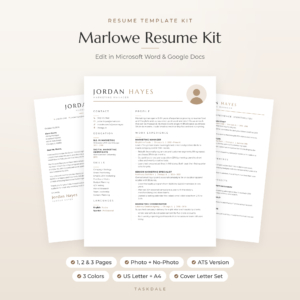
Marlowe Resume Template
Price: $4.79 | Best for: a full matching set, bought once
Marlowe gives you 10 editable Word templates in Sand, Sage and Slate, in US Letter and A4: 1, 2 and 3 page CVs with and without a photo, an ATS version, a cover letter, references page and thank-you letter. It includes a 10-page Resume Playbook with 120+ action verbs and a Job Search Tracker for Excel and Google Sheets. It is a single download with no subscription, so open the playbook first and work through the checklist at the end.
When paying once is worth it, and when it is not
A one-off template is a different deal from an online builder subscription. You download the files, they sit on your computer, and you can edit them for as long as you like. No renewals, no lost access.
It is probably worth it if:
- You are applying for many jobs and want a cover letter and references page that match
- You need both a designed CV and a plain ATS version
- You want writing guidance, not just a blank layout
- You keep fighting a free template that falls apart when you edit it
It is probably not worth it if you are applying for one or two jobs, your current CV already works, or a basic Google Docs layout does everything you need. A good free CV beats a pretty paid one with weak content every time. For a deeper look at the trade-offs, see our guide to free versus paid resume templates.
Hollis suits people who switch between free programs, because it was built to open the same way in Word, Google Docs and LibreOffice.
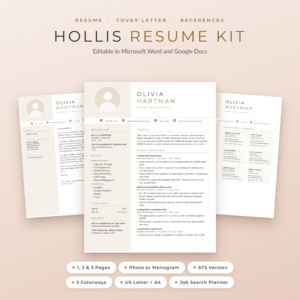
Hollis Resume Template
Price: $8.99 | Best for: people using free office software
Hollis includes photo and monogram CVs in 1, 2 and 3 pages, a 1 and 2 page ATS version, a cover letter, references page and thank-you letter, in Champagne, Rosewood and Graphite and both paper sizes. Fonts are built into every Word file and each page sits on an invisible table, so it opens cleanly in Google Docs and LibreOffice. Upload one file to Google Drive first to see how it looks in your setup.
Build a CV for free in Google Docs in 30 minutes
If you want to stay at zero cost, here is a fast route that works.
- Open Google Docs and pick a plain resume template. Choose one with a single column if you plan to apply through job portals.
- Set the paper size. File, Page setup, then A4 or Letter depending on your country.
- Write a three-line profile. What you do, years of experience, what you want next.
- Add your jobs, newest first. Three to five bullets each, each starting with an action verb and ending with a result.
- Add education and skills. Keep skills specific, such as Excel pivot tables or forklift licence.
- Check spacing and length. One page for early career, two for most experienced people.
- Download as PDF. File, Download, PDF Document. Name it with your name and the year.
That is a perfectly good CV, made for nothing. The feeling of hitting download without a payment screen is a small but real relief.
If you would rather start from a designed file but still work in Google Docs, Alder was tested there and even includes a browser tool for making a round photo.
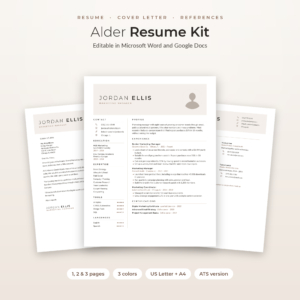
Alder Resume Template with Photo
Price: $4.79 | Best for: Google Docs users who want polish
Alder includes 1, 2 and 3 page CVs with and without a photo, a one-column ATS version, a cover letter, references page and thank-you letter, in Mocha, Sage and Slate. The Round Photo Maker crops your photo into a circle in your browser, and the Excel Job Application Tracker holds up to 300 applications. Upload the 1-page file to Google Drive, open it with Google Docs and type over the tips.
Mistakes people make with free CV tools
- Doing all the work before checking the price. Always look at the pricing page first.
- Forgetting a trial. Set a reminder the moment you sign up.
- Keeping only a PDF. Save an editable copy too, or you will be rebuilding from scratch next time.
- Choosing looks over content. A plain layout with strong bullets wins. Our list of the best resume templates for Word and Google Docs shows designs that balance both.
- Leaving a watermark on. If the free version adds branding to your file, do not send it. Rebuild it elsewhere.
Frequently asked questions
Is there a completely free CV maker?
Yes. Google Docs, Word for the web, LibreOffice and the EU’s Europass tool all let you build and download a CV without paying.
Why do free CV builders charge to download?
Many use free building to draw you in and charge for the finished file or a subscription. It is a normal business model, but check the pricing before you start.
Can I make a CV in Google Docs for free?
Yes. Google Docs has free resume templates, and you can download your CV as a PDF or Word file at no cost.
Are free CV templates good enough?
For a few applications, often yes. They tend to lack matching letters, an ATS version and writing guidance, which matter more when you apply widely.
How do I cancel a CV builder trial?
Look in your account settings for billing or subscription, and cancel before the renewal date. Keep the confirmation email.
Your next step
Before you sign up anywhere, open Google Docs and draft your profile and latest job there, so your words are safe and free whatever you decide. If you later want a matching set with writing help, the Marlowe Resume Template is a single download you keep for good.