A financial spreadsheet for personal money planning does a bigger job than a budget. A budget answers “what can I spend this month?” A financial plan answers “where am I now, where am I heading, and how long will it take?” It holds your net worth, your debts, your savings goals and a full year of expected costs, all in one file you control.
This guide is for people who have a budget of some kind and want to step back and see the whole picture. Maybe you are paying off debt and want a real end date. Maybe you are saving for a deposit and want to know whether 2028 is realistic. You will see the tabs a personal financial spreadsheet needs, how to take a money snapshot, how to plan a year month by month, two ways to pay off debt, and a calm monthly review. If spreadsheets are not your thing, there is an offline app option too.
Quick picks: tools for personal money planning
| Product | Best for | Price | Link |
|---|---|---|---|
| Executive Budget Dashboard Spreadsheet Suite | A full-year financial plan in Excel or Google Sheets | $9.99 | View |
| Thriftwood Money Studio Offline Budget App | People who prefer an app to a spreadsheet | $12.99 | View |
| Rooted & Rich Money Mindset Workbook | Setting goals worth planning for | $17.99 | View |
| The Calm Money Method | A gentle start with budget and debt pages | $11.99 | View |
Budget or financial plan: what is the difference?
Think of a budget as the weather report and a financial plan as the map. The budget tells you what is happening this month: income in, spending out, what is left. The plan shows where you stand overall and the route to where you want to go.
A budget-only spreadsheet usually has a monthly view and a spending log. A personal financial spreadsheet adds a few more pieces:
- Net worth: everything you own minus everything you owe, tracked over time.
- A 12-month plan: expected income and costs for the year, including the irregular ones.
- Debt payoff: balances, interest rates and a realistic payoff date for each debt.
- Savings goals: targets, deadlines and how much to put aside each month to hit them.
- A review page: a monthly check-in and a yearly look back.
You do not need all of this on day one. But once your monthly budget feels steady, adding these pieces is what turns “getting by” into “getting somewhere”.
The tabs that do the heavy lifting
The most reliable personal financial spreadsheets follow one rule: enter each number once. Every purchase, paycheck and transfer goes onto a single transactions tab. Every other tab reads from it. That way your budget, your cash flow and your net worth never disagree with each other, because they all draw from the same source.
A good layout looks like this:
- Setup: categories, accounts, currency and your start month.
- Transactions: the only place you type day-to-day numbers.
- Monthly budget: plan against actual for the current month.
- Annual plan: every category across 12 months.
- Cash flow: money in, money out and a running balance.
- Debt: balances, rates, minimums and payoff order.
- Savings: emergency fund, goals and sinking funds.
- Net worth: assets and liabilities, month by month.
- Dashboard: the headline numbers and a few charts.
If a template asks you to type the same figure into three places, walk away. Sooner or later one of those copies drifts, and you stop trusting the file.
The dashboard deserves a little thought, because it is the tab you will look at most. Keep it to the handful of numbers that change your decisions: money left this month, total debt, net worth, emergency fund balance and progress on your top goal. Our guide to what a budget dashboard in Excel should show walks through the layout in more detail, including which charts are worth the space and which are just decoration.
Start with a money snapshot
Before you plan anything, take a snapshot of where you stand today. This is your net worth, and it is simpler than it sounds. List what you own, list what you owe, and subtract.
Here is an example for Marcus, a 34-year-old surveyor:
| Owns | Amount | Owes | Amount |
|---|---|---|---|
| Checking account | $2,150 | Credit card | $3,400 |
| Savings account | $4,800 | Car loan | $9,200 |
| Retirement account | $28,500 | Student loan | $14,600 |
| Car (resale value) | $11,000 | ||
| Total | $46,450 | Total | $27,200 |
Marcus’s net worth is $19,250. On its own, that number does not mean much. Its value is in the trend. If it is $19,250 today and $23,000 in six months, his plan is working. If it slips, something needs attention. Updating it once a month, on the same date, takes about ten minutes and gives you the clearest single signal of progress you can get.
A note for anyone with a negative net worth, which is common in your twenties or after study: it is a starting point, not a verdict. Watching a negative number climb toward zero is one of the most motivating things in personal finance.
Plan the year one month at a time
The annual plan tab is where a financial spreadsheet earns its keep. Instead of planning one month at a time and getting ambushed by car registration in March or school uniforms in August, you lay out all 12 months at once.
Start with your regular monthly costs, which repeat across every column. Then add the irregular ones in the month they land: insurance renewals, annual subscriptions, holidays, birthdays, the December gift pile, a planned dentist visit. Seeing the whole year at once shows you which months will be tight. Then you can save toward them in the lighter months.
A household might discover that March has $1,100 of extra costs and December has $900. Spread across the year, that is about $167 a month into a sinking fund. Put that number in the plan, and the scary months stop being scary.
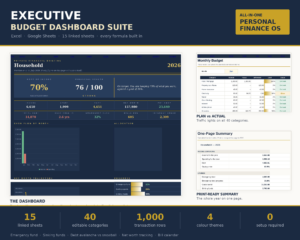
Executive Budget Dashboard Spreadsheet Suite
Price: $9.99 | Best for: planners who want the whole year in one file
The Executive Budget Dashboard Suite puts everything on one Transactions sheet of 1,000 rows, and 14 other sheets read from it. You get an Annual Plan grid with 40 categories across 12 months, monthly budget with traffic lights, cash flow, bills, savings with 12 goals and 14 sinking funds, debt avalanche versus snowball, net worth, and a monthly and yearly review. It works in Excel 2016 or newer and Google Sheets. Fill in your annual targets first.
For a closer look at what a one-page money overview should show, see our guide on running your money from one personal finance dashboard.
Debt payoff: snowball or avalanche?
If you have more than one debt, a financial spreadsheet can show you two payoff orders side by side. Both work. They just suit different people.
Snowball
Pay minimums on everything, then throw every spare dollar at the smallest balance first. When it is gone, roll that payment into the next smallest. You get early wins, which keeps motivation high.
Avalanche
Pay minimums on everything, then target the debt with the highest interest rate first. This usually costs less in interest overall, though the first win may take longer.
Using Marcus’s debts: snowball would clear the $3,400 credit card first, then the car loan, then the student loan. Avalanche would also start with the credit card if it has the highest rate, which it usually does. The orders often match at the top and differ further down. A spreadsheet that calculates both, using your real balances and rates, takes the guesswork out of the choice.
Whichever you pick, write the expected payoff date next to each debt. Seeing “credit card: gone by June” is a powerful reason to keep going on a hard month.
Not a spreadsheet person? Try an offline app file
Some people find spreadsheets stressful. All those cells, all that grid. If that sounds like you, there is a middle path between a spreadsheet and a subscription budgeting app: an offline app that runs in your web browser from a single file. You open it, it looks and feels like an app, and your numbers stay on your own computer. No account, no bank login, no monthly fee.
This suits people who want buttons and screens instead of formulas, and who care about keeping their financial details off other people’s servers.
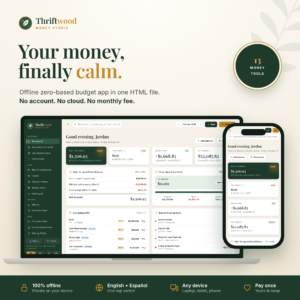
Thriftwood Money Studio Offline Budget App
Price: $12.99 | Best for: app lovers who want no subscription
Thriftwood Money Studio is an offline budget app in one HTML file. Double-click it and it opens in your browser, with no account or bank login, and your data stays on your device. It includes a zero-based budget with a live To assign counter, accounts and net worth, bills with due-date reminders, a paycheck planner, savings goals, debt payoff, reports and a document vault. Start by adding your accounts and their balances.
Set goals your spreadsheet can actually track
A spreadsheet can only track goals that have numbers and dates. “Save more” is a wish. “Save $6,000 for a house deposit by December 2027” is a goal, and a spreadsheet can tell you exactly what it takes.
Turn each goal into three numbers:
- Target: how much you need. $6,000.
- Deadline: when you need it. December 2027.
- Monthly amount: the target minus what you have, divided by the months left. With $1,200 saved and 25 months to go, that is $192 a month.
If $192 a month is not possible, you have three honest options: move the deadline, lower the target, or find the money elsewhere in your plan. The spreadsheet does not decide for you. It just makes the trade-off visible.
Picking which goals matter most is often harder than the maths. Many people save for things they think they should want rather than things they do want. A little reflection up front saves a lot of abandoned goals later.

Rooted and Rich Money Mindset Workbook
Price: $17.99 | Best for: people unsure which goals matter most
Rooted and Rich is an 83-page printable and fillable workbook in US Letter and A4, with an Ink-Saver edition for home printing. It has nine short lessons, 34 guided worksheets and nine bonus tools covering money beliefs, spending habits, budgeting, saving and goals. Each lesson takes about ten minutes to read. Work through the goals chapter before you enter targets in your spreadsheet.
A monthly review in 30 minutes
A financial plan needs a regular check-in to stay useful. Once a month, ideally a few days after your main payday, sit down for half an hour.
- Update account balances and debt balances. (5 minutes)
- Record your net worth. Compare it with last month. (5 minutes)
- Review the monthly budget. Which categories went over and why? (10 minutes)
- Check goal progress. Are you on pace for each deadline? (5 minutes)
- Look ahead. What irregular costs land in the next two months? (5 minutes)
Once a year, add a longer review. Compare this year’s net worth with last year’s, list what worked, and set next year’s targets. That yearly comparison can be quietly emotional in a good way. Seeing a debt that once felt endless finally hit zero on a chart is a moment worth pausing for.
Keep your financial spreadsheet safe and trustworthy
- Never store passwords, full card numbers or PINs in the file. Account nicknames are enough.
- Back it up. Save a dated copy at the end of each month in a second location.
- Protect formula cells so a stray keystroke cannot break the maths.
- Reconcile with real statements monthly. If the spreadsheet says $2,150 and the bank says $2,080, find the gap now.
- Keep it simple. A plan you update every month beats a beautiful one you abandoned in February.
Frequently asked questions
What should a personal financial spreadsheet include?
A transactions log, monthly budget, 12-month plan, cash flow, debt payoff, savings goals, net worth tracker and a review page. A dashboard that pulls the main numbers together is a helpful extra, as long as it stays focused on the few figures you act on.
How often should I update my financial spreadsheet?
Log spending weekly and do a full review monthly, including net worth and debt balances. A yearly review helps you set new goals and spot slow trends that a single month hides.
Is a spreadsheet better than a budgeting app?
A spreadsheet gives you full control, no subscription and no bank login. An app can feel easier to use. An offline app file sits in between, with app-style screens and your data kept on your device.
How do I calculate my net worth?
Add up everything you own, such as cash, savings, retirement accounts and the resale value of a car. Subtract everything you owe, including card balances and loans. The result is your net worth.
Should I pay off debt or save first?
Many people build a small emergency fund first, then focus on high-interest debt, then save for bigger goals. Your own plan depends on your rates, income and how secure your job feels.
Take your money snapshot this week
Set aside 20 minutes, list every account and every debt, and work out your net worth. Write the date beside it. That single number is the starting line for your plan. If you want one file to hold your snapshot, debts, goals and a full year ahead, open the Executive Budget Dashboard Spreadsheet Suite.