If you list the same item on eBay, Poshmark, Mercari and Facebook Marketplace, you already know the scary part of crosslisting. It is not the listing. It is the sale. One app pings at midnight, and three other listings are still live for an item that is now packed in a mailer. A crosslisting spreadsheet fixes that with one simple habit: write down where every item is live, and check that list the moment something sells.
Below you can grab our free crosslisting spreadsheet, Crosswise Lite, for Excel and Google Sheets. Then we walk through how to set up a crosslisting system that stops double sales and shows your real profit per item.
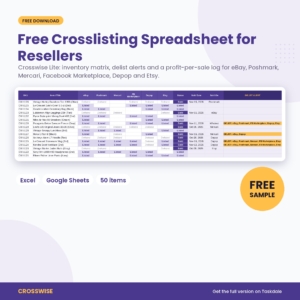
Free Crosslisting Spreadsheet: Crosswise Lite (Excel & Google Sheets)
A free reseller spreadsheet with a 50-item inventory, a 6-platform crosslisting matrix with automatic delist alerts, and a sales log that works out fees and net profit for eBay, Poshmark, Mercari, Facebook Marketplace, Depop and Etsy.

Want everything unlocked?
The free file is a sample. The full version has every page, tab and feature, plus the user guide.
See the full versionWhat is in the free crosslisting spreadsheet
Crosswise Lite is a working sample of the full Crosswise Reseller Crosslisting & Profit Tracker. It includes:
- Inventory with a crosslisting matrix for 50 items. Six platform columns (eBay, Poshmark, Mercari, Facebook Marketplace, Depop and Etsy) each take Listed, Draft or Delisted.
- Automatic DELIST ALERT. When an item sells, it names every other platform where it is still live.
- Sales log for 50 sales that works out the platform fee, payout, net profit, margin, ROI and days to sell.
- Settings with your currency symbol, editable fees for eight platforms and your own category, source and condition lists.
Formula cells are locked without a password, so you can type freely without breaking anything.
How to set up a crosslisting system in five steps
1. Give every item a SKU
A SKU is just a short code like CW-1001. Write it on the tag, the bag or the bin label. When a sale comes in, the SKU is how you find the item on your shelf and in your spreadsheet in seconds. Never reuse one. The spreadsheet turns a duplicate SKU yellow so you catch it early.
2. Record the cost the day you buy
Profit tracking falls apart when cost is a guess. Type the cost, source and date acquired as soon as you get home from the thrift store. Bought a bag or a box for one price? Split it across the pieces by what each one should sell for. The full Crosswise has a lot splitter that does this to the cent.
3. Mark every platform where the item is live
This is the heart of a crosslisting tracker. Each time you post the item somewhere, pick Listed under that platform and fill in the Date Listed. Started a listing but did not publish it? Pick Draft. You now have a live map of your whole closet across every app.
4. Log the sale the same day
On the Sales tab, add the date, pick the SKU from the dropdown, pick the platform and type the price. Add the shipping label and packaging if you paid them. The spreadsheet pulls the item cost, adds the platform fee and shows your net profit. Back on Inventory, the item flips to Sold.
5. Delist everywhere else, then mark it
The DELIST ALERT column now lists every platform still showing the item. End those listings, change each one from Listed to Delisted, and the alert clears. Do this before you list anything new each day and double sales stop.
What to track for each reseller item
You do not need fifty columns. These are the ones that pay off:
- SKU, title and bin so you can find it
- Cost, source and date acquired so you know what you paid and where
- List price and date listed so you can spot stale listings
- Where it is listed so you can delist fast
- Sale price, platform, label and packaging so profit is real, not a guess
Why fees make crosslisting profit tricky
Every platform takes its cut differently. Some charge a percentage of the item and the shipping, some add a fixed fee per order, some have a flat fee on small sales, and some have a minimum fee. The same item can leave you with noticeably different money depending on where it sells. That is why the spreadsheet keeps a fee table for each platform on the Settings tab. The starting values were checked in November 2026, and you can edit them any time a platform changes its fees.
Free Crosswise Lite vs the full Crosswise tracker
The free sample handles the core job. The full version turns it into a daily system.
| Feature | Crosswise Lite (free) | Crosswise (full) |
|---|---|---|
| Inventory rows | 50 | 1,000 |
| Sales rows | 50 | 1,000 |
| Crosslisting matrix and DELIST ALERT | Yes | Yes |
| Fees, net profit, margin and ROI per sale | Yes | Yes |
| Dashboard with 12 KPI tiles and 4 charts | No | Yes |
| Action Center: delist list, stale listings, backlog | No | Yes |
| Price and offer calculator for 8 platforms | No | Yes |
| Lot and bundle cost splitter | No | Yes |
| Daily listing tracker heat map | No | Yes |
| Monthly profit and loss with goals | No | Yes |
| Platform, source and category scorecards | No | Yes |
| Expense log and user guide | No | Yes |
Get the full Crosswise Reseller Crosslisting & Profit Tracker
Once you pass a few dozen items, the jobs pile up: which listings are going stale, which items you sourced but never listed, whether a lowball offer still leaves you a profit, which thrift store is worth the drive. The full Crosswise answers all of them.
- Action Center. One tab with your delist list, your oldest listings with a suggested markdown price, and your listing backlog with bin locations.
- Price and offer calculator. The list price you need on each of eight platforms to hit your target profit, the lowest offer worth accepting, and an accept, counter or decline check for any offer.
- Dashboard. Net profit, revenue, sell-through, average days to sell, stock at cost and your monthly goal at a glance, with charts by month and platform.
- Scorecards. See which platform, source and category earn the most, so you buy and list smarter.
See the full Crosswise tracker on Taskdale →
Crosslisting tips that save real time
- List on your best-paying platform first, then crosslist. The full version’s platform table shows which one that is for you.
- Check your delist list before you start new listings each day.
- Mark down anything past 60 days a little at a time instead of all at once.
- Keep bins small and labeled (A1, A2, B1) and put the bin on every row.
- Review your sources monthly and spend more time at the stores with the best return.
Frequently asked questions
Does the free crosslisting spreadsheet work in Google Sheets?
Yes. Upload the .xlsx file to Google Drive, then open it with Google Sheets. It also works in Microsoft Excel.
Does it sync with eBay or Poshmark?
No. It is a spreadsheet, so you enter items and sales yourself. There is no login and no monthly fee.
Can I rename the platforms?
Yes. Type a new name on the Settings tab, for example Grailed or Vinted, and edit its fees. The inventory headings and dropdowns update.
What happens when I reach 50 items?
The free sample stops at 50 items and 50 sales. The full Crosswise holds 1,000 of each, plus 500 expenses.
Download your free crosslisting spreadsheet
Start with your ten most recent listings tonight and you will see your first delist alert the next time something sells.
Get the free Crosswise Lite file ↑ (enter your email in the download box at the top of this page)
Ready for the dashboard, Action Center, calculator and 1,000 rows? Get the full Crosswise tracker →