A crosslisting spreadsheet that tells you where to delist
Crosswise is a crosslisting spreadsheet and reseller inventory tracker for people who list the same item on several apps at once. You post a pair of Levi’s on eBay, Poshmark, Mercari, Facebook Marketplace and Depop. It sells on Mercari at 11 p.m. Now four live listings could sell an item you no longer have.
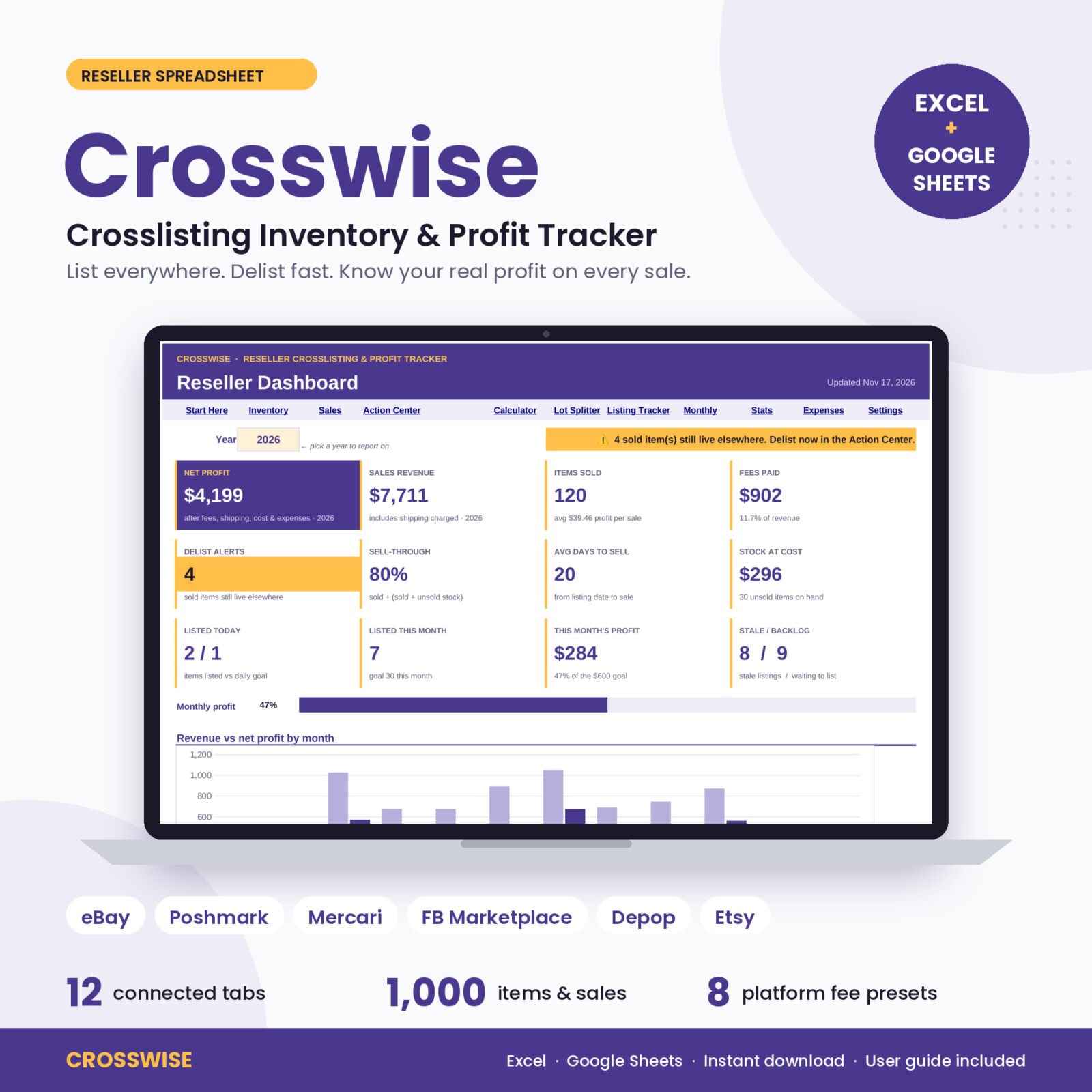
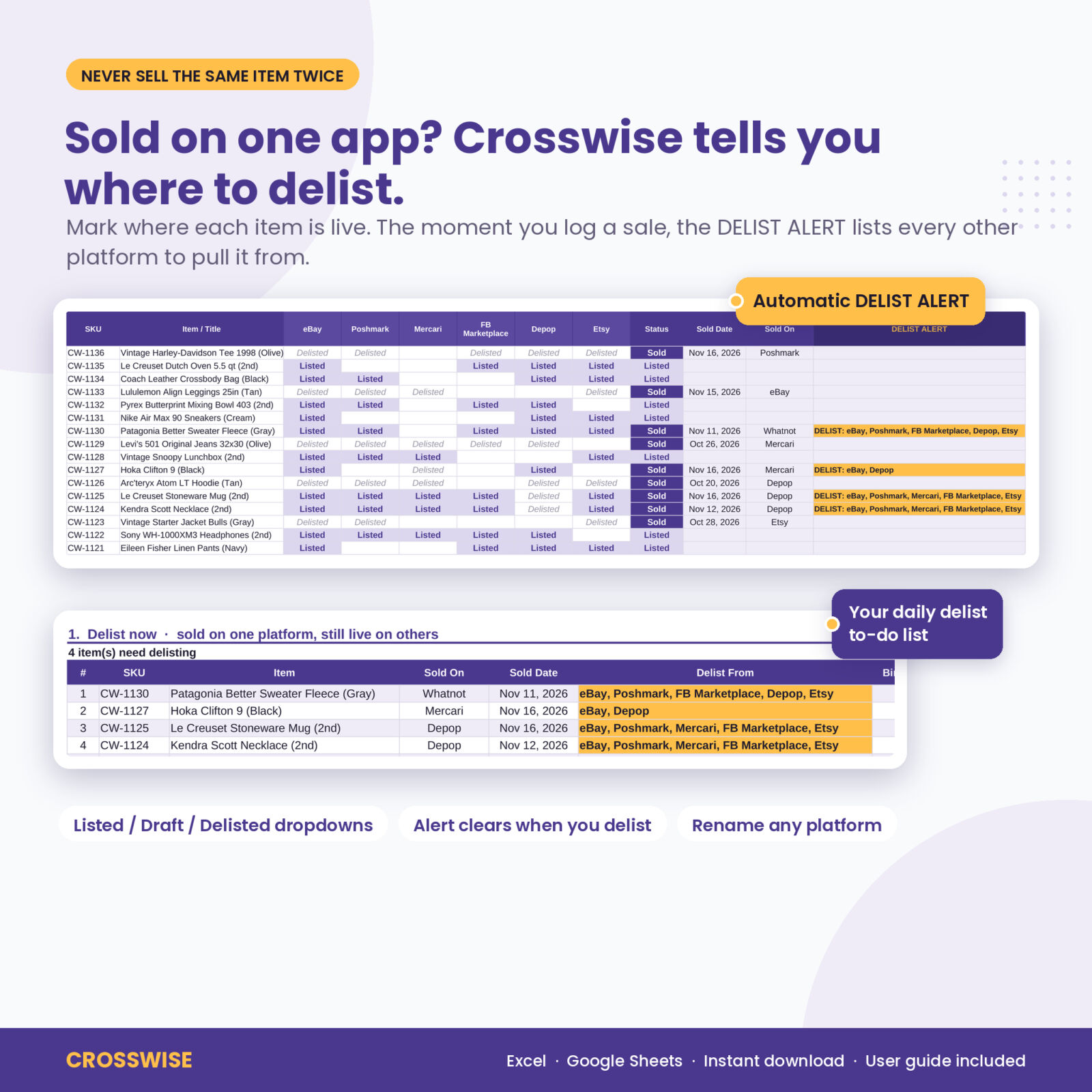
Crosswise catches that. Mark where each item is live, log the sale, and a DELIST ALERT names every platform you still need to pull it from. The same sale works out your fee, payout, net profit, margin, ROI and days to sell, then updates your dashboard.
Who it is for
- Part-time and full-time resellers who crosslist clothing, shoes, home goods, electronics, toys, vintage and collectibles
- Thrift, bins, garage sale and estate sale flippers who buy in lots and need a fair cost per piece
- Sellers who want to know which platform, store and category really pays after fees
- Anyone tired of paying monthly for an app just to see their profit
Why resellers pick Crosswise
- No more double sales. Every sold item still live elsewhere lands on your Action Center list with the exact platforms to delist.
- Your real profit. Fees for eight platforms are built in, including small-sale flat fees and minimum fees, so the number you see is what you keep.
- A clear daily routine. Delist, reprice stale listings, list the backlog. The Action Center sorts it for you, oldest first.
- Better buying. The source scorecard shows which thrift stores, bins and sales pay you back best.
Features of this reseller inventory spreadsheet
Inventory and crosslisting matrix
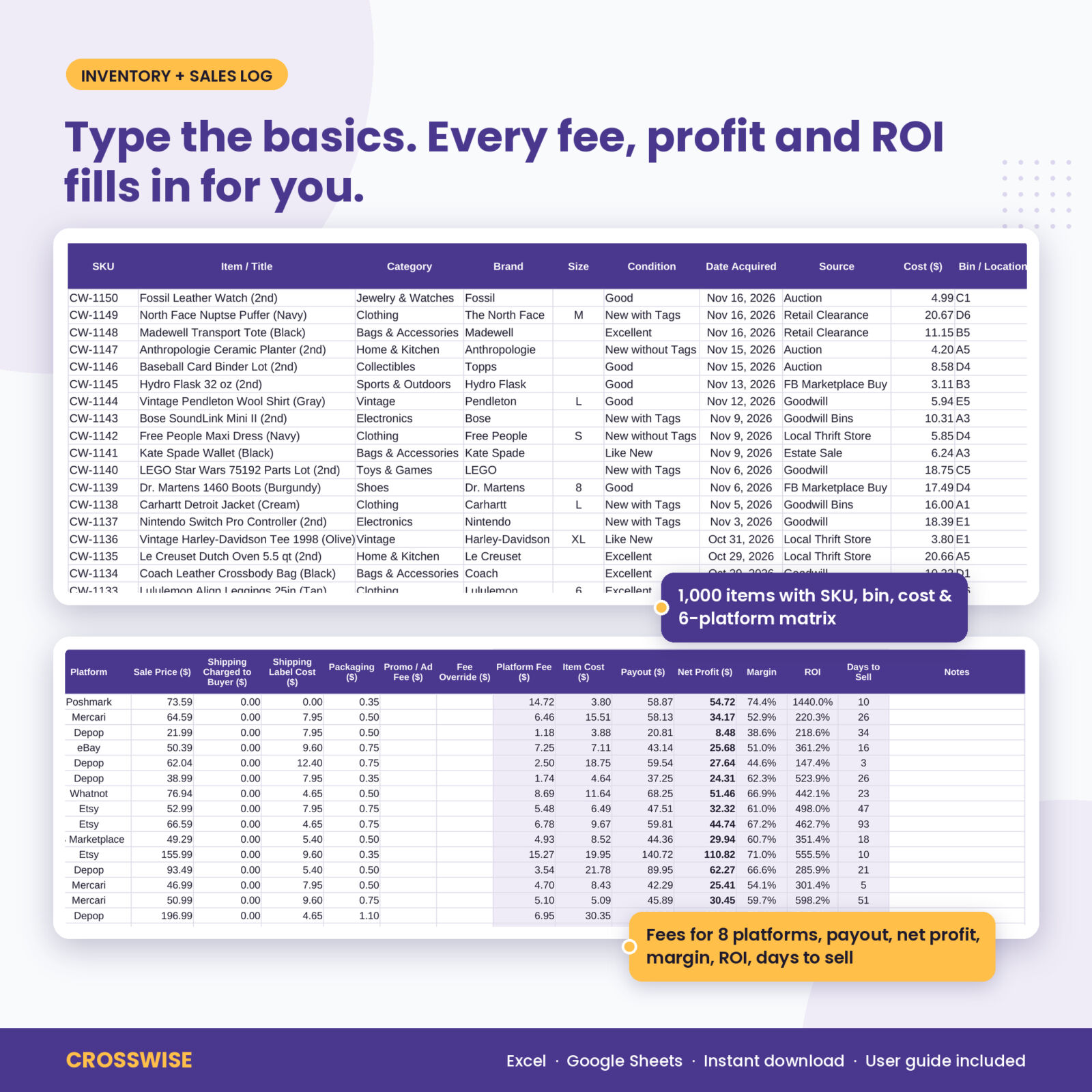
Room for 1,000 items with SKU, title, category, brand, size, condition, source, cost, bin location, list price and date listed. Six platform columns take a Listed, Draft or Delisted dropdown. Status, live-on count, days listed, age flag (Fresh, Aging, Stale, Clear Out), estimated profit and the DELIST ALERT all fill in by themselves. Duplicate SKUs turn yellow.
Sales log with fees for 8 platforms
Room for 1,000 sales. Pick the SKU and platform, type the price, and add shipping charged, label, packaging and promoted listing fees. Crosswise adds the platform fee, item cost, payout, net profit, margin, ROI and days to sell. A Fee Override column handles one-off cases.
Dashboard
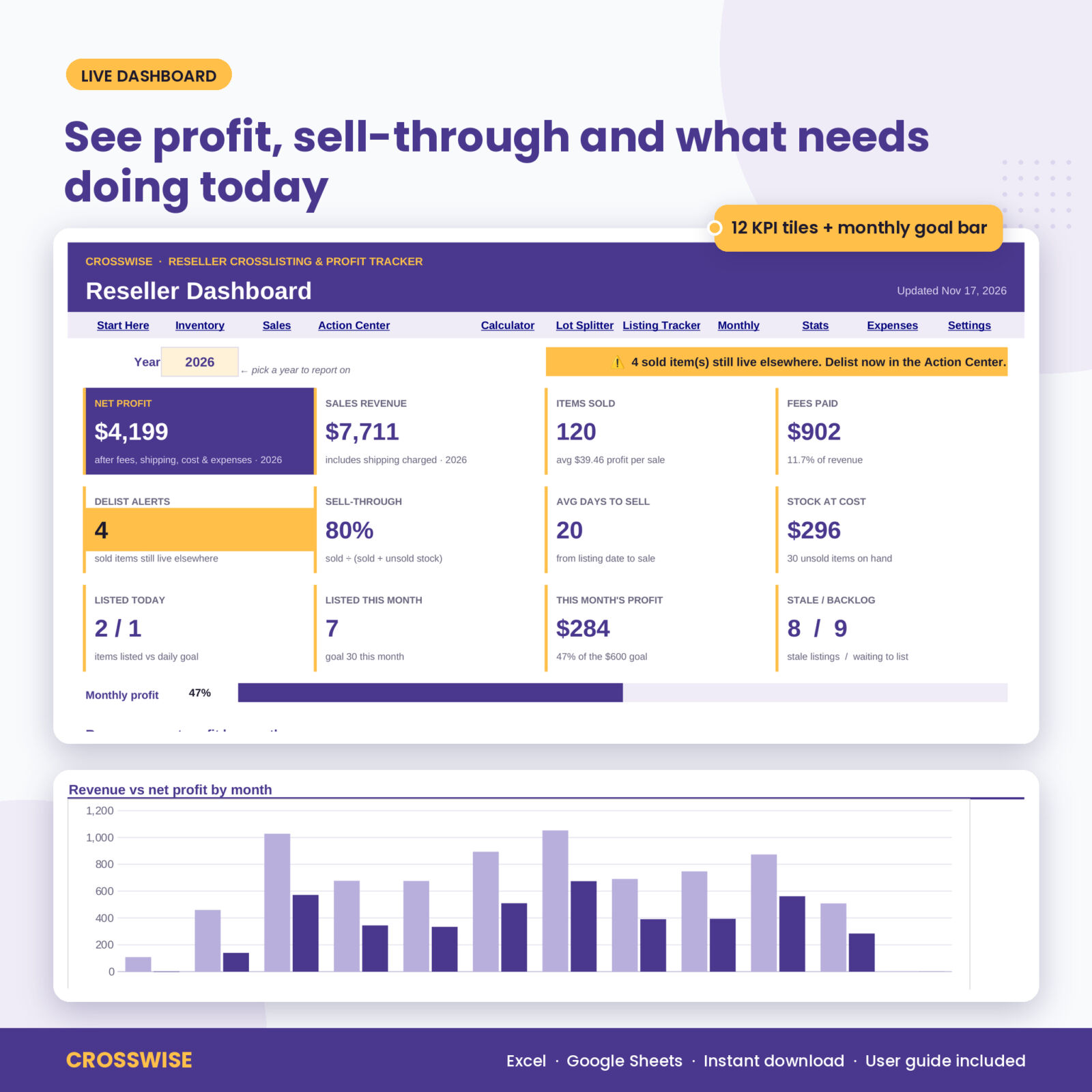
Twelve live tiles: net profit, revenue, items sold, fees paid, delist alerts, sell-through, average days to sell, stock at cost, listed today against your goal, listed this month, this month’s profit against your goal, and stale and backlog counts. Add a monthly goal bar and four charts: revenue vs net profit, profit by platform, live listings by age, and items listed vs sold. Pick any year.
Action Center
Your to-do list in three parts: delist now, stale listings with a suggested markdown price and the profit at that price, and items sourced but not yet listed with their bin.
Price and offer calculator
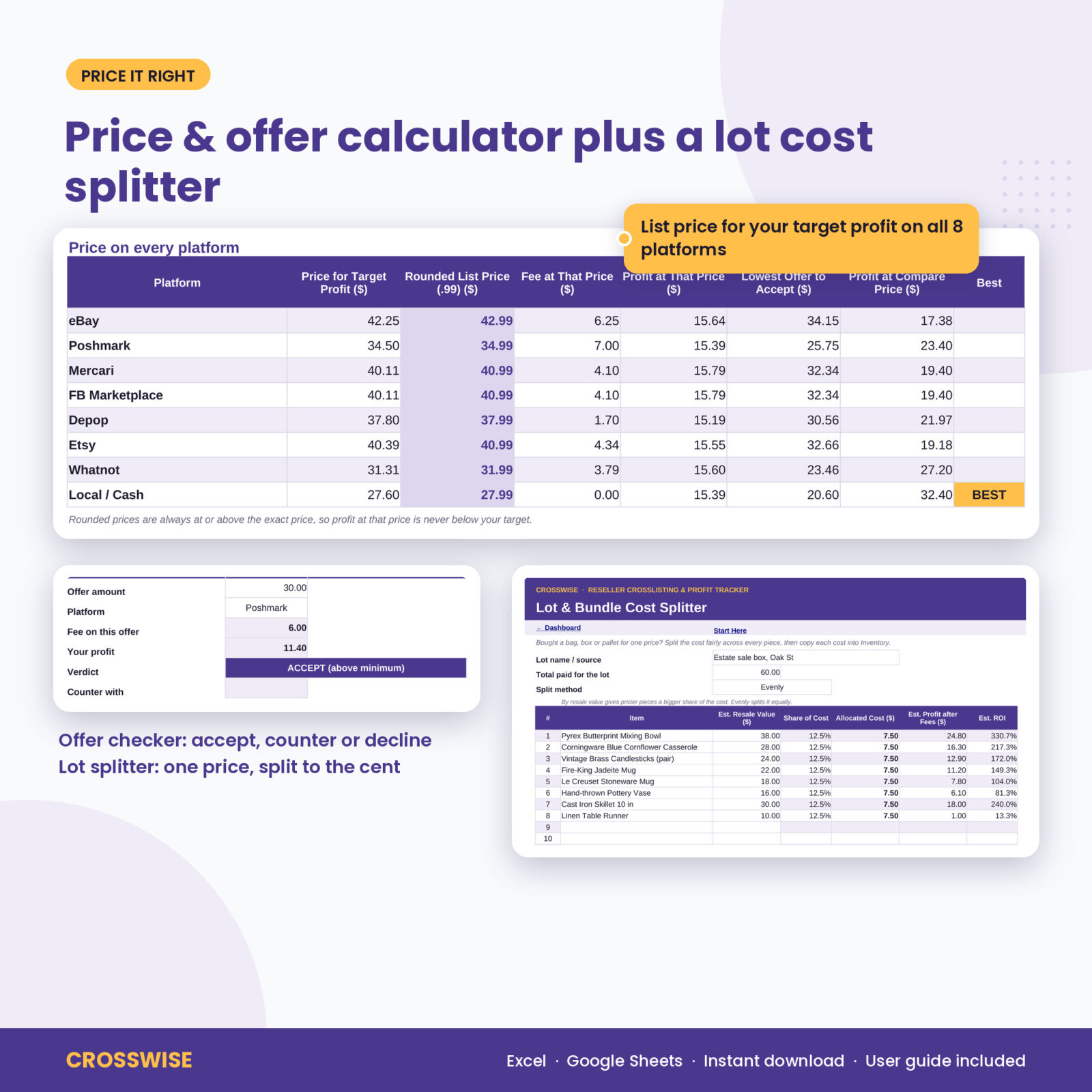
Enter the cost (or pick a SKU) and your target profit. See the list price you need on all eight platforms, a rounded .99 price that never drops below your target, the lowest offer worth accepting, and which platform pays most at the same price. The offer checker says accept, counter or decline.
Lot and bundle cost splitter
Paid one price for a box of eight pieces? Split the cost by resale value or evenly across up to 40 items. The split always adds up to the exact lot price, to the cent.
Daily listing tracker
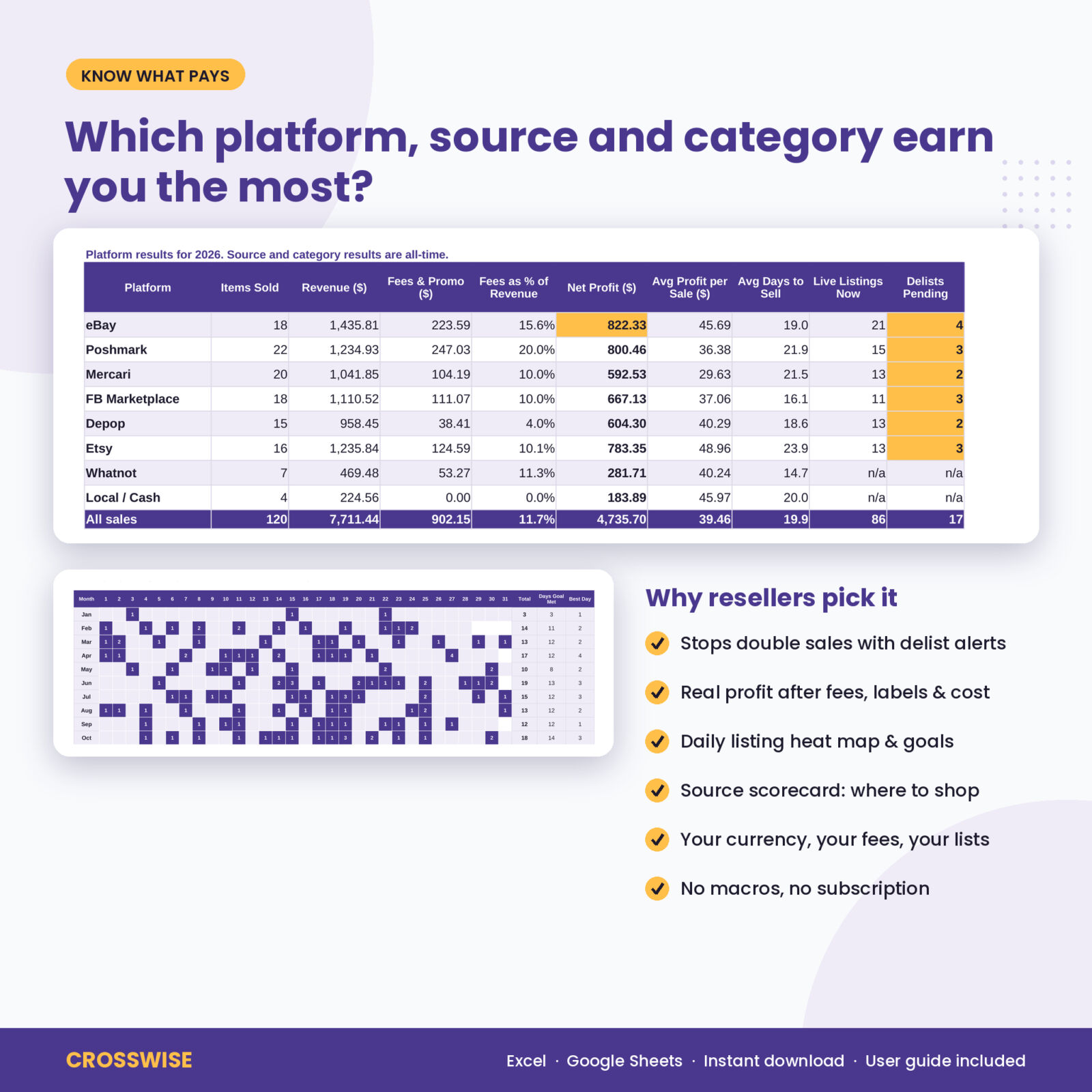
A full-year heat map of items listed per day, measured against your daily listing goal.
Monthly profit and loss, stats and expenses
Twelve months of revenue, fees, shipping, cost of goods, gross profit, expenses and net profit with goal tracking. Platform, source and category scorecards. An expense log with room for 500 entries.
What is included
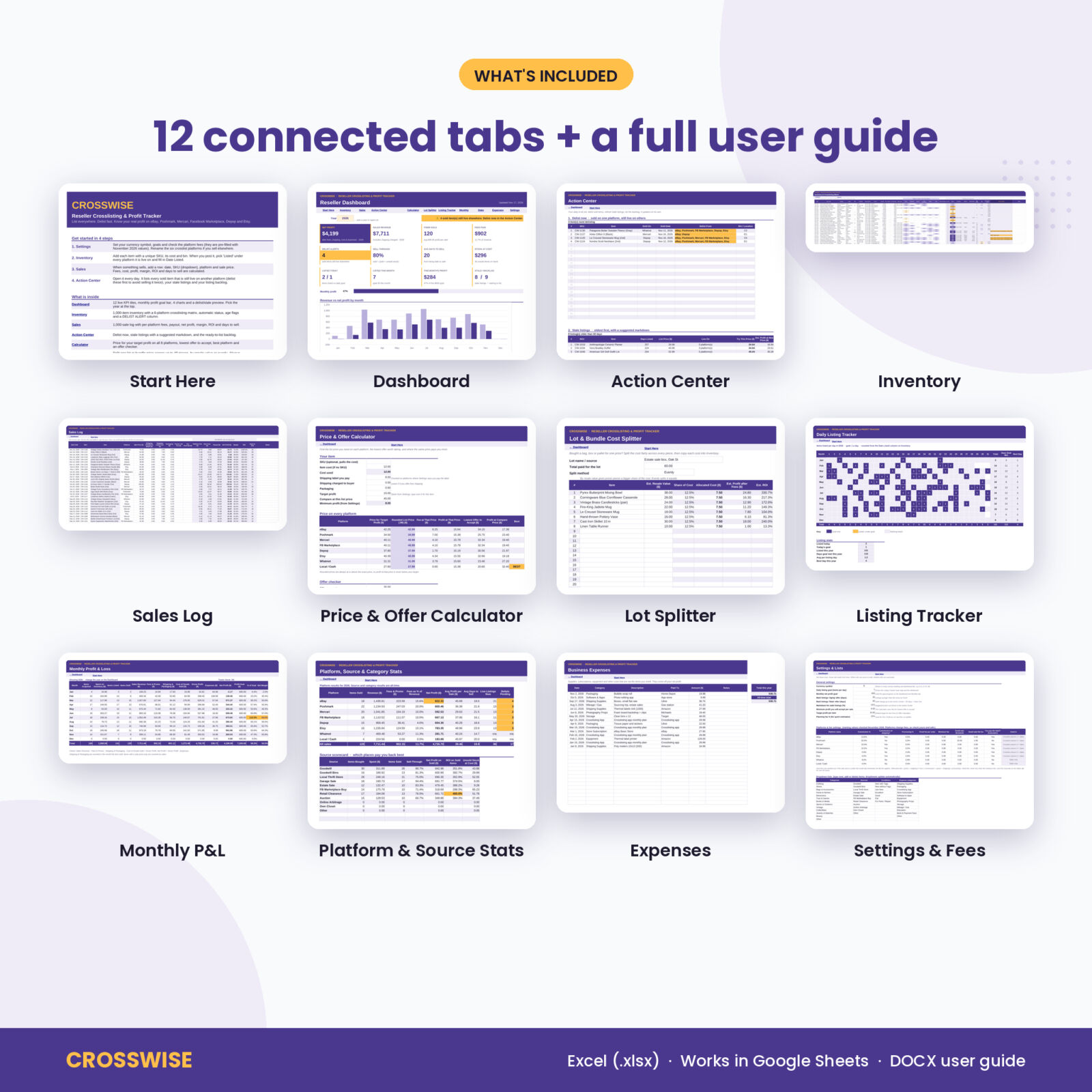
- Crosswise Reseller Crosslisting & Profit Tracker (.xlsx) with 12 tabs: Start Here, Dashboard, Action Center, Inventory, Sales, Calculator, Lot Splitter, Listing Tracker, Monthly, Stats, Expenses and Settings
- Crosswise User Guide (.docx): setup, every tab explained, customizing, Google Sheets steps, tips, troubleshooting and FAQ
How it works
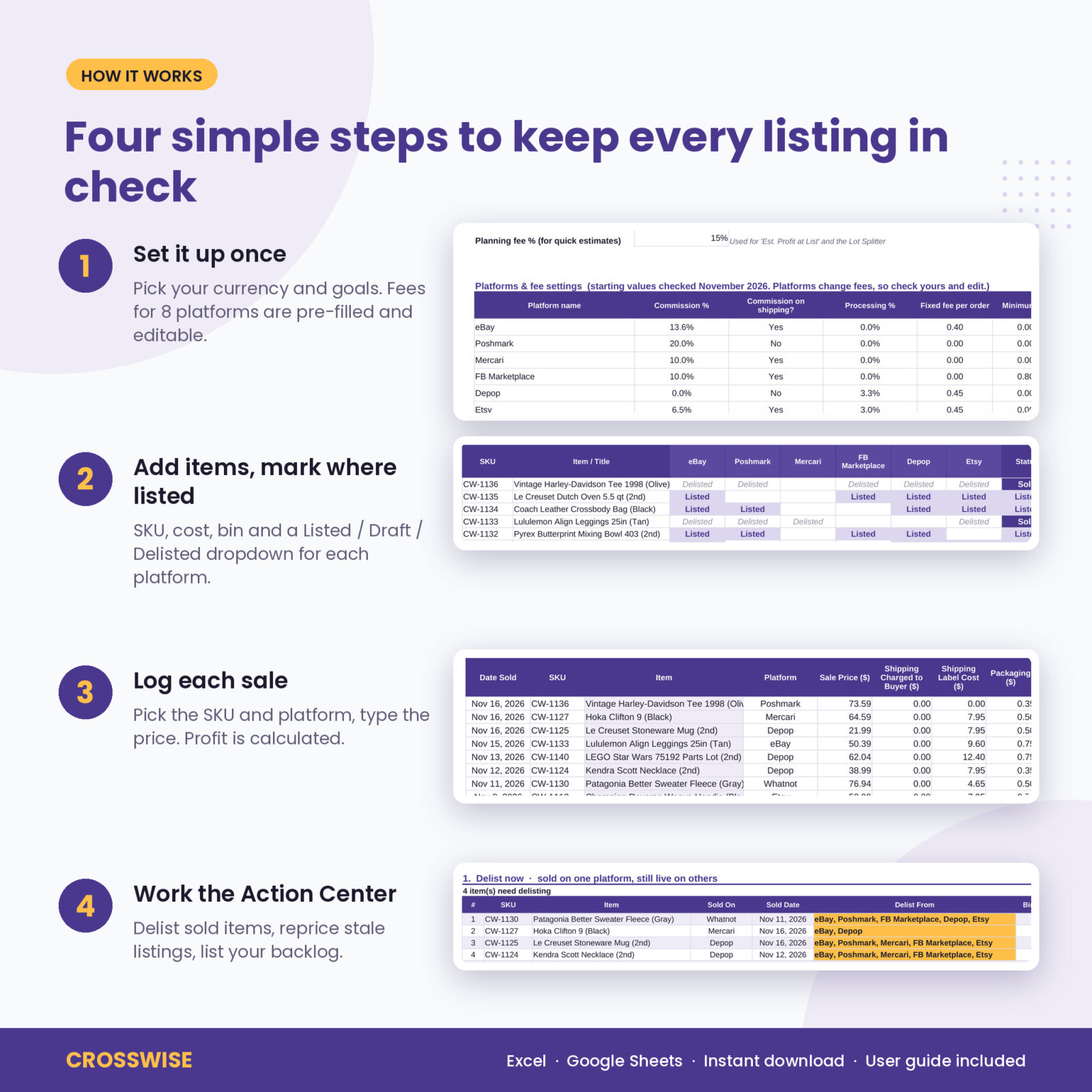
- Set your currency, goals and platform fees on Settings. Fees come pre-filled.
- Add each item to Inventory and mark where it is listed.
- When it sells, add a row on Sales: date, SKU, platform, price.
- Open the Action Center daily and clear your delist list.
File format and software
One .xlsx workbook for Microsoft Excel 2016 or newer, Excel for Mac and Excel for the web. For Google Sheets, upload the file to Google Drive and open it with Google Sheets. All formulas use functions both programs support. No macros, add-ins or logins. Formula cells are locked without a password, so typing in the wrong place will not break anything, and you can unprotect a sheet any time.
Customize it
One currency setting changes every money heading and tile. Rename any platform (Grailed or Vinted instead of Etsy, for example), edit its fees, and change the category, source, condition and expense lists. Set your own aging days, markdown percentage, minimum profit and goals.
Digital download
This is a digital product. Nothing will be shipped. Your files are ready to download right after checkout. Personal use license: please do not share or resell the files.
Real ways resellers use it
- A Mercari sale comes in overnight. Next morning the Action Center lists the eBay and Poshmark listings to end before anyone else buys.
- A buyer sends a lowball offer on Poshmark. The offer checker shows your profit on it and suggests a counter price.
- You buy an estate sale box of eight pieces for one price. The lot splitter gives each piece a fair cost before you list it.
- At month end you see which store and which platform earned the most, and plan next week’s sourcing around it.
FAQ
Does it connect to eBay, Poshmark or Mercari automatically?
No. It is a spreadsheet, so you enter your items and sales. There is no syncing, no login and no monthly fee.
Does it work in Google Sheets?
Yes. Upload the .xlsx to Google Drive and open it with Google Sheets. The tabs along the bottom are the easiest way to move around there.
Which platforms are set up?
eBay, Poshmark, Mercari, Facebook Marketplace, Depop and Etsy in the crosslisting matrix, plus Whatnot and Local / Cash for sales. You can rename any of them and edit every fee.
Are the fees up to date?
Fee settings were checked in November 2026. Platforms change fees, so the guide shows you how to check and edit them in a minute.
How many items can I track?
1,000 inventory items, 1,000 sales and 500 expenses.
Can I use my own currency?
Yes. Type your symbol on Settings once.
Is this tax software?
No. It gives you clean totals to share with your tax preparer, but it is not tax advice.
Is there a free version?
Yes. Crosswise Lite has the inventory matrix, delist alerts and sales log for 50 items. Get it free on our free crosslisting spreadsheet page.


Reviews
There are no reviews yet.