Houses do not fall apart all at once. They fall apart one skipped filter, one clogged gutter and one ignored water heater at a time. The cheapest way to avoid big repair bills is boring: do the small jobs on schedule. The hard part is remembering them.
Below is a free home maintenance schedule spreadsheet that does the remembering for you. It works in Excel and Google Sheets, lists 36 common tasks, and tells you what is overdue the moment you open it. After the download, you will find a season-by-season checklist and a few tips on keeping the habit going.
Download the free home maintenance schedule spreadsheet
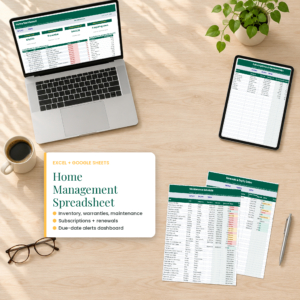
This is the free edition of the Eavesly Home Management Spreadsheet. It includes the Maintenance Schedule (36 tasks pre-listed with automatic next-due dates and status colors), the Subscriptions tracker (true monthly and yearly cost of every subscription) and a Settings tab for your currency and alert window.
Free Home Maintenance Schedule Spreadsheet (Excel + Google Sheets)
The Eavesly free edition: a maintenance schedule with 36 home tasks pre-listed and automatic next-due dates, plus a subscriptions tracker with true monthly and yearly cost. Works in Excel and Google Sheets.
Want everything unlocked?
The free file is a sample. The full version has every page, tab and feature, plus the user guide.
See the full versionHow the spreadsheet works
Each task has a frequency: weekly, every 2 weeks, monthly, every 2 months, quarterly, every 6 months, yearly, every 2 years or every 5 years. You type one thing, the date you last did it. The sheet then shows:
- Next due date, calculated from the frequency
- Days until it is due (negative means overdue)
- Status: red for Overdue, amber for Due soon, green for OK
- Estimated cost per year, if you add what each job usually costs
“Due soon” means inside your alert window, which is 30 days by default. Change it on the Settings tab if you prefer a 14-day or 60-day heads-up.
The 36 tasks already on the list
You can delete what does not apply (no pool, no septic) and add your own. Here is what comes pre-loaded, grouped by area:
Heating, cooling and air
- Replace HVAC filter (quarterly, monthly if you have pets)
- Service the furnace or heat pump (yearly, before winter)
- Service the AC (yearly, before summer)
- Clean bathroom exhaust fans (every 6 months)
Safety
- Test smoke alarms (monthly)
- Replace smoke and CO alarm batteries (yearly)
- Check the fire extinguisher gauge (monthly)
- Chimney sweep and inspection (yearly)
- Test GFCI outlets (monthly)
Plumbing and water
- Flush the water heater (yearly)
- Check under sinks for leaks (quarterly)
- Test the sump pump (every 6 months)
- Drain outdoor faucets before freezing weather (yearly)
- Re-caulk tub and shower (every 2 years)
- Septic tank pump-out (every 5 years, check with your installer)
Kitchen and laundry
- Replace the fridge water filter (every 6 months)
- Clean range hood filter, dishwasher filter and garbage disposal
- Clean fridge coils (yearly)
- Clean the dryer vent duct (yearly) and lint trap housing (quarterly)
- Clean the washing machine (monthly)
Outside, roof and garage
- Clean gutters (every 6 months)
- Inspect the roof (yearly)
- Check window and door seals (yearly)
- Power wash deck or siding (yearly) and seal the deck (every 2 years)
- Service sprinklers, sharpen the mower blade
- Lubricate the garage door and test the auto-reverse
A season-by-season home maintenance checklist
If you like to batch jobs, here is how the list falls across the year in most of the US. Adjust for your climate.
| Season | Main jobs |
|---|---|
| Spring | AC service, test sump pump, clean gutters, inspect roof after winter, service sprinklers, power wash |
| Summer | Seal deck, check window seals, clean fridge coils, pest inspection |
| Fall | Furnace service, clean gutters again, drain outdoor faucets, chimney sweep, replace smoke alarm batteries |
| Winter | Flush water heater, check attic for leaks, deep clean carpets, rotate mattresses |
| Every month | Test smoke alarms and GFCI outlets, clean dishwasher filter and disposal, check extinguisher |
Why a spreadsheet beats a paper checklist
Paper checklists are great until you lose track of when you last did something. “Did I change the filter in June or August?” A spreadsheet holds the date, does the math and flags the job when it comes around again. It also gives you a record you can sort, filter and print, which helps when you sell the house or file a warranty claim.
And unlike an app, it does not need an account, a subscription or an internet connection (in Excel). Your data stays in your own file.
EDITOR’S PICK: THE FULL SPREADSHEET
Eavesly Home Management Spreadsheet
Everything in the free edition plus a Home Dashboard (inventory value, maintenance status, subscription cost per month and year, three charts and the next 15 due items in date order), a 200-row Household Inventory with value by room, Warranties with expiry alerts, Renewals for passports, licenses, registrations and insurance, a 300-entry Maintenance and Repair Log, and a Contacts list for utilities and service pros. Excel and Google Sheets, any currency, DOCX user guide.
Instant download | No macros
Free edition vs the full Eavesly spreadsheet
| Feature | Free edition | Eavesly full |
|---|---|---|
| Maintenance schedule (36 tasks, auto next-due) | Yes | Yes |
| Subscriptions tracker | Yes | Yes |
| Currency and alert window settings | Yes | Yes |
| Home Dashboard with charts | No | Yes |
| Next 15 due items across every tab | No | Yes |
| Household inventory (200 rows, value by room) | No | Yes |
| Warranty tracker with expiry alerts | No | Yes |
| Renewals: passports, licenses, registration, insurance | No | Yes |
| Maintenance and repair log with yearly totals | No | Yes |
| Contacts and service pros | No | Yes |
| User guide | No | Yes |
How to keep the habit going
- Pick one day a month. The first Saturday works for a lot of people. Open the sheet, do whatever is red, check what is amber.
- Update the date right away. The moment the new filter is in, change the Last done date. It takes five seconds.
- Buy supplies ahead. Keep a spare set of filters and alarm batteries so the job is never blocked by a store run.
- Book pros early. HVAC and gutter companies fill up in spring and fall. If the sheet says Due soon, call that week.
- Add the cost. Once you know your yearly upkeep total, you can set aside money for it each month.
Setting it up in your first 30 minutes
You do not need to know every date to start. Here is a quick way to get the sheet working tonight:
- Do a 10-minute walk-through. Look at the furnace filter, the smoke alarms, the fridge filter light and the gutters. Anything that looks overdue probably is.
- Enter the dates you know. Receipts, emails from service companies and your own photos often show when a job was done. Search your inbox for “HVAC”, “gutter” or “plumbing”.
- Guess the rest, then fix it. If you think the water heater was flushed “sometime last year”, put January of last year. The sheet will flag it, you will do it, and the next date will be accurate.
- Delete what does not apply. No chimney, no septic, no sprinklers? Clear those rows so the status counts stay honest.
- Add your own. Water softener salt, pool chemicals, the generator test, the RV battery. Pick a frequency and you are done.
Homeowners vs renters: what to track
Homeowners carry the whole list. Renters usually do not service furnaces or clean gutters, but there is still plenty that falls on the tenant, and tracking it protects your deposit.
| Task | Homeowner | Renter (usually) |
|---|---|---|
| HVAC filter | Yes | Often yes, check your lease |
| Smoke alarm tests | Yes | Yes, report failures to the landlord |
| Dishwasher, disposal, dryer lint | Yes | Yes |
| Gutters, roof, water heater | Yes | Landlord |
| Leak checks under sinks | Yes | Yes, report leaks in writing |
| Subscriptions and renewals | Yes | Yes |
Renters can use the Who does it column to record “Landlord” and the date they reported a problem, which is handy if there is ever a dispute.
What skipping maintenance tends to cost
Prices vary a lot by region, so the spreadsheet lets you enter your own estimates. The pattern is the same everywhere, though: small jobs are cheap and big failures are not. A clogged dryer vent is a fire risk and a slower, costlier dryer. Gutters that overflow can push water toward the foundation. A water heater full of sediment works harder and wears out sooner. Logging each job also gives you proof of care if you ever need to make a warranty or insurance claim.
Bonus: use the subscriptions tab too
The free edition also includes the Subscriptions tracker. Add every streaming service, app, gym, delivery plan and membership, with its cost and billing cycle. The sheet converts weekly meal kits and yearly plans to a monthly figure, so you can compare like with like. Mark anything you do not use as Cancel. It is often the fastest $20 a month you will find in your budget.
Using it in Google Sheets
- Upload the .xlsx file to Google Drive.
- Open it and choose File > Save as Google Sheets.
- If dates show as numbers, go to File > Settings and set your locale.
- Use the tabs at the bottom to move around.
More Taskdale spreadsheets for the home
| Product | Best for |
|---|---|
| Sill & Season Home Maintenance Tracker | A simpler maintenance schedule with repair log and budget |
| Roomtrove Home Inventory for Insurance | Detailed room-by-room inventory and claim builder |
| SubSweep Subscription & Renewal Tracker | Subscriptions only |
| Keyledger Car Maintenance Tracker | Vehicle service reminders and cost of ownership |
| Leftnote If Something Happens to Me Binder | How the house works, bills and documents for whoever steps in |
FAQ
How often should I do home maintenance?
Some jobs are monthly (smoke alarm tests), most are every 6 or 12 months (gutters, HVAC service, water heater). The spreadsheet lists a typical frequency for each, which you can change.
Is the free spreadsheet really free?
Yes. Enter your email to download it. There is no trial period and no expiry.
Does it work on a Mac?
Yes, in Excel for Mac or Google Sheets in any browser.
Can I add my own tasks?
Yes. There are 80 rows and 36 are filled, so you have 44 open rows for your own tasks.
Will it remind me by email?
No. It is a spreadsheet, so reminders show as colors and status labels when you open it. A monthly calendar reminder to open the file works well.
What does the full version add?
A dashboard with charts, inventory, warranties, renewals, a repair log, contacts and a user guide.
Get your free maintenance schedule
Download it, type in the five dates you remember, and let the sheet tell you what comes next.
Want the dashboard, inventory, warranties and renewals too? See the full Eavesly Home Management Spreadsheet on Taskdale.