Taskdale makes the coloring books featured in this article. When you buy one, you support the site.
Coloring online for adults is easier than most people expect. A few good sites let you open a page in your browser, pick colors and fill it in, with no app and no download. Coloring Bunny and Just Color are the best free places to start, and both have proper grown-up pages like mandalas and cozy scenes.
There’s one honest catch. Browser coloring is mostly tap-to-fill. It’s relaxing, but it’s not quite the same as shading with a pencil.
Below are the free sites worth your time, what each one is like, and a printable option for nights when you’d rather hold a real pencil.
Quick answer
- Best free online coloring for adults overall: Coloring Bunny. No account, works on phones, tablets and desktops, and you can export your finished page.
- Best for mandalas and art-therapy pages: Just Color, with a big adult library to color online or print.
- Best for numbers fans: Numicolor on CrazyGames, a free browser color by number game.
- Best for coloring your own pages in a browser: Kapwing’s free coloring tool, which accepts PNG and PDF uploads.
- Best printable alternative: a downloadable coloring book you print at home.
Best free online coloring for adults
1. Coloring Bunny
Coloring Bunny is the one we’d open first. The online tool is free, needs no sign-up, and runs on phones, tablets and computers. Your progress autosaves in the browser, so you can close the tab and come back later on the same device.
For adults, the “cozy” pages are the highlight: baking scenes, reading corners, autumn afternoons and winter evenings. There’s also a long list of mandalas, from simple to detailed and geometric. You can build your own palettes, blend gradients, and export the finished page as a PDF, PNG or JPEG. A Magic Fill tool is currently desktop-only.
2. Just Color
Just Color is built for grown-ups. Its categories read like a calm afternoon: mandalas, art therapy (anti-stress, Zen, doodles, dreamcatchers), nature, animals, travel and art. You can color online or download pages as PDFs to print. A free account lets you save your online creations.
3. Kapwing’s coloring tool
Kapwing is an online editor with a free coloring tool. You can color one of its templates, or upload your own JPG, PNG or PDF and color it with marker, pencil and highlighter brushes. That last part is handy if you already own coloring pages. The catch: exports from a free account carry a watermark, and you may need to sign in to save.
4. Happy Color and Numicolor (color by number)
If you’d rather follow numbers than choose colors, CrazyGames hosts Numicolor, a browser color by number game with nature, animal and fashion pictures, filters for difficulty, and modes for adults and children. It plays on desktop, phone and tablet with no install. Happy Color, the best-known color by number app, is an app rather than a website, so it needs a download.
5. Crayola
Crayola’s free pages are print-only, but it does have an Adult Coloring category alongside the kids’ sections. Good for grabbing a page to print on a slow afternoon.
What’s it really like to color in a browser?
Most free sites use tap-to-fill. Click a shape, it fills with color. That’s quick and very soothing, especially on a busy mandala where one tap fills a petal perfectly.
What you lose is texture. There’s little or no pressure, no layering of two pencils into a soft gradient, and no paper grain. Some sites (Coloring Bunny included) add gradients and brushes to close the gap, but it still feels different.
Expect ads on most free sites too. That’s how they stay free. If adverts beside the page bother you, a downloaded page in an app, or on paper, is the calmer choice.
Which pages suit coloring online?
Not every page works well in a browser. Tap-to-fill needs closed shapes. If a line has a gap, the color leaks into the background and you’ll spend more time undoing than coloring.
So look for pages with clear, bold outlines and medium-sized spaces. Mandalas are perfect: every petal is its own sealed shape. Cozy room scenes work well too, with walls, rugs, cushions and windows that each fill in one tap.
Very fine, sketchy line art is better on paper. Pencils don’t care about gaps.
Size matters as well. On a phone, a page with hundreds of tiny shapes turns into a lot of pinching and zooming. On a laptop or tablet, the same page is a pleasure. Match the page to the screen and you’ll enjoy it more.
Relaxing coloring online: how to make it feel calmer
A few simple habits turn a browser tab into a proper wind-down.
- Go full screen. Press F11 on a Windows PC (or use your browser’s full-screen view on a Mac) to hide tabs and notifications.
- Choose five colors before you start. A small palette looks calmer and finishes faster than a rainbow.
- Use a tablet if you have one. Tapping on glass feels more natural than clicking with a mouse.
- Pick cozy scenes over giant mandalas at night. Fewer shapes means less decision-making when you’re tired.
- Set a gentle limit. One page, then bed. Screens make it easy to keep going.
Free coloring apps for adults without downloading
If “no download” is what matters, browser sites are the answer. They work on almost any device with a modern browser, including work laptops where you can’t install apps, library computers and Chromebooks.
If you don’t mind installing something, an app gives you better brushes and a stylus. Our guide to free coloring apps for adults covers the best ones, and we’ve done separate deep-dives on the best coloring book app for iPad and the best free coloring apps for Android.
Coloring books for adults online: is free enough?
For a lot of people, yes. The free sites above have hundreds of good pages between them, and you could color one a night for a year without paying a cent.
Where free starts to feel thin is consistency. Pages on free sites come from many different artists, in many styles, and some are better drawn than others. A themed coloring book gives you a set that belongs together: same line weight, same mood, same level of detail. Finish one page and the next one feels like the next chapter, not a random click.
That’s the case for buying a book. Not more pages, but better-matched ones, and no ads beside them.
The printable alternative: adult coloring books online, printed at home
Sometimes the best online coloring isn’t online at all. You buy the book online, download it in seconds, and color it on paper with your own pencils. No ads in the margins, no browser tabs, no screen glow at 11pm.
Every Taskdale coloring book comes as a US Letter PDF, an A4 PDF and single-page 300 DPI PNGs, with an instant download after checkout. Print one page or all of them. And if you do want to color on a screen, the same PNG files import into Procreate, ibis Paint X or Kapwing’s upload tool.
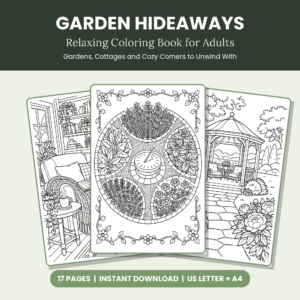
Taskdale pick · Adults who color to relax
Garden Hideaways Relaxing Coloring Book for Adults
Seventeen calm, adult pages: a fireside reading nook, a rainy window seat, a wisteria path and a koi lily pond. Print them at home and color away from the screen.
17 printable pages · Instant download · US Letter + A4
Adult coloring books online: our picks for printing
These three suit grown-up colorers best, from quiet gardens to nostalgic scenes.
| Coloring book | Pages | Best for | Price | |
|---|---|---|---|---|
| Garden Hideaways |
17 | Adults who color to relax | $2.99 | View book |
 Golden Days Golden Days |
14 | Seniors, care homes and activity groups | $2.99 | View book |
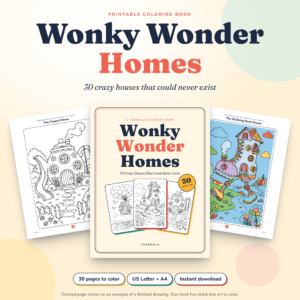 Wonky Wonder Homes Wonky Wonder Homes |
30 | Teens and adults who like whimsical, cozy scenes | $3.99 | View book |
You can see every title in the Taskdale coloring books shop.
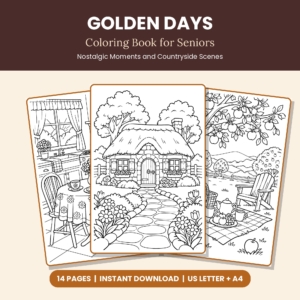
Taskdale pick · Seniors, care homes and activity groups
Golden Days Coloring Book for Seniors
A steam railway, afternoon tea, a seaside promenade and a cozy kitchen with an old wireless. Big, friendly shapes that work well for older relatives who'd rather color on paper than click a mouse.
14 printable pages · Instant download · US Letter + A4
Online coloring or printable pages?
| Coloring online | Printable pages | |
|---|---|---|
| Setup | None, open a tab | Download and print |
| Feel | Tap-to-fill, some brushes | Real pencils, markers, paint |
| Ads | Common on free sites | None on the page |
| Best for | Quick breaks, work laptops | Long sessions, screen-free evenings |
Plenty of people use both: a browser page at lunch, a printed page in the evening. Want to try numbered pages instead? Our guide to color by number for adults covers that style, and our roundup of coloring pages online includes sites the whole family can use.
Ready to print something tonight?
Garden Hideaways Relaxing Coloring Book for Adults is $2.99 and downloads the moment you check out. Or browse every book in the Taskdale coloring collection.
Frequently asked questions
Can I color online for free without downloading anything?
Yes. Coloring Bunny lets you color in your browser with no account, and Just Color has an online coloring option too.
Can I save my online coloring?
Coloring Bunny autosaves in your browser and exports PDF, PNG or JPEG files. Just Color saves creations to a free account.
What’s the best free online coloring for adults on a phone?
Coloring Bunny’s tool works on phones as well as tablets and computers. Pick pages with larger shapes so you’re not zooming constantly.
Is online coloring relaxing?
Many people find tap-to-fill coloring calming, especially cozy scenes and mandalas. If screens keep you awake, printed pages are a gentler option at night.