Best Freelancer Spreadsheet: Four Templates Compared
The best freelancer spreadsheet is the one that matches how you actually earn and get paid. Plumline suits client and follow-up tracking, Deductory suits US tax and write-offs, BizBloom Freelance HQ suits a freelancer who wants invoicing, pricing and bookkeeping together, and Keystone Business Hub suits a freelancer growing into a small business.
Choosing can feel more complicated than it should, because every template promises "everything in one place". We'll go through what genuinely separates them, so you can pick one and get back to client work.
- A freelancer spreadsheet is a ready-built workbook, in Excel or Google Sheets, that tracks clients, invoices, expenses and tax in linked tabs.
- Deductory is built around US rules (Schedule C, 1099 work, IRS mileage rates), so it fits US freelancers best.
- BizBloom Freelance HQ has 18 tabs and Keystone Business Hub has 24, which is the clearest gap in scope on this page.
- Plumline is the most focused option, centred on leads, follow-ups, payments and your real hourly rate.
- All 4 templates here come with a guide, so you aren't left to work out the formulas yourself.
 Tax Write-Off Tracker Spreadsheet | Deductory Freelance Write-Off Organizer for Google Sheets & Excel with Tax Dashboard, Quarterly Tax Planner, Mileage Log & Schedule C Summary
Table of Contents Toggle
- What should you look for in the best freelancer spreadsheet?
- How do the freelancer spreadsheets compare?
- Which freelancer spreadsheet suits which type of freelancer?
- How do you set up a freelancer spreadsheet in your first week?
- What mistakes should you avoid with a freelancer spreadsheet?
- What affects the price of a freelancer spreadsheet?
- Which freelancer spreadsheet should you choose?
- Common questions
What should you look for in the best freelancer spreadsheet?
A good freelancer spreadsheet records each piece of information once and updates everything else from it. It should cover the jobs you really do each week, which are chasing clients, sending invoices and setting money aside for tax. Five factors separate the options on this page.
Does it fit your tax system?
Tax logic is the factor most likely to rule a template out. Deductory calculates a Schedule C summary, quarterly estimated taxes and a mileage log with automatic 2026 IRS rate switching, so it is designed for US freelancers and 1099 contractors.
If you file elsewhere, including in the UK, those features won't map onto your return. BizBloom Freelance HQ and Keystone Business Hub both work in any currency, and BizBloom handles up to two taxes, which suits VAT or sales tax setups better.
Does it show who owes you money?
Late payment is where most freelancers lose time and cash flow, so look for overdue flags. Plumline flags overdue follow-ups and unpaid invoices on its own. BizBloom shows Paid, Part-Paid and Overdue status on its Invoice Maker, and Keystone lists money owed by age, so you can see which debts are 15 days late and which are 90.
Do you need Excel, Google Sheets, or both?
Check the file format before you buy, because formulas can behave differently between programs. Deductory is listed for both Google Sheets and Excel. BizBloom is an Excel .xlsx file tested in Google Sheets, and Keystone is an Excel workbook that also works in Google Sheets. Plumline is described as an Excel template, so treat it as an Excel-first choice.
Does it work out what you really earn?
Your real hourly rate is income divided by all the hours you spend, including admin and unpaid proposals. Plumline puts this on its dashboard next to revenue, pipeline value and win rate. BizBloom includes an hourly rate and service pricing calculator, which helps when you are setting rates rather than just measuring them.
Does it come with a guide and sample data?
A workbook with a dozen or more linked tabs is hard to learn from a blank screen. Plumline includes a step-by-step user guide. Deductory has a sample file, an illustrated guide and a bonus cheat sheet. BizBloom comes with an illustrated DOCX guide, and Keystone has a sample file and a 21-page guide.
How do the freelancer spreadsheets compare?
The four templates differ mainly in scope, file format and tax focus. The table sets out what each one states in its own description.
| Product | Format | Size and scope | Tax and money features | Best for |
|---|---|---|---|---|
 Client Tracker Spreadsheet & Small Business CRM Template (Excel) | Plumline | Excel | One workbook for leads, deals, follow-ups, projects, hours and payments | Unpaid invoice flags, real hourly rate, win rate | Freelancers who live by client follow-up |
| Tax Write-Off Tracker Spreadsheet | Deductory Freelance Write-Off Organiser for Google Sheets & Excel with Tax Dashboard, Quarterly Tax Planner, Mileage Log & Schedule C Summary | Google Sheets and Excel | 12 tabs, 8 live KPIs, home office calculator | Schedule C summary, quarterly estimates, set-aside per payment, IRS mileage rates | US freelancers and 1099 contractors |
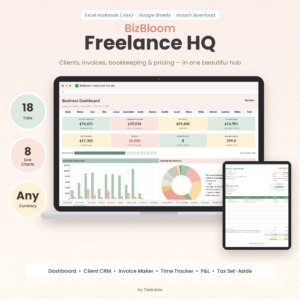 Freelancer Business Spreadsheet for Excel & Google Sheets | BizBloom Freelance HQ All-in-One Client CRM, Invoice Tracker, Bookkeeping & Pricing Calculator | Excel .xlsx, tested in Google Sheets | 18 connected tabs | Invoice Maker, tax set-aside, up to two taxes, any currency | Freelancers wanting CRM, invoicing and bookkeeping together |
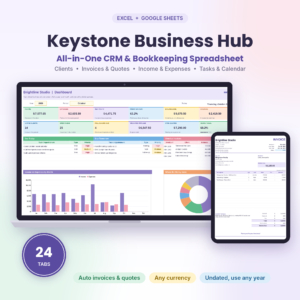 Keystone Business Hub | Small Business Spreadsheet for Excel & Google Sheets | CRM, Bookkeeping, Invoice Tracker, Client Tracker & Business Dashboard | Excel, also works in Google Sheets | 24 tabs including Calendar and Client Profile | Money owed by age, bank reconciliation, budgets, quarterly tax planner, any currency | Freelancers running quotes, budgets and bank checks |
Which freelancer spreadsheet suits which type of freelancer?
Each template suits a different working pattern, and the right match depends on whether your biggest pain is chasing clients, handling tax, or running the whole business.
Plumline suits a freelancer with many small leads, such as a designer or copywriter juggling proposals. Its strength is that nothing in your pipeline gets forgotten, and the real hourly rate shows whether a client is worth keeping.
Deductory suits a US-based freelancer whose main worry is the tax bill. You log expenses, income and miles once, and it shows deductible totals and how much to set aside from each payment. It is less of a client manager, so you may pair it with a separate tracker.
BizBloom Freelance HQ suits a freelancer who wants one workbook for the whole cycle, from client enquiry to paid invoice. The pricing calculator and print-ready Invoice Maker make it a practical choice if you invoice in a currency other than dollars.
Keystone Business Hub suits someone whose freelancing is turning into a small business, with quotes, bank balances, budgets and reconciliation. Record a payment once and the invoice, client balance, dashboard and reports all update. That is a lot of workbook, so it rewards people who like detail.
How do you set up a freelancer spreadsheet in your first week?
Setting up a freelancer spreadsheet takes about five steps, and the order matters because later tabs depend on earlier ones.
- Open the sample file or sample data first and click through each tab, so you see how a finished workbook behaves.
- Read the user guide's setup section before you type anything into your own copy.
- Enter your own business details, currency and tax settings once, then check the dashboard still calculates.
- Add your current clients and any invoices still unpaid, since these give the dashboard something useful to show straight away.
- Choose a fixed weekly slot, perhaps Friday afternoon, to log hours, payments and expenses.
Keep an untouched copy of the file as a backup before you start. If a formula breaks, you can copy it back rather than rebuilding it.
What mistakes should you avoid with a freelancer spreadsheet?
The most common mistake is buying a template that doesn't match your tax system. A US-focused tool such as Deductory will not produce figures you can use on a UK return, however neat its dashboard looks.
Other pitfalls are worth knowing before you commit:
- Typing over formulas. Overwriting a calculated cell breaks the link to the dashboard, so only edit the cells the guide marks as inputs.
- Updating once a month. Overdue flags and tax set-aside figures are only as current as your last entry.
- Choosing the largest workbook by default. Keystone's 24 tabs are useful if you need bank reconciliation, but if you only need a client list and invoices, a smaller template is easier to keep up.
- Skipping the format check. If you plan to work in Google Sheets, confirm that the product states it works there.
- Treating the tax figures as advice. A spreadsheet organises your records, and for filing decisions you should check with an accountant.
What affects the price of a freelancer spreadsheet?
The price of a freelancer spreadsheet depends mainly on its scope, the amount of supporting material and the file formats it supports. The live product cards show current prices, so we won't quote any here.
Generally, a focused tracker such as Plumline costs less up front than a larger all-in-one workbook such as Keystone Business Hub. More tabs, print-ready invoices and quotes, reconciliation tools and a long guide all add to the work behind a template. Tax-specific logic, like Deductory's yearly mileage rate switching, adds value only if it applies to you.
Compare cost against the time you will save on chasing invoices and preparing tax records. A cheaper template that you actually keep updating is better value than a larger one you abandon.
Which freelancer spreadsheet should you choose?
Pick by your biggest headache, then check the file format. If you need to stop leads and follow-ups slipping, choose Plumline. If you file US taxes as a 1099 contractor, choose Deductory. If you want client management, invoicing, bookkeeping and pricing in one workbook, choose BizBloom Freelance HQ. If you also need quotes, budgets and bank reconciliation, choose Keystone Business Hub.
Before you buy, run through this short checklist:
- Does the tax logic match the country where you file?
- Does the file format match the program you use?
- Will you realistically update it every week?
Common questions
Is a spreadsheet enough for a freelancer, or do I need accounting software?
For many sole traders a spreadsheet is enough, especially with a low number of invoices each month. It stores your records and does the sums. If you need automatic bank feeds or have employees, accounting software may suit you better.
Can I use these templates if I'm not in the US?
Yes, with a caveat. BizBloom Freelance HQ and Keystone Business Hub both support any currency. Deductory is built around IRS rules and Schedule C, so its tax outputs will not suit a non-US return.
Do I need Excel, or will Google Sheets do?
Google Sheets will do for Deductory, BizBloom and Keystone, which all state that they work there. Plumline is described as an Excel template, so you should use Excel to be safe. Complex formulas can occasionally behave differently between the two programs.
How often should I update my freelancer spreadsheet?
Weekly is a sensible minimum. Record payments and expenses as they happen if you can, because overdue flags and tax set-aside figures only reflect what you have entered. A fixed weekly slot stops the work building up.
Will a spreadsheet tell me how much tax to set aside?
Some do. Deductory shows how much to set aside from every payment, and BizBloom's dashboard shows a tax set-aside figure. These are planning aids based on your inputs, so confirm final amounts with an accountant or the tax authority.