If you already use GoodNotes for lists, journaling or school notes, your recipes probably belong there too. A GoodNotes recipe book is a hyperlinked PDF that you import once and write in forever: tabs down the side, an index for each category, and pages you fill with a stylus or the text tool. No ads, no account, no “jump to recipe” button.
This guide walks through setting one up from the first import to a full week of meals, using the Butter & Basil Digital Recipe Book & Meal Planner. It’s a recipe book first, but it also carries a year of weekly meal plans with a grocery list behind every week, which is where it earns its keep.
What you’re working with
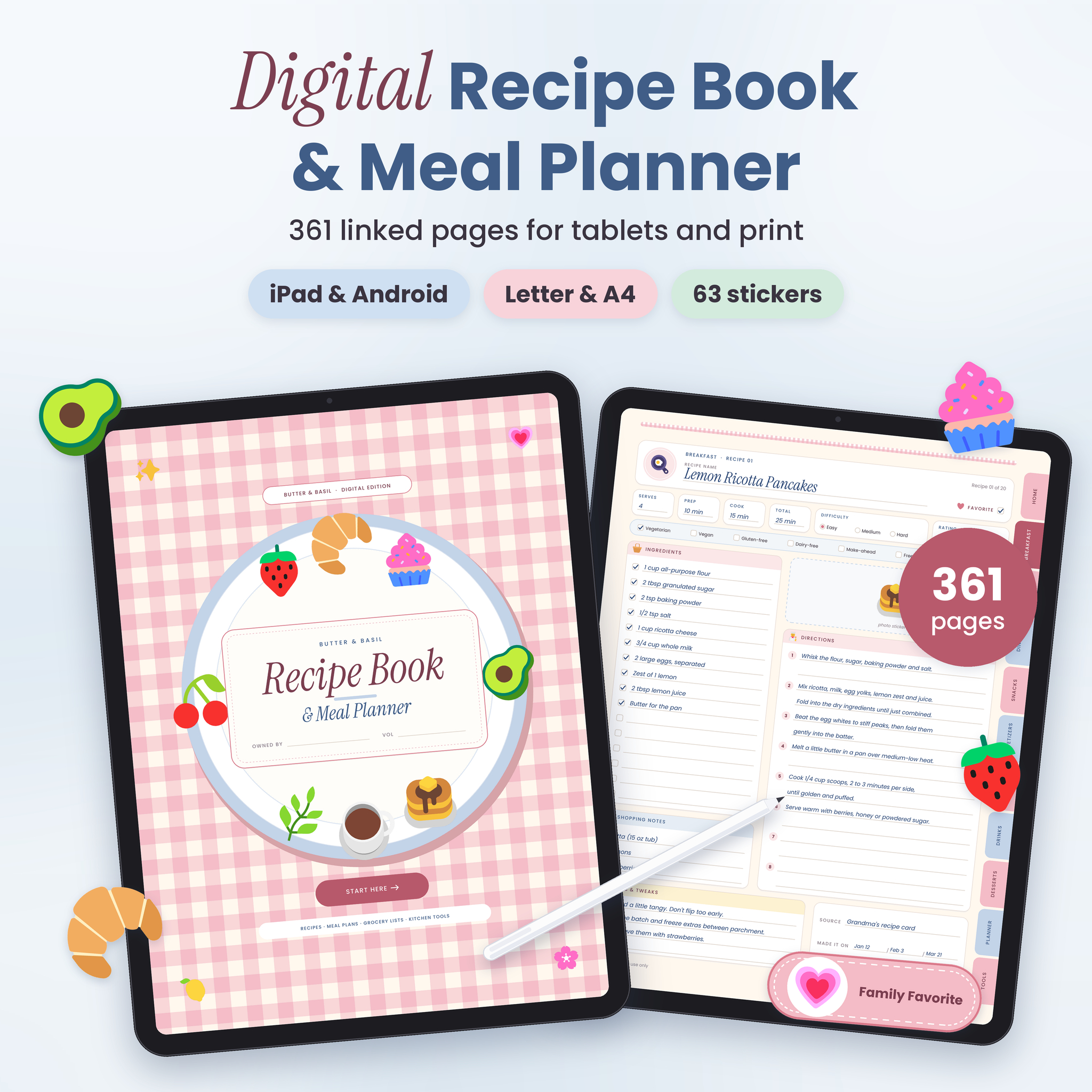
Butter & Basil is 361 pages in soft blush pink, powder blue and cream. The recipe book takes 176 of those pages: 8 categories (Breakfast, Lunch, Dinner, Snacks, Appetizers, Sauces, Drinks and Desserts), each with an illustrated divider, an index with 20 linked rows and 20 recipe pages. The undated meal planner takes another 133: a year at a glance, 12 monthly meal calendars, 60 weekly plans and 60 grocery lists. The rest is kitchen tools: pantry, fridge and freezer inventories, a meal prep planner, a monthly food budget tracker and conversion charts.
The download includes a tablet PDF (3:4 portrait, sized for iPad and most Android tablets), printable US Letter and A4 copies, 6 extra covers, a sticker pack and a user guide. Each planner file is about 4.5 MB, so it won’t eat your storage.
Step 1: Import into GoodNotes
- Download the tablet PDF and save it to the Files app.
- Open GoodNotes, tap the plus button and choose Import.
- Pick the file. GoodNotes creates a new notebook.
- Before writing anything, duplicate the notebook and rename the copy “Recipe Book Master”. That’s your clean backup.
Then tap a side tab to check links work. If a tap draws a line instead of jumping, switch GoodNotes to read-only mode or tap with a finger instead of the pencil. Most people settle into a rhythm quickly: pencil for writing, finger for jumping around.
Step 2: Swap the cover
Small thing, but it makes the notebook feel like yours. Pick one of the 6 extra covers, add it to the notebook and move it to the front. Delete the old one from your working copy if you like.
Step 3: Fill your first five recipes
Don’t try to fill 160 pages in a weekend. Start with the five dinners you cook most. For each one, go to the category index, write the recipe name in the first empty row, and tap it to open the matching page.
Each recipe page has:
- Serves, prep, cook and total time, difficulty
- A 5-star rating and a favourite box
- Diet tags: vegetarian, vegan, gluten-free, dairy-free, make-ahead, freezer-friendly, kid-approved
- 16 ingredient checkboxes and 8 numbered steps
- A photo or sticker space, shopping notes, notes and tweaks, source and “made it on” dates
Handwriting or typing both work. Typing with GoodNotes’ text tool is quicker for ingredient lists. Handwriting feels nicer for notes and tweaks. A lot of people mix the two.
Step 4: Add photos and stickers
Paste a photo of the finished dish into the photo space: copy from your camera roll, then paste or drag it in with GoodNotes’ image tool. The sticker pack has 63 transparent PNGs: 48 food icons and 15 labels such as “Family Favorite”, “Make Ahead” and “30 Minutes”. Labels are handy because you can spot a quick dinner while flicking through.
Step 5: Plan a week from the same notebook
Here’s where a GoodNotes recipe book beats a plain one. Tap into the meal planner, open this month’s calendar and pick a week. Each weekly plan runs Monday to Sunday with breakfast, lunch, dinner and snacks, plus prep-ahead and notes boxes.
Write your dinners from the recipe pages you just filled. Then tap “Grocery list for this week” and you’re on that week’s list, sorted into 8 store sections. Copy the ingredients across, check the pantry inventory page, and you’re ready to shop.
A few other pages worth bookmarking in your head:
- 4-week dinner rotation: plan a month of dinners once and repeat it.
- Recipes to try: park new ideas here until you’ve cooked them.
- Leftovers log: so the Tuesday curry doesn’t become Saturday’s science experiment.
- Party and holiday planner: a cook-ahead timeline for big meals.
Step 6: When a category fills up
Twenty recipes per category is a lot for most families, but bakers might fill Desserts in a year. Duplicate a blank recipe page in GoodNotes and move it into place. The index links cover the first 20 in each category, so write the extra page numbers by hand on the index.
Who it suits, and who it doesn’t
Butter & Basil suits GoodNotes users with recipes scattered across screenshots and sticky notes, parents who want meal plans and recipes in the same file, and anyone who likes a pretty planner.
It’s less suited to people who want recipes already included (every page is blank), or who want to edit the printed labels and layout. It’s a write-in PDF, not a Canva template. If you’re not a tablet person, the printable versions work, but you lose the tapping.
GoodNotes recipe book FAQ
Does it work in GoodNotes 6?
It’s a standard hyperlinked PDF built for apps like GoodNotes and Notability, so the tabs and buttons work as links once imported. Test a couple of tabs after importing.
Can I use it on an Android tablet?
Yes. Use a PDF app that supports links and handwriting, such as Xodo.
Is the meal planner dated?
No. It’s undated, so you can start in any month of any year.
Can I print my GoodNotes recipe book?
The download includes printable US Letter and A4 versions. Print at 100 percent for a kitchen binder.