Habit apps are great for about a fortnight. Then the notifications get muted, the streak breaks, and the app quietly moves to the third screen of your phone. A habit tracker spreadsheet is less exciting, and that’s exactly why it lasts. You see the whole month at once, the numbers are yours, and there’s no subscription asking for money in March.
This guide shows how to set one up from scratch in Excel or Google Sheets, the few design choices that stop you quitting, and a ready-made tracker if you’d rather skip the formulas.
Why a habit tracker spreadsheet works
- The whole month on one screen. Gaps and patterns jump out. You notice that every Thursday is blank.
- Real numbers. Completion rates, streaks, best days of the week. Proof that something is sticking (or isn’t).
- Flexible goals. Not every habit is daily. A spreadsheet can handle “gym three times a week” properly.
- It’s yours. Works offline, in Excel or Google Sheets, for as many years as you like.
Step 1: pick fewer habits than you want to
Everyone starts with 15. Most people can keep up with three to six. Choose a mix of one or two easy wins (drink water, make the bed) and one or two that matter (read 20 minutes, walk after lunch). You can add more next month.
Make each habit specific. “Exercise” is vague. “20-minute walk” is clear enough to tick.
Step 2: set a target, not perfection
This is the change that keeps people going. Give each habit a days-per-week goal. Reading might be 7. The gym might be 3. Meal prep might be 1. Now three gym sessions in a week is a full score, not “4 missed days”. A month at 80% is a great month.
Step 3: build the grid
If you’re building it yourself:
- Put habits down column A, one per row.
- Put the days of the month across row 1 (columns B to AF for 31 days).
- Type an x in a cell when you do the habit.
- In column AG, count the ticks with a formula like
=COUNTIF(B2:AF2,"x"). - In column AH, divide by your monthly target to get a percentage.
- Add conditional formatting so cells with an x fill with colour.
That’s a working tracker in 20 minutes. Streaks, charts and yearly views take more work, because streak formulas get fiddly fast, especially when they need to carry over from one month to the next.
Step 3b: add a mood column (optional)
Add one more row for mood, scored 1 to 5. After a couple of months you can compare it with your habits. Maybe your best-mood days are the ones where you walked before work. That kind of link is more motivating than any streak.
Step 4: make ticking the easiest part of your day
Pin the file in your browser or phone. Tick at the same moment each day, maybe while the kettle boils at night. If ticking takes more than 30 seconds, something’s too complicated.
Step 5: review once a month
At the end of each month, ask three questions. Which habit was easiest? Which one kept slipping, and on which days? What should change next month: the habit, the target, or the time of day? Ten minutes of honest review beats a perfect streak.
A ready-made habit tracker spreadsheet: Streakline
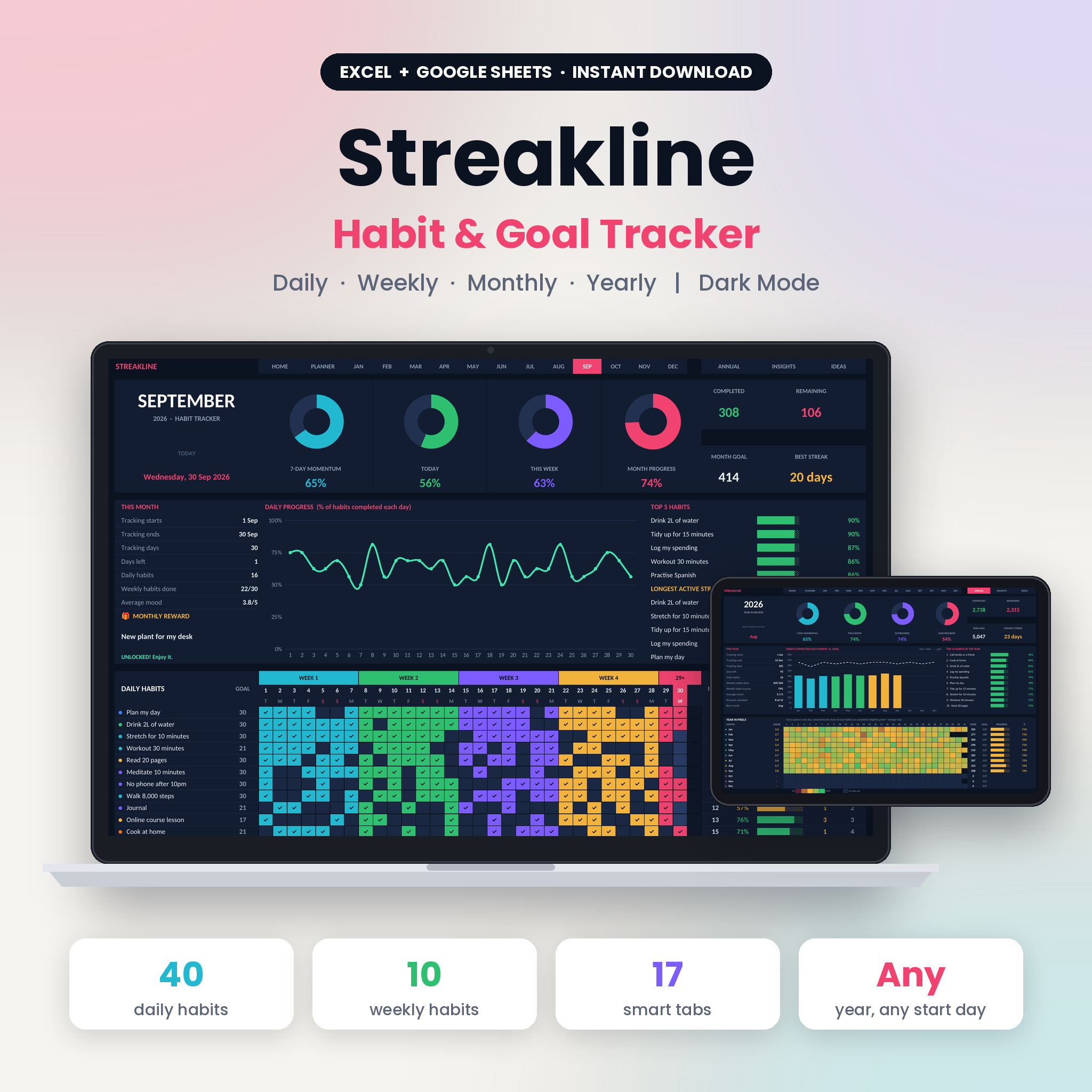
If you’d rather not write streak formulas at 11pm, Streakline does all of the above and a lot more. It’s a dark-mode habit tracker spreadsheet that works in Microsoft Excel and Google Sheets, with no macros, add-ons or subscription.
Here’s how it lines up with the steps:
- Habit Planner: set the year, list up to 40 daily habits, pick a category and how many days a week you’re aiming for. Monthly goals work themselves out, and you can type over them.
- 12 monthly trackers: type x or 1 to tick. Each habit shows done, %, a progress bar, current streak and best streak. Today’s column is highlighted.
- Fair goals: goals are based on days per week, so a 3-day gym habit isn’t marked as a failure. Days before your start date don’t count against you, and streaks can carry over between months.
- Monthly dashboard: four live rings (7-day momentum, today, this week, month progress), a daily progress chart, your top 5 habits and longest active streaks.
- Weekly habits: up to 10 things you only do once a week.
- Mood and rewards: rate each day 1 to 5, and pick a monthly treat, and the tracker shows how close you are to earning it.
- Annual dashboard and Insights: Year in Pixels, a scorecard heat map, and for any habit its best and toughest weekday, best streak and best month. You can also see how mood lines up with your habits.
The download includes a blank tracker set to 2027 (it works for any year), a sample file with nine months of example data, a 13-page printable PDF tracker for paper fans, and an 18-page illustrated user guide. Formulas are protected without a password, so you can’t break them by accident but can still change colours or fonts if you want.
Who it suits
People who like seeing data, anyone who has burned out on habit apps, and night owls who appreciate a dark screen after sunset. If you only want to track two habits, the DIY version above is plenty.
FAQ
Is Excel or Google Sheets better for a habit tracker?
Both work. Google Sheets is free and syncs to your phone, which makes daily ticking easy. Excel is nice if you prefer a desktop file. Streakline works in both, as well as Excel for the web.
How many habits should I track?
Start with three to six. You can track up to 40 in some spreadsheets, but more habits usually means lower completion. Add one new habit a month once the first few feel automatic.
What if I miss a day?
Nothing breaks. With days-per-week goals, one missed day often still means you hit your weekly target. Just tick today and keep going.
Can I print a habit tracker spreadsheet?
You can print any spreadsheet tab, but a dedicated printable layout looks better. Streakline includes a separate 13-page ink-friendly PDF tracker for that reason.