Best Household Planner: Apps, Sheets and Printables
The best household planner is the one that matches how your home already runs. For money, schedules, meals and chores in one place, choose a connected planner such as Kinnest, Linden Life Organiser or Well-Kept. For paperwork and emergency details, the Keepwell Home Management Binder fits. For cleaning or shopping alone, Tidyhue, Home Reset or the grocery bundle are simpler.
Choosing can feel bigger than it should, because these planners come in three different formats and cover very different amounts of home life. We'll go through what separates them in plain terms, so you can pick one and start using it this week.
- Household planners here come in three formats: offline apps that open in your browser, Excel or Google Sheets files, and printable PDFs you can also fill in on screen.
- The widest planners (Well-Kept and Linden) have 28 linked tabs each, while the narrowest, the Printable Grocery List Template Bundle, has nine pages.
- Kinnest, Evergrove, Fernhaven and LoadLight are described as having no subscription, and the three apps keep your plans on your own computer.
- Keepwell has 77 pages in 10 colour-coded sections, the most paperwork-focused layout on the page.
- Tidyhue and Home Reset cover cleaning and chores only, so they suit households that already manage money elsewhere.
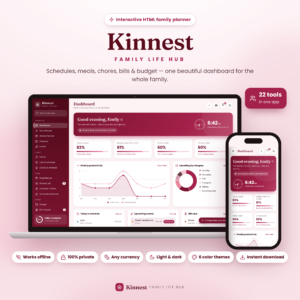 Family Planner Dashboard | Kinnest Interactive Mom Life Organizer with Budget, Bills, Meal Planner, Grocery List & Chore Chart | Offline HTML App
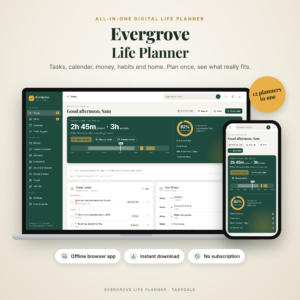 Evergrove All-in-One Digital Life Planner | Offline Budget, Habit Tracker & Calendar App
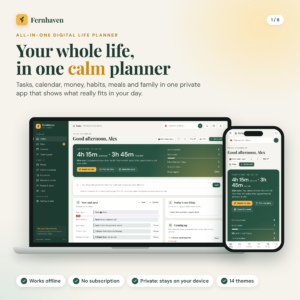 All in One Digital Life Planner | Fernhaven Offline HTML Planner App with Budget, Habit Tracker, Calendar, Meal Planner & Debt Payoff
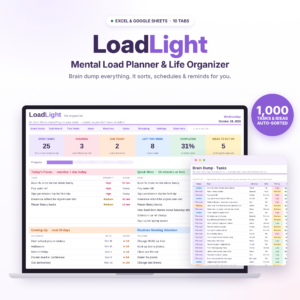 LoadLight Mental Load Planner | Brain Dump Task Organizer & Weekly Planner Spreadsheet for Moms | Excel & Google Sheets Life Organizer
 Tidyhue Cleaning Planner | Fillable Cleaning Schedule Printable, ADHD Cleaning Checklist & Family Chore Chart | US Letter & A4
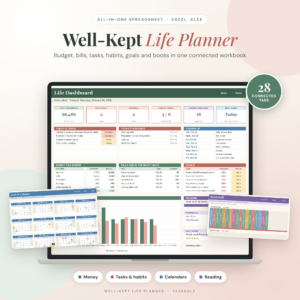 Well-Kept Life Planner Spreadsheet for Excel | All-in-One Budget Planner, Bill Tracker, Debt Payoff, Habit Tracker, Goal Planner, Weekly Planner & Book Tracker | Undated 2026 2027
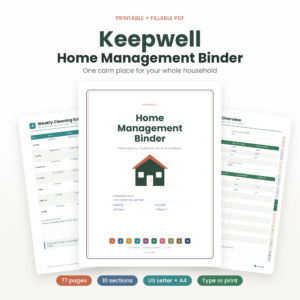 Keepwell Home Management Binder | Printable & Fillable PDF Household Organizer, 77 Pages, US Letter & A4
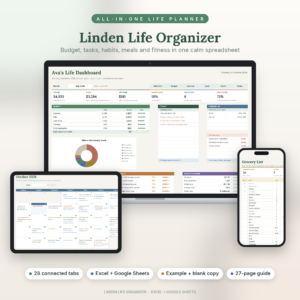
Table of Contents
Toggle
- What should you look for in a household planner?
- How do the household planners compare?
- Which household planner suits which household?
- How do you set up a household planner?
- What mistakes should you avoid?
- What affects the price?
- Which household planner should you choose?
- Common questions
What should you look for in a household planner?
A household planner should cover the jobs your home actually has, in a format you will open every day, without charging you again to keep using it. Five factors decide that, and each one rules some options in and others out.
Format: app, spreadsheet or printable
A household planner's format decides how you use it daily. Kinnest, Evergrove and Fernhaven are offline HTML apps: you open one file in your browser and your information stays on your computer. Linden, Well-Kept and LoadLight are spreadsheets, so they suit anyone already comfortable in Excel. Keepwell, Tidyhue, Home Reset and the grocery bundle are PDFs you can type into or print and write on by hand.
How many jobs it covers
Scope is the number of household jobs one planner handles. Kinnest has 22 interactive pages spanning schedules, meals, groceries, chores, bills, budget and savings. Evergrove has 12 connected areas. At the narrow end, Home Reset only does cleaning. Wide is not automatically better: a planner you only half use is worse than a small one you finish.
Whether entries connect to each other
A connected planner is one where you enter something once and it appears everywhere it belongs. In Well-Kept, adding a bill puts it on your budget, bill calendar, paycheck plan and dashboard. Linden works the same way, and its meal planner builds an automatic grocery list. Kinnest turns a meal plan into a grocery list in one click. Printables do not link in this way, so they take more manual effort.
Privacy and ongoing fees
The offline apps need no account and no subscription, and Fernhaven, Evergrove and Kinnest keep plans private on your device. LoadLight is a one-time purchase with no subscription. If you would rather not hand family and money details to another online service, that matters more than any feature.
Paper size and guidance
Printable planners only help if they print cleanly on your paper. Keepwell and Tidyhue come in US Letter and A4, the grocery bundle adds A5 and Half Letter, and Home Reset offers four sizes. Guides vary too: Linden includes a 27-page illustrated guide, Evergrove a 31-page Word guide and Fernhaven a 23-page guide. For a large planner, a decent guide saves hours.
How do the household planners compare?
The planners differ mainly in format and in how much of the household they take on. The table summarises that, using only what each listing states.
| Planner | Format | What it covers | Suits |
|---|---|---|---|
| Family Planner Dashboard | Kinnest Interactive Mum Life Organiser with Budget, Bills, Meal Planner, Grocery List & Chore Chart | Offline HTML App | Offline HTML app, 22 pages | Schedules, meals, groceries, chores with rewards, bills, budget, savings | Families wanting everything in one private app |
| Evergrove All-in-One Digital Life Planner | Offline Budget, Habit Tracker & Calendar App | Offline browser file, 12 areas | Tasks, calendar, budget, bills, habits, meals, journal | Busy people who need to see real free time |
| All in One Digital Life Planner | Fernhaven Offline HTML Planner App with Budget, Habit Tracker, Calendar, Meal Planner & Debt Payoff | Offline HTML app | Tasks, calendar, budget, bills, habits, meals, chores, birthdays, trips | Households juggling trips and birthdays as well as bills |
| LoadLight Mental Load Planner | Brain Dump Task Organiser & Weekly Planner Spreadsheet for Mums | Excel & Google Sheets Life Organiser | Spreadsheet, 10 tabs | Task sorting, self-filling week, routines, birthdays, shopping, load-share view | Couples dividing the mental load |
| Tidyhue Cleaning Planner | Fillable Cleaning Schedule Printable, ADHD Cleaning Checklist & Family Chore Chart | US Letter & A4 | Fillable PDF, 18 pages | Master schedule, 10 room checklists, chore charts, quick resets | Households that need a cleaning routine |
| Well-Kept Life Planner Spreadsheet for Excel | All-in-One Budget Planner, Bill Tracker, Debt Payoff, Habit Tracker, Goal Planner, Weekly Planner & Book Tracker | Undated 2026 2027 | Excel workbook, 28 tabs | Budget, bills, debt payoff, paycheck planner, goals, habits | Money-led households using Excel |
| Keepwell Home Management Binder | Printable & Fillable PDF Household Organiser, 77 Pages, US Letter & A4 | Fillable PDF, 77 pages | Emergency info, home records, maintenance, documents, pets, vehicles | People who want a paper-style home binder |
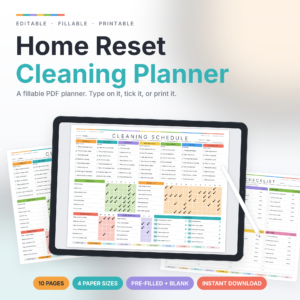 Home Reset Cleaning Planner | Fillable PDF | Daily themed cleaning, low energy lists | Low-energy days and simple routines |
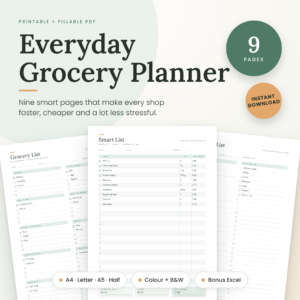 Printable Grocery List Template Bundle, Fillable Shopping List PDF, Meal Planner, Pantry Checklist, Budget Tracker, A4 A5 Letter, Instant Download | Printable PDFs, 9 pages | Grocery lists, meal plan, pantry checklist, price comparison | Anyone fixing the weekly shop only |
| Linden Life Organiser | Life Planner Spreadsheet for Excel and Google Sheets | Budget Tracker, Habit Tracker, Smart Calendar, Meal Planner, Workout Tracker | Spreadsheet, 28 tabs | Budget, calendar, habits, meals, workouts | Households sharing a Google Sheets file |
Browse all 10 options in the grid to see current prices and previews.
Which household planner suits which household?
Each household planner suits a different starting problem, so match the planner to your biggest daily friction rather than to the longest feature list.
A family that wants one place for everything. Kinnest has a kids' chore chart with rewards, bill and budget pages, and a meal plan that feeds the grocery list. It runs offline and works in any currency.
Someone whose days always overrun. Evergrove and Fernhaven both show how much free time you really have each day. Fernhaven fixes an overloaded day in one tap, and Evergrove moves whatever does not fit with one click.
A couple sharing the load. LoadLight sorts a brain dump into a self-filling week and has a load-share view for couples. It is ten tabs, so it is lighter than the 28-tab workbooks.
A household focused on money. Well-Kept offers avalanche or snowball debt payoff, a paycheck planner, savings goals and net worth. It is undated, so it works for any year and start month.
A household that shares a spreadsheet online. Linden works in Excel and Google Sheets, budgets by month or by paycheck, and comes with a filled-in example copy and a blank copy.
Someone who wants paper. The Keepwell Home Management Binder holds emergency information, home records, maintenance, documents, pets and vehicles across 77 pages with clickable tabs.
A home that needs routines. Tidyhue has 120+ editable tasks in its Ready-Made edition and ADHD-friendly quick resets. Home Reset gives each day a theme and includes low energy lists.
A shopper trying to cut waste. The Printable Grocery List Template Bundle offers a pantry checklist, price comparison sheet and meal plan, with a bonus Excel budget tracker.
How do you set up a household planner?
Setting up a household planner takes one sitting if you enter the fixed items first and leave the rest for later. This sequence works for any of the formats above.
- Open or print the planner and read the quick start section of the guide, not the whole guide.
- Enter fixed items: bills, due dates, birthdays and regular appointments.
- Add the people in your household and assign chores or tasks to each.
- Set up one routine only, such as the weekly meal plan or the daily cleaning theme.
- Choose one weekly review slot, ten minutes on the same day, and use it to check the week ahead.
- After two weeks, add the next area you want to track.
For spreadsheets, save a blank copy before you start. For printables, keep a spare set of pages so you can reset each season.
What mistakes should you avoid when choosing a household planner?
The commonest mistake is choosing the planner with the most features instead of the one you will open daily. Four others come up often.
- Buying a 28-tab workbook for a cleaning problem. If the real issue is chores, Tidyhue or Home Reset will be used far more.
- Ignoring your device. Spreadsheets need Excel or Google Sheets, and the offline apps open in your browser. Check that suits the computer you will actually use.
- Skipping the setup hour. Linked planners pay off only after bills, dates and people are entered.
- Expecting printables to calculate. The PDFs help you record and tick off, but they do not update other pages for you.
- Forgetting paper size. Pick US Letter or A4 before you print, not after.
What affects the price of a household planner?
The price of a household planner mostly follows how much it does and how much support comes with it. A narrow printable such as Home Reset or the grocery bundle costs less up front than a connected planner with budgeting, debt tools and a long user guide.
Format matters too. Offline apps and large spreadsheets take more work to build, so the wide ones usually cost more. Extras such as example copies, multiple paper sizes and written guides also add value. Because these are one-off downloads in the listings, compare them against a year of any subscription app you use now, and check live prices on the product cards.
Which household planner should you choose?
Choose by your biggest problem. If it is money and scheduling together, pick Kinnest, Linden or Well-Kept. If it is paperwork, pick the Keepwell Home Management Binder. If it is chores or shopping alone, start with Tidyhue, Home Reset or the grocery bundle and add more later.
Common questions
Is an offline household planner safer than an online one?
An offline household planner keeps your information in a file on your own computer instead of on a company's server. Kinnest, Evergrove and Fernhaven all work this way with no account needed. The trade-off is that you are responsible for backing the file up.
Can two people use the same household planner?
Yes, with the right format. Linden works in Excel and Google Sheets, which suits sharing a file. LoadLight includes a load-share view for couples. The offline apps stay on one computer, so they suit one person entering information for the family.
Do I need Excel to use the spreadsheet planners?
Linden and LoadLight work in both Excel and Google Sheets, so a free Google account is enough. Well-Kept is listed as an Excel workbook, so check you have Excel before choosing it.
Can I use the printable planners on screen only?
Yes. Keepwell, Tidyhue and Home Reset are fillable PDFs you can type into and tick off on screen, or print and write by hand. Tidyhue's listing says typing works in Chrome or Firefox.
How many areas of home life should one planner cover at first?
Start with two or three, such as bills, meals and chores, even if the planner offers more. Once those habits hold for a fortnight, switch on the next area. Starting smaller is how most people keep a planner going past the first month.