An income and expenditure form is one page that answers one question: does more money come into your home each month than goes out? Everything else, from a debt repayment plan to a savings goal, starts from that answer.
You might need one because a lender, landlord or debt adviser has asked for it. Or you may simply want to know where you stand after a change like a new baby, a job loss or a move. Either way, this guide walks you through each section of a household income and expenditure form, shows a filled-in example with real numbers, and points out the small errors that make a form look worse (or better) than your life really is.
Quick picks: household budget forms and planners
| Product | Best for | Price | Link |
|---|---|---|---|
| Gildwise Budget Planner Fillable PDF | A form that adds itself up on screen | $7.99 | View |
| Soft Ledger Budget Planner | Printing and writing by hand | Original price was: $12.99.$8.99Current price is: $8.99. | View |
| Hearthfolio Family Budget Planner | Families with weekly or biweekly pay | $22.00 | View |
| Penny & Petal Income and Expense Tracker | Ongoing tracking with net worth | $4.99 | View |
What the form is and when you need one
At its simplest, the form has two columns of numbers and a line at the bottom. Money in. Money out. The difference is your monthly surplus or shortfall.
People reach for one in a handful of situations:
- Talking to creditors. If you are asking for lower payments on a card or loan, the lender usually wants to see what you can realistically afford.
- Working with a debt adviser or counselor. Most free debt services start by building this exact form with you.
- Renting or borrowing. Some landlords and lenders ask for a household budget alongside pay slips.
- A life change. Maternity leave, a reduced-hours contract, a partner moving in. The old budget no longer fits.
- Plain curiosity. Plenty of people fill one in because the account keeps running dry around the 20th and they want to know why.
Whatever the reason, the method is the same. The only difference is who reads it.
Gathering the numbers in one evening
The form itself takes twenty minutes. Finding the figures takes longer, so do that part first and do it properly. One focused evening is enough for most homes.
- Download three months of statements for every account that pays household costs: checking, savings, credit cards and any buy-now-pay-later apps.
- Pull your last three pay slips, or your benefit letters, so you have the take-home figure rather than a guess.
- Find the yearly bills. Search your email for words like renewal, annual and policy. Car insurance, software subscriptions and memberships often hide here.
- List every debt with the lender, balance and payment. Log in to each account if you need to. Do not rely on the last paper statement.
- Track cash for one week if you use it. A small notebook in your pocket or a note on your phone is fine.
Put everything in one folder, paper or digital. Many people feel a wave of relief at this point, oddly enough before a single number has been added up. Having it all in one place is half the battle won.
The five sections every household form needs
1. Income
List money that actually lands in your account, after tax and deductions. That means take-home pay, not salary. Include each adult’s wages, benefits or tax credits, child support received, pension income, and any regular side income. If your pay changes from month to month, use a three-month average and note that it varies.
2. Home costs
Rent or mortgage, property tax, home insurance, electricity, gas, water, internet and phone. These are the bills that keep a roof over the family, and creditors and advisers usually treat them as priorities.
3. Everyday living
Groceries, toiletries, cleaning products, clothing, haircuts, school costs, childcare, pet food, prescriptions. This is the section people underestimate most. Be honest here. A form that says a family of four eats on $300 a month will not be believed, and it will not work.
4. Travel
Car payment, fuel, insurance, registration, servicing, parking, bus or train passes. Split out anything yearly and turn it into a monthly figure.
5. Debts and savings
Each debt gets its own line with the lender’s name, balance owed and current monthly payment. Savings come last. If you are struggling, an adviser may suggest pausing savings, but list what you currently put away so the picture is complete.
A filled-in example with real numbers
Meet a household of three: two adults and a seven-year-old. One parent works full-time, the other works 20 hours a week. Here is their month after they gathered three months of bank statements.
| Section | Item | Monthly |
|---|---|---|
| Income | Take-home pay, adult 1 | $2,980 |
| Income | Take-home pay, adult 2 (average) | $1,120 |
| Income | Child benefit or credits | $150 |
| Total income | $4,250 | |
| Home | Rent | $1,550 |
| Home | Utilities, internet, phones | $385 |
| Living | Groceries and household | $720 |
| Living | After-school care | $340 |
| Living | Clothing, haircuts, school costs | $140 |
| Travel | Car payment, fuel, insurance, upkeep | $610 |
| Debts | Credit card minimum | $95 |
| Debts | Personal loan | $210 |
| Savings | Emergency fund | $50 |
| Total outgoings | $4,400 | |
| Shortfall | -$150 |
A $150 gap every month explains why the card balance kept creeping up even though they never missed a payment. The form did not solve anything yet. It did something better. It named the problem.
From here they had options: trim groceries by $60 with a meal plan, shop around for car insurance at renewal, and ask the card company about a lower payment for six months. Seeing it written down made those calls feel manageable instead of scary.
Notice what they did not do. They did not cut the $50 emergency fund to zero just to make the form balance on paper. A small cushion is what stops one flat tire from landing back on the credit card, so they kept it and found the money elsewhere.
Turning weekly and yearly costs into monthly figures
This trips up nearly everyone. A month is not four weeks. It is about 4.33 weeks, and that gap adds up.
- Weekly to monthly: multiply by 52, then divide by 12. A $90 weekly grocery shop is $390 a month, not $360.
- Biweekly to monthly: multiply by 26, then divide by 12. A $1,400 biweekly paycheck is about $3,033 a month.
- Yearly to monthly: divide by 12. A $480 car service becomes $40.
- Quarterly to monthly: multiply by 4, then divide by 12, or simply divide by 3.
If you are paid every two weeks, our guide to the paycheck budget explains how to plan around the two months each year that bring a third check.
Fillable form or printed pages?
Both work. The right choice depends on who will see it and how often you plan to update it.
A fillable PDF is tidy, easy to read and easy to email. Typed numbers look clear to an adviser, and if the totals calculate themselves you will not hand over a form where a column fails to add up. That small embarrassment is more common than you would think.
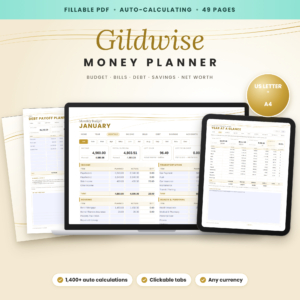
Gildwise Budget Planner Fillable PDF
Price: $7.99 | Best for: anyone who wants totals done on screen
An undated, auto-calculating fillable PDF in US Letter and A4 that works in any currency. Twelve monthly budget pages show planned against actual for income and seven expense groups, with a running difference and a Left to Budget figure. It also has spending logs with category dropdowns, a debt payoff planner, savings trackers and a net worth page. Fill in the first monthly budget page from your bank statements and you have a clean income and expenditure summary ready to save or print.
Paper suits people who think with a pen, or who want to sit at the kitchen table with a partner and talk it through line by line. Writing each figure slows you down in a useful way.
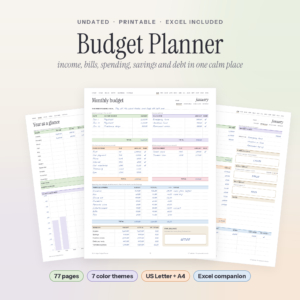
Soft Ledger Budget Planner
Price: Original price was: $12.99.$8.99Current price is: $8.99. | Best for: couples working it out at the table
77 undated printable pages in seven color themes, US Letter and A4, plus an Excel budget spreadsheet and a user guide. Each month has a budget page for income, fixed bills, debt payments and variable spending, then an overview, a daily log and a review. There are trackers for 24 bills, four debts and several savings goals. Print one month’s budget page first and fill it in together using last month’s statements.
If a creditor or adviser will read it
A form that goes to someone else needs a little extra care. The goal is a figure you can actually keep to, not the smallest possible budget.
- Use real figures. Pull them from statements, not memory. If someone asks how you arrived at a number, you can show them.
- Do not shave essentials to look better. Cutting food to an unrealistic level only sets up a plan that breaks in month two.
- Add short notes. “Hours reduced from March” or “car insurance renews in August” helps the reader understand the numbers.
- Keep a copy. Save the PDF or photograph the paper version, with the date on it.
- Update it when life changes. A new job, a new baby, a rent rise. Each one means a fresh form.
Every lender and debt service has its own process, so this form will not guarantee any particular outcome. What it does is make the conversation clearer and quicker, and show you have done the homework.
Mistakes that skew the bottom line
- Gross pay instead of take-home. A $52,000 salary does not put $4,333 in your account each month. Use what arrives.
- Forgetting irregular costs. Birthdays, school trips, the yearly vet visit, holiday gifts. Add a monthly line for each, even if it is only $20.
- Counting the same thing twice. If your phone is bundled with the internet bill, list it once.
- Leaving out cash. Coffee, parking meters and lunch money vanish from bank statements once withdrawn. Track one week of cash to find the real figure.
- Treating it as a one-off. The form is most useful as a monthly check, not a document you fill in once and forget.
From one-off form to monthly habit
Once the first form is done, the hard part is behind you. Each month after that is mostly a copy with small edits. Fifteen minutes on the first Sunday of the month is plenty.
Families with lots of moving parts, like two paychecks on different schedules and bills that land quarterly, often find a spreadsheet easier than redoing a form by hand each month. It fills in recurring bills and paydays for you, so the monthly review is just checking the gaps.
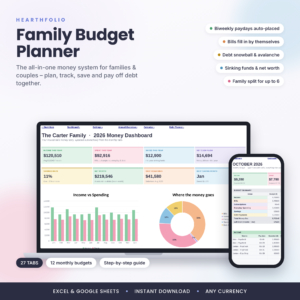
Hearthfolio Family Budget Planner
Price: $22.00 | Best for: families with weekly or biweekly paychecks
A family budget spreadsheet for desktop Excel, Excel for the web and Google Sheets. Enter one payday and it places every paycheck on its real date for the year, then fills in up to 30 recurring bills on the right months. It handles up to six family members, 20 spending categories tagged as needs or wants, and any currency. Set up your paychecks and bills in Plan Settings first, then check the first month’s dashboard.
Couples who are combining money for the first time should also read how to budget as a couple, which compares a 50/50 split with splitting by income. And if this is your very first budget of any kind, how to make a budget when you have never made one starts right at the beginning.
Frequently asked questions
What goes on a household income and expenditure form?
Take-home income for every adult, plus home costs, everyday living costs, travel, debt payments and savings. The bottom line shows whether you have money left over or a shortfall each month.
Should I put my gross or net income on the form?
Net. Use the amount that actually reaches your bank account after tax and other deductions.
How do I work out monthly costs if I pay weekly?
Multiply the weekly amount by 52 and divide by 12. Multiplying by four leaves out roughly four weeks of costs across the year.
What if my income is different every month?
Average the last three months and note that it varies. If one month was unusually high, use the lower figure so the plan still holds in a slow month.
Do I include my partner’s income if we keep separate accounts?
For a household form, yes, if you share the bills. List both incomes and the full household costs. If the form is for one person’s debt, an adviser may ask only for that person’s share of the costs, so check what they need.
Can I fill in an income and expenditure form on my phone?
A fillable PDF opens in most PDF apps on phones and tablets, though a larger screen makes the long tables easier to check before you send them.
Your next step
Download your last three bank statements and highlight every regular payment in one color and every one-off in another. That single job gives you most of the figures you need. Then type them into the Gildwise Budget Planner Fillable PDF and let the bottom line appear.