Plenty of sole traders sign up for accounting software because it feels like the grown-up thing to do. Then, a year later, they notice they only ever use one button: create invoice. If that sounds familiar, an Intuit invoice alternative built on simple templates might suit you better.
This guide is for self-employed people working alone: electricians, tutors, cleaners, designers, dog walkers, bookkeepers, mobile hairdressers. You will get a fair comparison of software and templates, three template routes with what each one does, a step-by-step plan for moving over, and an honest list of what you give up.
No one answer suits everyone. The aim is to help you pick the setup you will actually keep using.
Quick picks: template alternatives for sole traders
| Product | Best for | Price | Link |
|---|---|---|---|
| Ledgerline Invoice, Quote & Receipt Template Kit | Simple invoices, quotes and receipts with automatic totals | Original price was: $3.00.$1.50Current price is: $1.50. | View |
| Client Billing Hub Invoice Tracker Spreadsheet | Invoices, payments and statements in Excel or Google Sheets | $6.49 | View |
| PaidPath Client & Invoice Hub | Clients, invoices, expenses and profit in one Excel file | $9.49 | View |
| Tallyhive Small Business Spreadsheet | Sole traders who sell products and hold stock | $35.99 | View |
When accounting software is more than you need
Intuit’s invoicing sits inside QuickBooks, which is full accounting software. For a business with staff, payroll, stock and an accountant who logs in every month, that can be exactly right. It is built to do a lot.
A sole trader often needs far less. Think of a self-employed piano teacher with 22 pupils. Each month she sends 22 invoices, gets paid by bank transfer, and at year end hands a summary of income and costs to whoever does her tax return. She does not need a chart of accounts. She does not need payroll. She needs invoices that look professional and a list of who has paid.
The usual reasons sole traders look for an alternative are fair and fairly simple:
- Ongoing subscription. Software is usually billed monthly or yearly, every year you trade, including the quiet months.
- Logins and online accounts. Your records live on someone else’s servers, behind a password you must keep track of.
- Features you never open. Menus full of tools built for larger firms can make a simple job feel harder.
- Plan changes. Any subscription service can change its plans or features over time, which is out of your hands.
None of this makes software bad. It just means a one-off template can be the better fit for a business of one.
What a sole trader really needs from invoicing
Before comparing anything, write down what you truly use. For most people working alone, the list looks like this:
- A professional invoice with your name, contact details, a unique number, dates, line items and payment details.
- Totals that add up by themselves, including any discount or VAT if you are registered.
- Saved clients and saved prices, so you are not retyping them.
- A list of every invoice with its status: paid, part paid, overdue.
- A simple way to see income for the tax year.
- Quotes and receipts that match your invoices.
If that is your list, a well-built spreadsheet covers all six. If your list also includes bank feeds, payroll or multi-user access, keep reading, because the section on what you give up is for you.
Software vs templates at a glance
| Invoicing software | Invoice templates | |
|---|---|---|
| How you pay | Ongoing subscription | Once |
| Where your data lives | Online account | A file on your own computer or Drive |
| Internet needed | Usually | No, for Excel files |
| Bank feeds | Often available | No, you log payments yourself |
| Online card payments on the invoice | Often available | You add your own payment link |
| Setup time | Account setup and settings | About an hour |
| Learning curve | Depends on the product | Low if you know basic Excel |
Route 1: a matching invoice, quote and receipt kit
Best for the sole trader who sends a modest number of invoices and wants them to look sharp. You keep an Excel workbook that does the maths, plus Word and PDF versions for the days you would rather type or write by hand.
Take a self-employed gardener in Bristol with 15 regular customers. He quotes new jobs in spring, invoices monthly in summer and gives a receipt to the two elderly customers who still pay in cash. One kit covers all three forms, in one design, and the totals are always right.
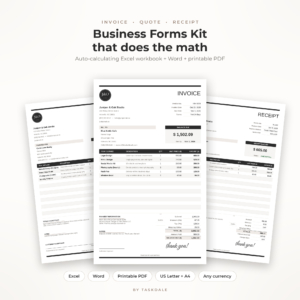
Ledgerline Invoice Quote and Receipt Kit
Price: Original price was: $3.00.$1.50Current price is: $1.50. | Best for: Sole traders billing a few clients
An auto-calculating Excel workbook with Invoice, Quote, Receipt, Statement, Invoice Log and Dashboard sheets, plus six Word templates and printable PDFs in US Letter and A4. It saves up to 100 clients and 150 products or services, and opens in Excel 2010 or newer or the free LibreOffice Calc. Fill in the Settings sheet with your details and currency first, then make your next invoice from it.
Route 2: a billing workbook that chases the money for you
Best for the sole trader whose real headache is late payment, not making invoices. A billing workbook gives every invoice a live status and shows, on one dashboard, what is overdue and by how long.
Picture a freelance copywriter with eight agency clients. Some pay in 14 days. One always takes 60. Another pays three invoices at once, randomly. Without a tracker, she has no idea what she is owed on any given day. With one, she opens a single tab and sees it: two invoices overdue, one by 34 days. That clarity takes a weight off.
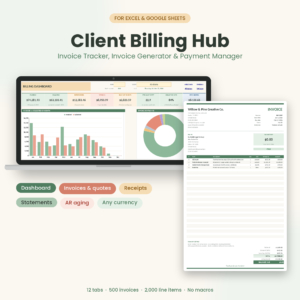
Client Billing Hub Invoice Tracker Spreadsheet
Price: $6.49 | Best for: Sole traders chasing late payers
A 12-tab workbook for Excel and Google Sheets with a print-ready invoice and receipt, payment log, client statements and an AR aging tab that sorts what is owed into current, 1 to 30, 31 to 60, 61 to 90 and over 90 days. Statuses update on their own as you log payments. Enter your open invoices first, then log what has already been paid, and the dashboard shows your true position.
Route 3: one file for clients, invoices and costs
Best for the sole trader who wants to know whether the business is actually making money, not just whether it is getting paid. Expenses sit beside invoices, so profit is worked out for you.
A mobile beauty therapist is a good example. She buys products, pays for fuel and a booking app, and bills 30 clients a month. Seeing income and costs side by side tells her that her Saturday mobile slots earn far more than her weekday salon rental. That is a business decision she could not see before.

PaidPath Client and Invoice Hub
Price: $9.49 | Best for: Sole traders wanting profit at a glance
An Excel workbook with 12 linked tabs, including Clients, Client Card, Services, Invoices, Payments, Expenses, Calendar and a Print Invoice page for US Letter or A4. The dashboard shows invoiced, collected, outstanding, overdue, expenses and net profit, with a monthly chart. It needs no macros or internet and also opens in LibreOffice Calc. Add your services and this year’s expenses first to see your real margin.
If you sell products rather than services, the Tallyhive Small Business Spreadsheet links orders, invoices and stock in one file instead.
How to switch from invoicing software to templates
Moving over is not hard, but do it in the right order so nothing goes missing.
- Pick a clean start date. The start of a month or a tax quarter is easiest. 1 April or 6 April works well for many UK sole traders.
- Download your old records. Export your invoice list, customer list and any reports while your account is still active. Save copies of every sent invoice as PDFs.
- Carry on your numbering. If your last invoice was 0418, your first new one is 0419. Clients and the tax office both like an unbroken run.
- Copy across your clients and prices. Paste them into the template’s client and item lists.
- Enter any open invoices. Anything still unpaid on your start date goes into the new log, so the chase carries on.
- Run both for one month. Keep the old account open until the first month’s invoices are paid and logged in the new file.
- Then cancel, keeping the exported files somewhere safe for as long as your tax records must be kept.
That last step feels good. One less login, one less renewal email.
Making a template invoice look every bit as polished
A common worry is that clients will see a spreadsheet and think “amateur”. They will not, if you take ten minutes over the details. Clients judge an invoice on whether it is clear, not on which program made it.
- Add your logo or a clean text name. Even a bold business name in your brand colour looks finished.
- Write proper payment details. Account name, sort code and account number, or your payment link, spelled out in full. Never “usual account”.
- Use plain descriptions. “Rewire kitchen sockets, 6 points, parts and labour” reads far better than “Electrical work”.
- Add a short thank-you line. “Thanks for your business, Dev” at the bottom costs nothing and clients notice it.
- Always send a PDF. It looks identical on a phone, a tablet or an office printer.
Do that, and the only thing a client will notice is how easy your invoice is to pay.
A sole trader’s week with a template
Here is how it might look for Dev, a self-employed electrician who works mostly for homeowners and a couple of letting agents.
Monday evening, 10 minutes. Dev invoices last week’s four jobs. Each customer is already saved, and his callout charge and hourly rate are in the price list. He adds the parts as separate lines, saves four PDFs and emails them.
Wednesday, 2 minutes. Two homeowners pay by bank transfer. He logs both payments on his phone in the evening.
Friday, 5 minutes. He checks the dashboard. One letting agent invoice from last month is 9 days overdue. He resends it with a short, friendly note.
Last Friday of the month, 15 minutes. He logs fuel, parts receipts and his van insurance payment, glances at net profit for the month, and moves a share of it into a separate tax savings account.
Thirty minutes a week, give or take. All in a file he owns.
What you give up by leaving software
A fair comparison needs this section. Templates are simpler, and simpler means fewer automatic extras.
- No bank feeds. You log payments yourself. For 20 to 40 payments a month, that is a few minutes a week.
- No built-in card payment button. You can still add a payment link from your own payment provider to the invoice text.
- No automatic reminder emails. You send reminders yourself, guided by the overdue list.
- No accountant login. You send your accountant the file or a summary instead.
- No direct tax filing. If your country requires digital record keeping or filing through approved software, check what that means for you before you switch.
So who should stay with software? Anyone running payroll, anyone who needs bank reconciliation for hundreds of transactions a month, and anyone whose accountant works directly inside the software. For everyone else, a template is often plenty.
Keeping your records ready for tax time
Templates only help at tax time if the records are kept up through the year. A weekly 20-minute habit beats a frantic January. Our guide to bookkeeping for freelancers sets out a simple weekly system that works well beside an invoice workbook.
Keep receipts for costs in a folder, named by month. Log income as it arrives. At the end of each quarter, check that the totals in your invoice log match the money that reached your bank. If you want to compare full bookkeeping options for working alone, see our roundup of the best bookkeeping templates for self-employed pros.
Frequently asked questions
Do sole traders need accounting software to send invoices?
No. An invoice needs the right information on it, not a particular program. A template in Excel or Word can produce a perfectly valid invoice.
Can I use an Excel template if I am VAT registered?
You can produce invoices showing VAT with a template that has a tax line. Check the details your tax office asks to see on a VAT invoice, and whether its digital record rules apply to you.
What is the cheapest way to invoice as a sole trader?
A free blank template costs nothing, but you do all the maths and tracking. A one-off paid template adds automatic totals and payment tracking without an ongoing subscription.
Will my clients notice I stopped using invoicing software?
Not if your invoices keep the same details and numbering. A clean PDF with your name, a clear total and payment details looks just as professional.
Can I still accept card payments without invoicing software?
Yes. Add a payment link from your chosen payment provider to the invoice, or list it in the payment details box.
How long should a sole trader keep invoice records?
It depends on where you live and trade. Check your tax office’s rules, then keep your workbook and every PDF for at least that long, ideally with a backup copy off your computer.
Your next step
Open your current software and count how many features you used last month. If the answer is “invoices and not much else”, export your client list this week and set up a template alongside it for one month. A tidy place to start is the Ledgerline Invoice, Quote & Receipt Template Kit.