The fastest way to get paid sooner is not a sterner reminder. It is clearer terms, set before the work starts and printed on every invoice. Most late payments are not malice. They are an invoice with no real due date, sitting in a busy person’s inbox behind 40 other emails.
This guide covers invoice payment terms that get you paid sooner, for freelancers, trades and small service businesses billing other people directly. You will get the common terms explained in plain words, wording you can copy, how deposits and late fees fit in, a worked example of the cash difference terms make, and a weekly routine for the clients who still drift.
Quick picks: trackers that keep terms working
| Product | Best for | Price | Link |
|---|---|---|---|
| PaidPath Client & Invoice Hub | Terms per client, an overdue list and a due-in-14-days view | $9.49 | View |
| Client Billing Hub Invoice Tracker Spreadsheet | Aging by client, client statements and an optional late fee estimate | $6.49 | View |
| Ledgerline Invoice, Quote & Receipt Template Kit | Quotes with deposits and invoices that turn red when late | Original price was: $3.00.$1.50Current price is: $1.50. | View |
Why payment terms matter more than reminders
Picture two invoices for the same $800 job. One says “Payment terms: 30 days”. The other says “Please pay $800 by Friday 14 November. Bank transfer details below.” The second one gets paid sooner almost every time.
Why? Because it removes thinking. The client does not have to work out a date, find your bank details or guess whether you meant 30 days from the invoice or from the end of the month. Less friction means less delay.
Terms also set the tone. When they are on your quote, repeated on your invoice and matched by your reminders, clients learn that you mean them. Inconsistent terms teach the opposite.
The common payment terms, in plain words
| Term | What it means | Good for |
|---|---|---|
| Due on receipt | Pay as soon as you get this | One-off jobs and private customers, though many people read it loosely |
| Net 7 | Due 7 days after the invoice date | Small jobs, trades, regular private clients |
| Net 14 | Due 14 days after the invoice date | Most freelancers and small service businesses |
| Net 30 | Due 30 days after the invoice date | Larger companies with set payment runs |
| EOM | Due at the end of the month the invoice is dated | Clients who pay in one batch each month |
| 50% upfront | Half before work starts, half on completion | Projects, custom orders, materials-heavy jobs |
“Net” just means the full amount, with the number of days to pay it. You do not have to use the jargon. Plain dates work better with private customers.
Choosing the right terms for your business
Shorter is not always better. A big company that pays suppliers once a month will not pay you in 7 days just because your invoice asks. It will pay you on its next run, and you will have spent three weeks feeling ignored. Ask at the start: “When does your accounts team pay suppliers?” Then set your terms to land just before that date.
For private customers and small businesses, 7 or 14 days usually works well. People pay small bills quickly when the date is close and clear.
A simple rule of thumb
- Private customers and one-off jobs: 7 days, or payment on completion.
- Small businesses and regular clients: 14 days.
- Large companies: whatever their payment run needs, agreed in writing up front.
- Projects over a few weeks, or with materials to buy: a deposit plus staged payments.
Whatever you pick, use it on your quote and invoice, and set it once in your template so the due date fills in by itself.
When to change a client’s terms
Terms are not carved in stone. A client who has paid on day 3 for a year might earn 30-day terms as a thank you. A client who has been late on four invoices in a row might move to payment before delivery. Tell them in writing before the next job, explain it briefly and without blame, and update their record in your tracker so every new invoice shows the change.
Wording you can copy
Terms work best as a short, friendly sentence near the total. Here are versions you can adapt.
- Standard: “Payment due by 14 November 2026. Please use invoice number 0231 as your reference.”
- With options: “Please pay by bank transfer or card by 14 November 2026. Details below.”
- With a deposit: “A 50% deposit of $600 is due to book your date. The balance of $600 is due on completion.”
- With a late fee: “Invoices unpaid 30 days after the due date may be charged a late fee of 1.5% per month, as set out in our terms.”
- With thanks: “Thank you for your business. Payment by 14 November keeps your next booking on schedule.”
Notice the date is always written out. “Net 14” is fine between businesses, but a date leaves nothing to work out.
Deposits: getting paid before you start
A deposit is the single most effective term for project work. It shows the client is serious, covers your materials, and means a no-show does not leave you out of pocket. A baker making a $300 wedding cake, a painter buying $450 of paint, a web designer blocking out two weeks of her calendar: all good cases for money up front.
Put the deposit on the quote, ask for it before you book the date, and show it on the final invoice as a payment already received. That last part matters. If the deposit is missing from the invoice, the client may think you are charging the full amount twice.
A template that tracks part payments makes this easy. You log the deposit, and the invoice shows the balance still owed. If you are unclear on which document asks for what, our explainer on quote vs estimate vs invoice sets it out.
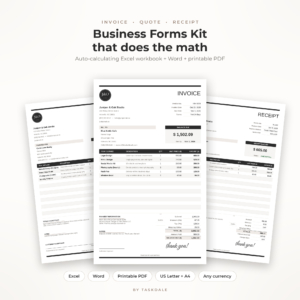
Ledgerline Invoice Quote and Receipt Kit
Price: Original price was: $3.00.$1.50Current price is: $1.50. | Best for: Service businesses taking deposits
An Excel workbook with an auto-calculating invoice, a quote with a valid-until date, deposit line and customer signature, and a receipt that shows paid or partial status. The invoice log handles up to 300 invoices and marks late ones Overdue with days late. It also includes Word templates and printable PDFs in US Letter and A4. Set your default payment terms and deposit percentage on the Settings sheet first.
Once the deposit and terms live in Settings, every new quote and invoice carries them without you retyping a word.
Late fees and early payment discounts
Late fees can work, but only if they are agreed before the work starts. A fee that appears for the first time on a reminder feels like a penalty out of nowhere, and it can sour a good client. Put it in your terms, mention it on the quote, and print it on the invoice. Rules on late fees and interest differ by country and state, so check what applies where you work before you set a rate.
In practice, many small businesses use the late fee mostly as a signal. They rarely charge it, but having it written down nudges people to pay on time.
Early payment discounts are the friendlier cousin. “2% off if paid within 7 days” can bring money in faster from businesses that watch their costs. Run the numbers first. On a $2,000 invoice, 2% is $40. Is getting paid three weeks sooner worth $40 to you? Sometimes yes, especially in a tight month.
A worked example: what terms do to your cash
Lena runs a small cleaning business with 10 commercial clients, each billed $600 a month. That is $6,000 a month in invoices.
On 30-day terms, invoices dated 1 March are due 31 March. Two clients usually run a week late. So most of March’s money arrives in early April, and Lena pays her two part-time cleaners and her supplies through March out of savings.
She moves new and willing clients to 14-day terms, starting with six of them. Those six now pay around the 15th. That is $3,600 arriving roughly two weeks sooner every month. Her total income has not changed at all. But wages day no longer makes her stomach drop, and she stops dipping into savings mid-month.
That is the quiet power of terms. Same work, same prices, less stress. Our guide to building a cash flow forecast shows how to see that effect before you make the change.
Track due dates so terms actually work
Terms only help if someone notices when they are broken. If you are tracking invoices in your email or your memory, late ones slip by for weeks. A tracker that calculates the due date from your terms and flags overdue invoices on its own does the noticing for you.

PaidPath Client and Invoice Hub
Price: $9.49 | Best for: Freelancers and small service teams
An Excel workbook where payment terms can be set by default, by client or by invoice, with due dates worked out automatically. Overdue invoices rise to the top of the dashboard sorted by how late they are, and a separate list shows everything due in the next 14 days. Partial, split and installment payments are tracked too. Begin by setting your default terms on the Setup tab, then give slow clients their own terms.
That due-in-14-days list is a good place to start your week. You can send a gentle heads-up before anything is even late.
A weekly routine for slow payers
Even with clear terms, some clients drift. A calm, fixed routine keeps it from becoming awkward.
- 3 days before the due date: a friendly note. “Just a reminder that invoice 0231 for $800 is due on Friday. Thanks again for the work.”
- 1 day after: a short, factual message with the invoice attached again.
- 7 days after: a phone call or a direct message. Ask if anything is holding it up. Sometimes the invoice went to the wrong person.
- 14 days after: a firmer email that restates the terms you both agreed and gives a new date.
- 30 days after: a client statement listing everything owed, and a pause on new work until it is settled.
A statement often works where reminders failed, because it shows the whole picture: three invoices, one total, how late each one is.
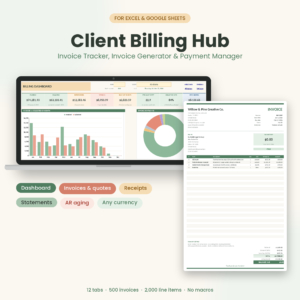
Client Billing Hub Invoice Tracker Spreadsheet
Price: $6.49 | Best for: Owners chasing a few late clients
A workbook for Excel and Google Sheets that tracks invoice status, days overdue and days to get paid, with an optional late fee estimate. It builds a client statement for any date range, all invoices or unpaid only, with a five-bucket aging strip, and prints numbered receipts when payments land. Set your default terms in Settings, then pull a statement for your slowest client.
There is real relief in sending a tidy statement instead of a frustrated email. It keeps things professional, and it keeps you calm.
Mistakes that slow payment down
- Different terms on the quote and invoice. The client goes with whichever is longer.
- No reference number. Payments arrive with no clue which invoice they cover.
- Only one way to pay. Offer bank transfer and a card link if you can.
- Sending to the wrong person. Ask who handles invoices at the start of the job, and copy them in.
- Invoicing late. Terms start when the invoice is sent. A job finished on the 2nd and invoiced on the 20th has already lost 18 days.
Frequently asked questions
What are the best payment terms for a small business?
For most freelancers and small service businesses, 14 days works well, with 7 days for private customers and small jobs. Use a deposit for projects and agree longer terms only with large clients whose payment runs need it.
Is net 30 or net 15 better?
Net 15 or net 14 gets you paid sooner if the client can manage it. Net 30 suits larger companies that pay suppliers monthly. Ask the client how they pay before choosing.
How do I write payment terms on an invoice?
Write a short sentence near the total with the exact due date, how to pay and the reference to use, for example: “Payment due by 14 November 2026 by bank transfer. Reference: 0231.”
Can I add a late fee to an overdue invoice?
Only if it was agreed in your terms before the work started, and the rate follows the rules where you work. Adding one for the first time on a reminder usually backfires.
Should I ask for a deposit?
For projects, custom orders and jobs with materials, yes. A deposit of 25% to 50% is common and protects you if the client cancels.
What does due on receipt mean on an invoice?
It means the client should pay as soon as they get the invoice. Many people treat it loosely, so a written date such as “due by 10 November” usually works better.
Your next step
Open your invoice template today and replace “30 days” with a real date, a reference number and two ways to pay. Then set your default terms once in a tracker like the PaidPath Client and Invoice Hub, so every invoice from here on carries them and the overdue list tells you who to call on Friday.