Best To Do List Template for Excel and Google Sheets
The best to do list template is the one that matches how you already plan. Choose MonthMosaic if you think in calendar months, the Clearday To-Do Planner if you want one list feeding every view, and the Clearday Task Tracker Spreadsheet if much of your work repeats. All three run in Excel and Google Sheets.
Choosing a template can feel more complicated than the task itself, with dashboards, matrices and boards all competing for your attention. This guide reduces it to a few practical questions, so you can pick one and start using it today.
Key facts at a glance
- All three templates are spreadsheets for Excel and Google Sheets, and the two Clearday files need Excel 2010 or newer.
- MonthMosaic is calendar-first and holds up to five tasks a day across 12 automatic monthly calendars.
- The Clearday To-Do Planner has room for 500 to-dos and a 12-month routine tracker for habits and chores.
- The Clearday Task Tracker Spreadsheet repeats routines daily, weekly, monthly, yearly and on several other schedules.
- The Clearday files are instant downloads with no subscription, and the Task Tracker does not need Microsoft 365.
 MonthMosaic Monthly Calendar Planner for Excel & Google Sheets | Digital Calendar Template with To-Do List, Task Tracker & Year Dashboard
Table of Contents Toggle
- What should you look for in a to do list template?
- How do the three to do list templates compare?
- Which to do list template suits which person?
- How do you start using a spreadsheet to do list?
- What mistakes should you avoid with a to do list template?
- What affects the price of a to do list template?
- Which to do list template should you choose?
- Common questions
What should you look for in a to do list template?
A good to do list template does three things: it runs in software you already have, it shows your tasks in the view you actually think in, and it updates itself so you are not maintaining the system as well as the work. Five factors decide whether that holds true for you.
Where the template runs
A spreadsheet template is a pre-built file with formulas, tabs and formatting already set up, so you only type in your own entries. All three products here work in Microsoft Excel and Google Sheets. The Clearday To-Do Planner and Task Tracker both need Excel 2010 or newer, and the Task Tracker also works in Excel for the web without Microsoft 365. If you use an older copy of Office or share a file with family on a free Google account, that detail matters.
Calendar-first or list-first
A calendar-first template starts from dates and places tasks on days. A list-first template starts from a single list and builds the calendar from it. MonthMosaic is calendar-first: you pick the year and week start once, and dates and weekdays fill in. The Clearday products are list-first, so you type a to-do once and it appears on the dashboard, weekly board and monthly calendar.
How repeating tasks are handled
Repeating tasks are the bin collection, the monthly bill check, the weekly shop and the yearly renewal. The Clearday Task Tracker Spreadsheet repeats routines daily, on weekdays, weekly, every 2, 3 or 4 weeks, monthly, quarterly and yearly. The Clearday To-Do Planner has a 12-month routine tracker for habits and chores. MonthMosaic places birthdays and appointments on the right day automatically.
Capacity and limits
Limits are easy to miss until you hit them. MonthMosaic plans up to five tasks per day, which suits most people but not a crowded working day. The Clearday To-Do Planner has room for 500 to-dos. The supplied details for the Task Tracker don't state a capacity, so check the listing if you plan to store a very large backlog.
What is in the download
Look for a sample file and a guide, because a filled-in example shows you how the formulas behave. Both Clearday products include a blank file and a sample file, plus a 17-page guide for the To-Do Planner and a 14-page guide for the Task Tracker. MonthMosaic includes a year dashboard and printable PDF calendars in US Letter and A4 sizes.
How do the three to do list templates compare?
The three templates differ mainly in their starting point: a calendar, a single list, or a set of repeating routines. The table sets out what each one is built around and what you receive.
| Template | Built around | Repeating tasks and routines | What is included |
|---|---|---|---|
| MonthMosaic Monthly Calendar Planner for Excel & Google Sheets | Digital Calendar Template with To-Do List, Task Tracker & Year Dashboard | 12 automatic monthly calendars, up to five tasks a day, tick-off dropdown | Birthdays and appointments land on the correct day | Year dashboard, printable PDFs in US Letter and A4 |
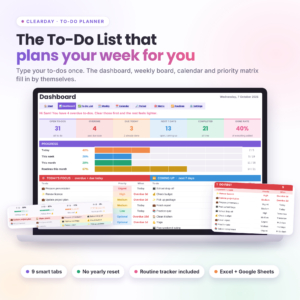 Clearday To-Do Planner | To-Do List Spreadsheet for Excel & Google Sheets with Dashboard, Weekly & Monthly Calendar and Routine Tracker | One list feeding a dashboard, weekly board, monthly calendar and priority matrix | 12-month routine tracker for habits and chores | 9 tabs, room for 500 to-dos, blank and sample files, 17-page guide |
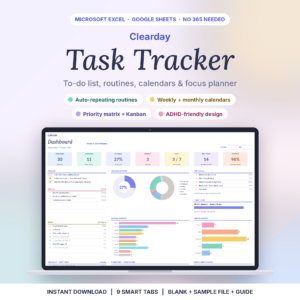 Clearday Task Tracker Spreadsheet | To Do List, Recurring Task Planner, Weekly & Monthly Calendar for Excel & Google Sheets | Overdue list, today's list, calendars, priority matrix and Kanban board built from your entries | Daily, weekdays, weekly, every 2, 3 or 4 weeks, monthly, quarterly, yearly and more | 9 tabs, blank and sample files, 14-page guide |
Which to do list template suits which person?
Each template suits a different planning habit, and the right match depends on whether your week is shaped by dates, by a long list or by routine.
MonthMosaic suits people who plan by looking at the month ahead. If you want birthdays, appointments and a handful of daily tasks on one page, with live daily, weekly and monthly progress, it fits. The printable PDFs help if you prefer a paper copy on the fridge. One caution: the holidays that fill in are US holidays, so check whether that matters to you.
The Clearday To-Do Planner suits people with a long, mixed list of work, home and personal jobs. The priority matrix helps you decide what to do first, and the routine tracker keeps habits beside your tasks. It is a sensible pick for someone retiring or reorganising a household, when tasks arrive from many directions.
The Clearday Task Tracker Spreadsheet suits people whose to-dos repeat. Think of a landlord with monthly checks, a club treasurer with quarterly deadlines, or anyone running a household on a rota. You enter a routine once and it reappears on schedule. The Kanban board also lets you see jobs as to do, in progress and done.
How do you start using a spreadsheet to do list?
You start by opening the sample file, then moving to the blank file once you understand how it behaves. This takes about half an hour.
- Download the file and open the sample version first. Click through each tab to see where entries appear.
- Make a copy of the blank file and save it with a clear name and the year.
- If you use Google Sheets, upload the file to Google Drive and open it with Sheets. Excel users can open it directly.
- Enter the setup choices first. In MonthMosaic that means the year and week start.
- Add ten real tasks, not all of them. Check that they show up where you expect.
- Set up two or three repeating routines, if your template supports them.
- Spend five minutes each morning marking items done and adding new ones.
What mistakes should you avoid with a to do list template?
The most common mistakes come from overloading the template or abandoning it after a week. These are worth knowing before you begin.
- Typing over formulas. The automatic features rely on formulas. Type only in the entry cells, and keep an untouched blank file as a backup.
- Entering everything on day one. Start with this week. A system that feels heavy in the first hour rarely survives the first month.
- Ignoring the sample file. It shows how the dashboard and calendars respond, and saves you guessing.
- Using a calendar-first template for a long backlog. With a limit of five tasks a day, MonthMosaic suits scheduled work better than a dumping ground for 200 loose ideas.
- Skipping version checks. The Clearday files need Excel 2010 or newer. Confirm yours before you buy.
- Never saving a dated copy. Save a copy at the end of each month so you can look back at what was done.
What affects the price of a to do list template?
The price of a to do list template depends on how many connected views it builds for you, how much support material comes with it, and whether the purchase is one-off or recurring. Live prices appear on the product cards beside this page.
A template that automates several views, such as a dashboard, a Kanban board and recurring schedules, generally costs more than a simple checklist file. Extras such as printable PDFs, a sample file and a detailed user guide also add value. Both Clearday products are instant downloads with no subscription, which means you pay once rather than monthly. Compare what you will actually use rather than the longest feature list.
Which to do list template should you choose?
Choose by the way you naturally look at your week, and you will be more likely to keep using it.
- If you plan by month and date, pick MonthMosaic.
- If you keep one long list and want it sorted into views, pick the Clearday To-Do Planner.
- If most of your tasks come round again on a schedule, pick the Clearday Task Tracker Spreadsheet.
If you are still unsure, choose the one whose sample file you could understand in five minutes. Browse all 3 options below and compare the listings against the table above.
Common questions
Can I use these templates on my phone or tablet?
All three are built for Excel and Google Sheets. Google Sheets has mobile apps, so you can open a file from Google Drive on a phone. Spreadsheet layouts are easier to use on a larger screen, so many people enter tasks on a computer and tick them off on a phone.
Do I need Microsoft 365 to use them?
No. The Clearday Task Tracker Spreadsheet states that Microsoft 365 is not needed. It works in Excel 2010 or newer, Excel for the web and Google Sheets. The Clearday To-Do Planner works in Excel 2010 or newer and Google Sheets.
Can I print a to do list template?
MonthMosaic includes printable PDF calendars in US Letter and A4 sizes, so you can keep a paper copy. For the Clearday files, the supplied details don't mention printable versions, so check the product listing if paper matters to you.
What is a priority matrix?
A priority matrix is a grid that sorts tasks by urgency and importance, so you can see what to do now, what to schedule and what to drop. Both Clearday templates build one automatically from the tasks you enter.
Is a spreadsheet better than a to do list app?
A spreadsheet suits people who want full control, no subscription and files stored on their own computer or drive. An app may suit you better if you want reminders and notifications. Both Clearday products are one-off downloads rather than subscriptions.
Pick the one whose main screen matches how you already think about your week, then open its sample file before you add your own tasks.