A pocket calendar earns its place the moment someone asks, “Are you free on the 18th?” and your phone is flat, or in the car, or buried under a toddler. You unfold a small card, check the date, and answer. No unlocking, no app, no battery.
The good news is that pocket calendar templates to print and fold are easy to make from a normal printable calendar. You shrink the pages with your printer settings, print several on one sheet, then fold. This guide shows three fold styles, the exact print settings to look for, the paper that folds cleanly, and a wallet-size year card you can make in five minutes.
One honest note before we start. The Taskdale calendars below are full-page printables, not pre-folded pocket booklets. You make the pocket version yourself with print settings. That is a good thing, because you choose the size, the months and how many copies you need.
Quick picks for pocket calendars
| Product | Best for | Price | Link |
|---|---|---|---|
| Sagewell 2027 Monthly Calendar Printable | Clean month grids that shrink well | $2.99 | View |
| Twelvefold 2027 Printable Calendar | Ink Saver pages and a year at a glance | $2.99 | View |
| MonthMosaic Monthly Calendar Planner | Printing a month after typing it in Sheets | $8.40 | View |
| Wayfold 2027 Digital Planner | A tablet planner with calendar buttons | $27.99 | View |
Why a folded paper calendar still earns a pocket
Phones are brilliant calendars until they are not. A paper card never needs charging, never logs you out, and never pings you with a news alert while you are checking a date. It also works in places where pulling out a phone feels rude, like a parent-teacher meeting or a church committee.
There is a practical side for older relatives too. A grandparent who finds calendar apps fiddly can carry a folded card with the family birthdays already circled. Print one, write the dates in, and hand it over at Sunday lunch. It is a small, kind thing that gets used.
And for anyone working with their hands, a nurse on a ward, a builder on site, a market trader at a stall, a card in a shirt pocket is quicker than wiping your hands and finding your phone.
Three fold styles, from simple to clever
Each style starts with one sheet of Letter or A4 paper. The difference is how many calendar pages you print on it and how you fold.
Style 1: The two-month fold
Print two month pages on one sheet, one above the other. Fold the sheet in half across the middle. You now have a card about 5.5 by 8.5 inches with one month on each side. Six sheets cover a year. This size is good for a bag or a planner pocket, and the date boxes stay big enough to write in with a fine pen.
Style 2: The four-month quarter card
Print four month pages on one sheet in a two by two grid. Fold in half, then in half again. You get a card about 4.25 by 5.5 inches, small enough for a jacket pocket. One month shows on the front, one on the back, and the other two sit inside when you open it. Three sheets cover the whole year, one per four months. This is the most popular style because it balances size and readability.
Style 3: The wallet year card
Print the year at a glance page at a very small size, so the whole year sits on a card roughly the size of a credit card. Trim it, and slip it behind your bank card. You cannot write appointments on it, but you can see what weekday the 14th of August falls on, which is half the reason most people reach for a calendar.
Choosing a template that shrinks well
Not every calendar survives being printed at a quarter of its size. Busy designs with patterned borders, tiny holiday text and thin lines turn into mush. What you want is a calm layout with bold day numbers and plenty of white space.
Landscape month pages are handy here, because two or four of them fit a portrait sheet neatly with very little wasted paper. Look for clear, readable dates and simple grid lines.
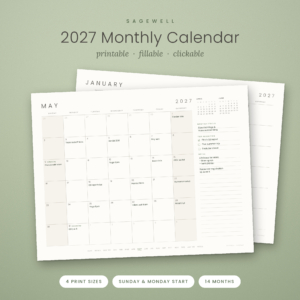
Sagewell 2027 Monthly Calendar Printable
Price: $2.99 | Best for: minimal pocket cards that stay readable
A minimalist landscape calendar PDF with large, legible day numbers, a clickable 2027 Year at a Glance and month pages from December 2026 to January 2028. It comes in Letter, Ledger, A4 and A3 with Sunday and Monday start, and the date boxes are fillable, so you can type birthdays in before you shrink and print. For pocket cards, use the Classic edition on Letter or A4, since it has the most open space per month.
Typing your key dates into the fillable boxes first is a nice trick. Typed text stays crisp at small sizes, while handwriting squeezed into a tiny box often does not.
The print settings that do the shrinking
This is where most people get stuck, so here are the settings in plain terms. The names change slightly between programs, but every common PDF reader has them.
- Open the PDF in a free reader such as Adobe Acrobat Reader, or your browser’s built-in viewer.
- Choose the pages. Type the page numbers you want, such as 3-6 for four months.
- Find “Multiple” or “Pages per sheet”. In Acrobat Reader it sits under Page Sizing and Handling. Set it to 2 for the two-month fold, or 4 for the quarter card.
- Set orientation to portrait. Landscape pages will then stack neatly.
- Turn off “Print page border” unless you want a guide for cutting.
- Print one test sheet on plain paper before you use the good stuff.
For the wallet card, set pages per sheet to 16 and print the year at a glance page 16 times. You get sixteen tiny year cards from one sheet, enough for everyone in the family plus spares for the glovebox.
On a Mac, the Layout section of the print dialog has a “Pages per Sheet” menu that does the same job. Windows printer drivers often have it too, under Layout or Finishing.
Paper and folding tips
Plain office paper (around 20 lb or 80 gsm) folds easily but wears out in a pocket within a few weeks. Slightly heavier paper, around 24 to 28 lb or 90 to 105 gsm, is the sweet spot. It folds cleanly and survives a month of being pulled out and put back.
Card stock looks smart but cracks along the fold. If you want to use it, score the fold line first. Lay a ruler along the line and run the back of a butter knife along it with firm pressure. The paper then bends exactly where you want, with no cracking.
- Fold toward the printed side for cards you carry, so the ink rubs less.
- Press each fold with the side of a spoon or a bone folder for a sharp edge.
- Laminate the wallet card if you have a home laminator. A self-seal pouch from the stationery aisle works too.
- Round the corners with scissors. Square corners catch on pocket linings and fray.
A cheerful option for ink-conscious printing
Printing a year of pocket cards for a whole family uses ink, especially with colored pages. If you print a lot, a calendar that comes with a black and white version saves cartridges and still looks tidy.
This also suits anyone who likes to add their own color. Kids enjoy coloring the little drawings on their own card, and a hand-colored calendar is much more likely to stay in a school bag than a plain one.
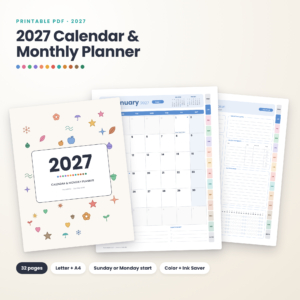
Twelvefold 2027 Printable Calendar
Price: $2.99 | Best for: families printing several copies
A 32-page 2027 calendar and monthly planner in Letter and A4, Sunday or Monday start, with a monthly calendar grid and a plan page for each month. It includes a 2027 year at a glance with US holidays circled, a birthdays and anniversaries page and a 2028 year at a glance. The Ink Saver files print in black and white and turn the small doodles into coloring spots. For pocket cards, print only the 12 calendar grids four to a sheet and keep the plan pages at full size at home.
The birthdays page is worth printing at full size too. Fold it into quarters and tuck it inside your quarter card so you never miss a cousin’s birthday again.
Filling in a pocket calendar before you fold
Small cards leave little room for writing, so decide what goes on them. Four kinds of entry fit well: birthdays, paydays, school holidays and booked trips. Everything else stays in your main planner.
A spreadsheet is a tidy way to do this, because you can type every date in comfort, then print a single month and shrink it the same way. If your plans change mid-month, you fix the cell and print a fresh card. Five seconds at the printer, done.

MonthMosaic Monthly Calendar Planner
Price: $8.40 | Best for: people who type first and print later
An editable monthly calendar for Excel and Google Sheets with twelve monthly tabs that set themselves up once you choose the year and week start. Dates and US holidays fill in automatically, and birthdays and appointments added once on the Key Dates tab appear on the right day every year. Type your dates in, then print a month tab and use the pages-per-sheet setting to shrink it for a pocket card.
If you want to see what a self-filling month looks like before you buy anything, our guide to a monthly calendar spreadsheet that fills itself in walks through the idea.
A ten-minute routine to keep the cards current
A pocket calendar is only useful if it is right. The trick is a fixed routine on the last weekend of each quarter, so the next card is ready before you need it.
- Check your main calendar for any new birthdays, trips or school dates in the next four months.
- Type or write them into the next four month pages.
- Print the quarter card, fold it, and put it in your bag.
- Recycle the old card, or keep it in a drawer if you like a paper record of where the months went.
Some people make four quarter cards in January and carry the current one. That works, but dates added later get missed. Printing each quarter as it comes keeps it fresh.
Turning loose cards into a small planner
If you like the pocket format, you can go one step further and bind several folded sheets into a slim booklet. Fold six two-month sheets, stack them, and staple along the spine with a long-arm stapler, or punch two holes and tie them with string. You now have a 12-month pocket diary that cost you six sheets of paper.
For people who enjoy building their own planner from printables, our guide on how to build your own planner from printable pages covers punching, binding and choosing inserts.
When paper is not enough
A pocket card is great for checking dates. It is weak at reminders. If you need an alert ten minutes before a call, paper cannot help. Many people end up using both: a folded card for quick glances and a digital planner for the details.
If you write on a tablet, the Wayfold 2027 Digital Planner has buttons on each daily page that open Apple Calendar or Google Calendar on that date, so a handwritten plan can become a phone reminder with one tap. Keep the paper card for the pocket and the tablet for the desk.
Frequently asked questions
How do I print a calendar small enough for my wallet?
Open the year at a glance page in a PDF reader, choose Multiple or Pages per sheet, set it to 16, and print that page 16 times. Trim one card and laminate it if you can.
What paper is best for a folding pocket calendar?
Paper around 24 to 28 lb (90 to 105 gsm) folds cleanly and lasts a few weeks in a pocket. Card stock works if you score the fold line first with a ruler and a butter knife.
Can I make a pocket calendar from a full-page printable?
Yes. Print two or four month pages on one sheet using the pages-per-sheet setting, then fold in half once or twice. A calm design with large day numbers stays readable when shrunk.
How many sheets do I need for a full year?
Six sheets with two months each, or three sheets with four months each. A wallet year card needs only one small piece.
Can I print extra copies for my family?
For your own household, yes, print as many as you need. Check each product’s license before sharing copies outside your home.
Your next step
Pick the next four months, print them four to a sheet on slightly heavier paper, and fold twice. Start with the Sagewell 2027 Monthly Calendar Printable, type in the birthdays first, and see how it feels to answer “Are you free on the 18th?” without reaching for your phone.