Best Priority Matrix Planners and Templates Compared
The best priority matrix depends on how you plan. The Focus Desk Work Planner Kit gives you a ready-made fillable matrix page. Wrenweek Weekly To-Do List puts one inside a printable weekly set. The two Clearday spreadsheets sort your to-dos into a matrix for you. Choose the format first, then the extras.
A priority matrix can feel like one more system to learn when your list is already long. It is a simple idea, though, and the choices on this page differ mainly in how much work you want to do yourself. We'll go through what to look for, how the options compare and which suits which kind of planner.
- A priority matrix is a four-box grid that sorts tasks by how urgent and how important they are, a layout often linked to the Eisenhower method and to Stephen Covey's time management matrix.
- The options here come in three formats: fillable PDFs, a GoodNotes-style digital planner and Excel or Google Sheets spreadsheets.
- Only the two Clearday spreadsheets build the matrix automatically from your task list.
- Focus Desk and Wrenweek name a priority matrix page in their descriptions, and both work printed or typed.
- Browse all 6 options below to see the live prices on each product card.
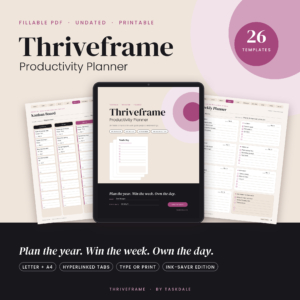 Productivity Planner Printable & Fillable PDF | Undated Work Planner with Time Blocking, Meeting Notes, Kanban & Goal Pages | Thriveframe
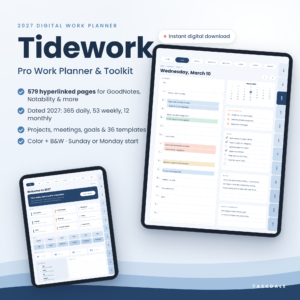 Tidework 2027 Digital Work Planner for GoodNotes & Notability, Hyperlinked Daily, Weekly & Monthly Planner with Project & Meeting Templates
 Weekly To-Do List Printable & Fillable PDF | Wrenweek Undated Weekly Planner, Task Planner & Habit Tracker | Letter, A4, A5, Half, Classic Happy Planner
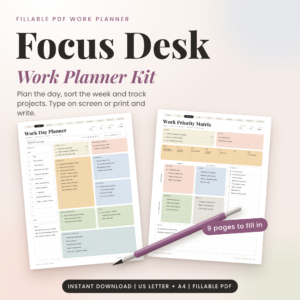 Focus Desk Work Planner Kit: Fillable Work Day Planner PDF, Priority Matrix and Weekly Planner (US Letter and A4)
Table of Contents Toggle
- What should you look for in the best priority matrix?
- How do the priority matrix options compare?
- Which priority matrix suits which person?
- How do you use a priority matrix day to day?
- What mistakes should you avoid with a priority matrix?
- What affects the price of a priority matrix planner?
- Which one should you choose if you want a quick rule?
- Common questions
What should you look for in the best priority matrix?
The best priority matrix is one you will open every working day, so format, automation, paper size and the pages around the matrix matter more than design. Five factors separate the options here.
Format: fillable PDF, digital planner or spreadsheet
A fillable PDF lets you type into the page or print it and write by hand. Focus Desk, Wrenweek and Thriveframe all work this way. A digital planner such as Tidework is built for GoodNotes, Notability and other PDF apps, usually on a tablet with a stylus. A spreadsheet such as Clearday runs in Excel or Google Sheets and behaves like a small piece of software.
If you like paper, choose a PDF. If you like tapping and typing, choose a spreadsheet. If you already write on a tablet, choose the digital planner.
Whether the matrix is drawn by you or built for you
A manual matrix is a blank four-box page where you decide which box each task goes in. This takes a few minutes but makes you think about every item, which is the whole point. An automatic matrix, as in both Clearday files, draws the grid from the priority you give each task, so it stays current as you tick things off.
Automation saves effort, but it only sorts what you enter. It won't tell you which task matters.
Page size and printing
Page size decides whether the matrix fits your desk or your binder. Focus Desk and Thriveframe come in US Letter and A4. Wrenweek adds A5, Half Letter and the Classic Happy Planner size (7 x 9.25 in), which suits a smaller ring binder. Thriveframe and Wrenweek also include ink-saver versions, which is useful if you print at home and don't want to empty a colour cartridge on a grid.
The pages around the matrix
A matrix on its own tells you what to do first, but not when. Focus Desk pairs its Priority Matrix with a Work Day Planner and a Time Blocker. Wrenweek adds daily, schedule, goals, brain dump, habit tracker and review pages. Clearday adds weekly and monthly calendars and a Kanban board or routine tracker.
Pick the set whose neighbouring pages you would really use. Unused pages are clutter.
Software and device requirements
The Clearday files work in Excel 2010 or newer and Google Sheets. The Task Tracker version also works in Excel for the web and doesn't need Microsoft 365. Tidework needs a PDF app that supports hyperlinks. The PDF planners need only a PDF reader to type in, or a printer.
Check this before buying. A planner you can't open on your usual device won't get used.
How do the priority matrix options compare?
The six options differ most in format and in whether the matrix is a page you fill in or a view the file builds. The table uses only the details supplied for each product.
| Product | Format | Priority matrix | Sizes or software | Best for |
|---|---|---|---|---|
| Productivity Planner Printable & Fillable PDF | Undated Work Planner with Time Blocking, Meeting Notes, Kanban & Goal Pages | Thriveframe | Fillable PDF, undated, 6 templates | Not named in the description; check the template list | US Letter, A4, ink-saver editions | Mixed work planning with tabs |
| Tidework 2027 Digital Work Planner for GoodNotes & Notability, Hyperlinked Daily, Weekly & Monthly Planner with Project & Meeting Templates | Digital, dated 2027, 579 pages | Not named in the description; the work library has 6 templates | GoodNotes, Notability, other PDF apps; printables in US Letter and A4 | Tablet users planning a full year |
| Weekly To-Do List Printable & Fillable PDF | Wrenweek Undated Weekly Planner, Task Planner & Habit Tracker | Letter, A4, A5, Half, Classic Happy Planner | Fillable PDF, undated, 12 pages | One page among the 12, filled in by you | Five sizes, Monday or Sunday start | Weekly planning on paper or screen |
| Focus Desk Work Planner Kit: Fillable Work Day Planner PDF, Priority Matrix and Weekly Planner (US Letter and A4) | Fillable PDF kit, 18 single-page files | Dedicated Priority Matrix page, filled in by you | US Letter, A4 | A quick daily sort, with filled examples |
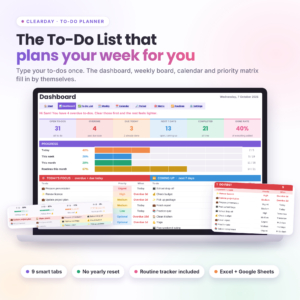 Clearday To-Do Planner | To-Do List Spreadsheet for Excel & Google Sheets with Dashboard, Weekly & Monthly Calendar and Routine Tracker | Spreadsheet, 9 tabs, room for 500 to-dos | Built automatically from your list | Excel 2010 or newer, Google Sheets | Tasks plus a 12-month routine tracker |
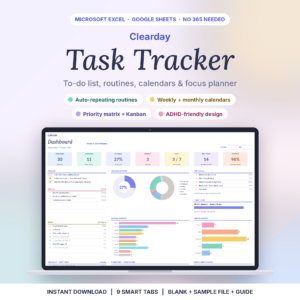 Clearday Task Tracker Spreadsheet | To Do List, Recurring Task Planner, Weekly & Monthly Calendar for Excel & Google Sheets | Spreadsheet, 9 tabs | Built automatically, with a Kanban board | Excel 2010 or newer, Excel for the web, Google Sheets | Repeating tasks and overdue lists |
Which priority matrix suits which person?
Each option suits a different working habit, and the right match comes from how you already plan, not from the longest feature list.
Focus Desk Work Planner Kit suits you if you want a single sheet to sort a busy morning. It includes filled examples and a Word user guide, and the description says you can plan a calmer day in about five minutes. It is the most direct answer to the search.
Wrenweek Weekly To-Do List suits you if you plan by the week. The matrix sits beside a weekly page, a brain dump and a review page. The five sizes make it the best fit for a small binder or a planner you carry.
Clearday To-Do Planner suits you if your tasks already live in a list. You add a to-do, mark it done and the tabs update themselves. The 12-month routine tracker keeps habits and chores next to work tasks, and there is no subscription.
Clearday Task Tracker Spreadsheet suits you if much of your work repeats. Routines can recur daily, on weekdays, weekly, every 2, 3 or 4 weeks, monthly, quarterly or yearly. It also builds the overdue list and today's list for you.
Thriveframe Productivity Planner suits you if you want one workbook for the day, week, goals, projects and meetings, with clickable tabs to jump between them. Its description doesn't name a matrix page, so look at the template list first.
Tidework 2027 Digital Work Planner suits you if you live in GoodNotes or Notability and want a dated year with quarterly OKRs and 365 time-blocked daily pages. Again, no matrix page is named in the supplied description, so treat it as a full planner you could draw a matrix into.
How do you use a priority matrix day to day?
You use a priority matrix by listing everything you need to do, then placing each task in one of four boxes: urgent and important, important but not urgent, urgent but not important, or neither. It takes about five minutes.
- Write every task on your mind onto a list. Don't judge them yet.
- Mark each one urgent if it has a deadline within a day or two, and important if it moves a goal or avoids a real problem.
- Place the urgent and important tasks in the first box and do them today.
- Book a time for the important but not urgent tasks. A time-blocking page helps here.
- Hand off or shorten the urgent but not important tasks, such as routine emails.
- Cross off or postpone anything in the last box.
- Review at the end of the day and move what is left.
With the Clearday spreadsheets, steps 2 to 6 happen when you enter the priority. With the PDFs, you write each task into its box.
What mistakes should you avoid with a priority matrix?
The most common mistake is putting too many tasks in the urgent and important box, which leaves you with a to-do list in a different shape. Aim for a handful there. If the box holds a dozen items, recheck what is truly urgent.
Other pitfalls worth avoiding:
- Treating every deadline as important. A deadline set by someone else is urgent, but it may not matter much.
- Never scheduling the important but not urgent box. This is where planning, health and long-term projects sit, and they slip first.
- Buying more pages than you will use. A large workbook can be harder to keep up than a one-page grid.
- Skipping the review. A matrix filled on Monday and ignored by Wednesday is out of date.
- Printing a colourful set at full ink. Use the ink-saver editions, where supplied, for everyday pages.
What affects the price of a priority matrix planner?
Price mainly reflects how much is in the file, how long it covers and how much it does for you. A single-purpose PDF kit generally costs less than a dated 579-page digital planner. A spreadsheet with automatic tabs, a dashboard and a routine tracker sits somewhere between, depending on the listing.
Other factors include the number of page sizes, whether the file is dated or undated, and whether a user guide and sample files come with it. An undated planner can be reused year after year, which may spread the cost, while a dated 2027 planner is built for one year. Live prices appear on each product card, so compare them against the extras you actually want.
Which one should you choose if you want a quick rule?
If you want a matrix page this afternoon, choose Focus Desk. If you plan by the week on paper, choose Wrenweek. If your tasks sit in a list and some repeat, choose one of the Clearday spreadsheets: the To-Do Planner if you also want routines, the Task Tracker if recurring work and overdue lists matter most. If you work on a tablet, look at Tidework or Thriveframe, and check their template lists for a matrix page first.
Common questions
Is a priority matrix the same as an Eisenhower matrix?
Mostly, yes. The Eisenhower matrix sorts tasks by urgent and important in four boxes, and most priority matrix templates use that layout. Some versions use other axes, such as effort and impact, so check how the page you choose labels its boxes.
Can I use these printables without a printer?
The fillable PDFs let you type straight into the pages on screen, so printing is optional. The descriptions for Focus Desk, Thriveframe and Wrenweek all mention typing or fillable versions. You will need a PDF reader that supports form fields.
Do the Clearday spreadsheets need Microsoft 365?
No. The Clearday Task Tracker works in Excel 2010 or newer, Excel for the web and Google Sheets, and its description says Microsoft 365 isn't needed. The Clearday To-Do Planner is listed for Excel 2010 or newer and Google Sheets.
How often should I redo my priority matrix?
Most people refresh it once a day, in the morning or at the end of the previous day. A weekly review also helps, because it catches important tasks that never became urgent. The Wrenweek set includes a review page for this purpose.
Is an undated planner better than a dated one?
An undated planner lets you start on any day and skip weeks without leaving blank pages behind. A dated planner, like Tidework's 2027 edition, gives you a ready calendar and hyperlinks. Choose undated if your schedule varies, and dated if you want the whole year laid out.