



A printable notary journal that keeps every entry clear, complete and easy to find
The Attestry notary journal printable is a 46-page fillable PDF notary log book for notaries public, mobile notaries and loan signing agents. It gives you clean, numbered entry pages for each notarial act, plus the pages that surround a working journal: your commission record, a worksheet for your own state’s journal rules, a fee schedule, a signer index, monthly totals and a loan signing add-on. Type into it with Adobe Acrobat Reader or print it and write by hand.
Important: notary journal rules are set by each state. Some states, including California, Colorado and Maryland, require a permanently bound journal for paper records, so a printed, loose-leaf journal may not be accepted as your official journal there. Check your state’s notary handbook or ask your commissioning office before you rely on any printable journal.
Who this notary log book is for
- Notaries public in states that accept a printable or loose-leaf journal, or that leave the format to the notary.
- Mobile notaries who want travel fees and appointments recorded next to each act.
- Loan signing agents who need a signing log, appointment checklists and scanback tracking.
- New notaries who want a structured place to write down their state’s rules and fees.
Features of the fillable notary journal
Journal entry pages built around what handbooks ask for
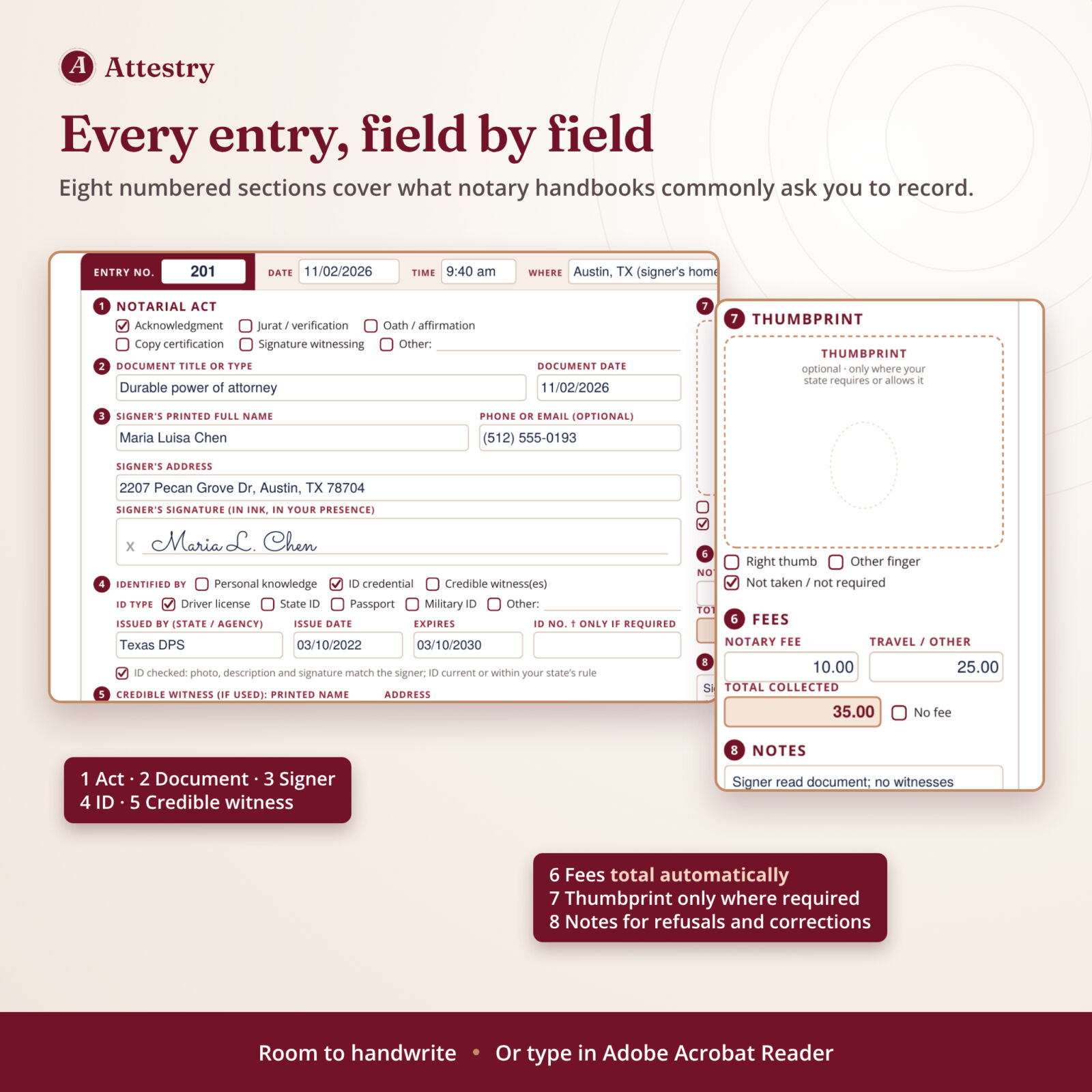
Each page holds two entries with eight numbered sections: notarial act (acknowledgment, jurat or verification, oath or affirmation, copy certification, signature witnessing, other), document title and date, signer name, address, optional phone or email and signature, identification, credible witness, fees, an optional thumbprint box and notes. The top strip records entry number, date, time, location and whether the signer appeared in person or remotely.
Privacy-minded identification section
You tick how you identified the signer (personal knowledge, ID credential or credible witnesses) and the ID type, issuer and dates. The ID number box is clearly marked “only if required”, because some states require ID numbers in the journal while others, such as Texas and Illinois, prohibit them.
Optional thumbprint box
California requires a journal thumbprint for real property documents and powers of attorney, while some states prohibit recording biometric identifiers. The box is labeled optional, with tick boxes for right thumb, other finger or not taken.
Multi-signer entries
Three pages for one document with up to three signers and two credible witnesses, each signer with an ID row and thumbprint box.
Your state, your rules
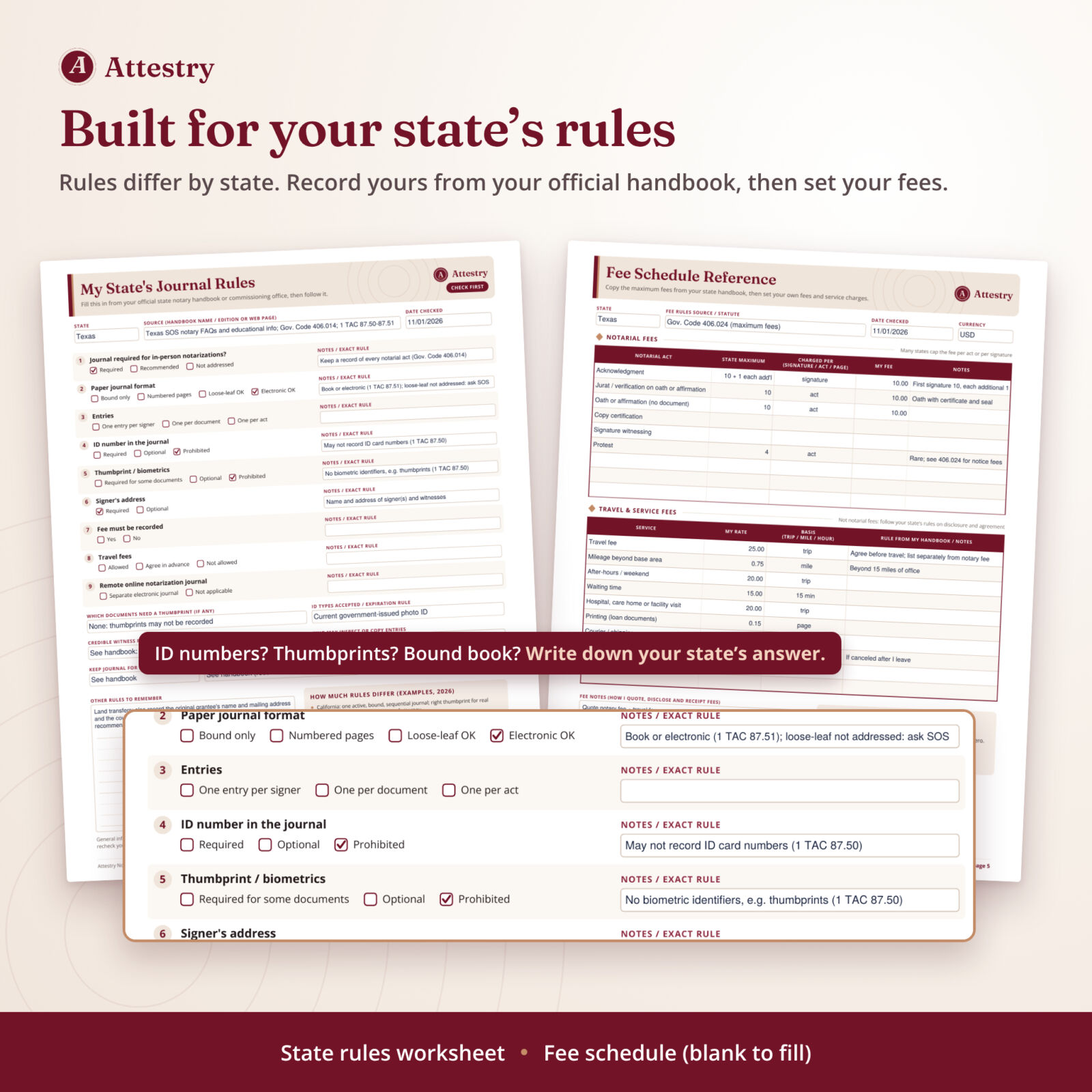
The My State’s Journal Rules worksheet walks through journal format, ID numbers, thumbprints, signer address, fee recording, travel fees, retention, delivery when a commission ends and what to do if a journal is lost. The Fee Schedule Reference is blank so you can copy your state’s maximum fees and set your own notary and travel fees.
Loan signing agent add-on
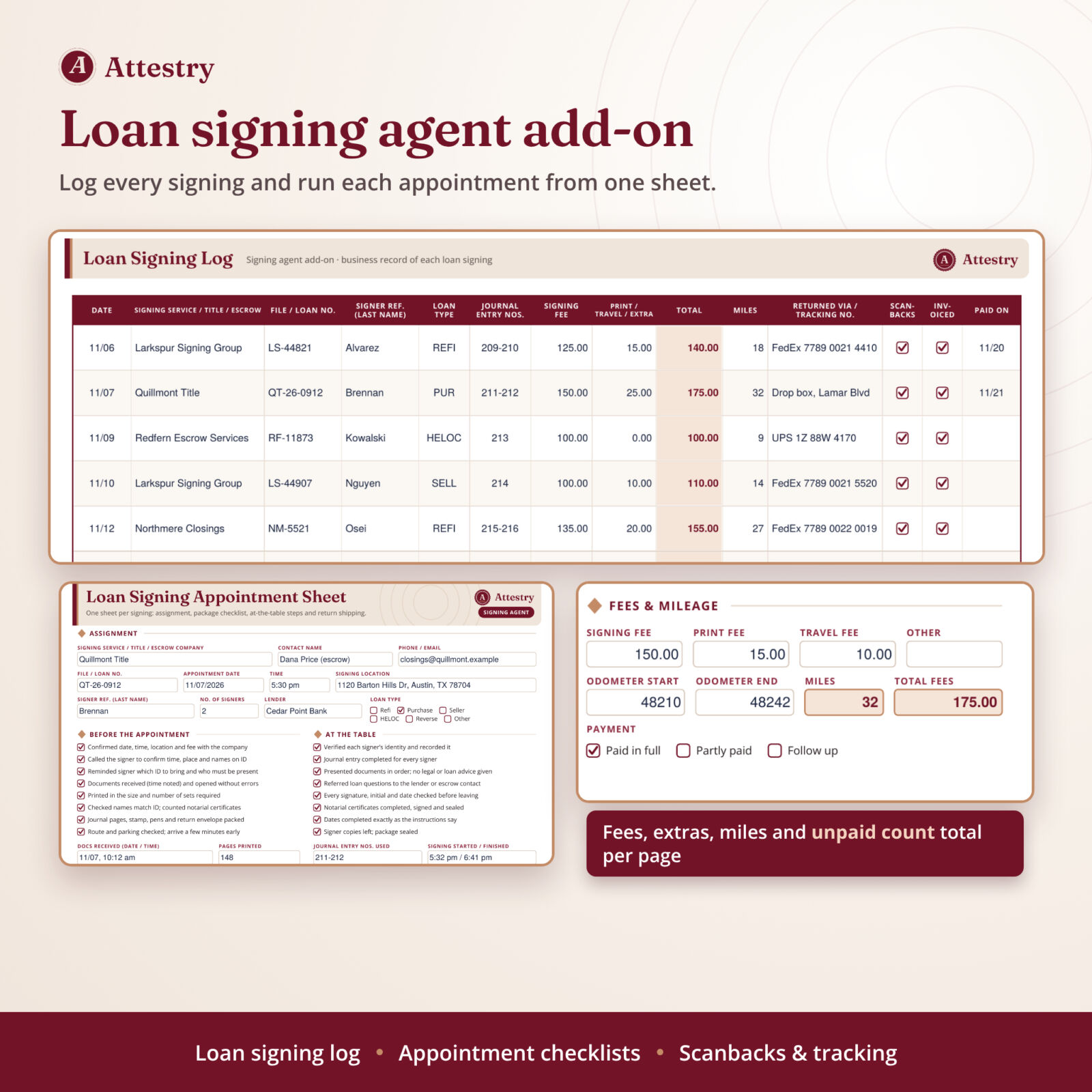
The landscape Loan Signing Log records company, file number, signer reference, loan type, journal entry numbers, signing fee, extra fees, miles, return method, tracking number, scanbacks, invoicing and payment date. Each page totals fees and miles and counts unpaid signings. The Loan Signing Appointment Sheet has before-the-appointment and at-the-table checklists, fees, odometer miles and after-signing steps.
Records that protect you
A signer index, a Corrections & Addenda Log, a Journal Copy & Inspection Log, a Monthly Activity Summary with automatic totals and a Volume Close-Out & Storage record round out the journal.
What is included
- Attestry Notary Journal & Signing Log, fillable PDF, US Letter (46 pages)
- The same journal sized for A4 paper (46 pages)
- Designed Word (DOCX) user guide: setup, every page explained, printing, troubleshooting and FAQ
Pages: cover, contents and quick start, Notary & Commission Record, My State’s Journal Rules, Fee Schedule Reference, Journal-Keeping Best Practices, How to Complete an Entry, Signer Index (3), Journal Entries (25 pages, 50 entries), Multi-Signer Entries (3), Corrections & Addenda Log, Journal Copy & Inspection Log, Monthly Activity Summary, Loan Signing Log (2) and Loan Signing Appointment Sheet (2), Volume Close-Out & Storage.
How it works
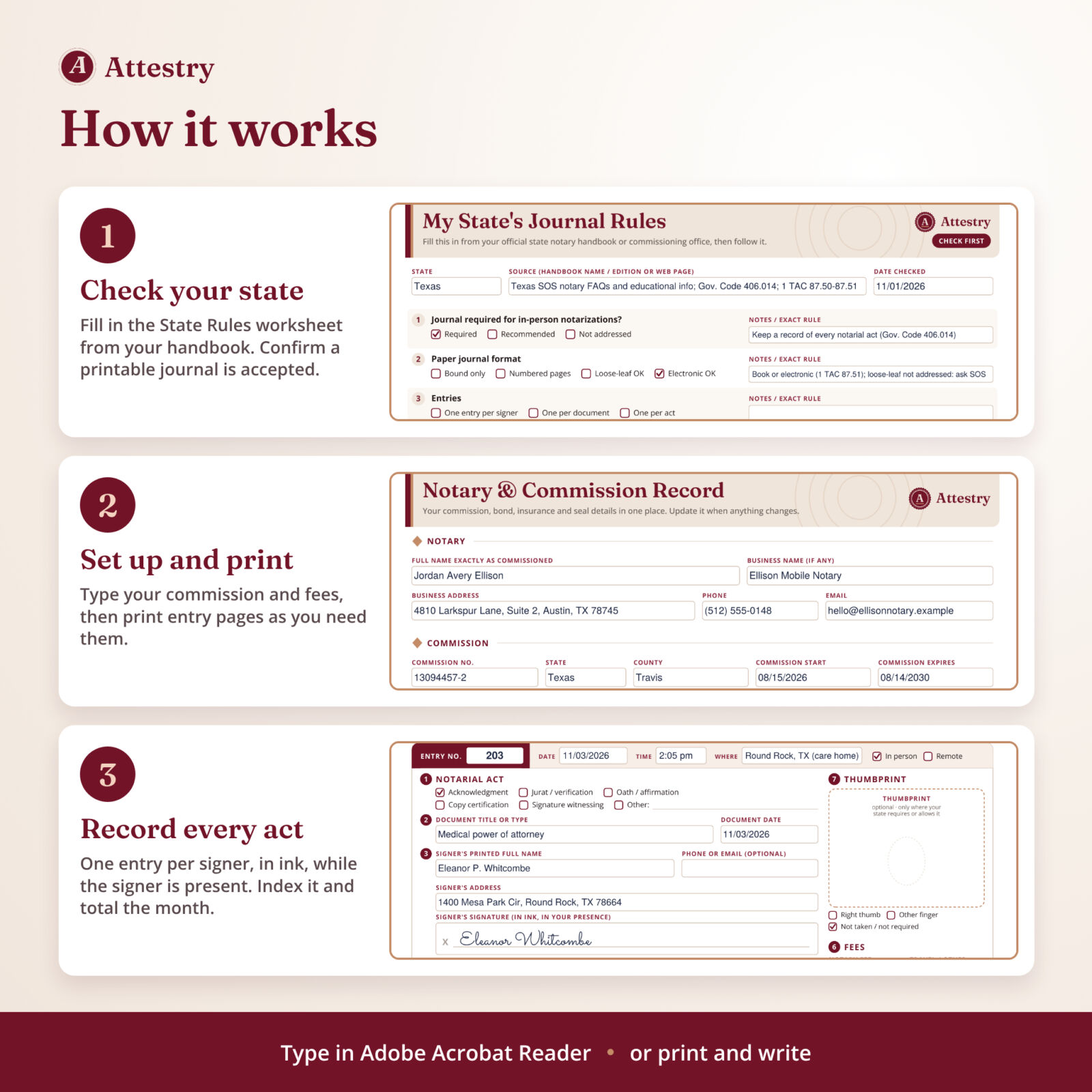
- Fill in My State’s Journal Rules from your official handbook and confirm your state accepts a printable journal.
- Type your commission, bond and fee details into the front pages and save.
- Print the front pages once and the journal entry pages as you need them, at actual size.
- Record each act at the time it happens, in ink, with the signer present. Add the signer to the index and total each month.
File formats and software
Fillable PDF in US Letter (8.5 x 11 in) and A4, with clickable contents. Fill it in free Adobe Acrobat Reader on Windows or Mac; the fee, mileage and monthly totals calculate automatically there. Browser previews and some mobile apps may not run the totals, but every page prints correctly. The user guide is a Word (.docx) file. Typing into the PDF does not make it a tamper-evident electronic journal, so most notaries print the pages and complete official entries by hand.
Customization
Every field is editable, including the pre-filled act names on the fee schedule. Money fields have no currency symbol, so you can record any currency. Use the Other boxes for acts or ID types your state allows, print only the pages you use, and number your journal pages in the header so printed batches stay in order.
Digital download
This is an instant digital download. Nothing is shipped. You can print as many copies as you need for your own notary work. Personal use or use within your own business only; the files may not be shared or resold.
Use cases
- A mobile notary records a durable power of attorney at a client’s home, notes the travel fee separately and finds the entry months later through the signer index.
- A loan signing agent logs each signing, ticks off scanbacks and tracking numbers, and sees unpaid signings at a glance.
- A notary closes out a full volume, records where it is stored and how long to keep it, and starts the next volume number.
Notary journal FAQ
Can I use this printable notary journal as my official journal?
Only if your state accepts a printed, loose-leaf journal. Several states require a permanently bound journal with numbered pages. Check your state handbook or commissioning office first.
Does it work in California?
California requires one active, bound, sequential journal, so this printable is not a substitute for a California journal. California notaries can still use the commission, fee and loan signing pages as business records.
Do I have to record ID numbers?
No. The ID number box is optional and marked “only if required”. Follow your state’s rule; some states require ID numbers and others prohibit them.
Is there a thumbprint box?
Yes, an optional one on every entry. Use it only where your state requires or allows a thumbprint.
Can I type into it on a computer?
Yes. Every page is fillable in Adobe Acrobat Reader, and totals calculate automatically there.
Is it legal advice?
No. It is a record-keeping template with general information. Always follow your state’s notary law and handbook.

Reviews
There are no reviews yet.