
A bakery order spreadsheet that tells you what to bake
When Friday’s lemon loaf orders and Saturday’s pickup orders are scattered across messages, it’s easy to total the sales and still miss the number you need: how many batches to make on each day. Batchday Bakery Planner turns confirmed orders into a daily quantity plan, rounds each recipe up to whole batches, and combines the resulting ingredient needs into one shopping list.
It’s designed for home bakers and cottage bakery owners who run preorder menus, porch pickups, or recurring weekend sales. Use it when customers order several products at once, when different products have different batch yields, or when you want to shop from a real pantry count instead of buying everything on the recipe list.
See what’s due, what’s extra, and what to buy
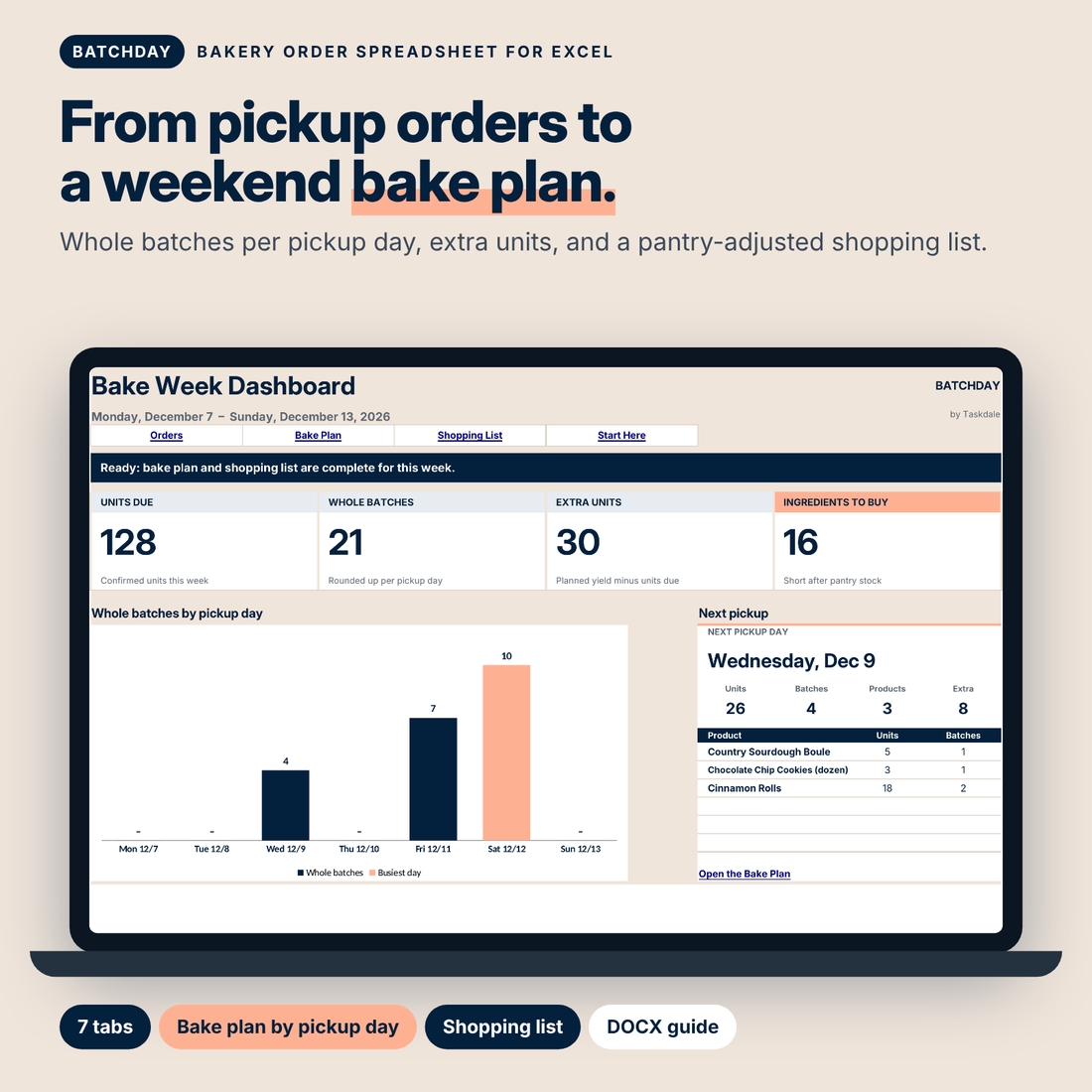
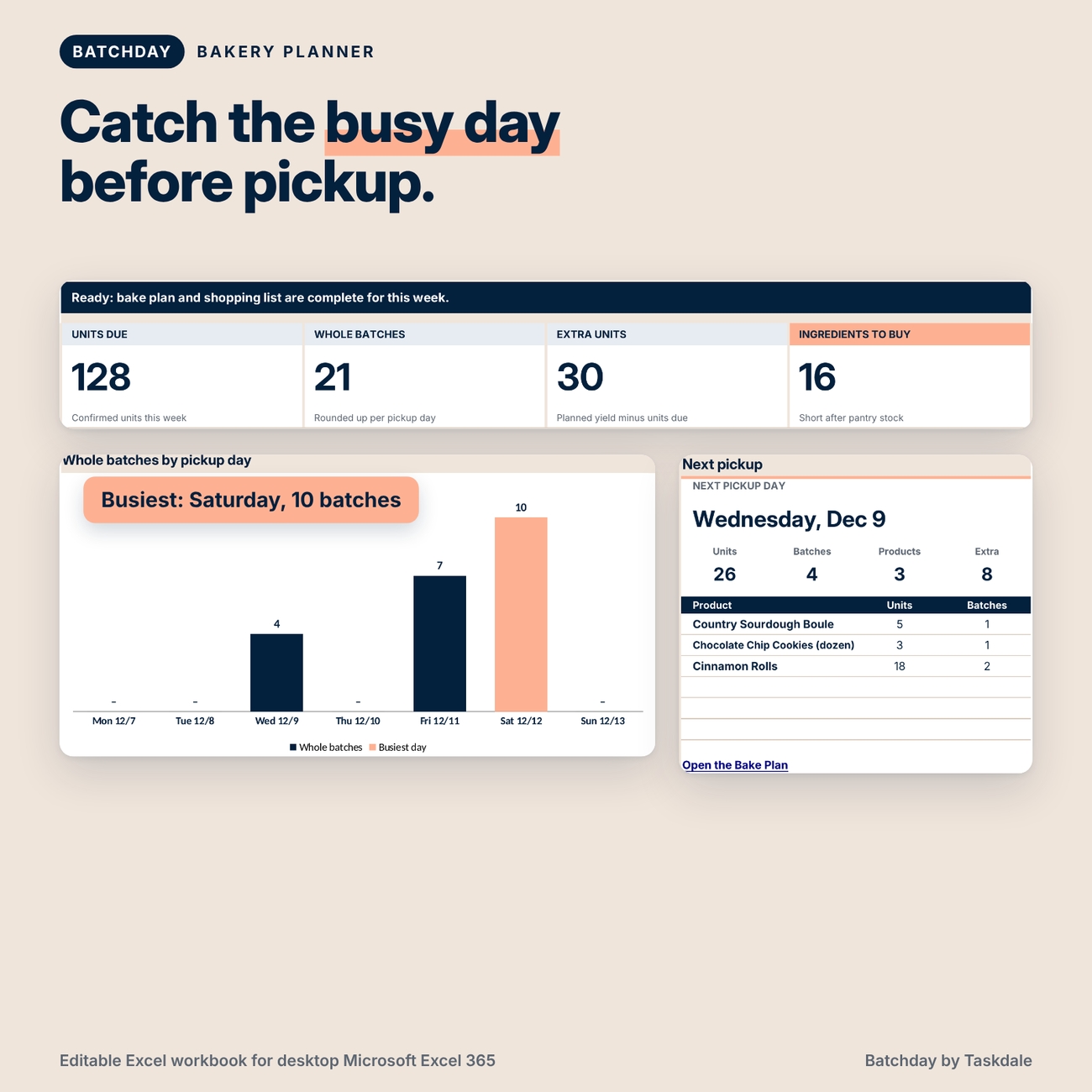
The dashboard gives you four numbers to start with: units due, whole batches, extra units, and ingredients to buy. A seven-day batch chart shows where the workload is concentrated, and the next-pickup panel gives you a place to start before you open the detailed plan.
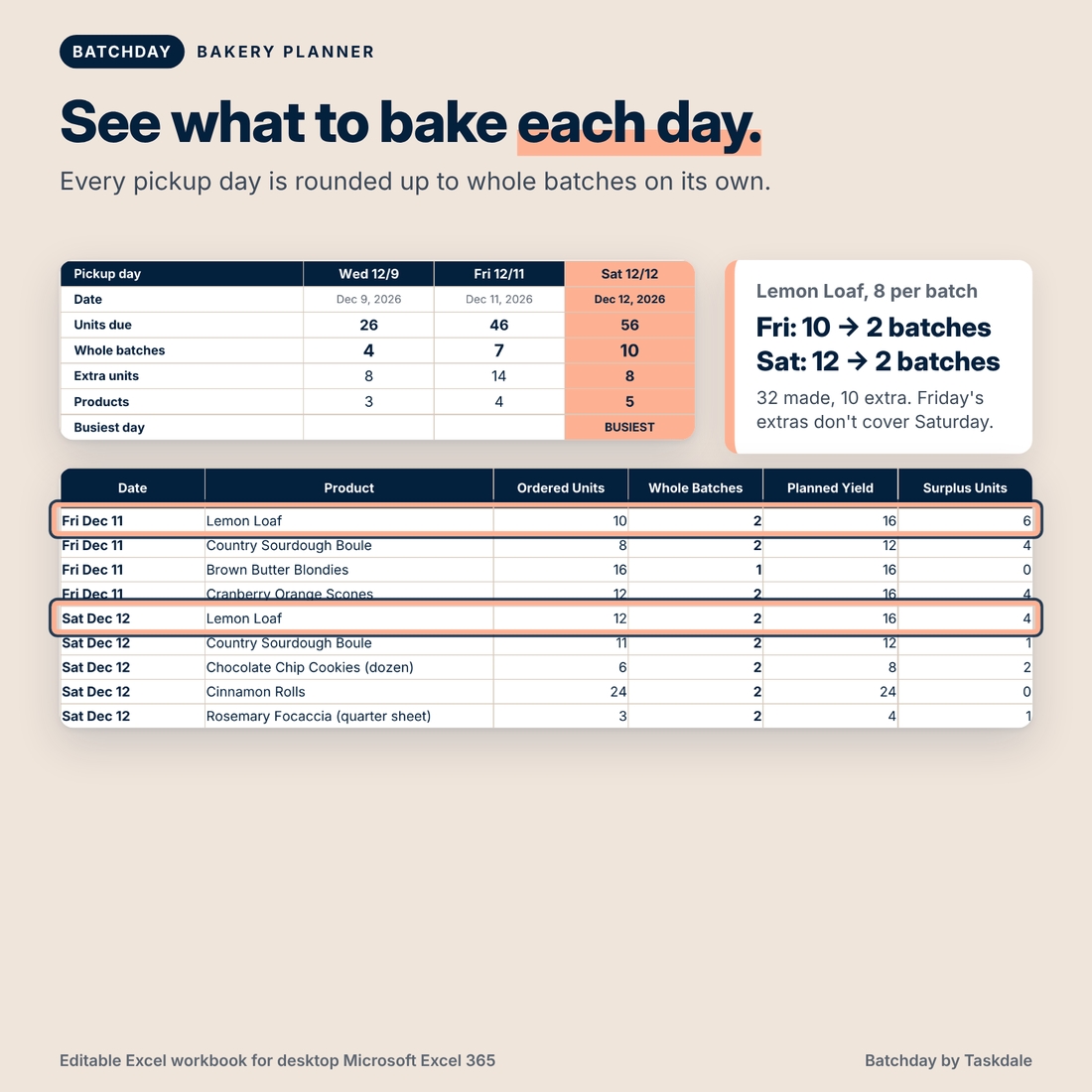
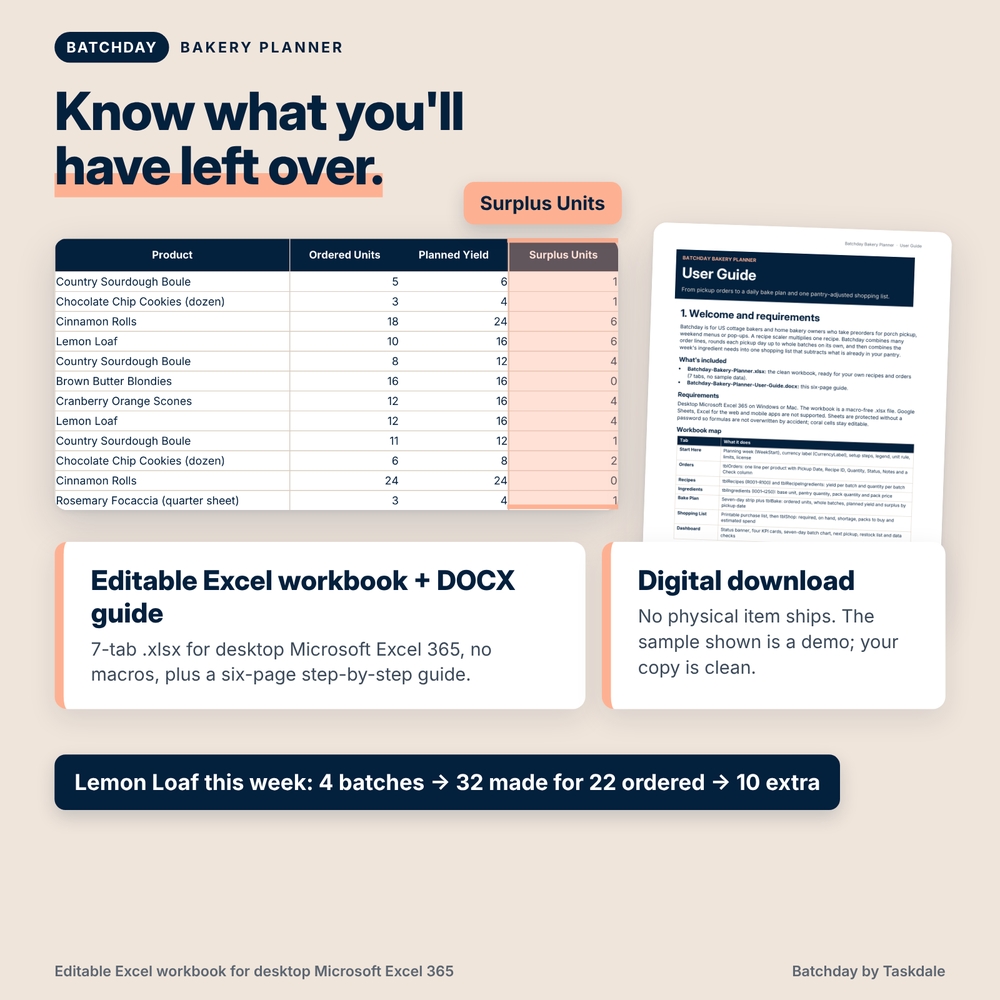
Suppose your lemon loaf recipe makes eight sellable loaves per batch. You have 10 confirmed loaves due Friday and 12 due Saturday. The workbook plans two batches for Friday and two for Saturday. That produces 32 loaves in total, with 10 extra across the two days. It does not assume you want to carry Friday’s extras forward to cover Saturday’s orders.
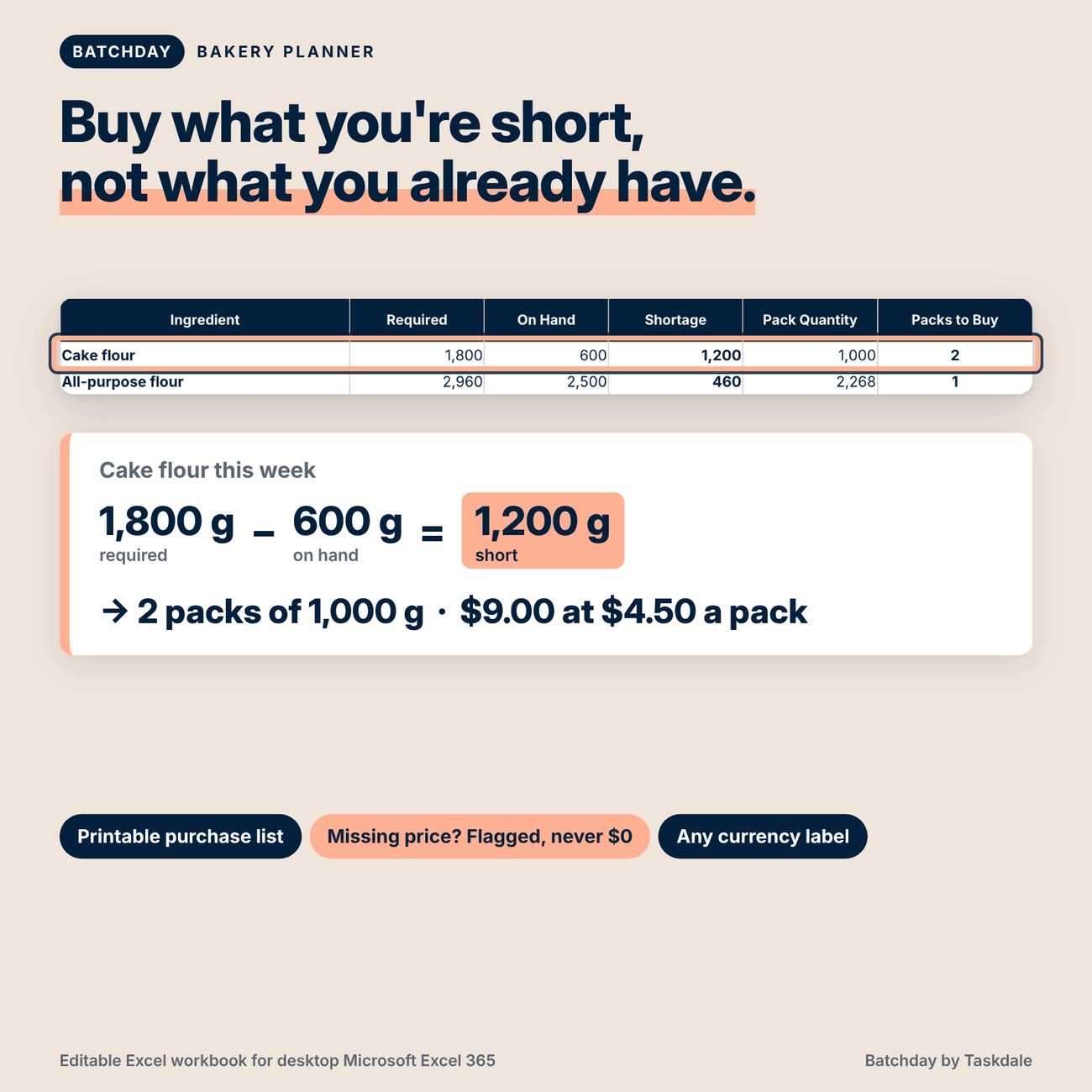
If those four batches require 1,800 grams of flour and you have 600 grams on hand, the shopping list shows a 1,200-gram shortage. If you buy flour in 1,000-gram packs, it tells you to buy two packs. If you enter the pack price, it also shows an estimated purchase cost.
What’s included
You receive an editable Excel workbook with seven tabs:
- Start Here: Choose the planning week and currency display, read the quick-start steps, and jump to the right worksheet.
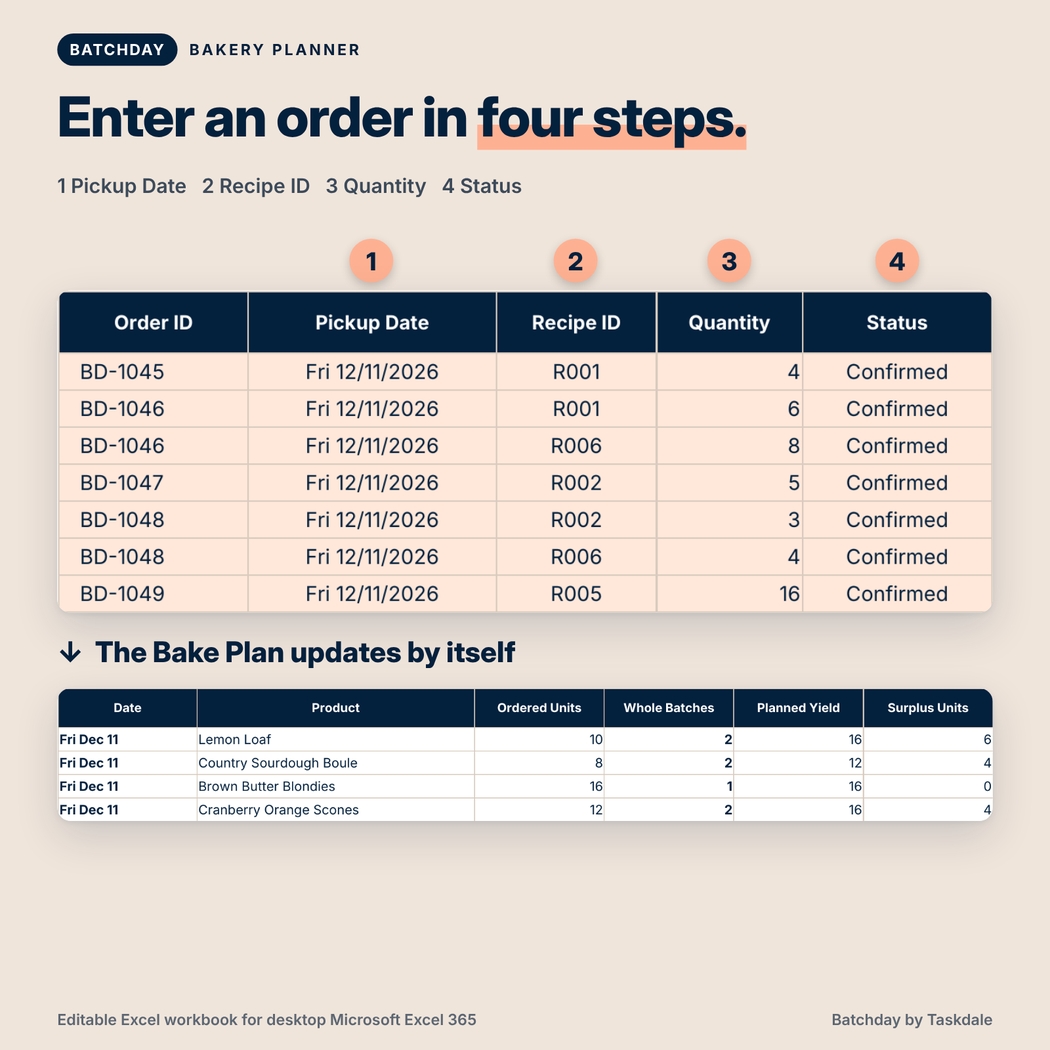
- Orders: Record pickup dates, recipe IDs, quantities, and statuses. Products in the same customer order can share an order ID.
- Recipes: Save the yield and ingredient quantities for each batch of your regular products.
- Ingredients: Enter what’s on hand, how much comes in a package, and what a package costs.
- Bake Plan: See the ordered quantity, number of whole batches, planned yield, and extra units for each product and pickup date.
- Shopping List: See what you need, what you already have, and which packages to buy.
- Dashboard: Review the week, spot the busiest pickup day, and jump straight to the supporting details.
You also receive a DOCX user guide that walks through setup, order entry, interpretation of the plan, and common issues. The workbook you receive is clean and ready for your own recipes and orders; the filled workbook shown in the images is a demonstration.
How to use Batchday for your next preorder
1. Set up your menu. Add each product’s sellable yield per batch. Enter its ingredient quantities using the same unit for that ingredient throughout the workbook. If you track flour in grams, enter recipe quantities, pantry stock, and pack sizes in grams.
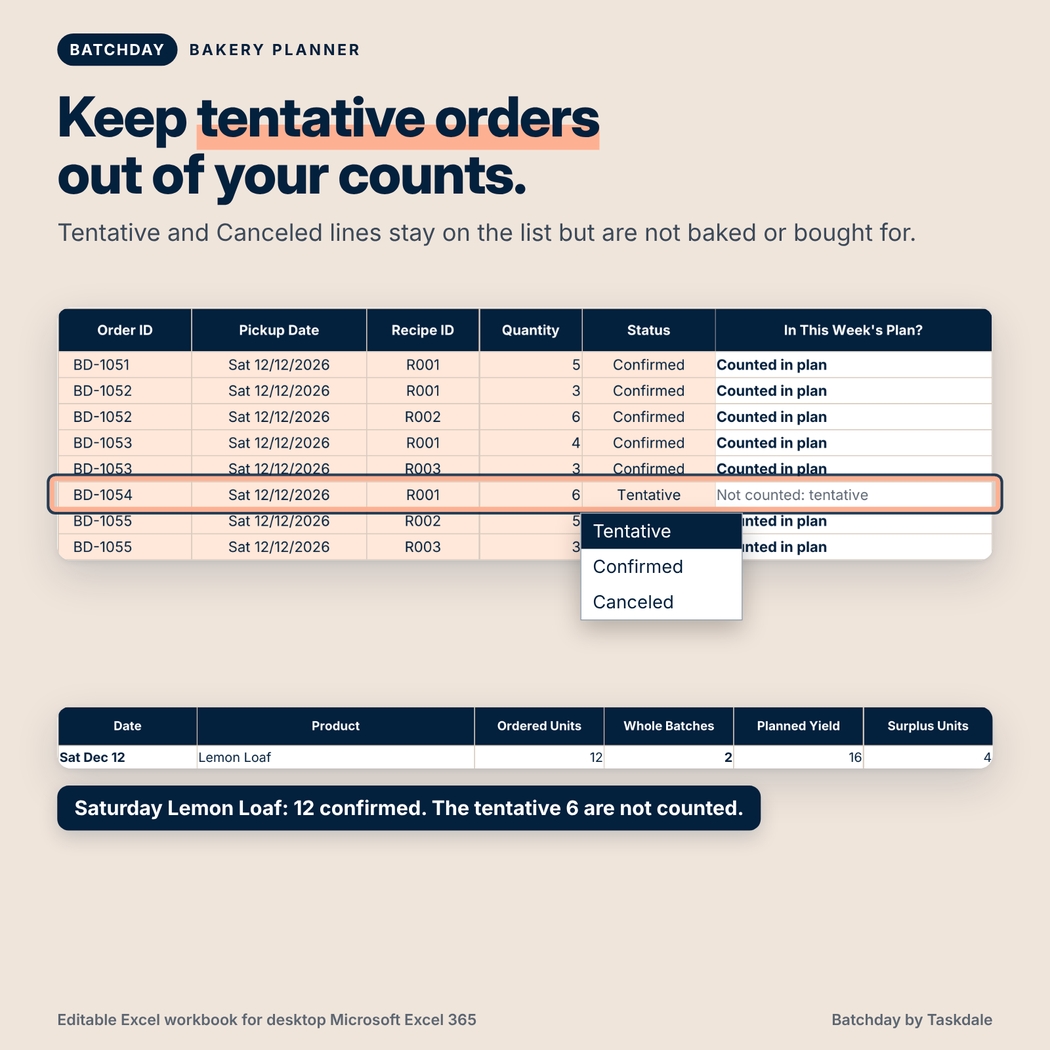
2. Enter your order lines. Put each product on its own line, choose a pickup date, and set its status. Tentative orders can stay on the list without becoming part of your production totals. Change the status to Confirmed when you’re ready to include them.
3. Review and shop. Open the Bake Plan for daily batch counts, then check the Shopping List before you place a supplier order. A missing pack price doesn’t erase the ingredient shortage. You can still see what you need and fill in the price when you have it.
The same process works for a single Saturday pickup or a week with different menus on different days. The spreadsheet groups work by pickup day; it doesn’t assign oven time or decide when you should start baking.
Format, customization, and download details
For desktop Microsoft Excel 365. The spreadsheet is an .xlsx file with no macros. The guide is a .docx file, readable in Microsoft Word or a compatible document reader. No physical item will ship.
You can change recipe names, yields, prices, menu items, pantry counts, and the currency display. The default is $; changing the display does not convert prices. Formula cells are protected against accidental typing, while everyday entry cells remain editable. The workbook is licensed for personal use or use within your own bakery, not for sharing, redistribution, or resale.
Frequently asked questions
Can I track several products in one customer order?
Yes. Give each product its own line and reuse the same order ID.
Does this work for cookies, cakes, breads, and mixed menus?
Yes. Each product has its own sellable yield. Choose a consistent unit of sale: for example, count cookies by the dozen if that’s how you take orders.
Can I use it without entering ingredient prices?
Yes. Ingredient quantities and valid pack counts still appear. A missing price is flagged so the estimated spend isn’t mistaken for a complete total.
Does it convert ounces to grams?
No. Use a consistent base unit for each ingredient throughout the workbook.
Can I use it to price baked goods or track profit?
No. The cost figure estimates the purchase cost of needed ingredient packs. It is not recipe costing, invoicing, or profit tracking.
Does it update my pantry after a bake?
No. Enter your current pantry count before shopping. The workbook uses that count to calculate shortages; it doesn’t maintain a running inventory ledger.
Can I use Google Sheets instead of Excel?
This listing is for desktop Microsoft Excel 365. Google Sheets compatibility is not included.
Reviews
There are no reviews yet.