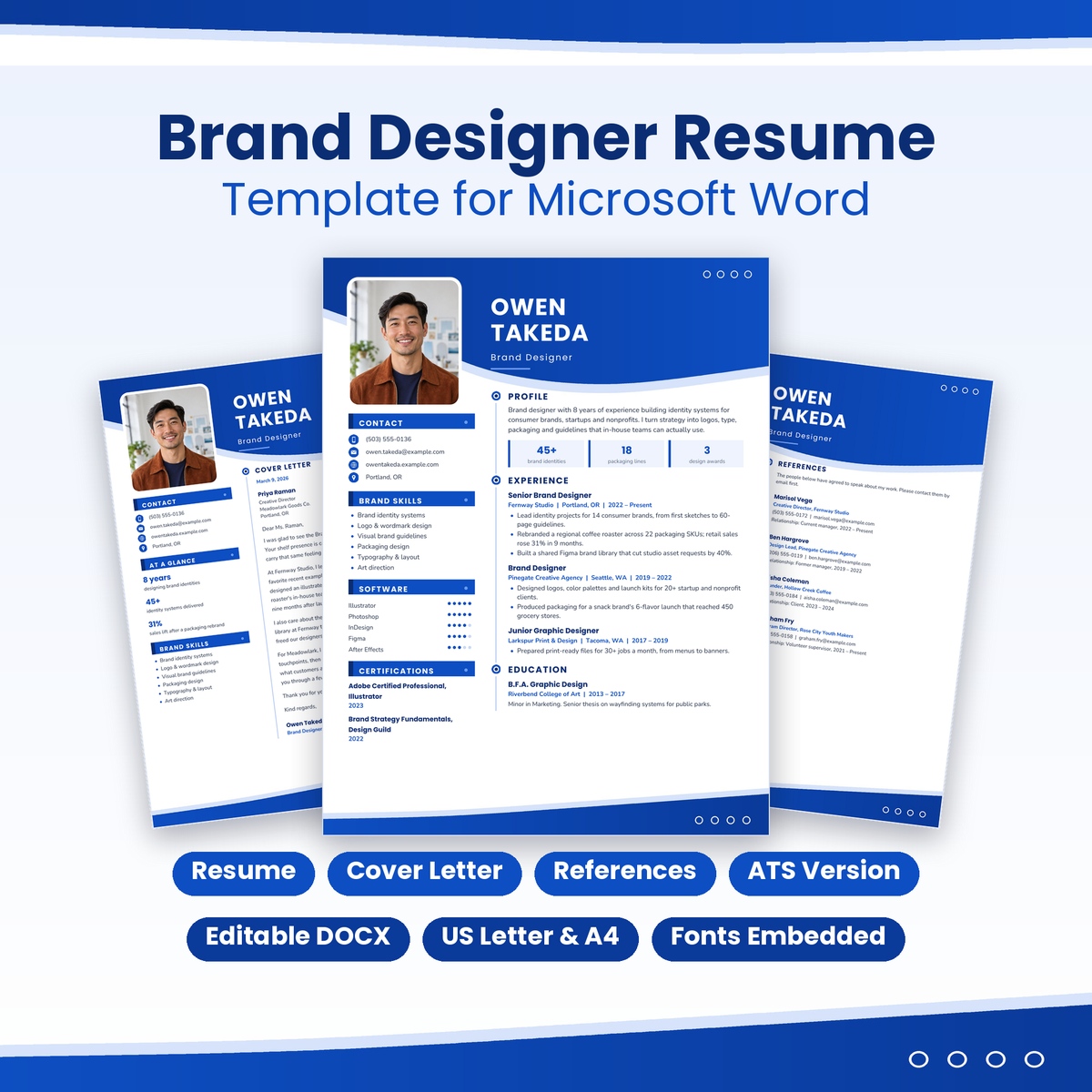



This brand designer resume template for Word gives you a polished job application set in one download: a 1-page resume, a 2-page resume, a matching cover letter, a references page and an ATS-friendly plain version. Bluecurve pairs royal blue curves, a rounded portrait photo and blue heading bars with sample wording written for brand designers, so you can see exactly how strong bullets read before you write your own.
Every file opens in Microsoft Word as a normal .docx. There are no floating text boxes, the fonts are embedded, and each file comes in both US Letter and A4.
A Brand Designer Resume Template in Word That Stays Put
Most designed Word resumes are built from text boxes that drift when you type. Bluecurve is built from table cells and real Word styles instead. Add a bullet and the column grows. Change a job title and nothing jumps to another page. We tested the 1-page resume with three extra bullets, a two-line job title and a long hyphenated surname, and it still fit on one page.
The photo sits in a rounded frame with a white border. Right-click it, choose Change Picture, and your own photo drops into the same frame.
Who It Is For
- Brand designers and identity designers applying for in-house or agency roles
- Graphic designers moving into brand, packaging or art direction work
- Freelancers who need a clean resume to send with a portfolio link
- Design graduates who want a professional layout and wording examples
Features
- Header with impact: your name in large white Poppins type on a royal blue curve, beside a rounded portrait photo.
- Impact tiles: three tiles under your profile for numbers such as identities delivered, packaging lines or awards.
- Experience timeline: a light vertical line with ring dots joins Profile, Experience and Education.
- Software dot ratings: five dots per tool for Illustrator, Photoshop, InDesign, Figma or anything you use.
- Blue heading bars: Contact, Brand Skills, Software and Certifications, each in a bar you can recolor with Table Design > Shading.
- Real sample content: a believable brand designer profile with numbers, so you never face lorem ipsum.
- Real Word styles: Title, Subtitle, Heading 1, Heading 2, Heading 3, List Bullet and Normal. Restyle every heading at once from the Styles pane.
- Embedded fonts: Poppins and Nunito are built into each file, and the font files are included as a backup install.
What Is Included
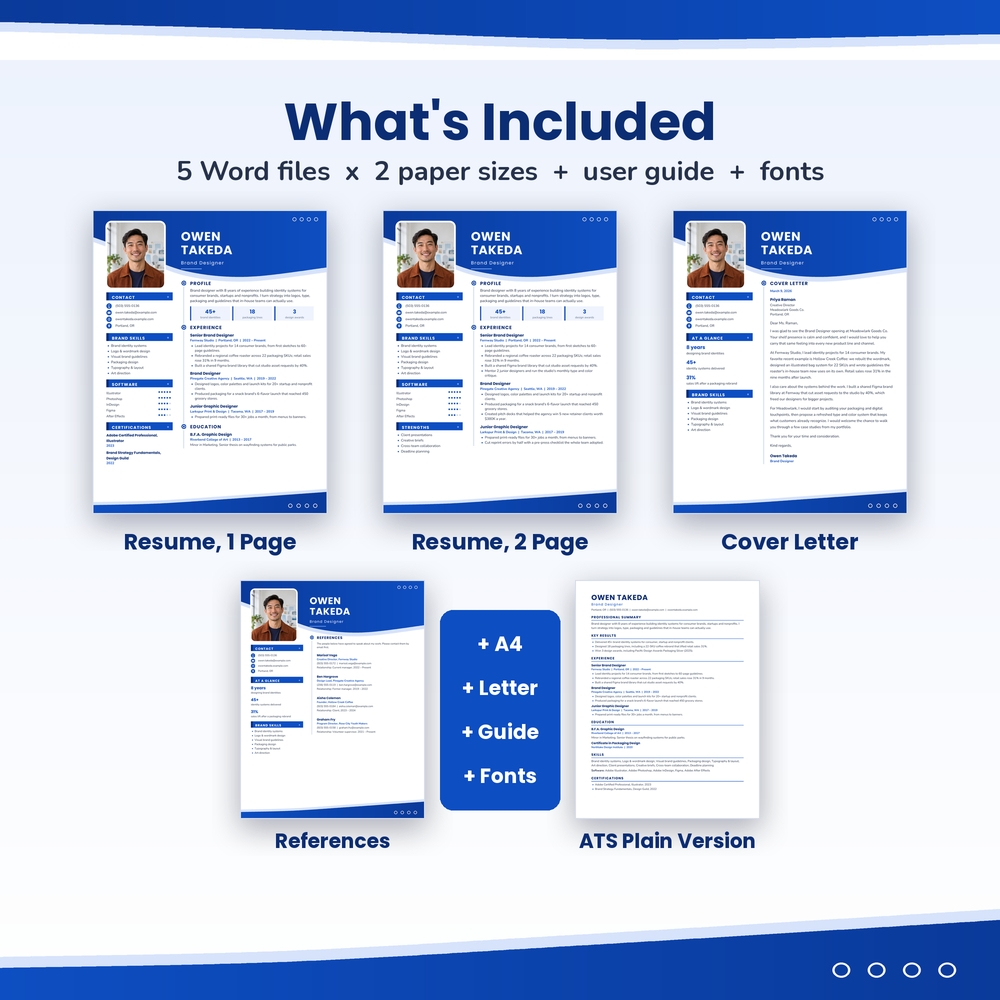
- Brand designer resume, 1 page (US Letter and A4)
- Brand designer resume, 2 pages, with room for selected projects, awards, languages, earlier roles and volunteer work (US Letter and A4)
- Matching cover letter with an At a Glance panel and a full sample letter (US Letter and A4)
- Matching references page with space for four references (US Letter and A4)
- ATS-friendly plain resume: one column, no photo, no tables (US Letter and A4)
- Fonts folder with Poppins and Nunito (SIL Open Font License)
- User guide (DOCX), 7 pages, with a resume writing cheat sheet for brand designers
That is 10 Word files in one zip, plus the user guide as a separate download.
How It Works
- Buy and download the zip and the user guide from your Taskdale account.
- Unzip the kit and open the US-Letter or A4 folder.
- Open the 1-page brand designer resume in Microsoft Word and click Enable Editing.
- Replace the sample text with your own details, then swap the photo with Change Picture.
- Export a PDF with File > Save As > PDF and send it with your portfolio link.
The Resume Writing Cheat Sheet
The user guide does more than explain buttons. Its cheat sheet gives you a bullet formula (action verb, what you designed, result with a number), weak and strong bullet examples, 30 action verbs for brand designers, and 30 keywords recruiters search for, from brand guidelines and packaging design to Figma and art direction. It also covers what to write in each section of the resume.
File Formats and Software
- Format: Microsoft Word .docx
- Works in: Word 2016 or newer, Word for Microsoft 365 and Word for Mac
- Paper sizes: US Letter (8.5 x 11 in) and A4 (210 x 297 mm)
- Google Docs and Apple Pages can open the files with minor layout differences. For the cleanest result, edit in Word and export your PDF from Word.
- Not a Canva template. No design software needed.
Customization
Change any text color or font from the Styles pane, and the whole document follows. The heading bars and impact tiles are table cells, so a new shading color takes one click. The curved shapes at the top and bottom of the page are a picture, because Word cannot draw smooth curves as editable shapes, so they stay royal blue. Delete them from the header if you want a plain page. You can remove the photo for US applications that prefer no photo, or use the ATS version.
Use Cases
- Applying for a Brand Designer role at a consumer goods company through Workday: upload the ATS version, then email the designed PDF to the hiring manager.
- Pitching a studio for a senior identity role: send the 2-page resume with selected projects and awards on page two.
- Moving from graphic design to packaging: use the Brand Skills bar and impact tiles to lead with packaging results.
- Applying abroad: switch to the A4 folder and keep the same design.
Digital Download
This is an instant digital download. No physical item will be shipped. Your files stay in your Taskdale account, and downloads do not expire. The sample person, companies and schools are fictional, and the sample portrait was generated for this template.
License: personal use only. Edit the files for your own job applications. Please do not resell, share or redistribute the files.
FAQ
Is this brand designer resume template editable in Word?
Yes. Every file is a .docx you edit directly in Microsoft Word. All text, including your name, is real Word text.
Will the fonts look right on my computer?
Yes. Poppins and Nunito are embedded in each file, so Word shows them without an install. The font files are also in the zip.
Can I use it in Google Docs?
You can open it in Google Docs, but the layout may shift slightly. Edit in Word if you can, or use the ATS version in Google Docs.
Does it include a cover letter template?
Yes, a matching cover letter and a matching references page, both in US Letter and A4.
Is the resume ATS friendly?
The kit includes an ATS plain version with one column, real headings and no text boxes, photo or tables, which is the format applicant tracking systems read best.
Can I change the colors?
Yes. Text colors, heading bars and tiles can be changed in Word. The curves at the top and bottom of the page are an image and stay blue.
How do I replace the photo?
Right-click the photo, choose Change Picture, and pick your own. The rounded frame and white border stay.
Reviews
There are no reviews yet.