



ChatterTrack is an SLP caseload tracker spreadsheet that keeps every student, IEP due date, goal, session and service minute in one workbook — and updates itself as you work. Built for school-based speech-language pathologists, it runs on ordinary formulas in Microsoft Excel and Google Sheets, so there are no scripts to authorize, no add-ons to install and nothing that times out halfway through adding your caseload.
Log a session once and ChatterTrack updates goal accuracy, minutes delivered, make-up minutes owed, billing reminders and your Dashboard automatically. Less retyping, fewer missed deadlines, and more time for therapy.
What the SLP Caseload Tracker Does
ChatterTrack replaces the stack of spreadsheets, sticky notes and data sheets most SLPs juggle. Add your students once, enter their goals, and log sessions as you go. Everything else is calculated for you:
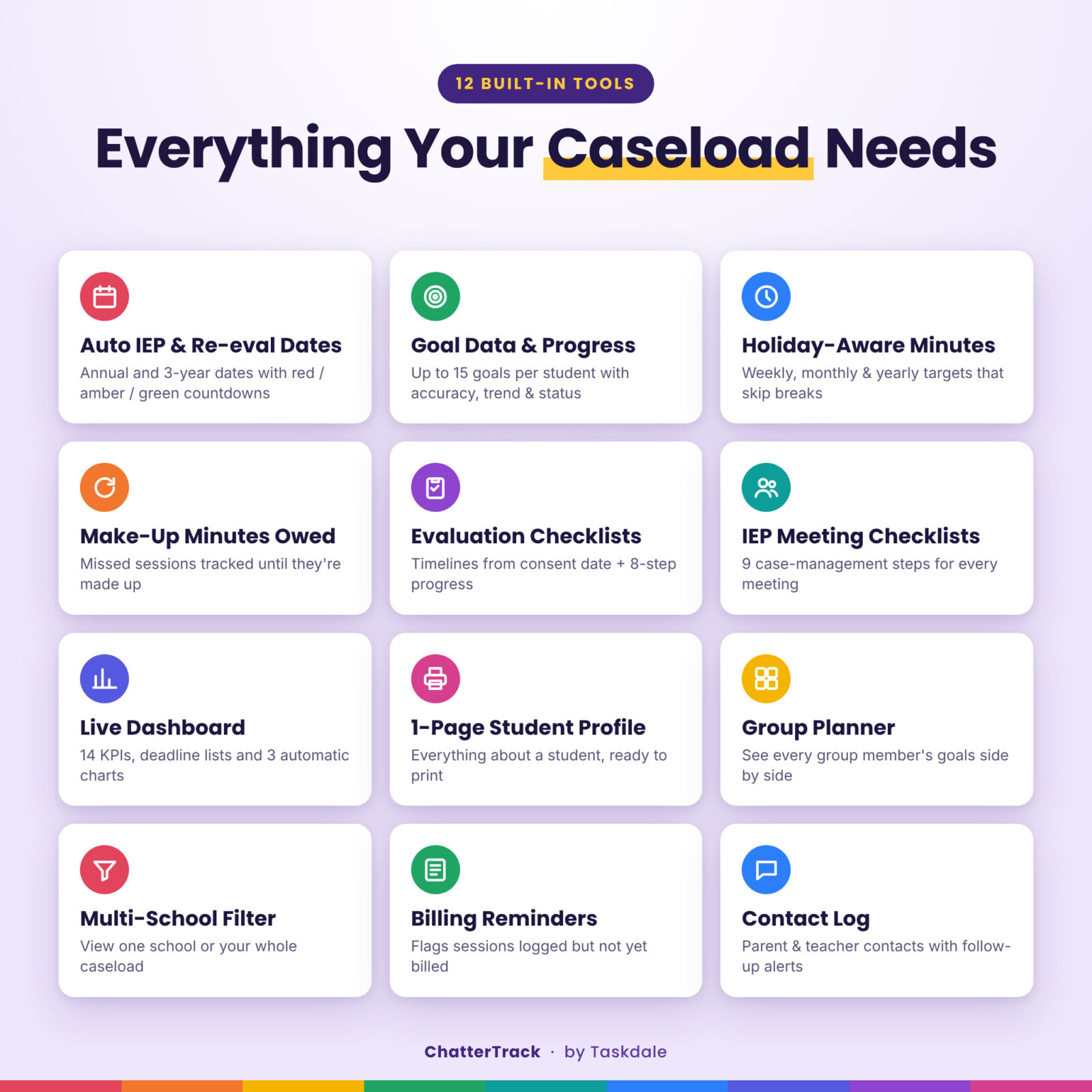
- Annual IEP and 3-year re-evaluation due dates with countdowns that turn red, amber or green
- Goal progress — overall accuracy, latest accuracy, change from baseline, progress bars and status for up to 15 goals per student
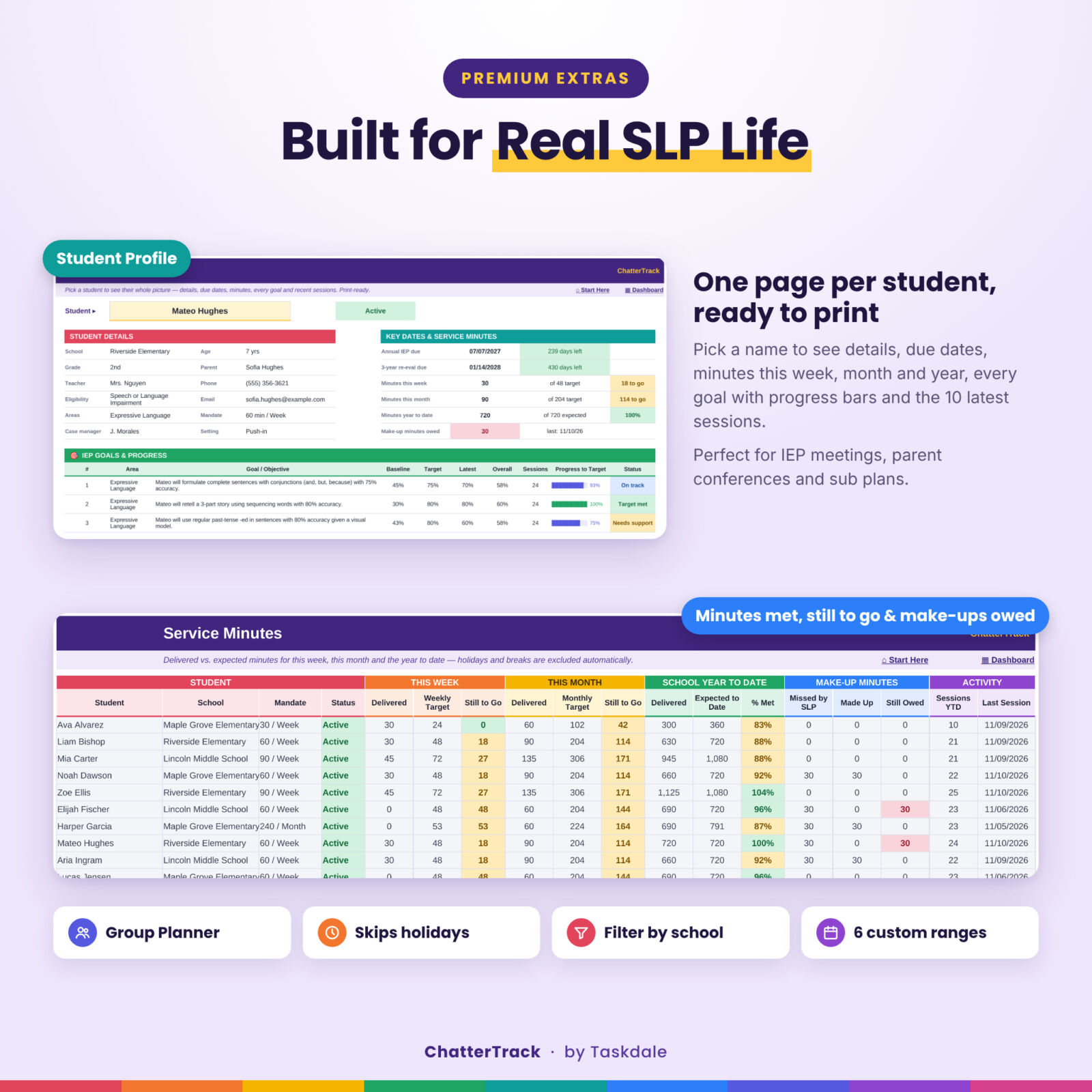
- Service minutes for this week, this month and the year to date, measured against real school days
- Make-up minutes owed when you miss a session, until they’re made up
- Evaluation timelines from the consent date, with an 8-step checklist
- IEP meeting case management with a 9-step checklist
- Progress report completion for up to 6 reporting periods
Who It’s For
- School-based SLPs and SLPAs with caseloads of up to 150 students
- Itinerant SLPs who serve two or more schools
- Special education teachers and related service providers who track IEP goals and minutes
Features
Live Caseload Dashboard
Fourteen KPI cards show active students, IEPs and re-evals due soon, overdue dates, open evaluations, year-to-date minutes met, make-up minutes owed, sessions this week, sessions still to bill, goals at target, goals needing support, progress-report completion, upcoming meetings and open follow-ups. Below them you’ll see your next 10 deadlines, the 5 most urgent evaluations, the next 3 IEP meetings and three automatic charts. A School filter narrows every number to one building.
Speech Therapy Data Collection
The Session Log holds 5,000 sessions. For each one, record the date, student, session type, start and end time, group, activity or lesson-plan link, correct and total trials for up to three goals, cue level, a SOAP note and whether it’s billed. Accuracy calculates and color-codes itself, and the tracker won’t let correct trials exceed total trials.
IEP Goal Tracker
List up to 15 goals per student with a baseline and target. ChatterTrack pulls the data from your sessions and labels each goal Target met, On track, Needs support or Not started — so the numbers for your progress reports are ready when you need them.
Holiday-Aware Service Minutes
Enter your school year and breaks once in Settings. Weekly, monthly and yearly mandates are converted into expected minutes using real school days, so a Thanksgiving week has a lower target than a full week. Track minutes on the Service Minutes, Monthly Minutes and Custom Ranges tabs — set up to six custom ranges for grading periods or billing months.
One-Page Student Profile
Choose a student to see their details, contacts, due dates, minutes, every goal with a progress bar, the 10 most recent sessions and accommodations — formatted to print on a single page for IEP meetings and parent conferences.
Group Planner
Build groups of 2–6 students and see every member’s grade, mandate and goals side by side, ready for planning mixed groups.
And More
- Contact Log with follow-up dates and overdue alerts
- Color-coded Weekly Schedule
- Duplicate-name warnings and input checks on dates, minutes and percentages
- Locked formulas (no password) so nothing gets overwritten by accident
- Start Here tab with a 6-step setup, tab directory and color key
What’s Included
- ChatterTrack SLP Caseload Tracker (.xlsx) — 17 connected tabs: Start Here, Dashboard, Caseload, IEP Goals, Session Log, Student Profile, Groups, Group Planner, Service Minutes, Monthly Minutes, Custom Ranges, Evaluations, IEP Meetings, Progress Reports, Contact Log, Weekly Schedule, Settings and Lists
- ChatterTrack User Guide (.docx) — a 16-page illustrated guide covering setup, every feature, customization, troubleshooting and FAQs
How It Works
- Set your school year — first and last day, breaks and progress-report dates.
- Add your caseload — students, schools, IEP and evaluation dates, and minutes.
- Enter IEP goals with a baseline and target.
- Log each session — it takes seconds.
- Check your Dashboard — deadlines, minutes and goal progress are always current.
File Format and Software Requirements
- Format: Excel workbook (.xlsx) plus a Word user guide (.docx)
- Works in Microsoft Excel 2019, Excel 2021 and Microsoft 365 (Windows and Mac)
- Works in Google Sheets — upload the file with File ▸ Import
- Not designed for Excel 2016 or older or Apple Numbers
- Best used on a laptop or desktop computer
Customization
Edit the Lists tab to change every dropdown — schools, teachers, grades, eligibility categories, service areas, cue levels, evaluation types and meeting types. Session types are fully renameable: simple Yes/No settings tell ChatterTrack whether each type counts toward minutes, adds make-up minutes or is a make-up session, so renaming can’t break a formula. Alert windows, the evaluation timeline and the goal “on track” margin are all adjustable in Settings.
Digital Download
This is a digital product — no physical item will be shipped. Your files are available to download right after purchase. The tracker is a clean copy with no sample students, ready for your caseload.
Use Cases
- Preparing for annual IEP meetings with a printed one-page Student Profile
- Checking which students still need minutes before the end of the month
- Writing quarterly progress reports from real goal data
- Tracking initial evaluations and re-evaluations against the 60-day timeline
- Planning mixed therapy groups around every student’s goals
- Catching up on Medicaid billing with a list of sessions not yet billed
Frequently Asked Questions
Does this SLP caseload tracker need scripts or add-ons?
No. Everything runs on standard spreadsheet formulas, so there’s nothing for your district to approve and nothing that times out.
Does it work in Google Sheets?
Yes. Upload the .xlsx file to Google Sheets and the dropdowns, alerts, charts and school filter all work. In-workbook navigation links work in Excel; in Google Sheets you move between tabs with the tab bar.
How many students can I track?
Up to 150 students, 1,200 goal rows (up to 15 per student), 5,000 sessions, 100 evaluations, 150 meetings and 500 contacts.
Can I use it for more than one school?
Yes. Assign each student to a school and use the Dashboard’s School filter to view one school at a time.
Does it count holidays when calculating minutes?
Yes. Enter your breaks and no-school days in Settings, and expected minutes are based only on real school days.
Can I print it?
Yes. The Student Profile is set to print on a single page, and the main tracking tabs have print settings for a clean layout.
Is my student data private?
Your data stays in your own copy of the file. Store it on district-approved, secure storage.
License
© Taskdale. For one person’s personal and professional use. You may not resell, share, distribute or upload the files, in original or modified form.
Reviews
There are no reviews yet.